70-688 Exam Details
-
Exam Code
:70-688 -
Exam Name
:Supporting Windows 8.1 -
Certification
:Microsoft Certifications -
Vendor
:Microsoft -
Total Questions
:224 Q&As -
Last Updated
:Apr 07, 2020
Microsoft 70-688 Online Questions & Answers
-
Question 101:
You are desktop technician for a small company. Employees use Windows 8.1 desktop computers.
An employee's computer is exhibiting unexpected behavior while running a certain application. You suspect that the application has a bug in how it manipulates the heap while running.
You need to capture detailed information by using the Windows Performance Toolkit (WPT).
Which command-line tool should you use to capture the data?
A. xperf.exe
B. netstat.exe
C. perfmon.exe /rel
D. ResMon.exe -
Question 102:
You are a systems administrator for your company. The company has employees who work remotely by using a virtual private network (VPN) connection from their computers, which run Windows 8 Pro. These employees use an application to access the company intranet database servers. The company recently decided to distribute the latest version of the application through using a public cloud.
Some users report that every time they try to download the application by using Internet Explorer, they receive a warning message that indicates the application could harm their computer. You need to recommend a solution that prevents this warning message from appearing, without compromising the security protection of the computers.
What should you do?
A. Publish the application through a public file transfer protocol (FTP) site.
B. Digitally sign the application by using a trusted certificate, and then update the default App Package Deployment policy on all computers.
C. Change the default Software Restriction Policies on the client computers.
D. Change the default Applications Control Policies on the client computers. -
Question 103:
You administer computers that run Windows XP Professional. These computers have a wide range of line of business (LOB) applications installed.
You want to migrate from Windows XP Professional to Windows 8.1 Pro.
You need to identify which applications will prompt users for elevated privileges.
What should you do first?
A. Install the Microsoft Application Compatibility Toolkit (ACT).
B. Configure the advanced audit setting on the Windows 8.1 Pro computers before you install the LOB applications.
C. Install the Microsoft Assessment and Planning (MAP) Toolkit.
D. Install User Experience Virtualization (UE-V) on the Windows 8.1 Pro computers before you install the LOB applications. -
Question 104:
You support desktop computers and tablets that run Windows 8 Enterprise. All of the computers are able to connect to your company network from the Internet by using DirectAccess.
Your company wants to deploy a new application to the tablets.
The deployment solution must meet the following requirements:
The application is stored locally on the tablets. Access to the application is protected with extra logon credentials, in addition to a standard domain account used by users.
The application utilizes the least amount of network bandwidth. The application must maintain access to the current desktop.
You need to deploy the new application to the tablets.
What should you do?
A. Deploy the application as an Application Virtualization (App-V) package. Install the App- V 4.6 client on the tablets.
B. Deploy the application as a published application on the Remote Desktop server. Create a Remote Desktop connection on the tablets.
C. Install the application on a local drive on the tablets.
D. Install the application in a Windows To Go workspace.
E. Install Hyper-V on tablets. Install the application on a virtual machine.
F. Publish the application to Windows Store.
G. Install the application within a separate Windows 8 installation in a virtual hard disk (VHD) file. Configure the tablets with dual boot.
H. Install the application within a separate Windows 8 installation in a VHDX file. Configure tablets with dual boot. -
Question 105:
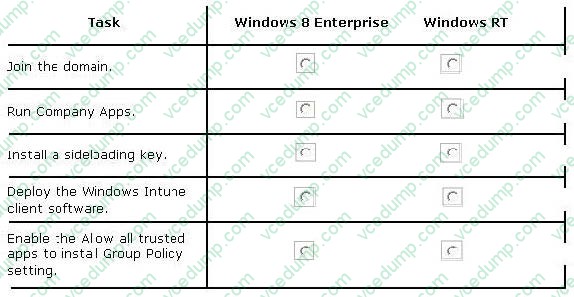
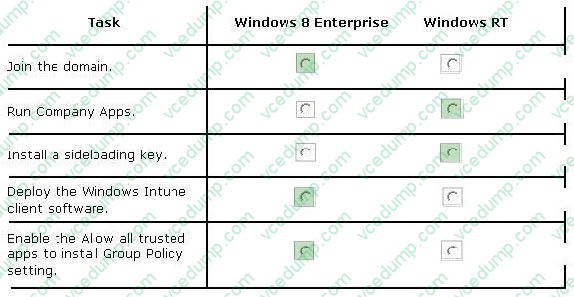
Your company has client computers that run Windows 8 Enterprise and Windows RT.
The company has a subscription to Windows Intune.
You plan to deploy line-of-business (LOB) Windows Store apps to all of the computers by using Windows Intune. The LOB apps will be signed by using a certificate issued by a trusted certification authority (CA).
You need to prepare all of the computers for the deployment of the LOB Windows Store apps.
In the table below, identify on which operating system each task should be performed. Make only one selection in each row. Each correct selection is worth one point.
Hot Area:
-
Question 106:
You administer a company network that includes a wireless network infrastructure and computers that run Windows 8 Enterprise.
You are planning to add a guest wireless network.
You need to collect information about nearby wireless networks, including their encryption methods.
Which command should you include in the batch file?
A. Netsh wlan set autoconfig enabled=no interface="Wireless Network Connection"
B. ipconfig /allcompartments
C. Get-WmiObject win32_networkadapterconfiguration -Filter 'ipenabled = "true"'
D. netsh wlan show networks
E. netsh wlan show hostednetwork
F. netstat -a -
Question 107:
You have a client computer named Computer1 that runs Windows 8 Enterprise. Computer1 has a Trusted Platform Module (TPM) chip installed and the operating system volume is encrypted by using BitLocker Drive Encryption (BitLocker).
You plan to upgrade the BIOS of Computer1.
You need to recommend a solution that meets the following requirements:
Ensures that the drive remains encrypted
Avoids the need to perform a BitLocker recovery
Ensures that Windows can start after the BIOS is upgraded Minimizes the time required to complete the BIOS upgrade What should you include in the recommendation?
A. From the command prompt, run manage-bde and specify the -protectors parameter and the -disable parameter.
B. From the command prompt, run manage-bde and specify the -protectors parameter and the -delete parameter.
C. From the Trusted Platform Module (TPM) Management console, click Turn TPM Off from the Actions menu.
D. From the command prompt, run tpmvscmgr.exe and specify the destroy parameter. -
Question 108:
Your network contains client computers that run Windows 8 Enterprise. The computers are members of an Active Directory domain.
Your company purchases a subscription to Windows Intune.
Synchronization between Active Directory and Windows Intune is not configured.
You enroll all of the computers in Windows Intune.
You plan to create groups that contain the computers by using dynamic membership.
You need to identify which criteria you can use to populate the groups dynamically.
Which three criteria should you identify? (Each correct answer presents a complete solution. Choose three.)
A. organizational unit (OU)
B. manager
C. security group
D. device type
E. domain -
Question 109:
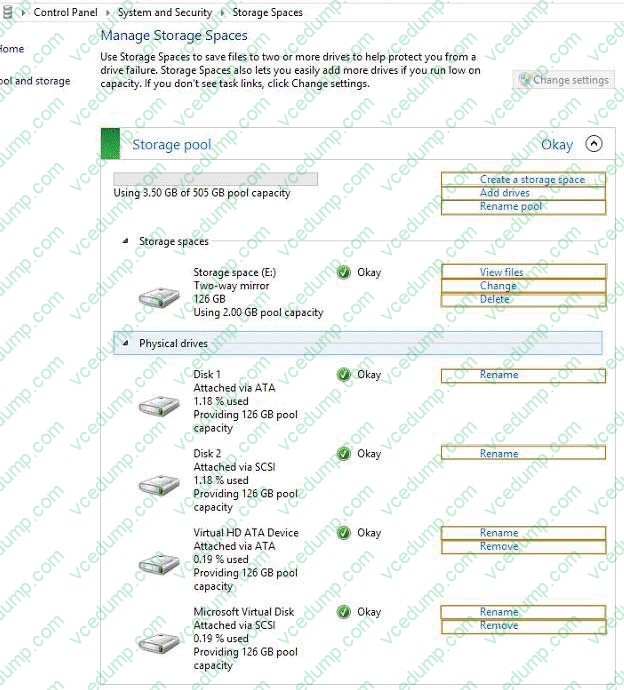
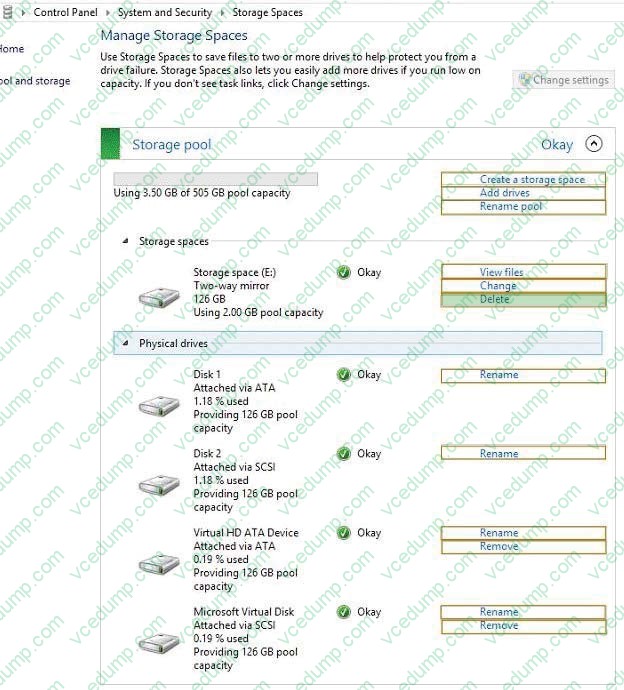
You have a client computer that runs Windows 8 Pro. The computer contains a storage pool.
You need to remove a disk named Disk 2 from the storage pool.
What should you configure first? (To answer, select the appropriate option in the answer area.)
Hot Area:
-
Question 110:
You have Windows 8.1 Enterprise tablet computers.
On a computer named Computed, you have a Wi-Fi connection named Access1.
When you connect to Access1 you discover the following behaviors:
New device software is not installed automatically. Video streamed from the Internet is in low resolution by default. Only critical updates are downloaded automatically in the background. Many Windows Store apps do not perform background
network activities. When you connect to your company's LAN, you do not experience the same behaviors.
You need to ensure that when you connect to Accessl, you have the same user experience as when you connect to the LAN.
What should you do?
A. Configure Access1 to not allow sharing.
B. From the PC settings page, enable the Download over metered connections option.
C. Configure Access1 as a non-metered connection.
D. From the PC settings page, modify the Wireless devices settings.
Related Exams:
-
62-193
Technology Literacy for Educators -
70-243
Administering and Deploying System Center 2012 Configuration Manager -
70-355
Universal Windows Platform – App Data, Services, and Coding Patterns -
77-420
Excel 2013 -
77-427
Excel 2013 Expert Part One -
77-725
Word 2016 Core Document Creation, Collaboration and Communication -
77-726
Word 2016 Expert Creating Documents for Effective Communication -
77-727
Excel 2016 Core Data Analysis, Manipulation, and Presentation -
77-728
Excel 2016 Expert: Interpreting Data for Insights -
77-731
Outlook 2016 Core Communication, Collaboration and Email Skills
Tips on How to Prepare for the Exams
Nowadays, the certification exams become more and more important and required by more and more enterprises when applying for a job. But how to prepare for the exam effectively? How to prepare for the exam in a short time with less efforts? How to get a ideal result and how to find the most reliable resources? Here on Vcedump.com, you will find all the answers. Vcedump.com provide not only Microsoft exam questions, answers and explanations but also complete assistance on your exam preparation and certification application. If you are confused on your 70-688 exam preparations and Microsoft certification application, do not hesitate to visit our Vcedump.com to find your solutions here.