70-688 Exam Details
-
Exam Code
:70-688 -
Exam Name
:Supporting Windows 8.1 -
Certification
:Microsoft Certifications -
Vendor
:Microsoft -
Total Questions
:224 Q&As -
Last Updated
:Apr 07, 2020
Microsoft 70-688 Online Questions & Answers
-
Question 91:
You have a client computer that runs Windows 8 Enterprise.
The computer uses BitLocker Drive Encryption (BitLocker) on a fixed disk that only stores data.
You need to prevent any data from being written to the fixed disk.
What should you do?
A. Run the Disable-BitLocker cmdlet.
B. Run the manage-bde command and specify the -pause switch.
C. Run the Lock-BitLocker cmdlet.
D. Run the manage-bde command and specify the -off switch. -
Question 92:
You have a computer that runs Windows 8.
The computer has a shared folder named C:\Marketing. The shared folder is on an NTFS volume.
The current NTFS and share permissions are configured as follows:
UserA is a member of both the Everyone group and the Marketing group. UserA must access C:\Marketing from across the network.
You need to identify the effective permissions of UserA to the C:\Marketing folder.
What permission should you identify?
A. Read
B. Full Control
C. Modify
D. Read and Execute -
Question 93:
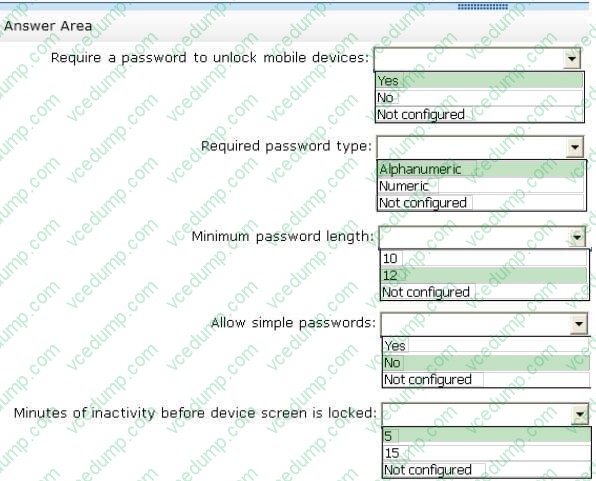
Your company has several Windows RT 8.1 devices. The devices connect to Exchange Online in Microsoft Office 365 and to Windows Intune for device management.
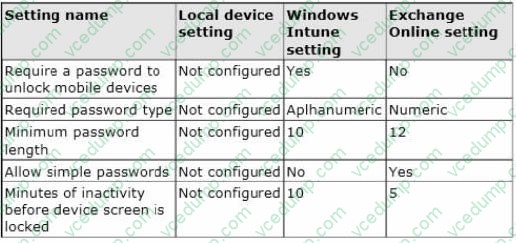
The security policies of Office 365 and Windows Intune are configured as shown in the following table.
You need to identify the effective settings on the Windows RT devices.
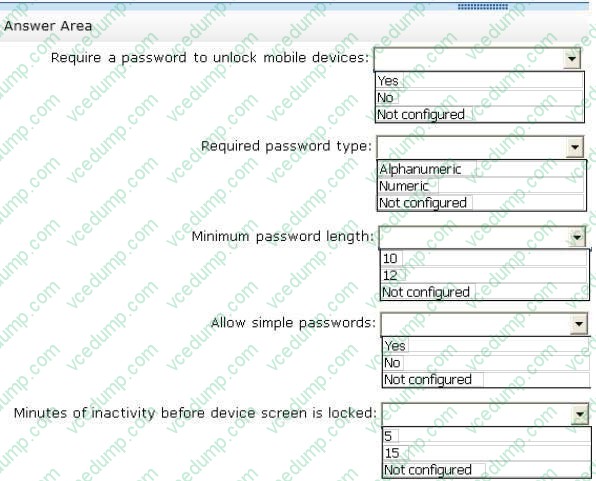
What should you identify? (To answer, select the appropriate effective configuration for each setting in the answer area.)
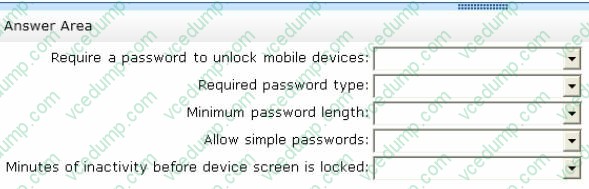
Hot Area:
-
Question 94:
Your network contains an Active Directory domain. The domain contains Windows 8.1 Enterprise client computers. You need to recommend a solution to ensure that help desk users can replace corrupt operating system files. Which Microsoft Diagnostics and Recovery Toolset (DaRT) tool should you include in the recommendation?
A. Standalone System Sweeper
B. File Restore
C. Disk Commander
D. Computer Management
E. SFC Scan -
Question 95:
You support computers that run Windows 8 Pro.
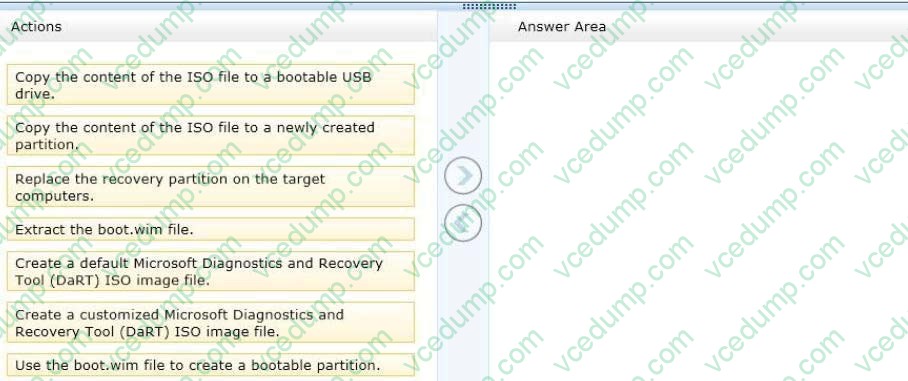
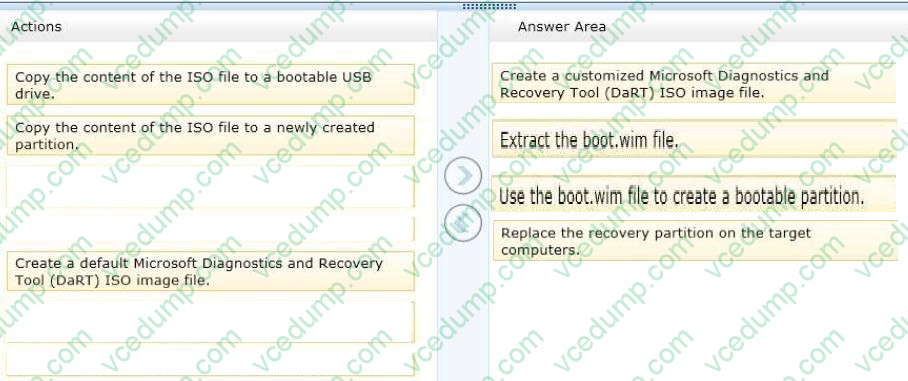
Your company recently purchased 200 new desktop computers. Company policy requires that the desktop computers include a recovery partition. The partition must contain a bootable image that includes support for incoming Remote
Desktop connections.
You need to configure the desktop computers to comply with company policy.
Which four actions should you perform in sequence? (To answer, move the appropriate actions from the list of actions to the answer area and arrange them in the correct order.)
Select and Place:
-
Question 96:
Your network contains an Active Directory domain and 100 Windows 8.1 client computers.
All software is deployed by using Microsoft Application Virtualization (App-V) 5.0.
Users are NOT configured as local administrators,
Your company purchases a subscription to Microsoft Office 365 that includes Office 365 ProPlus.
You need to create an App-V package for Office 365 ProPlus.
What should you do?
A. Run the Office Customization Tool (OCT), run the App-V Sequencer and then run Setup /Packager.
B. Download the Office Deployment Tool for Click-to-Run, run the App-V Sequencer and then run Setup /Ad mm.
C. Download the Office Deployment Tool for Click-to-Run, run Setup /Download and then run Setup /Packager.
D. Run the Office Customization Tool (OCT), run Setup /Download and then run the App-V Sequencer. -
Question 97:
Your network contains an Active Directory domain named contoso.com. All client computers run Windows 8.1 and Microsoft Office 2013. All of the computers are joined to the domain.
Your company purchases a subscription to Office 365. An administrator creates an Office 365 account for each user and deploys a federated solution for Office 365.
You need to prevent the users from being prompted for a user account and a password each time they access services from Office 365.
Which account should you instruct the users to use when they sign in to their computer?
A. A contoso.com account
B. A Microsoft account
C. An Office 365 account
D. A local user account -
Question 98:
You administer 50 laptops that run Windows 7 Professional 64-bit.
Your company purchases new laptops. You plan to install Windows 8.1 Pro (64-bit) on each new laptop.
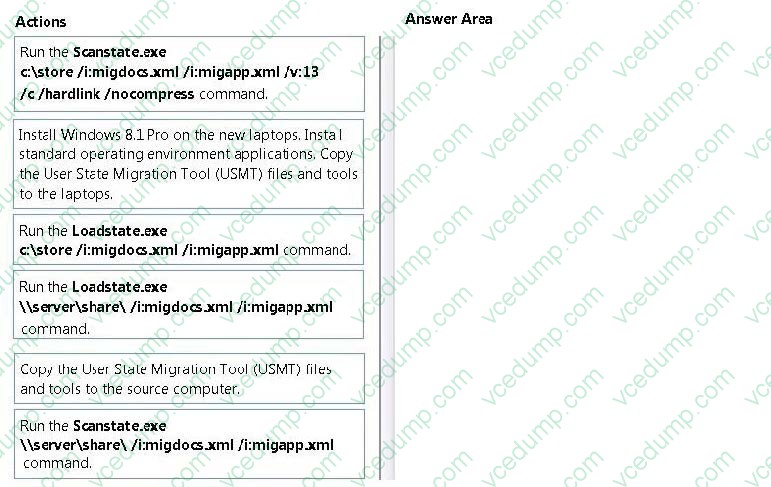
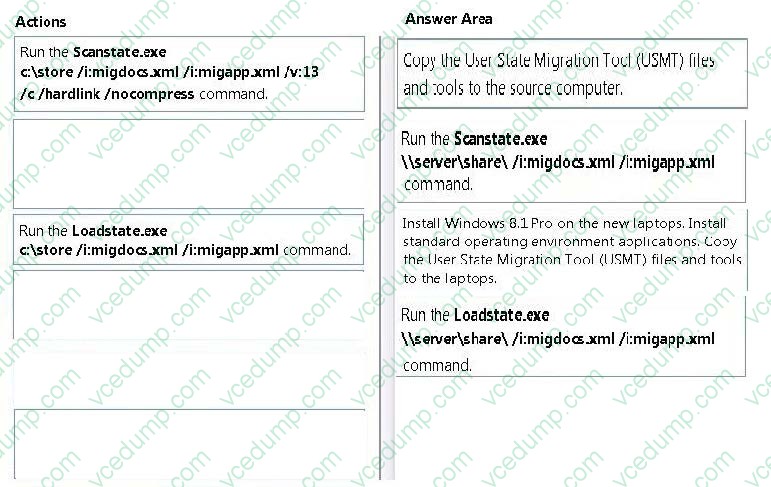
You need to ensure that user application settings, Windows settings, and user files are stored in a shared location before the installation of Windows 8.1 Pro on the new laptops.
Which four actions should you perform in sequence? (To answer, move the appropriate four actions from the list of actions to the answer area and arrange them in the correct order.)
Select and Place:
-
Question 99:
You support laptops that run Windows 8 Pro and are part of a workgroup.
An employee is unable to start Windows Mobility Center on his laptop. You need to make it possible for the employee to use Windows Mobility Center on the laptop.
What should you do?
A. Use Add features to Windows 8 to add Windows Mobility Center.
B. Use Programs and Features to repair the installation of Windows Mobility Center.
C. Use Local Group Policy Editor to set Turn off Windows Mobility Center to Not Configured.
D. Use Turn Windows features on or off in Programs and Features to enable Windows Mobility Center. -
Question 100:
You are systems administrator for a construction company. The Supervisor oversee multiple projects simultaneously. The supervisor use a mobile broadband connection on their Windows 8.1 tablets to create documents and interact with
corporate billing applications.
The accounting department reports that the current data plan costs the company too much money.
You need to reduce the data plan costs without disrupting the supervisors activities. Which two actions should you perform? (Select Two)
A. Disable Work Folder.
B. Turn off Download over Metered Connections.
C. Disable VPN auto triggering.
D. Enable Metered Connections.

Related Exams:
-
62-193
Technology Literacy for Educators -
70-243
Administering and Deploying System Center 2012 Configuration Manager -
70-355
Universal Windows Platform – App Data, Services, and Coding Patterns -
77-420
Excel 2013 -
77-427
Excel 2013 Expert Part One -
77-725
Word 2016 Core Document Creation, Collaboration and Communication -
77-726
Word 2016 Expert Creating Documents for Effective Communication -
77-727
Excel 2016 Core Data Analysis, Manipulation, and Presentation -
77-728
Excel 2016 Expert: Interpreting Data for Insights -
77-731
Outlook 2016 Core Communication, Collaboration and Email Skills
Tips on How to Prepare for the Exams
Nowadays, the certification exams become more and more important and required by more and more enterprises when applying for a job. But how to prepare for the exam effectively? How to prepare for the exam in a short time with less efforts? How to get a ideal result and how to find the most reliable resources? Here on Vcedump.com, you will find all the answers. Vcedump.com provide not only Microsoft exam questions, answers and explanations but also complete assistance on your exam preparation and certification application. If you are confused on your 70-688 exam preparations and Microsoft certification application, do not hesitate to visit our Vcedump.com to find your solutions here.