70-688 Exam Details
-
Exam Code
:70-688 -
Exam Name
:Supporting Windows 8.1 -
Certification
:Microsoft Certifications -
Vendor
:Microsoft -
Total Questions
:224 Q&As -
Last Updated
:Apr 07, 2020
Microsoft 70-688 Online Questions & Answers
-
Question 121:
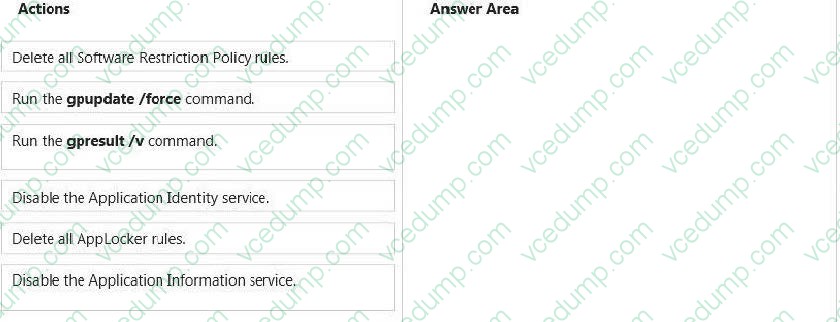
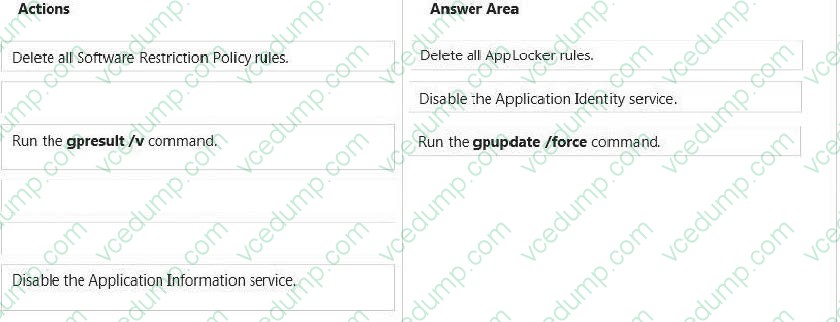
You support Windows 8.1 Enterprise computers. AppLocker policies are deployed.
Company policy states that AppLocker must be disabled.
You need to disable AppLocker.
Which three actions should you perform in sequence? (To answer, move the appropriate actions from the list of actions to the answer area and arrange them in the correct order.)
Select and Place:
-
Question 122:
You support desktop computers and tablets that run Windows 8. Domain joined computers are able to connect to your company network from the Internet by using DirectAccess.
Your company wants to deploy a new application to the tablets.
The deployment solution must meet the following requirements:
The application is installed locally on the tablets. The application installation is hosted in a public cloud.
The installation must support Windows RT.
You need to deploy the new application to the tablets.
What should you do?
A. Deploy the application as an Application Virtualization (App-V) package. Install the App- V 4.6 client on the tablets.
B. Deploy the application as a published application on the Remote Desktop server. Create a Remote Desktop connection on the tablets.
C. Install the application on a local drive on the tablets.
D. Install the application in a Windows To Go workspace.
E. Install Hyper-V on tablets. Install the application on a virtual machine.
F. Publish the application to Windows Store.
G. Install the application within a separate Windows 8 installation in a virtual hard disk (VHD) file. Configure the tablets with dual boot.
H. Install the application within a separate Windows 8 installation in a VHDX file. Configure tablets with dual boot. -
Question 123:
You administer several computers that run Windows 8.
The manufacturer of the video display adapters used in these computers issues a new version of the video driver.
You need to install the new version of the driver on the computers.
What should you do first?
A. From the Start screen, search settings for "update device drivers."
B. From the Start screen, search settings for "devices and printers."
C. From the Start screen, right-click the Video tile.
D. From the Start screen, open the Charms bar and select Devices.
E. From the Start screen, open the Charms bar and select Settings. -
Question 124:
You are a systems administrator for Contoso, Ltd.
You disabled picture passwords by using a Group Policy object (GPO) named Picture Password Disable.
Management wants to use picture passwords. You disable and remove the GPO that disables picture passwords.
One user's picture password does not function properly on the user's tablet. The tablet is wirelessly connected to the network. You connect to the tablet and view the screen, which is shown in the following exhibit.
You need to ensure that the tablet is able to use picture passwords. What should you do?
A. Log off of the tablet and then log back on.
B. Run the gpupdate/force command from an elevated command prompt.
C. Run the gpupdate /target:user command from an elevated command prompt.
D. Connect the tablet to a wired connection, and then run the gpresult /F command. -
Question 125:
Your network contains a web server named testweb.contoso.com that is used for testing.
You have a Windows 8.1 Pro laptop.
After a network administrator changes the IP address of the web server, you discover that you can no longer connect to testweb.contoso.com.
You need to resolve immediately the issue that prevents you from connecting to the server.
Which command line tool should you run?
A. Set-DnsClient
B. Netstat
C. Ipconfig
D. Netcfg -
Question 126:
You use a Windows 8.1 desktop computer and a Windows 8.1 tablet. The desktop computer is connected to the Internet by using your home network.
You plan to travel and want to have access to the desktop computer from the tablet.
You need to configure remote access to the file system on the desktop computer by using the Internet.
What should you do?
A. Configure User Experience Virtualization (UE-V).
B. Allow Remote Assistance connections to the desktop computer.
C. Go to the SkyDrive website and create a group named Administrators. Add your user Windows accounts for both computers to the group.
D. Install SkyDrive for Windows on the desktop computer and select the Make files on this PC available to me on my other devices check box. -
Question 127:
Your network contains an Active Directory domain named contoso.com. The domain contains Windows 8.1 Enterprise client computers.
Your company has a subscription to Microsoft Office 365. Each user has a mailbox that is stored in Office 365 and a user account in the contoso.com domain.
Each mailbox has two email addresses.
You need to add a third email address for each user.
What should you do?
A. From Windows Azure Active Directory Module for Windows PowerShell, run the Set- Mailbox cmdlet.
B. From Active Directory Users and Computers, modify the E-mail attribute for each user.
C. From Active Directory Domains and Trust, add a UPN suffix for each user.
D. From the Office 365 portal, modify the Users settings of each user. -
Question 128:
Your network contains an Active Directory domain. The domain contains client computers that run Windows 8 Enterprise.
Users frequently use USB drives to store sensitive files that are used on multiple computers.
Your corporate security policy states that all removable storage devices, such as USB data drives, must be encrypted.
You need to ensure that if a user forgets the password for a USB disk that is encrypted by using BitLocker To Go, the user can resolve the issue themselves.
What should you do?
A. Instruct the user to open BitLocker Drive Encryption, select Backup Recovery Key, and then select Save to your Microsoft account.
B. Instruct the user to open BitLocker Drive Encryption, select Backup Recovery Key, and then select Print the recovery key.
C. Implement the BitLocker Network Unlock feature.
D. Publish a data recovery agent certificate by using a Group Policy object (GPO). -
Question 129:
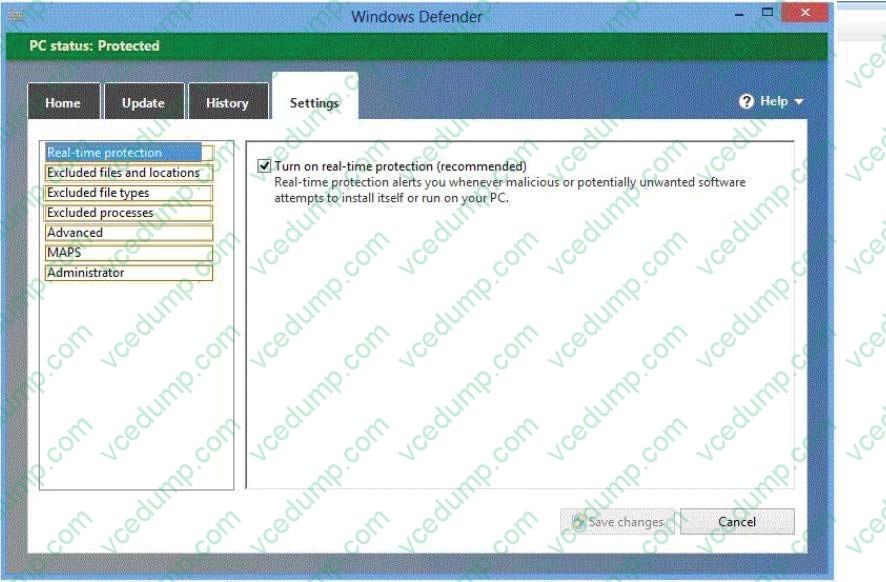
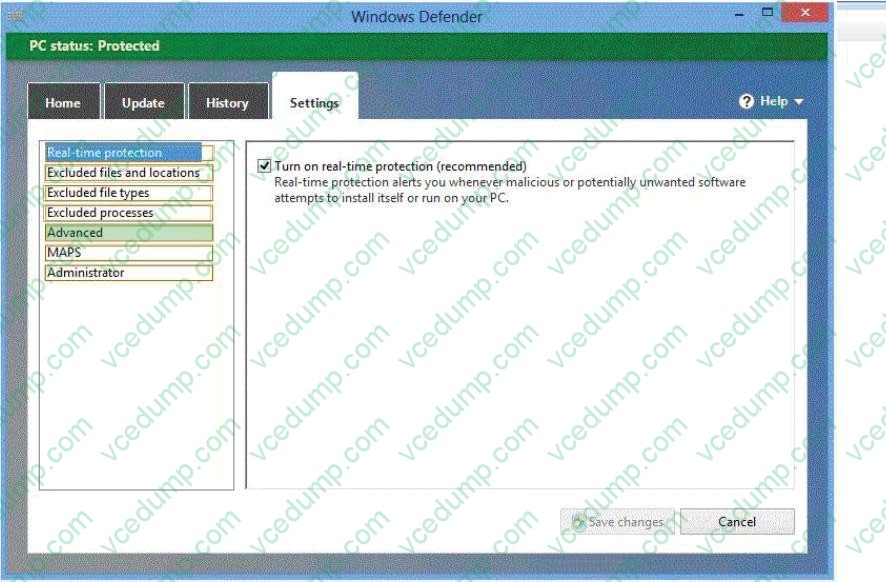
You have a computer that runs Windows 8 Enterprise.
You need to ensure that all users can see the history of detected items in Windows Defender.
Which option on the Settings tab should you select? (To answer, select the appropriate option in the answer area.)
Hot Area:
-
Question 130:
You support laptops that run Windows 8 Pro and are members of an Active Directory domain.
The domain is configured with user folder redirection by using a Group Policy Object (GPO). Loopback group policies are not used.
Your company has decided to deploy tablets to all managers, for use as secondary computers.
Tablets will be added to the domain.
You need to ensure that the folder redirection settings are applied only to laptops.
What should you do?
A. Apply one GPO to the managers' laptops and another GPO to the tablets.
B. Assign the msDS-Primary Computer attribute for the managers' user domain accounts.
C. Assign the msDS-Primary Computer attribute for the computer domain accounts on the managers' laptops.
D. Block the managers' tablets from receiving the GPO.
Related Exams:
-
62-193
Technology Literacy for Educators -
70-243
Administering and Deploying System Center 2012 Configuration Manager -
70-355
Universal Windows Platform – App Data, Services, and Coding Patterns -
77-420
Excel 2013 -
77-427
Excel 2013 Expert Part One -
77-725
Word 2016 Core Document Creation, Collaboration and Communication -
77-726
Word 2016 Expert Creating Documents for Effective Communication -
77-727
Excel 2016 Core Data Analysis, Manipulation, and Presentation -
77-728
Excel 2016 Expert: Interpreting Data for Insights -
77-731
Outlook 2016 Core Communication, Collaboration and Email Skills
Tips on How to Prepare for the Exams
Nowadays, the certification exams become more and more important and required by more and more enterprises when applying for a job. But how to prepare for the exam effectively? How to prepare for the exam in a short time with less efforts? How to get a ideal result and how to find the most reliable resources? Here on Vcedump.com, you will find all the answers. Vcedump.com provide not only Microsoft exam questions, answers and explanations but also complete assistance on your exam preparation and certification application. If you are confused on your 70-688 exam preparations and Microsoft certification application, do not hesitate to visit our Vcedump.com to find your solutions here.