70-680 Exam Details
-
Exam Code
:70-680 -
Exam Name
:Windows 7 Configuring -
Certification
:Microsoft Certifications -
Vendor
:Microsoft -
Total Questions
:565 Q&As -
Last Updated
:Dec 13, 2021
Microsoft 70-680 Online Questions & Answers
-
Question 21:
You have a computer that has the following hardware configuration:

1.6-gigahertz (GHz) processor (64-bit)
8-GB RAM
500-GB hard disk
Graphics card that has 128-MB RAM
You need to select an edition of Windows 7 to meet the following requirements:
Support DirectAccess
Support Windows XP Mode
Use all of the installed memory
Support joining an Active Directory domain
Which edition should you choose?
A. Windows 7 Enterprise (x86)
B. Windows 7 Professional (64-bit)
C. Windows 7 Enterprise (64-bit)
D. Windows 7 Ultimate (x86) -
Question 22:
You need to back up your Encrypting File System (EFS) certificate. You must achieve this goal in the minimum amount of time.
What should you do?
A. Run Cipher.exe /x.
B. Run Ntbackup.exe /p.
C. From Backup and Restore, click Back up now.
D. From Backup and Restore, click Create a system image. -
Question 23:
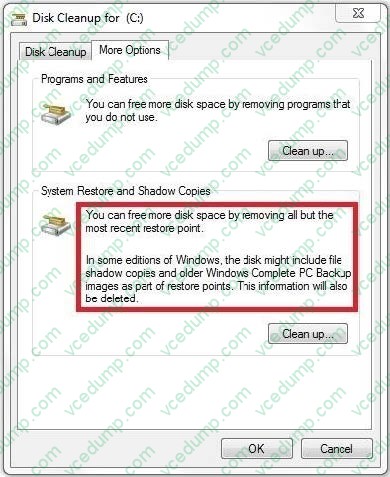
You need to reduce the amount of space currently being used to store system restore points.
What should you do?
A. Run Disk Cleanup.
B. Run Msconfig.exe.
C. Configure disk quotas.
D. Configure Windows Backup. -
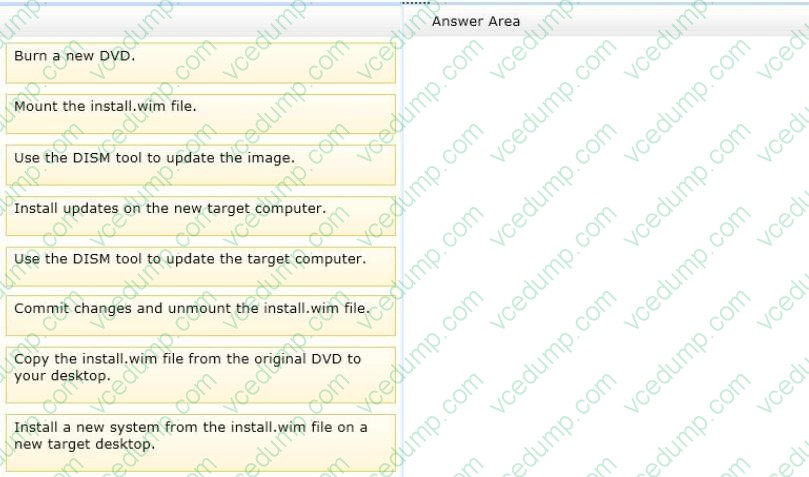
Question 24:
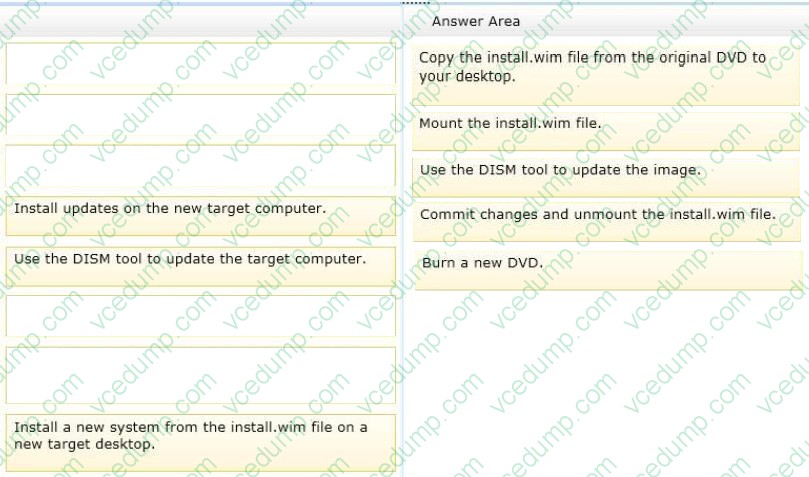
You deploy Windows 7 on client computers by using a default Windows 7 DVD.
You discover that the client computers use the most recently released critical updates.
You download the updates' package files from the Microsoft site to your desktop.
You need to prepare a new installation DVD that includes the updates.
What should you do? (To answer, move the appropriate actions from the list of actions to the answer area and arrange them in the correct order.)
Select and Place:
-
Question 25:
You have a computer that runs Windows 7. The computer is a member of an Active Directory domain and has a shared printer. Users report that they can print to the shared printer, but they cannot delete their print jobs.
You need to ensure that users can delete their own print jobs.
What should you do?
A. Restart the Print Spooler service.
B. Stop sharing the local printer and then share it again.
C. Assign the Manage Documents permission to SYSTEM.
D. Assign the Manage Documents permission to CREATOR OWNER. -
Question 26:
Your company's chief accountant consults you with a question about a financial spreadsheet. She needs to recover the version of this particular spreadsheet that existed six months ago because it is needed for a financial audit. Using Restore Previous Versions, you find that the oldest version stored is dated three months ago.
How can you recover the required file?
A. Edit the System Protection properties for the volume that hosts the file. Use the Max Usage slider to increase the maximum proportion of the hard disk capacity used for system protection to 70 percent.
B. Perform a system restore. Select a system restore point that was created six months ago.
C. Edit the System Protection properties for the volume that hosts the file. Select the Only Restore Previous Versions Of Files setting.
D. Use the Backup And Restore console to recover the file from a backup set generated six months ago. -
Question 27:
You use a portable computer that has Windows 7 installed. The computer has a single hard disk drive and a dual-core CPU.
You need to analyze the performance of the computer to meet the following requirements:
Include the CPU, Memory, and Disk subsystems.
Send events to another computer for predefined Event IDs.
What should you do?
A. Run powercfg.exe.
B. Run the Windows Experience Index.
C. Configure Event Viewer subscriptions.
D. Open Task Manager.
E. Open System Properties, and configure performance settings.
F. Open System Properties, and configure environment variables.
G. Open System Properties, and configure user profiles settings.
H. Open System Properties, and configure the page file settings.
I. Open Performance Monitor, and configure a Data Collector Set.
J. Open Performance Monitor, and customize the System Monitor view. -
Question 28:
You have a computer that runs Windows 7.
You view the properties of a file on the computer as show in the exhibit. (Click the Exhibit button.)
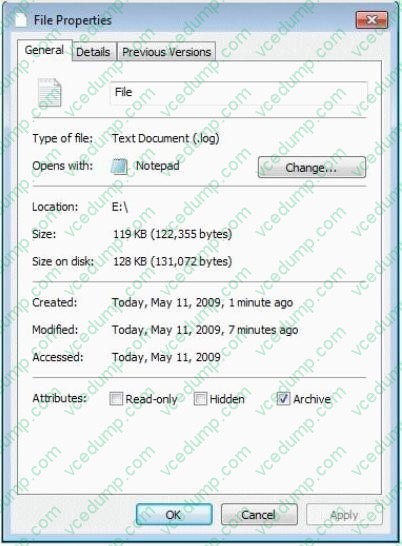
You need to ensure that you can configure permissions on the file. What should you do?
A. From Folder Options, modify the View settings.
B. Move the file to a disk that has the NTFS file system.
C. Open Windows Explorer by using elevated privileges.
D. Hold the SHIFT key, right-click the file, and click Properties. -
Question 29:
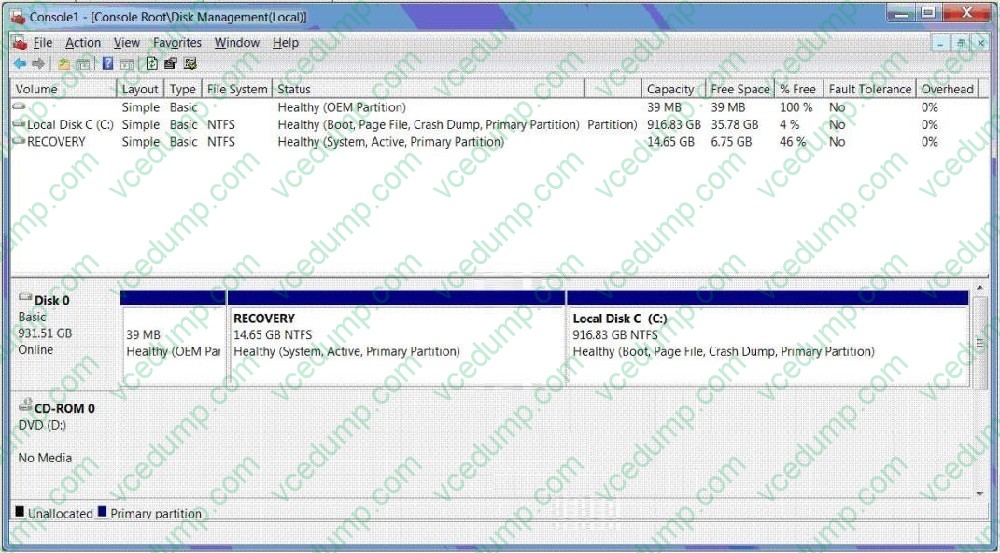
You use a desktop computer that has Windows 7 Ultimate SP1. The relevant portions of the computer configuration are shown in the following exhibits: The Disk Management console (Click the Exhibit button.)
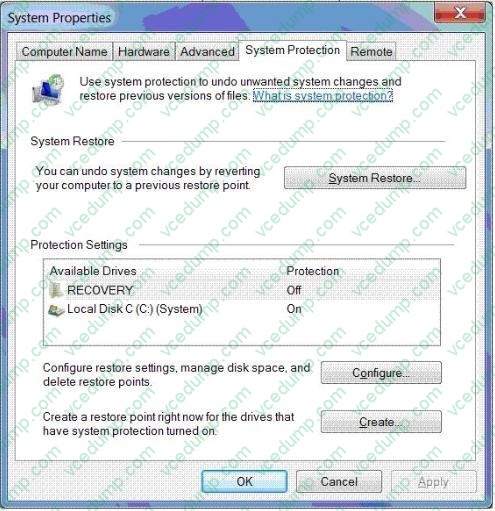
The System Properties window (Click the Exhibit button.)
The System protection for Local Disk C window (Click the Exhibit button.)
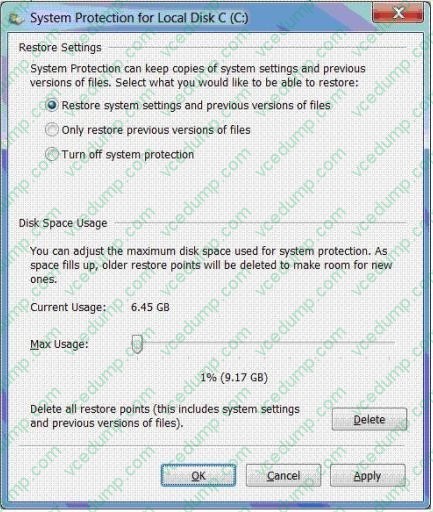
You create a password for several Microsoft Office files from your Documents library.
You share the Documents library over a network.
You need to ensure that network users are unable to access the unprotected versions of the files.
What should you do?
A. Delete restore points.
B. Create a restore point.
C. Perform a system restore.
D. Search for the file in the Recycle Bin.
E. Increase disk space used for system protection.
F. Copy the file from a previous version of a folder.
G. Set restore settings to Only restore previous versions of files.
H. Run the cipher /x command from the elevated command prompt.
I. Run the vssadmin list volumes command from the elevated command prompt.
J. Run the vssadmin list shadows command from the elevated command prompt. -
Question 30:
The Aero Shake feature will work if which of the following conditions are met? Choose Two.
A. A display adapter compatible with WDDM is installed.
B. Aero features are downloaded from Microsoft.
C. The windows experience index is at least 2.
D. The Windows Experience Index is 3 or greater.
Related Exams:
-
62-193
Technology Literacy for Educators -
70-243
Administering and Deploying System Center 2012 Configuration Manager -
70-355
Universal Windows Platform – App Data, Services, and Coding Patterns -
77-420
Excel 2013 -
77-427
Excel 2013 Expert Part One -
77-725
Word 2016 Core Document Creation, Collaboration and Communication -
77-726
Word 2016 Expert Creating Documents for Effective Communication -
77-727
Excel 2016 Core Data Analysis, Manipulation, and Presentation -
77-728
Excel 2016 Expert: Interpreting Data for Insights -
77-731
Outlook 2016 Core Communication, Collaboration and Email Skills
Tips on How to Prepare for the Exams
Nowadays, the certification exams become more and more important and required by more and more enterprises when applying for a job. But how to prepare for the exam effectively? How to prepare for the exam in a short time with less efforts? How to get a ideal result and how to find the most reliable resources? Here on Vcedump.com, you will find all the answers. Vcedump.com provide not only Microsoft exam questions, answers and explanations but also complete assistance on your exam preparation and certification application. If you are confused on your 70-680 exam preparations and Microsoft certification application, do not hesitate to visit our Vcedump.com to find your solutions here.