70-643 Exam Details
-
Exam Code
:70-643 -
Exam Name
:Windows Server 2008 Applications Infrastructure, Configuring -
Certification
:Microsoft Certifications -
Vendor
:Microsoft -
Total Questions
:419 Q&As -
Last Updated
:Dec 14, 2021
Microsoft 70-643 Online Questions & Answers
-
Question 291:
You have a Remote Desktop Session Host (RD Session Host) server named SRV4. You Open Remote Desktop Services Manager as shown in the exhibit (Click the Exhibit button.) You need to take remote control of the session of User1. What should you do first?
A. From Remote Desktop Connection, connect to Server4.
B. From local Users and Groups, add user1 to the Remote Desktop Users group.
C. From Remote Desktop Services Manager, disconnect the session of User1.
D. From Local Users and Groups, add the built-in Administrator account to the Remote Desktop Users group. -
Question 292:
Your network contains a server that runs Windows Server 2008 R2 and has the Hyper-V server role installed.
Virtual machines (VMs) are frequently added to the Hyper-V server.
You need to ensure that a VM named VM1 has priority regarding the allocation of the physical CPU resources on the Hyper-V host.
What should you modify?
A. the number of virtual processors for VM1
B. the relative weight of the virtual processor for VM1
C. the VM limit of the virtual processor for VM1
D. the VM reserve of the virtual processor for VM1 -
Question 293:
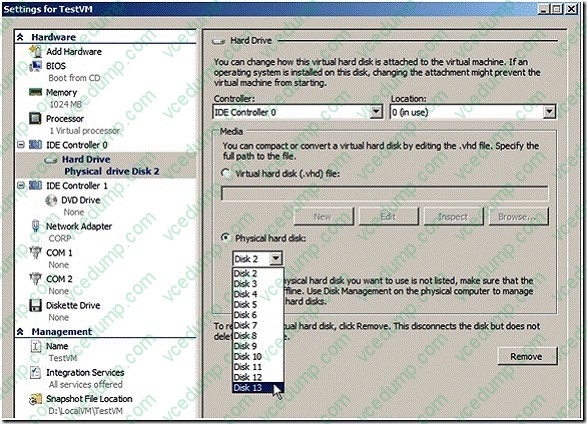
Your network contains a server named Server1 that has the Hyper-V server role installed. Server1 hosts a virtual machine (VM) named VM1.
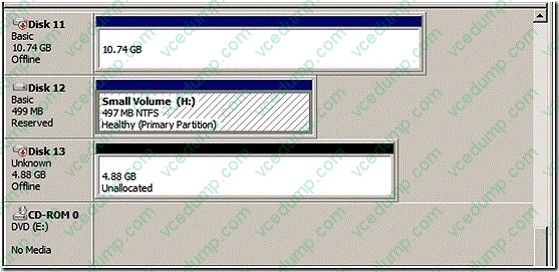
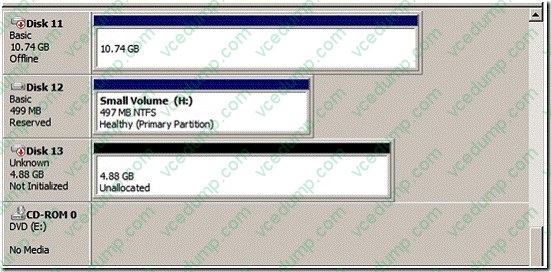
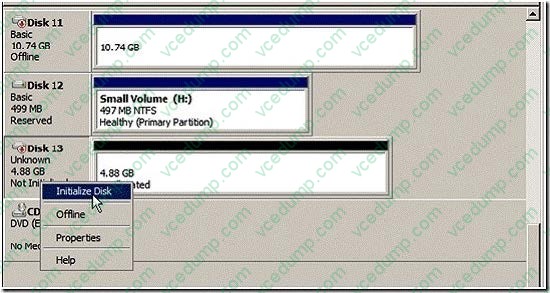
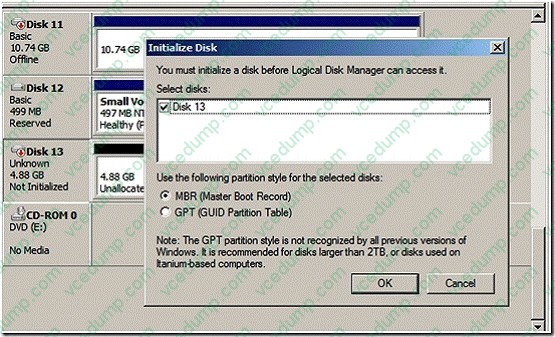
You add an additional hard disk to Server1. The hard disk is configured as a basic disk.
You need to configure VM1 to use the new hard disk as a pass-through disk.
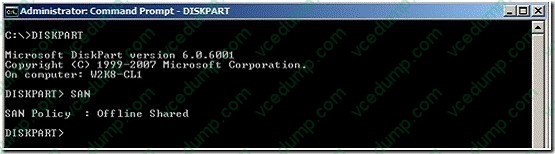
What should you do before you configure the pass through disk?
A. Create a simple volume.
B. Take the new hard disk offline.
C. Convert the new hard disk to a GPT disk.
D. Convert the new hard disk to a dynamic disk. -
Question 294:
Your network contains a server named Server2 that has Microsoft SharePoint Foundation 2010 installed. The server has a fully qualified domain name (FQDN) of server2.contoso.com.
You connect to http://server2.contoso.com.
When you attempt to search for a document, you receive the error message shown in the exhibit. (Click the Exhibit button.)
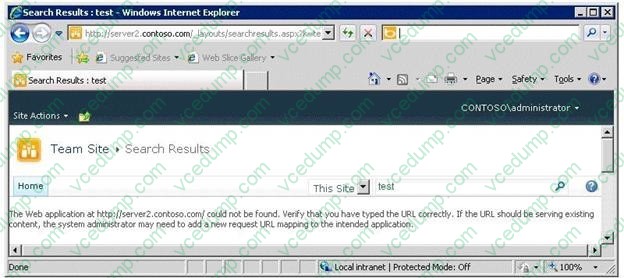
When you connect to http://server2, the search results are displayed successfully. You need to ensure that the search results display when you search from http://server2.contoso.com.
What should you do?
A. From Central Administration, configure the Alternate Access Mappings.
B. From Central Administration, configure the Cross Firewall Access Zone.
C. From Internet Information Services (IIS) Manager, add a site binding.
D. From Internet Information Services (IIS) Manager, add an authorization rule. -
Question 295:
Your network contains a server named Server1 that has the Hyper-V server role installed.
Server1 hosts a virtual machine (VM) named VM1 that runs Windows Server 2003 Service Pack 2 (SP2).
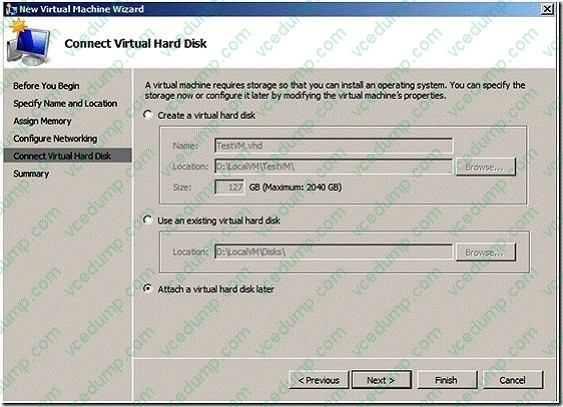
VM1 is configured to use a 127-GB dynamically-expanding virtual hard disk (VHD).
You need to add 500 GB of disk space to VM1. The solution must minimize the amount of downtime for VM1.
What should you do?
A. Increase the size of the VHD drive.
B. Convert the VHD to a fixed-size disk.
C. Add a new VHD drive to a SCSI controller.
D. Add a new VHD drive to an IDE controller. -
Question 296:
Your network contains a virtual machine (VM) named VM1. VM1 contains two virtual hard disks (VHDs). One VHD is a dynamically expanding disk and the other VHD is a fixed disk. You need to manually copy the VHDs.
The solution must minimize the amount of downtime for VM1.
What should you do first?
A. From Hyper-V Manager, reset VM1.
B. From Hyper-V Manager, pause VM1.
C. Run the Export-VM PowerShell cmdlet.
D. Run the Unmount-VHD PowerShell cmdlet. -
Question 297:
Your network contains an Active Directory domain. The domain contains a Key Management Service (KMS) host.
The network has a perimeter network and an internal network.
The network contains 1,000 client computers. All of the client computers receive their IP address from a DHCP server.
You deploy a new server named Server1 by using a corporate image of Windows Server 2008 R2 Service Pack 1 (SP1).
You configure Server1 as a member of a workgroup.
You move Server1 to the perimeter network and you configure Server1 to use an external DNS server.
Six months later, when you log on to Server1, you discover a message on the lower-right corner of the desktop as shown in the exhibit. (Click the Exhibit button.)
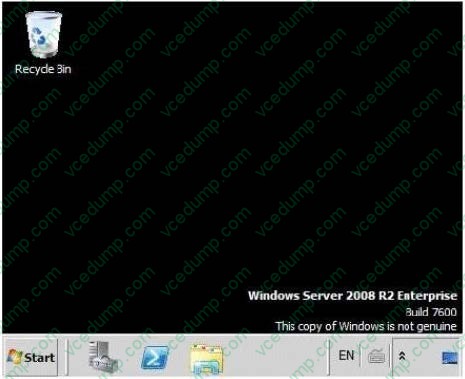
You need to ensure that the message does not appear on the desktop. What should you do?
A. From the command prompt, run djoin.exe.
B. From Windows Activation, click Activate Windows online now.
C. From Desktop Background, change the desktop background to solid white.
D. From the command prompt, run slmgr.vbs. -
Question 298:
You need to create a RemoteApp and Desktop Connection configuration (.wcx) file. Which tool should you use?
A. Remote Desktop Gateway Manager
B. Remote Desktop Connection Manager
C. RemoteApp Manager
D. Remote Desktop Session Host Configuration -
Question 299:
Your network contains a server named Server1 that runs Windows Server 2008 R2. You have a Microsoft Application Virtualization (App-V) application named App1.
You need to publish App1 as a RemoteApp program.
Which role service should you install on Server1?
A. Remote Desktop Gateway (RD Gateway)
B. Remote Desktop Session Host (RD Session Host)
C. Remote Desktop Virtualization Host (RD Virtualization Host)
D. Remote Desktop Web Access (RD Web Access) -
Question 300:
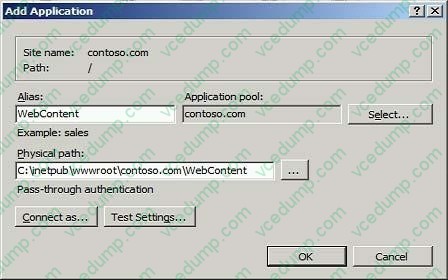
You have the Web Server (IIS) server role installed on a server that runs Windows Server 2008 R2. You create a Web site named contoso.com. You copy an application named WebContent to the server.
You need to enable the WebContent application on the Web site.
What should you do?
A. At the command prompt on the server, run the appcmd add site command.
B. At the command prompt on the server, run the appcmd add vdir command.
C. Select the Web site from the Internet Information Services (IIS) Manager console. Select Add Application.
D. Select the Web site from the Internet Information Services (IIS) Manager console. Select Add Virtual Directory.
Related Exams:
-
62-193
Technology Literacy for Educators -
70-243
Administering and Deploying System Center 2012 Configuration Manager -
70-355
Universal Windows Platform – App Data, Services, and Coding Patterns -
77-420
Excel 2013 -
77-427
Excel 2013 Expert Part One -
77-725
Word 2016 Core Document Creation, Collaboration and Communication -
77-726
Word 2016 Expert Creating Documents for Effective Communication -
77-727
Excel 2016 Core Data Analysis, Manipulation, and Presentation -
77-728
Excel 2016 Expert: Interpreting Data for Insights -
77-731
Outlook 2016 Core Communication, Collaboration and Email Skills
Tips on How to Prepare for the Exams
Nowadays, the certification exams become more and more important and required by more and more enterprises when applying for a job. But how to prepare for the exam effectively? How to prepare for the exam in a short time with less efforts? How to get a ideal result and how to find the most reliable resources? Here on Vcedump.com, you will find all the answers. Vcedump.com provide not only Microsoft exam questions, answers and explanations but also complete assistance on your exam preparation and certification application. If you are confused on your 70-643 exam preparations and Microsoft certification application, do not hesitate to visit our Vcedump.com to find your solutions here.