70-410 Exam Details
-
Exam Code
:70-410 -
Exam Name
:Installing and Configuring Windows Server 2012 -
Certification
:Microsoft Certifications -
Vendor
:Microsoft -
Total Questions
:537 Q&As -
Last Updated
:Feb 03, 2022
Microsoft 70-410 Online Questions & Answers
-
Question 521:
You run a Windows 2012 R2 Hyper-V Role Server, you need to shrink the size of files.vhd (200GB).
Using the Edit Virtual Disk Wizard what option should you choose?
A. Compact
B. Shrink
C. Resize
D. Convert -
Question 522:
Your network contains an Active Directory domain named contoso.com. The domain contains a server named Server1. Server1 runs Windows Server 2012 R2.
You need to create 3-TB virtual hard disk (VHD) on Server1.
Which tool should you use?
A. New-StorageSubsytemVirtualDisk
B. File Server Resource Manager (FSRM)
C. Server Manager
D. Computer Management -
Question 523:
You have a laptop named Computer1. Computer1 runs Windows 8.1 Enterprise.
Computer1 has a wired network adapter and a wireless network adapter. Computer1 connects to a wireless network named Network1.
For testing purposes, you install Windows Server 2012 R2 on Computer1 as a second operating system. You install the drivers for the wireless network adapter.
You need to ensure that you can connect to Network1 from Windows Server 2012 R2.
What should you do?
A. Restart the WLAN AutoConfig service.
B. From a local Group Policy object (GPO), configure the Wireless Network (IEEE 802.11) Policies settings.
C. From a local Group Policy object (GPO), configure the settings of Windows Connection Manager.
D. From Server Manager, install the Wireless LAN Service feature. -
Question 524:
Your network contains an Active Directory domain named contoso.com.
The password policy for the domain is set to require a minimum password length of 10 characters.
A user named User1 and a user named User2 work for the sales department.
User1 is forced to create a domain password that has a minimum of 12 characters. User2 is forced to create a domain password that has a minimum of eight characters.
You need to identify what forces the two users to have different password lengths.
Which tool should you use?
A. Credential Manager
B. Security Configuration Wizard (SCW)
C. Group Policy Management
D. Active Directory Administrative Center -
Question 525:
You have a server named Server2 that runs Windows Server 2012 R2.
A network technician installs a new disk on Server2 and creates a new volume.
The properties of the new volume are shown in the exhibit. (Click the Exhibit button.)
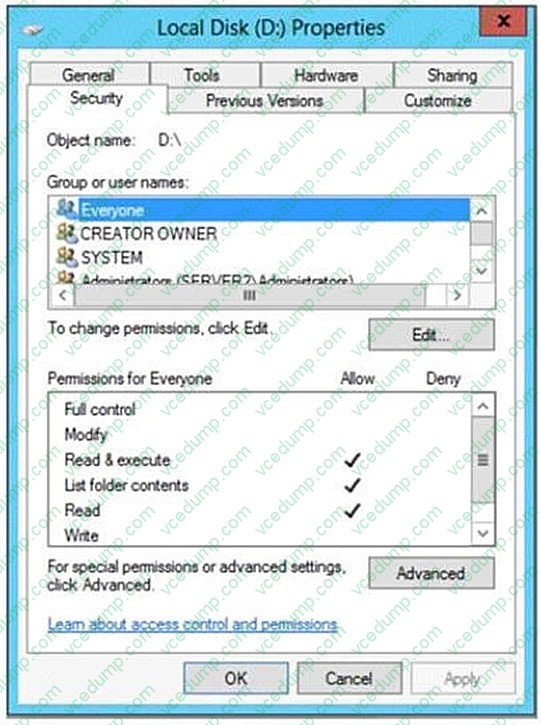
You need to ensure that you can enable NTFS disk quotas for volume D. What should you do first?
A. Format volume D
B. Install the File Server Resource Manager role service
C. Run the convert.exe command
D. Convert the disk to a dynamic disk -
Question 526:
You work as a senior administrator at Contoso.com. The Contoso.com network consists of a single domain named Contoso.com. All servers on the Contoso.com network have Windows Server 2012 R2 installed.
You are running a training exercise for junior administrators. You are currently discussing Group Policy preference.
Which of the following is TRUE with regards to Group Policy preference?
A. It supports applications and operating system features that are not compatible with Group Policy
B. It does not support item-level targeting.
C. It is the same as Group Policy filtering.
D. It does not cause the application or operating system feature to disable the user interface for the settings they configure. -
Question 527:
Your network contains an Active Directory domain named contoso.com. All domain controllers run Windows Server 2008 R2 Service Pack 1 (SP1). One of the domain controllers is named DC1.
The network contains a member server named Server1 that runs Windows Server 2012 R2.
You need to promote Server1 to a domain controller by using install from media (IFM).
What should you do first?
A. Create a system state backup of DC1.
B. Create IFM media on DC1.
C. Upgrade DC1 to Windows Server 2012 R2.
D. Run the Active Directory Domain Services Configuration Wizard on Server1.
E. Run the Active Directory Domain Services Installation Wizard on DC1. -
Question 528:
Note: This question is part of a series of questions that use the same or similar answer choices. An answer choice may be correct for more than one question in the series. Each question is independent of the other questions in this series. Information and details provided in a question apply only to that question.
Your network contains one Active Directory domain named contoso.com. The domain contains 10 domain controllers and a read-only domain controller (RODC) named RODC01.
You need to ensure that when administrators create users in contoso.com, the default user principal name (UPN) suffix is litwareinc.com.
Which command should you use?
A. the ntdsutil command
B. the Set-ADDomain Windows PowerShell cmdlet
C. the Install-ADDSDomain Windows PowerShell cmdlet
D. the dsadd command
E. the dsamain command
F. the dsmgmt command
G. the net user command
H. the Set-ADForest Windows PowerShell cmdlet -
Question 529:
Your network contains an Active Directory domain named contoso.com. All domain controllers run Windows Server 2012 R2.
All server are configured to enforce AppLocker policies.
You install a server named Server1.
On Server1, you install an application named appl.exe in a folder located on C:\App1.
You have two domain groups named Group1 and Group2. A user named User1 is a member of Group1 and Group2.
You create a Group Policy object (GPO) named GPO1. You link GPO1 to contoso.com.
You create the executable rules as shown in the exhibit by using the Create Executable Rules wizard. (Click the Exhibit button.)
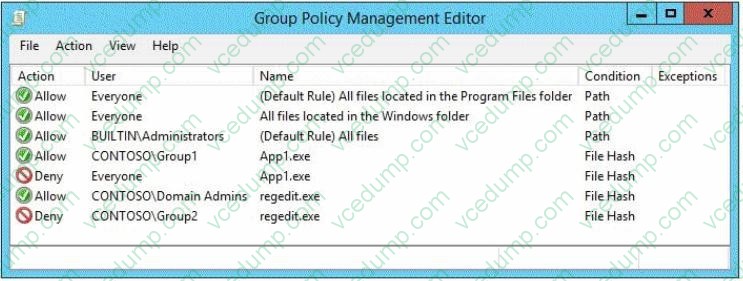
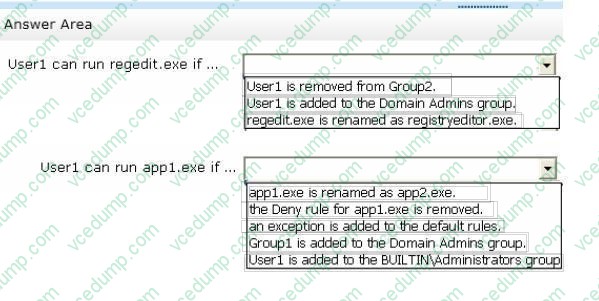
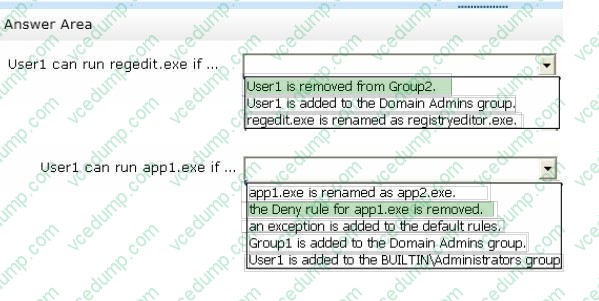
To answer, complete each statement according to the information presented in the exhibit. Each correct selection is worth one point.
Hot Area:
-
Question 530:
Your network contains an Active Directory domain named contoso.com.
All of the AppLocker policy settings for the member servers are configured in a Group Policy object (GPO) named GPO1.
A member server named Server1 runs Windows Server 2012 R2.
On Server1, you test a new set of AppLocker policy settings by using a local computer policy.
You need to merge the local AppLocker policy settings from Server1 into the AppLocker policy settings of GPO1.
What should you do?
A. From Local Group Policy Editor on Server1, export an .inf file. Import the .inf file by using Group Policy Management Editor.
B. From Server1, run the Set-ApplockerPolicy cmdlet.
C. From Local Group Policy Editor on Server1, export an .xml file. Import the .xml file by using Group Policy Management Editor.
D. From Server1, run the New-ApplockerPolicy cmdlet.
Related Exams:
-
62-193
Technology Literacy for Educators -
70-243
Administering and Deploying System Center 2012 Configuration Manager -
70-355
Universal Windows Platform – App Data, Services, and Coding Patterns -
77-420
Excel 2013 -
77-427
Excel 2013 Expert Part One -
77-725
Word 2016 Core Document Creation, Collaboration and Communication -
77-726
Word 2016 Expert Creating Documents for Effective Communication -
77-727
Excel 2016 Core Data Analysis, Manipulation, and Presentation -
77-728
Excel 2016 Expert: Interpreting Data for Insights -
77-731
Outlook 2016 Core Communication, Collaboration and Email Skills
Tips on How to Prepare for the Exams
Nowadays, the certification exams become more and more important and required by more and more enterprises when applying for a job. But how to prepare for the exam effectively? How to prepare for the exam in a short time with less efforts? How to get a ideal result and how to find the most reliable resources? Here on Vcedump.com, you will find all the answers. Vcedump.com provide not only Microsoft exam questions, answers and explanations but also complete assistance on your exam preparation and certification application. If you are confused on your 70-410 exam preparations and Microsoft certification application, do not hesitate to visit our Vcedump.com to find your solutions here.