70-410 Exam Details
-
Exam Code
:70-410 -
Exam Name
:Installing and Configuring Windows Server 2012 -
Certification
:Microsoft Certifications -
Vendor
:Microsoft -
Total Questions
:537 Q&As -
Last Updated
:Feb 03, 2022
Microsoft 70-410 Online Questions & Answers
-
Question 491:
Your network contains an Active Directory domain named contoso.com. The domain contains two domain controllers. The domain controllers are configured as shown in the following table.
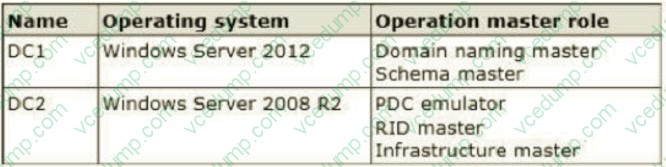
In the perimeter network, you install a new server named Server1 that runs a Server Core Installation of Windows Server 2012 R2. You need to join Server1 to the contoso.com domain. The solution must minimize administrative effort. What should you use?
A. The New-ADComputer cmdlet
B. The djoin.exe command
C. The dsadd.exe command
D. The Add-Computer cmdlet -
Question 492:
Your network contains an Active Directory domain named contoso.com. All servers run Windows Server 2012 R2.
When a domain user named User3 attempts to log on to a client computer named Client10, User3 receives the message shown in the following exhibit. (Click the Exhibit button.)
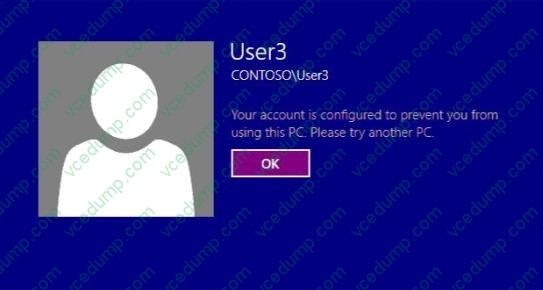
You need to ensure that User3 can log on to Client10. What should you do?
A. From Active Directory Users and Computers, configure the Logon Workstations setting of User3.
B. On Client10, modify the Allow log on locally User Rights Assignment.
C. From Active Directory Users and Computers, configure the Personal Virtual Desktop property of User3.
D. On Client10, modify the Deny log on locally User Rights Assignment. -
Question 493:
Your network contains a server named Server1 that runs Windows Server 2012 R2. Server1 has the Hyper-V server role installed.
Server1 hosts four virtual machines named VM1, VM2, VM3, and VM4.
Server1 is configured as shown in the following table.
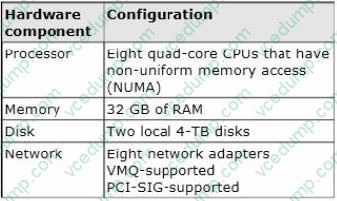
You plan to schedule a complete backup of Server1 by using Windows Server Backup.
You need to ensure that the state of VM1 is saved before the backup starts.
What should you configure?
A. NUMA topology
B. Resource control
C. resource metering
D. virtual Machine Chimney
E. The VLAN ID
F. Processor Compatibility
G. The startup order
H. Automatic Start Action
I. Integration Services
J. Port mirroring -
Question 494:
Your network contains an Active Directory forest named contoso.com. The forest contains a single domain. The domain contains two domain controllers named DC1 and DC2 that run Windows Server 2012 R2.
The domain contains a user named User1 and a global security group named Group1.
User1 logs on to a client computer named Computer1.
You need to disable the computer account of Computer1.
Which cmdlet should you run?
A. Add-AdPrincipalGroupMember.hip
B. Install-AddsDomainController
C. Install WindowsFeature
D. Install AddsDomain
E. Roname-AdObject
F. Set-AdAccountControl
G. Set-AdGroup
H. Set-User -
Question 495:
Your network contains an Active Directory domain named contoso.com. The domain contains two servers named Server1 and Server2 that run Windows Server 2012 R2.
You create a security template named Template1 by using the Security Templates snap-in.
You need to apply Template1 to Server2.
Which tool should you use?
A. Authorization Manager
B. Local Security Policy
C. Certificate Templates
D. Computer Management -
Question 496:
Your network contains an Active Directory domain named contoso.com. The domain contains a server named Server1. Server1 runs Windows Server 2012 R2.
You plan to create a shared folder. The shared folder will have a quota limit. You discover that when you run the New Share Wizard, you cannot select the SMB Share ?Advanced option.
You need to ensure that you can use SMB Share ?Advanced to create the new share. What should you do on Server1 before you run the New Share Wizard?
A. Configure the Advanced system settings.
B. Run the Install-WindowsFeature cmdlet.
C. Configure DynamicAccess Control and apply a central access policy.
D. Run the Set-SmbServerConfiguration cmdlet.
E. Install the Share and Storage Management tool.
F. Run the Unblock-SmbShareAccess cmdlet. -
Question 497:
Your network contains an Active Directory domain named contoso.com. All servers run Windows Server 2012 R2. Client computers run either Windows 7 or Windows 8.
All of the computer accounts of the client computers reside in an organizational unit (OU) named Clients. A Group Policy object (GPO) named GPO1 is linked to the Clients OU. All of the client computers use a DNS server named Server1.
You configure a server named Server2 as an ISATAP router. You add a host (A) record for ISATAP to the contoso.com DNS zone.
You need to ensure that the client computers locate the ISATAP router.
What should you do?
A. Run the Set-DnsServerGlobalQueryBlockList cmdlet on Server1.
B. Configure the Network Options Group Policy preference of GPO1.
C. Run the Add-DnsServerResourceRecord cmdlet on Server1.
D. Configure the DNS Client Group Policy setting of GPO1. -
Question 498:
A company's server administration team would like to take advantage of the newest file systems available with Windows Server 2012 R2. The team needs a file system capable of managing extremely large data drives that can auto-detect data corruption and automatically perform needed repairs without taking a volume offline.
Which file system should the server administration team choose?
A. NFS
B. DFS
C. NTFS
D. ReFS -
Question 499:
Your network contains three servers that run Windows Server 2012 R2. The servers are configured as shown in the following table. Server3 is configured to obtain an IP address automatically.
You need to ensure that Server3 only receives an IP address from Server1. The IP address must always be the same.
Which two tasks should you perform? (Each correct answer presents part of the solution. Choose two.)
A. Create an exclusion on Server1.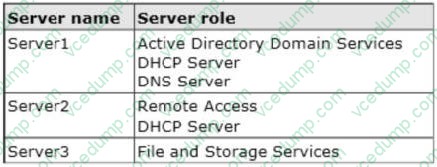
B. Create a filter on Server1.
C. Create a reservation on Server2
D. Create a reservation on Server1
E. Create a filter on Server2. -
Question 500:
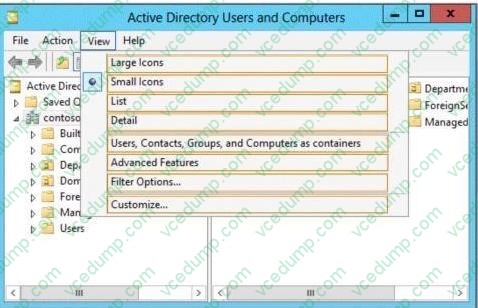
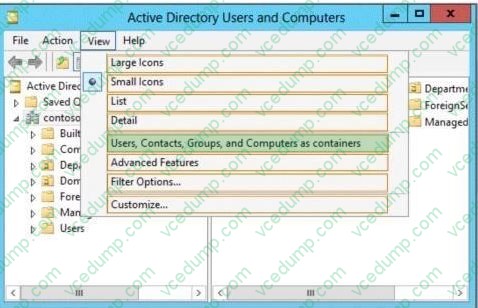
Your network contains an Active Directory domain named contoso.com. The domain contains a print server named Server1 that runs Windows Server 2012 R2. You share several printers on Server1. You need to ensure that you can view the printer objects associated to Server1 in Active Directory Users and Computers. Which option should you select? To answer, select the appropriate option in the answer area.
Hot Area:
Related Exams:
-
62-193
Technology Literacy for Educators -
70-243
Administering and Deploying System Center 2012 Configuration Manager -
70-355
Universal Windows Platform – App Data, Services, and Coding Patterns -
77-420
Excel 2013 -
77-427
Excel 2013 Expert Part One -
77-725
Word 2016 Core Document Creation, Collaboration and Communication -
77-726
Word 2016 Expert Creating Documents for Effective Communication -
77-727
Excel 2016 Core Data Analysis, Manipulation, and Presentation -
77-728
Excel 2016 Expert: Interpreting Data for Insights -
77-731
Outlook 2016 Core Communication, Collaboration and Email Skills
Tips on How to Prepare for the Exams
Nowadays, the certification exams become more and more important and required by more and more enterprises when applying for a job. But how to prepare for the exam effectively? How to prepare for the exam in a short time with less efforts? How to get a ideal result and how to find the most reliable resources? Here on Vcedump.com, you will find all the answers. Vcedump.com provide not only Microsoft exam questions, answers and explanations but also complete assistance on your exam preparation and certification application. If you are confused on your 70-410 exam preparations and Microsoft certification application, do not hesitate to visit our Vcedump.com to find your solutions here.