70-410 Exam Details
-
Exam Code
:70-410 -
Exam Name
:Installing and Configuring Windows Server 2012 -
Certification
:Microsoft Certifications -
Vendor
:Microsoft -
Total Questions
:537 Q&As -
Last Updated
:Feb 03, 2022
Microsoft 70-410 Online Questions & Answers
-
Question 11:
You have a server named Serverl that runs Windows Server 2012 R2.
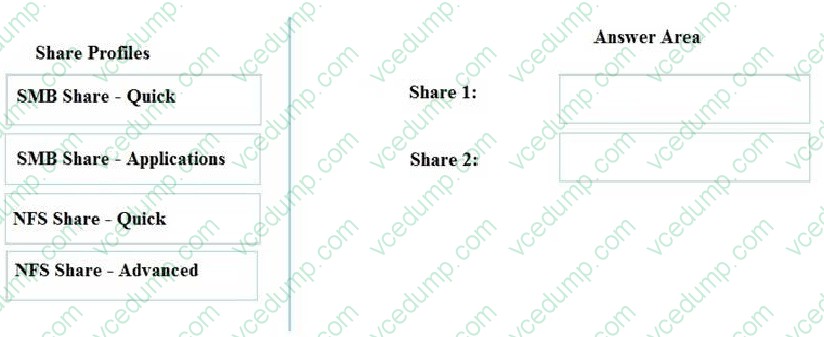
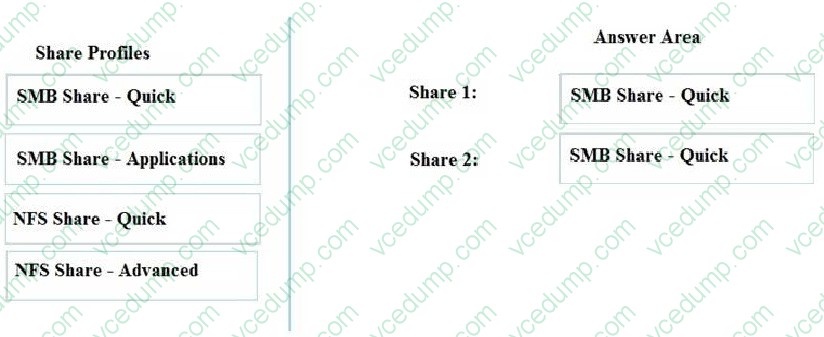
You need to create shares by using the New Share Wizard- The solution must meet the following requirements;
A share named Sharel must have access-based enumeration enabled for the files and folders in the share.
A share named Share2 must encrypt remote access to the files in the share.
Which share profile should you use for each share? To answer, drag the appropriate share profiles to the correct shares. Each share profile may be used once, more than once, or not at all. You may need to drag the split bar between panes
or scroll to view content.
Select and Place:
-
Question 12:
Your company has a remote office that contains 1,600 client computers on a single subnet.
You need to select a subnet mask for the network that will support all of the client computers. The solution must minimize the number of unused addresses. Which subnet mask should you select?
A. 255.255.248.0
B. 255.255.252.0
C. 255.255.254.0
D. 255.255.240.0 -
Question 13:
Your network contains an Active Directory domain named contoso.com. The domain contains a member server named Server 1. Server1 runs Windows Server 2012 R2 and has the DHCP Server server role installed.
You create two IPv4 scopes on Server1. The scopes are configured as shown in the following table.
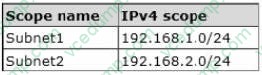
The DHCP clients in Subnet1 can connect to the client computers in Subnet2 by using an IP address or a FQDN.
You discover that the DHCP clients in Subnet2 can connect to client computers in Subnet1 by using an IP address only.
You need to ensure that the DHCP clients in both subnets can connect to any other DHCP client by using a FQDN.
What should you add?
A. The 015 DNS Domain Name option to Subnet1
B. The 015 DNS Domain Name option to Subnet2
C. The 006 DNS Servers option to Subnet2
D. The 006 DNS Servers option to Subnet1 -
Question 14:
You have a server named Data1 that runs a Server Core Installation of Windows Server 2012 R2 Standard.
You need to configure Data1 to run a Server Core Installation of Windows Server 2012 R2 Enterprise. You want to achieve this goal by using the minimum amount of administrative effort.
What should you perform?
A. a clean installation of Windows Server 2012
B. an offline servicing by using Dism
C. an online servicing by using Dism
D. an upgrade installation of Windows Server 2012 -
Question 15:
You work as a senior administrator at Contoso.com. The Contoso.com network consists of a single domain named Contoso.com. All servers on the Contoso.com network have Windows Server 2012 R2 installed.
You are running a training exercise for junior administrators. You are currently discussing connection security rules.
Which of the following is TRUE with regards to connection security rules? (Choose all that apply.)
A. Connection security rules allows for traffic to be secured via IPsec.
B. Connection security rules do not allow the traffic through the firewall.
C. Connection security rules are applied to programs or services.
D. Connection security rules are applied between two computers. -
Question 16:
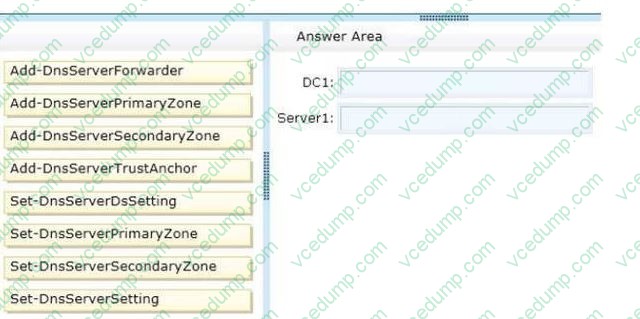
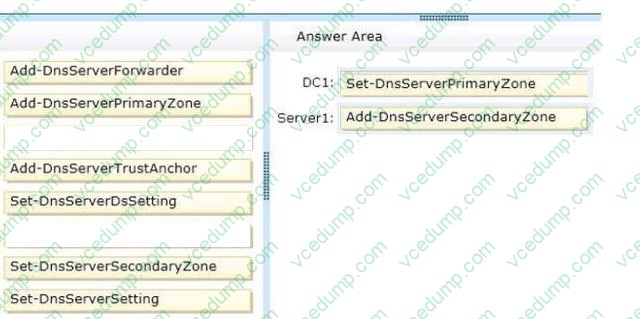
Your network contains an Active Directory domain named contoso.com. The domain contains a domain controller named DC1 that has the DNS Server server role installed. DC1 hosts an Active Directory-integrated zone for the domain. The domain contains a member server named Server1. You install the DNS Server server role on Server1. You need to ensure that Server1 can respond authoritatively to queries for the existing contoso.com namespace. Which cmdlets should you run on each server? (To answer, drag the appropriate cmdlets to the correct servers. Each cmdlet may be used once, more than once, or not at all. You may need to drag the split bar between panes or scroll to view content.)
Select and Place:
-
Question 17:
You work as a senior administrator at Contoso.com. The Contoso.com network consists of a single domain named Contoso.com. All servers on the Contoso.com network have Windows Server 2012 installed, and all workstations have Windows 8 installed.
You are running a training exercise for junior administrators. You are currently discussing the Always Offline Mode.
Which of the following is TRUE with regards to the Always Offline Mode? (Choose all that apply.)
A. It allows for swifter access to cached files and redirected folders.
B. To enable Always Offline Mode, you have to satisfy the forest and domain functional-level requirements, as well as schema requirements
C. It allows for lower bandwidth usage due to users are always working offline.
D. To enable Always Offline Mode, you must have workstations running Windows 7 or Windows Server 2008 R2. -
Question 18:
You have a server named Server1 that runs a Server Core installation of Windows Server 2012 R2.
Server1 is configured to obtain an IPv4 address by using DHCP.
You need to configure the IPv4 settings of the network connection on Server1 as follows:
IP address: 10.1.1.1
Subnet mask: 255.255.240.0 Default gateway: 10.1.1.254 What should you run?
A. net.exe
B. msconfig.exe
C. New-NetIPAddress
D. ipconfig.exe -
Question 19:
Your network contains an Active Directory domain named contoso.com. The domain contains a server named Server1. Server1 runs Windows Server 2012 R2. You need to create 3-TB virtual hard disk (VHD) on Server1.
Which tool should you use?
A. File Server Resource Manager (FSRM)
B. New-StoragePool
C. Diskpart
D. Share and Storage Management -
Question 20:
Your network contains an Active Directory domain named adatum.com. The domain contains several thousand member servers that run Windows Server 2012 R2. All of the computer accounts for the member servers are in an organizational
unit (OU) named ServersAccounts. Servers are restarted only occasionally.
You need to identify which servers were restarted during the last two days.
What should you do?
A. Run dsquery computer and specify the -stalepwd parameter
B. Run dsquery server and specify the -o parameter.
C. Run Get-ADComputer and specify the lastlogon property.
D. Run Get-ADComputer and specify the SearchScope parameter
Related Exams:
-
62-193
Technology Literacy for Educators -
70-243
Administering and Deploying System Center 2012 Configuration Manager -
70-355
Universal Windows Platform – App Data, Services, and Coding Patterns -
77-420
Excel 2013 -
77-427
Excel 2013 Expert Part One -
77-725
Word 2016 Core Document Creation, Collaboration and Communication -
77-726
Word 2016 Expert Creating Documents for Effective Communication -
77-727
Excel 2016 Core Data Analysis, Manipulation, and Presentation -
77-728
Excel 2016 Expert: Interpreting Data for Insights -
77-731
Outlook 2016 Core Communication, Collaboration and Email Skills
Tips on How to Prepare for the Exams
Nowadays, the certification exams become more and more important and required by more and more enterprises when applying for a job. But how to prepare for the exam effectively? How to prepare for the exam in a short time with less efforts? How to get a ideal result and how to find the most reliable resources? Here on Vcedump.com, you will find all the answers. Vcedump.com provide not only Microsoft exam questions, answers and explanations but also complete assistance on your exam preparation and certification application. If you are confused on your 70-410 exam preparations and Microsoft certification application, do not hesitate to visit our Vcedump.com to find your solutions here.