70-410 Exam Details
-
Exam Code
:70-410 -
Exam Name
:Installing and Configuring Windows Server 2012 -
Certification
:Microsoft Certifications -
Vendor
:Microsoft -
Total Questions
:537 Q&As -
Last Updated
:Feb 03, 2022
Microsoft 70-410 Online Questions & Answers
-
Question 501:
Your network contains an Active Directory domain named contoso.com.
You log on to a domain controller by using an account named Admin1. Admin1 is a member of the Domain Admins group.
You view the properties of a group named Group1 as shown in the exhibit. (Click the Exhibit button.)
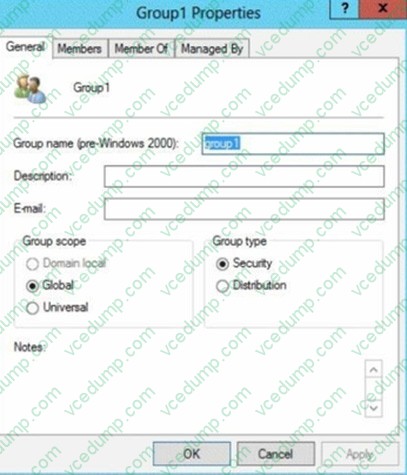
Group1 is located in an organizational unit (OU) named OU1.
You need to ensure that you can modify the Security settings of Group1 by using Active Directory Users and Computers.
What should you do from Active Directory Users and Computers?
A. From the View menu, select Users, Contacts, Groups, and Computers as containers.
B. Right-click OU1 and select Delegate Control
C. From the View menu, select Advanced Features
D. Right-click contoso.com and select Delegate Control. -
Question 502:
You have a server named Server1 that runs Windows Server 2012 R2.
You plan to use Windows PowerShell Desired State Configuration (DSC) to confirm that the Application Identity service is running on all file servers.
You define the following configuration in the Windows PowerShell Integrated Scripting Environment (ISE):
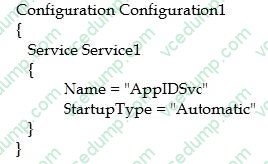
You need to use DSC to configure Server1 as defined in the configuration. What should you run first?
A. Service1
B. Configuration1
C. Start DscConfiguration
D. Test-DscConfigu ration -
Question 503:
Your network contains an Active Directory domain named contoso.com.
You need to prevent users from installing a Windows Store app named App1.
What should you create?
A. An application control policy executable rule
B. An application control policy packaged app rule
C. A software restriction policy certificate rule
D. An application control policy Windows Installer rule -
Question 504:
A company has a forest with 4 sites. Subnets are as follows:
Main Office 172.16.1.0 Subnet: 255.255.255.0 Gateway 172.16.1.254

Site1 192.168.12.0 Subnet: 255.255.255.0
Site 2 192.168.13.0 Subnet: 255.255.255.0
Site 3 192.168.14.0 Subnet: 255.255.255.0
Site 4 192.168.15.0 Subnet: 255.255.255.0
You add a new server to the Main Office and it needs to be able to communicate to all sites. Which route command would you run?
A. route add -p 192.168.8.0 netmask 255.255.252.0 172.16.1.254
B. route add -p 192.168.0.0 netmask 255.255.248.0 172.16.1.254
C. route add -p 192.168.12.0 netmask 255.255.252.0 172.16.1.254
D. route add -p 192.168.12.0 netmask 255.255.240.0 172.16.1.254 -
Question 505:
Your network contains an Active Directory domain named contoso.com. The domain contains two servers named CONT1 and CONT2. Both servers run Windows Server 2012 R2.
CONT1 has a shared printer named Printer1. CONT2 connects to Printer1 on CONT1.
When you attempt to remove Printer1 from CONT2, you receive the error message shown in the exhibit. (Click the Exhibit button.)
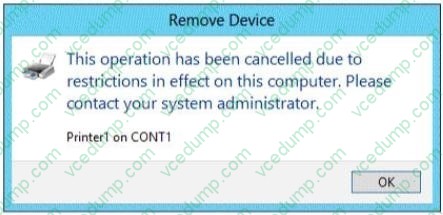
You successfully delete the other printers installed on CONT2.
You need to identify what prevents you from deleting Printer1 on CONT2.
What should you identify?
A. Printer1 is deployed as part of a mandatory profile.
B. Printer1 is deployed by using a Group Policy object (GPO).
C. Your user account is not a member of the Print Operators group on CONT2.
D. Your user account is not a member of the Print Operators group on CONT1. -
Question 506:
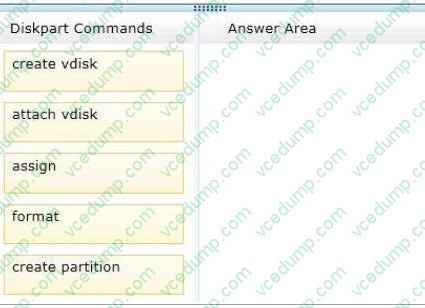
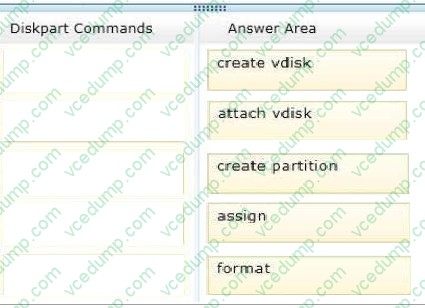
You have a server named Server1 that runs Windows Server 2012 R2. You need to create a new volume on Server1. The new volume must have the following configurations:
-
Be stored on a new virtual hard disk
-
Be assigned the drive letter G
-Have the NTFS file system
In which order should you run the Diskpart commands?
To answer, move all the Diskpart commands from the list of commands to the answer area and arrange them in the correct order.
Select and Place:
-
Question 507:
Your network contains an Active Directory domain named contoso.com. The DNS zone for contoso.com is Active-Directory integrated.
The domain contains 500 client computers. There are an additional 20 computers in a workgroup.
You discover that every client computer on the network can add its record to the contoso.com zone.
You need to ensure that only the client computers in the Active Directory domain can register records in the contoso.com zone.
What should you do?
A. Sign the contoso.com zone by using DNSSEC.
B. Configure the Dynamic updates settings of the contoso.com zone.
C. Configure the Security settings of the contoso.com zone.
D. Move the contoso.com zone to a domain controller that is configured as a DNS server. -
Question 508:
You work as a senior administrator at Contoso.com. The Contoso.com network consists of a single domain named Contoso.com. All servers on the Contoso.com network have Windows Server 2012 R2 installed.
You are running a training exercise for junior administrators. You are currently discussing what happens when you run the Remove-NetLbfoTeam Windows PowerShell cmdlet.
Which of the following describes the results of running this cmdlet?
A. It removes one or more network adapters from a specified NIC team.
B. It removes a team interface from a NIC team.
C. It removes a specified NIC team from the host.
D. It removes a network adapter member from a switch team. -
Question 509:
Your network contains an Active Directory domain named contoso.com. The domain contains a server named Server1. Server1 runs Windows Server 2012 R2.
You plan to create a shared folder. The shared folder will have a quota limit.
You discover that when you run the New Share Wizard, you cannot select the SMB Share ?Advanced option.
You need to ensure that you can use SMB Share ?Advanced to create the new share.
What should you do on Server1 before you run the New Share Wizard?
A. Run the Set-SmbShare cmdlet.
B. Install the File Server Resource Manager role service.
C. Configure Dynamic Access Control and Apply a central access policy.
D. Configure the Advanced system settings.
E. Run the Set-SmbServerConfiguration cmdlet.
F. Install the Share and Storage Management tool.
G. Run the Unblock-SmbShareAccess cmdlet. -
Question 510:
Your network contains an Active Directory domain named contoso.com. The domain contains a member server named HVServer1. HVServer1 runs Windows Server 2012 R2 and has the Hyper-V server role installed.
HVServer1 hosts 10 generation 1 virtual machines. All of the virtual machines connect to a virtual switch named Switch1. Switch1 is configured as a private network. All of the virtual machines have the DHCP guard and the router guard
settings enabled.
You install the DHCP server role on a virtual machine named Server1. You authorize Server1 as a DHCP server in contoso.com. You create an IP scope.
You discover that the virtual machines connected to Switch1 do not receive IP settings from Server1.
You need to ensure that the virtual machines can use Server1 as a DHCP server.
What should you do?
A. Enable MAC address spoofing on Server1.
B. Enable single-root I/O visualization (SR-IOV) on Server1.
C. Disable the DHCP guard on Server1.
D. Disable the DHCP guard on all of the virtual machines that are DHCP clients.
Related Exams:
-
62-193
Technology Literacy for Educators -
70-243
Administering and Deploying System Center 2012 Configuration Manager -
70-355
Universal Windows Platform – App Data, Services, and Coding Patterns -
77-420
Excel 2013 -
77-427
Excel 2013 Expert Part One -
77-725
Word 2016 Core Document Creation, Collaboration and Communication -
77-726
Word 2016 Expert Creating Documents for Effective Communication -
77-727
Excel 2016 Core Data Analysis, Manipulation, and Presentation -
77-728
Excel 2016 Expert: Interpreting Data for Insights -
77-731
Outlook 2016 Core Communication, Collaboration and Email Skills
Tips on How to Prepare for the Exams
Nowadays, the certification exams become more and more important and required by more and more enterprises when applying for a job. But how to prepare for the exam effectively? How to prepare for the exam in a short time with less efforts? How to get a ideal result and how to find the most reliable resources? Here on Vcedump.com, you will find all the answers. Vcedump.com provide not only Microsoft exam questions, answers and explanations but also complete assistance on your exam preparation and certification application. If you are confused on your 70-410 exam preparations and Microsoft certification application, do not hesitate to visit our Vcedump.com to find your solutions here.