70-410 Exam Details
-
Exam Code
:70-410 -
Exam Name
:Installing and Configuring Windows Server 2012 -
Certification
:Microsoft Certifications -
Vendor
:Microsoft -
Total Questions
:537 Q&As -
Last Updated
:Feb 03, 2022
Microsoft 70-410 Online Questions & Answers
-
Question 481:
You have a server named Corel that has a Server Core Installation of Windows Server 2012 R2.
Corel has the Hyper-V server role installed. Corel has two network adapters from different third-party hardware vendors.
You need to configure network traffic failover to prevent connectivity loss if a network adapter fails.
What should you use?
A. New-NetSwitchTeam
B. Install-Feature
C. Add-NetSwitchTeamMember
D. Netsh.exe -
Question 482:
Your network contains an Active Directory domain named contoso.com. The domain contains a server named Server1. Server1 runs Windows Server 2012 R2.
On Server1, you create a printer named Printer1. You share Printer1 and publish Printer1 in Active Directory.
You need to provide a group named Group1 with the ability to manage Printer1.
What should you do?
A. From Print Management, configure the Sharing settings of Printer1.
B. From Active Directory Users and Computers, configure the Security settings of Server1-Printer1.
C. From Devices and Printers, configure the Security settings of Printer1.
D. From Devices and Printers, configure the Sharing settings of Printer1. -
Question 483:
Your network contains a production Active Directory forest named contoso.com and a test Active Directory forest named contoso.test. A trust relationship does not exist between the forests.
In the contoso.test domain, you create a backup of a Group Policy object (GPO) named GPO1.
You transfer the backup of GPO1 to a domain controller in the contoso.com domain.
You need to create a GPO in contoso.com based on the settings of GPO1.You must achieve this goal by using the minimum amount of Administrative effort.
What should you do?
A. From Windows PowerShell, run the Copy-GPO cmdlet and the Restore- GPO cmdlet.
B. From Windows PowerShell, run the Get-GPO cmdlet and the Copy-GPO cmdlet.
C. From Group Policy Management, create a new GPO. Right-click the new GPO, and then click Import Settings.
D. From Group Policy Management, create a new starter GPO. Right-click the new starter GPO, and then click Restore from Backup. -
Question 484:
You have a server named Server1 that runs Windows Server 2012 R2. Server1 has the Hyper-V server role installed. The disks on Server1 are configured as shown in the exhibit. (Click the Exhibit button.)
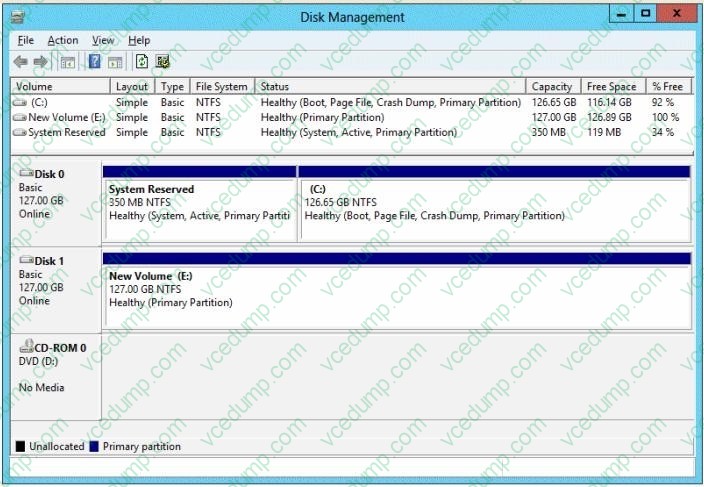
You create a virtual machine on Server1.
You need to ensure that you can configure a pass-through disk for the virtual machine.
What should you do?
A. Convert Disk 1 to a GPT disk.
B. Delete partition E.
C. Convert Disk 1 to a dynamic disk.
D. Take Disk 1 offline. -
Question 485:
You work as an administrator at Contoso.com. The Contoso.com network consists of a single domain named Contoso.com. All servers in the Contoso.com domain, including domain controllers, have Windows Server 2012 R2 installed.
You have been instructed to add a new domain controller to Contoso.com's existing environment.
Which of the following actions should you take?
A. You should consider making use of Server Manager.
B. You should consider making use of Authorization Manager.
C. You should consider making use of Remote Desktop Gateway Manager.
D. You should consider making use of Network Load Balancing Manager. -
Question 486:
You work as an administrator at Contoso.com. The Contoso.com network consists of a single domain named Contoso.com. All servers on the Contoso.com network have Windows Server 2008 R2 installed. Some of Contoso.com's workstations have Windows 7 installed, while the rest have Windows 8 installed.
After installing a new Windows Server 2012 computer in the Contoso.com domain, you configure it to run the File and Storage Services server role. You are instructed to create a shared folder on the new server, and configure the use of Previous Versions for restoring files located in the shared folder.
Which of the following actions should you take?
A. You should consider configuring the Shadow Copies settings on the new server.
B. You should consider configuring the Snapshot settings on the new server.
C. You should consider configuring the Background Copy settings on the new server.
D. You should consider configuring the Permission settings on the new server. -
Question 487:
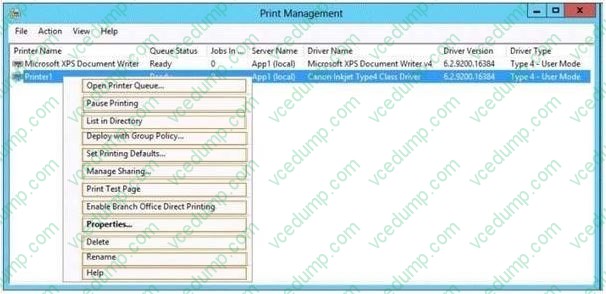
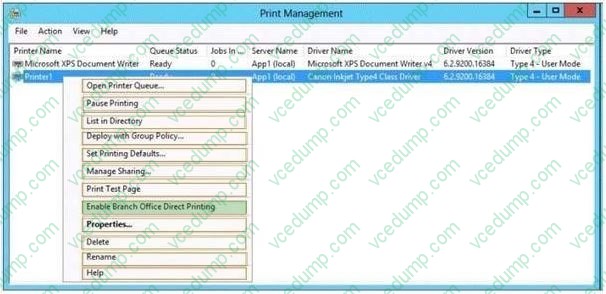
Your company has a main office and a sales office. The main office has 2,000 users. The sales office has 20 users. All client computers in the sales office run Windows 8. The sales office contains a print server named App1 that runs Windows Server 2012 R2. App1 has a shared printer named Printer1. Printer1 connects to a network-attached print device. You plan to connect all of the users in the sales office to Printer1 on App1. You need to ensure that if App1 fails, the users can continue to print to Printer1. What should you configure on App1?To answer, select the appropriate option in the answer area.
Hot Area:
-
Question 488:
Your network contains an Active Directory domain named contoso.com. The domain consists of 20 member servers and five domain controllers. All domain controllers run Windows Server 2012 R2. The domain contains 500 client computers.
You plan to deploy a domain controller for contoso.com in Microsoft Azure.
You need to prepare the environment for the planned deployment. The solution must ensure that the domain controller hosted in Azure always have the same IP address.
Which two actions should you perform? Each correct answer is a part of the solution.
A. From a domain controller, run adprep.exe.
B. From a domain controller, run the Set-NetIPAddress cmdlet.
C. From an Azure virtual machine, run the Set-AzureStaticVNetIP cmdlet.
D. From an Azure virtual machine, run the Set-NetIPAddress cmdlet.
E. Deploy a site-to-site virtual private network. -
Question 489:
Your network contains two subnets. The subnets are configured as shown in the following table.
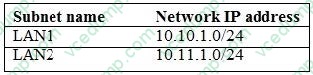
You have a server named Server1 that runs Windows Server 2012 R2. Server1 is connected to LAN1. You run the route print command as shown in the exhibit. (Click the Exhibit button.)
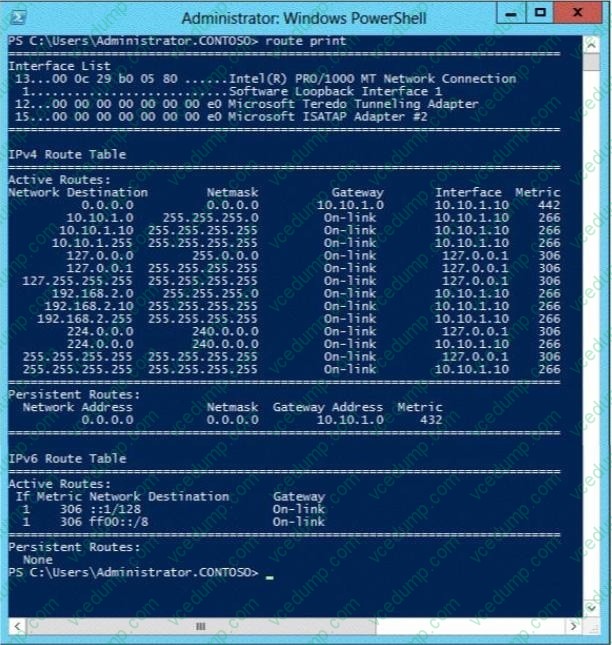
You need to ensure that Server1 can communicate with the client computers on LAN2.
What should you do?
A. Change the default gateway address.
B. Set the state of the Microsoft ISATAP Adapter #2 interface to disable.
C. Change the metric of the 10.10.1.0 route.
D. Set the state of the Teredo interface to disable. -
Question 490:
Your network contains an Active Directory domain named contoso.com. All servers run Windows Server 2012 R2. The domain contains a member server named Server1. Server1 has the File Server server role installed.
On Server1, you create a share named Documents. The Documents share will contain the files and folders of all users.
You need to ensure that when the users connect to Documents, they only see the files to which they have access.
What should you do?
A. Enable access-based enumeration.
B. Configure Dynamic Access Control.
C. Modify the Share permissions.
D. Modify the NTFS permissions.
Related Exams:
-
62-193
Technology Literacy for Educators -
70-243
Administering and Deploying System Center 2012 Configuration Manager -
70-355
Universal Windows Platform – App Data, Services, and Coding Patterns -
77-420
Excel 2013 -
77-427
Excel 2013 Expert Part One -
77-725
Word 2016 Core Document Creation, Collaboration and Communication -
77-726
Word 2016 Expert Creating Documents for Effective Communication -
77-727
Excel 2016 Core Data Analysis, Manipulation, and Presentation -
77-728
Excel 2016 Expert: Interpreting Data for Insights -
77-731
Outlook 2016 Core Communication, Collaboration and Email Skills
Tips on How to Prepare for the Exams
Nowadays, the certification exams become more and more important and required by more and more enterprises when applying for a job. But how to prepare for the exam effectively? How to prepare for the exam in a short time with less efforts? How to get a ideal result and how to find the most reliable resources? Here on Vcedump.com, you will find all the answers. Vcedump.com provide not only Microsoft exam questions, answers and explanations but also complete assistance on your exam preparation and certification application. If you are confused on your 70-410 exam preparations and Microsoft certification application, do not hesitate to visit our Vcedump.com to find your solutions here.