70-210 Exam Details
-
Exam Code
:70-210 -
Exam Name
:Installing, Configuring and Administering Microsoft Windows 2000 Professional -
Certification
:Microsoft Certifications -
Vendor
:Microsoft -
Total Questions
:145 Q&As -
Last Updated
:Dec 13, 2021
Microsoft 70-210 Online Questions & Answers
-
Question 71:
You install Windows 2000 Professional on your portable computer. You have an external CD-ROM drive that is connected to the parallel port on your computer.When you start Windows 2000 Professional, you cannot see the CD-ROM drive
in Windows Explorer. You use Computer Management to scan for hardware changes. The CD-ROM drive is not found.You view the Port Settings tab and the Resources tab of the ECP Printer Port (LPT1) Properties dialog box as shown in
the exhibit. (Click the Exhibit button.)You want to enable Windows 2000 Professional to detect the CD-ROM drive.
What should you do?
A. Configure the parallel port to never use an interrupt.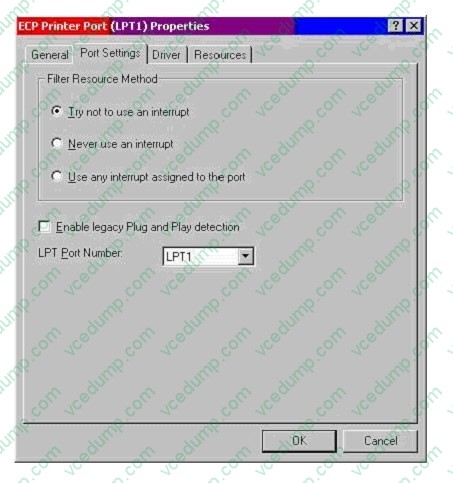
B. Configure the parallel port to use the automatic resource setting.
C. Configure the parallel port to use any interrupt assigned to the port.
D. Configure the parallel port to enable legacy Plug and Play detection. -
Question 72:
From your Windows 2000 Professional computer, you need to print from a 16-bit accounting application to a network printer named Printer02. Printer02 is attached to a print server named PrtSrv. The accounting application allows you to print only to a local LPT port.You currently have two printers attached to your local LPT1 and LPT2 ports. You need to be able to print to the network printer and to both local printers. You install the driver for the network printer on your computer.What must you do next to enable printing on the network printer?
A. Create a new local printer port named PrtSrv\Printer02, and configure the printer to use the new port.
B. Create a new local printer port named PrtSrv\Printer02. In the properties for the new port, select the option to print directly to the printer. Configure the printer to use the new port.
C. Run the net use lpt3 \\PrtSrv\Printer02 command.
D. Run the net print \\PrtSrv\Printer02 command. -
Question 73:
Your Windows 2000 Professional computer belongs to the contoso.com domain. You need to encrypt a compressed file named C:\data. You successfully encrypt the file but discover that it is no longer compressed.What is the most likely cause of this problem?
A. A Group Policy is preventing the compression of encrypted files.
B. The file is stored on a FAT32 partition.
C. Only members of the Administrators and the Power Users groups can compress and encrypt files.
D. Encrypted files cannot be compressed. -
Question 74:
Five of your companys employees have Windows 2000 Professional portable computers. The employees use their portable computers in a network-enabled docking station when they are at their desks. When the employees are working outside of the office, they use the portable computers without network connectivity.You have just installed wireless PC Card network adapters in the portable computers so that the employees can access the network when they are in conference rooms in the office building.You need to configure the portable computers for optimum performance in all of the working environments. What should you do?
A. Configure the wireless PC Card network adapters to use DHCP to obtain their IP addresses.
B. Configure three different hardware profiles on each portable computer.
C. Configure the wireless PC Card network adapters to use Automatic Private IP Addressing (APIPA) when they cannot detect a DHCP server.
D. Instruct each employee to unplug the wireless PC Card network adapter whenever the portable computer is attached to a network-enabled docking station. -
Question 75:
You are the administrator of a Windows 2000 Professional computer named Computer1. Computer1 has a shared color laser printer named Printer1. Printer1 will not turn on.The print queue for Printer1 has three jobs waiting to print. You want to enable the three waiting print jobs to print to an identical print device, which has been shared as Printer2 on Computer2. You also want to allow users who currently connect to Printer1 to automatically use Printer2 without having to reconfigure their default printer.What should you do?
A. Enable bidirectional support for Printer1.
B. Change the share name of Printer2 to Printer1.
C. Configure Printer1 to add a port, and set the port to \\Computer2\Printer2.
D. Configure the print server properties to use the path \\Computer2\Winnt$\System32\Spool\Printers. -
Question 76:
You are the network administrator for your company. A user reports that the USB ports on his Windows 2000 Professional portable computer function only when the portable computer is in its docked position at the office. He asks you to configure the computer so that the USB ports work when the portable computer is docked and when it is undocked and running on battery power. You verify that the portable computer supports ACPI power management.What should you do?
A. Modify the portable computers power management settings to ensure the USB ports are not shut down when the computer is running on battery power.
B. Modify the portable computers BIOS settings to disable ACPI when the computer is running on battery power.
C. Modify the portable computers undocked hardware profile, and enable the USB root hub.
D. Disable the BIOS power management features in the portable computers BIOS settings.
E. Obtain external power supplies for the users USB devices. Ensure that these power supplies are connected when the portable computer is undocked.
F. Undock the portable computer, and reinstall the drivers for the USB port. -
Question 77:
You are configuring five computers to use both Windows NT Workstation 4.0 and Windows 2000 Professional. Each computer has an 8-GB hard disk.You configure the hard disk on each computer to have two 4-GB partitions. Windows NT Workstation is installed on drive C. Windows 2000 Professional is installed on drive D.In Windows 2000 Professional, you configure a disk quota on drive D to prevent users from saving work files on the disk. You restart the computers and load Windows NT Workstation. You notice that users can still save files to drive D.You want to prevent users from saving files to drive D in either operating system. You also want to ensure that users can access both drives while using either operating system.What should you do on each computer?
A. Use Windows 2000 Professional to configure drive D as a dynamic partition.
B. Use Windows 2000 Professional to enable Encrypting File System (EFS) on drive D.
C. Use Windows NT Workstation to configure NTFS permissions on drive D to deny the users Write permission.
D. Reinstall Windows NT Workstation after configuring the disk quotas. -
Question 78:
Your Windows 2000 Professional computer contains a single hard disk configured as a single partition. You want to move a folder named Sales under a folder named Corp on your computer.You want the files in the Sales folder to remain compressed after moving the folder. You want the files in the Corp folder to remain uncompressed. You want to ensure that the files are recoverable in case of any disk problems. You also want to move the files with the least amount of administrative effort.What should you do?
A. Copy the Sales folder to the Corp folder. Do nothing further.
B. Back up the Sales folder. Move the Sales folder to the Corp folder.
C. Compress the Corp folder. Then copy the Sales folder to the Corp folder.
D. Move the Sales folder to a second computer. Then move the Sales folder to the Corp folder. -
Question 79:
You need to install Windows 2000 Professional on a new computer in your network. You use the Setup Manager wizard to configure a fully automated installation script file. You begin an unattended installation and leave the office.When you return, the installation has reached the GUI-mode Setup and you see the following error message: "Unattended Setup is unable to continue because a Setup parameter specified by your system administrator or computer manufacturer is missing or invalid."You need to complete the installation. What must you do?
A. In the Unattended section of the answer file, set the OemPreinstall property to Yes.
B. In the NetBinding section of the answer file, specify the Enable variable.
C. In the UserData section of the answer file, specify the ProductID variable.
D. In the GuiUnattended section of the answer file, set the OemSkipWelcome property to 1. -
Question 80:
A folder on your Windows 2000 Professional computer contains bitmap files that have been compressed from 2 MB to 1 MB. You want to copy one of the compressed bitmap files from your hard disk to a 1.4-MB floppy disk.When you attempt to copy the file, you receive the following error message: "Destination drive is full."What should you do?
A. Move, rather than copy, the compressed bitmap file to the floppy disk.
B. Reformat the floppy disk. Then copy the compressed bitmap file to the floppy disk.
C. Use another program to compress the bitmap file before copying it to the floppy disk.
D. Copy an empty compressed folder to the floppy disk. Then copy the compressed bitmap file to a folder on the floppy disk.
Related Exams:
-
62-193
Technology Literacy for Educators -
70-243
Administering and Deploying System Center 2012 Configuration Manager -
70-355
Universal Windows Platform – App Data, Services, and Coding Patterns -
77-420
Excel 2013 -
77-427
Excel 2013 Expert Part One -
77-725
Word 2016 Core Document Creation, Collaboration and Communication -
77-726
Word 2016 Expert Creating Documents for Effective Communication -
77-727
Excel 2016 Core Data Analysis, Manipulation, and Presentation -
77-728
Excel 2016 Expert: Interpreting Data for Insights -
77-731
Outlook 2016 Core Communication, Collaboration and Email Skills
Tips on How to Prepare for the Exams
Nowadays, the certification exams become more and more important and required by more and more enterprises when applying for a job. But how to prepare for the exam effectively? How to prepare for the exam in a short time with less efforts? How to get a ideal result and how to find the most reliable resources? Here on Vcedump.com, you will find all the answers. Vcedump.com provide not only Microsoft exam questions, answers and explanations but also complete assistance on your exam preparation and certification application. If you are confused on your 70-210 exam preparations and Microsoft certification application, do not hesitate to visit our Vcedump.com to find your solutions here.