70-210 Exam Details
-
Exam Code
:70-210 -
Exam Name
:Installing, Configuring and Administering Microsoft Windows 2000 Professional -
Certification
:Microsoft Certifications -
Vendor
:Microsoft -
Total Questions
:145 Q&As -
Last Updated
:Dec 13, 2021
Microsoft 70-210 Online Questions & Answers
-
Question 61:
You are the administrator of a Windows 2000 Professional computer. You schedule a task to run after 15 minutes. One hour later, the task still has not run.You notice that your Event Viewer system log has the following error message: "The Task Scheduler service failed to start due to the following error: The service did not start due to a logon failure."You want to run the scheduled task again. What should you do before restarting the Task Scheduler service?
A. Set the Task Scheduler service to log on as a Local System account.
B. Set the Task Scheduler service to allow the service to interact with the desktop.
C. Restart the Remote Procedure Call (RPC) service.
D. Log off and then log on to an account in the Power Users group. -
Question 62:
You have implemented the Hisecws.inf security template on all the Windows 2000 Professional client computers in your network.A user has received a driver and utility software for an internal SCSI controller in his computer. He uses the manufacturer-provided CD to install the driver and the utility. He restarts the computer and reports that the internal SCSI controller is not working correctly. You discover that the driver is not installed correctly.What should you do?
A. Disable the security template. Reconfigure the Driver Signing option. Install the driver. Enable the security template.
B. Reconfigure the Driver Signing option. Disable the security template. Install the driver. Enable the security template.
C. Run the Sigverif command. Reconfigure the Driver Signing option. Install the driver.
D. Run the Sigverif command. Disable the security template. Install the driver. Enable the security template.
E. Run the Sfc /cancel command. Install the driver. Run the Sfc /enable command. -
Question 63:
Five of your companys employees have Windows 2000 Professional portable computers. The employees use their portable computers in a network-enabled docking station when they are at their desks. When the employees are working outside of the office, they use the portable computers without network connectivity.You have just installed wireless PC Card network adapters in the portable computers so that the employees can access the network when they are in conference rooms in the office building.You need to configure the portable computers for optimum performance in all of the working environments. What should you do?
A. Configure the wireless PC Card network adapters to use DHCP to obtain their IP addresses.
B. Configure three different hardware profiles on each portable computer.
C. Configure the wireless PC Card network adapters to use Automatic Private IP Addressing (APIPA) when they cannot detect a DHCP server.
D. Instruct each employee to unplug the wireless PC Card network adapter whenever the portable computer is attached to a network-enabled docking station. -
Question 64:
You are the administrator of a Windows 2000 network. The network is configured as shown in the exhibit. (Click the Exhibit button.)Computers on the Sales subnet run Windows 2000 Professional. These computers are dynamically assigned IP addressing and configuration information from a DHCP server on the subnet.Computers on the Development subnet run Windows 98. These computers are statically assigned IP addressing and configuration information.Users on the Sales subnet report that they cannot communicate with users on the Development subnet. A user who works on Computer3 reports that he cannot communicate with computers on either subnet. You want all users to be able to communicate with other users on both subnets.What should you do? (Choose two.)
A. Change the frame type to 802.2 on Computer3.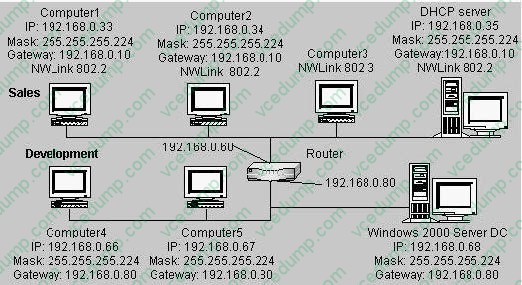
B. Change the default gateway option IP address on the DHCP server.
C. Change the default protocol on the computers on the Sales subnet to NWLink IPX/SPX/NetBIOS Compatible Transport Protocol.
D. Enable TCP/IP protocol with the default settings on Computer3.
E. Add the NetBEUI protocol to the binding order on all client computers. -
Question 65:
You are delegated administrative control of the Administration organizational unit (OU). The Administration OU has 12 Windows 2000 Professional computers that were recently purchased. Each computer has a fax modem. Each computer has the Fax service installed with the default values and settings.A user named Helene reports that she can use Microsoft Word 2000 to send faxes, but she cannot receive any faxes by using the fax printer. She also informs you that she cannot reconfigure the Fax service on her computer.You want to reconfigure the Fax service to work correctly. You want to accomplish this with the least amount of administrative effort.You log on to Helene's computer by using the local Administrator account. What should you do next?
A. Use Fax Service Management to start the Fax service, and configure the Fax service to start automatically.
B. Use Fax Service Management to select the Fax Management service, and enable the device to receive faxes.
C. Use Fax in Control Panel to reinstall the Fax service, and configure the Fax service to receive faxes.
D. Use Fax in Control Panel to add a fax printer, and configure the fax print device to receive faxes. -
Question 66:
You are the administrator of your company's network. Ten Windows 2000 Professional computers are located in the research department. The computers contain highly confidential information.You want the 10 computers to be able to communicate with other Windows 2000 computers on the network. However, you do not want the computers to communicate with computers that are not running Windows 2000, including those that are running Windows 95, Windows 98, and Windows NT.You want to configure a Security Policy on each computer to ensure that the confidential information is secure. What should you do?
A. Use Security Configuration and Analysis to import the Hisecws.inf security template file to modify the default security settings.
B. Use Security Templates to create a security template file and import the security settings to modify the default security settings.
C. Use the Local Computer Policy to disable the Access this computer from the network option.
D. Use Secedit.exe to reconfigure the computer default security settings to not allow anonymous access to the computers. -
Question 67:
Your Windows 2000 Professional computer is configured to support two monitors. You install a DOS- based application on your computer. The application uses the Windows 2000 Professional default settings Autoexec.nt and Config.nt.Your primary and secondary video adapters are both set to 16-bit color, 1024 x 768 resolution, and default refresh rates. You create a shortcut for the DOS-based application on the primary monitor's desktop and use the default PIF settings.You attempt to run the DOS-based application on the primary monitor. The application opens, but the display area is scrambled. You then attempt to run the DOS-based application on the secondary monitor. The application does not open. Both monitors function correctly when you run Windows-based applications.What should you do?
A. Change the color setting for both video adapters to 256 colors. Reconfigure the shortcut properties to run the DOS-based application in full-screen mode.
B. Change the refresh rate setting to optimal for both video adapters. Reconfigure the PIF settings of the DOS-based application to start in a window.
C. Change the drivers for the secondary video adapter from WDM-compliant drivers to DOS drivers. Reconfigure the PIF settings to run the DOS-based application in full-screen mode.
D. Update the drivers for the primary video adapter. Change the secondary video adapter to use 640 x 480 resolution and 256 colors. -
Question 68:
You are the administrator of a Windows 2000 domain. You deploy a graphics software application to users in the Graphics organizational unit (OU).You want to create a custom installation for three users named Carlos, Carmen, and Maria, who are members of the Graphics OU. You want these three users to be able to access additional text, filters, and other graphics options for the software.What should you do?
A. Create the Graphic Users OU in the domain. Add a custom .msi file to the Graphics OU.
B. Create the Graphic Users OU in the domain. Add a custom .mst file to the Graphics OU.
C. Create the Advanced Software OU within the Graphics OU, and add Carlos, Carmen, and Maria. Create an .msi file, including changes, and apply the modifications to the Advanced Software OU.
D. Create the Advanced Software OU within the Graphics OU, and add Carlos, Carmen, and Maria. Create an .mst file, including changes, and apply the modifications to the Advanced Software OU. -
Question 69:
You are administering a Windows 2000 Professional, single Pentium II 400-MHz processor computer. You need to install a new accounting software application. The software manufacturer recommends that you use a dual-processor
configuration. First, you install a second identical processor in your computer.You need to ensure that you will be able to install the new software.
What should you do next?
A. Update the HAL to support multiple processors.
B. In Device Manager, disable the Direct Memory Access Controller.
C. Use the Add/Remove Hardware wizard to detect and install the driver for the new processor.
D. Reinstall Windows 2000 Professional to support a multi-processor configuration. -
Question 70:
You are the administrator of your company's network. You configure a local group named Accounting to have a mandatory user profile. The mandatory profile has been configured to include a custom logo that was saved with 16-bit color and 1024 x 768 resolution.Some of the Windows 2000 Professional computers in the accounting department have standard VGA video adapters, and others have SVGA video adapters.Several users report that when they log on to certain Windows 2000 Professional computers, the custom bitmap becomes very pixilated and distorted, and does not reflect the proper color depth.You want users to be able to correctly view the custom bitmap on any computer in the accounting department.What should you do?
A. Configure a roaming user profile for each user in the Accounting group.
B. Configure a separate user profile for each user in the Accounting group.
C. Change the custom bitmap to a 16-color bitmap that has 640 x 480 resolution, and reconfigure the mandatory user profile.
D. Reinstall the appropriate WDM-compliant drivers for the computers that do not display the custom bitmap correctly.
Related Exams:
-
62-193
Technology Literacy for Educators -
70-243
Administering and Deploying System Center 2012 Configuration Manager -
70-355
Universal Windows Platform – App Data, Services, and Coding Patterns -
77-420
Excel 2013 -
77-427
Excel 2013 Expert Part One -
77-725
Word 2016 Core Document Creation, Collaboration and Communication -
77-726
Word 2016 Expert Creating Documents for Effective Communication -
77-727
Excel 2016 Core Data Analysis, Manipulation, and Presentation -
77-728
Excel 2016 Expert: Interpreting Data for Insights -
77-731
Outlook 2016 Core Communication, Collaboration and Email Skills
Tips on How to Prepare for the Exams
Nowadays, the certification exams become more and more important and required by more and more enterprises when applying for a job. But how to prepare for the exam effectively? How to prepare for the exam in a short time with less efforts? How to get a ideal result and how to find the most reliable resources? Here on Vcedump.com, you will find all the answers. Vcedump.com provide not only Microsoft exam questions, answers and explanations but also complete assistance on your exam preparation and certification application. If you are confused on your 70-210 exam preparations and Microsoft certification application, do not hesitate to visit our Vcedump.com to find your solutions here.