70-210 Exam Details
-
Exam Code
:70-210 -
Exam Name
:Installing, Configuring and Administering Microsoft Windows 2000 Professional -
Certification
:Microsoft Certifications -
Vendor
:Microsoft -
Total Questions
:145 Q&As -
Last Updated
:Dec 13, 2021
Microsoft 70-210 Online Questions & Answers
-
Question 51:
You install a SCSI adapter and a SCSI tape drive on your Windows 2000 Professional computer. You start the computer. Windows 2000 Professional detects and installs drivers for the new SCSI devices.Later the same day, you restart your computer. During the startup process, the computer stops loading Windows 2000 Professional. You then restart the computer and it stops again.You want to enable your Windows 2000 Professional computer to start successfully. What should you do?
A. Start the computer in safe mode. Enable driver signing.
B. Start the computer in safe mode. Use Device Manager to remove the SCSI tape device.
C. Start the computer by using the Recovery Console. Repair the Master Boot Record by using the fixmbr command.
D. Start the computer by using the Recovery Console. Disable the SCSI adapter device driver by using the disable command. -
Question 52:
You upgrade all client computers in your network to Windows 2000 Professional. Then you apply the Basicwk.inf security template to the computers. Now, none of the users can run the companys database application.What should you do?
A. Apply the Compatws.inf security template to the computers.
B. Delete the Basicwk.inf security template file from the computers.
C. Use the System Policy Editor to configure a new security policy for the database application.
D. For each user account, allow Read permission to the database application and its associated files. -
Question 53:
From your Windows 2000 Professional computer, you need to print from a 16-bit accounting application to a network printer named Printer02. Printer02 is attached to a print server named PrtSrv. The accounting application allows you to print only to a local LPT port.You currently have two printers attached to your local LPT1 and LPT2 ports. You need to be able to print to the network printer and to both local printers. You install the driver for the network printer on your computer.What must you do next to enable printing on the network printer?
A. Create a new local printer port named PrtSrv\Printer02, and configure the printer to use the new port.
B. Create a new local printer port named PrtSrv\Printer02. In the properties for the new port, select the option to print directly to the printer. Configure the printer to use the new port.
C. Run the net use lpt3 \\PrtSrv\Printer02 command.
D. Run the net print \\PrtSrv\Printer02 command. -
Question 54:
You install Windows 2000 Professional on a computer named Client2. The network is configured as shown in the Network Configuration exhibit. (Click the Exhibit button.)You connect to shared resources on ServerE daily. Today, you cannot connect to ServerE. Heather can connect to ServerE successfully from her computer. You ping ServerE to find out the nature of the problem as shown in the Ping Results exhibit. (Click the Exhibit button.)You verify that all of the servers are connected to the network and are running correctly.What is the most likely cause of the problem?
A. the router configuration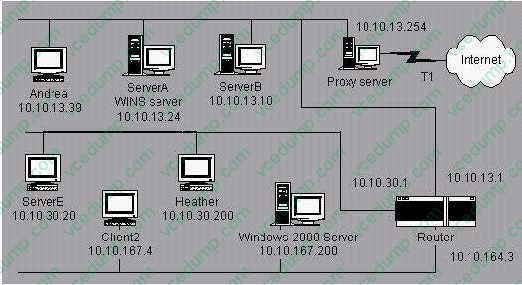
B. the WINS configuration on Client2
C. the WINS configuration on ServerE
D. the default gateway setting on Client2 -
Question 55:
You are the administrator of your company's network. Your network has 200 Windows 2000 Professional computers and 15 Windows 2000 Server computers. Users on the network save their work files in home folders on a network server. The NTFS partition that contains the home folders has Encrypting File System (EFS) enabled.A user named John leaves the company. You move all of the files from John's home folder to his manager's folder. When the manager attempts to open any of the files, she receives the following error message: "Access denied."You want the manager to be able to access the files. What should you do?
A. Grant the manager NTFS Full Control permission to the files.
B. Grant the manager NTFS Take Ownership permission to the files.
C. Log on to the network as a Recovery Agent. Decrypt the files for the manager.
D. Log on to the network as a member of the Backup Operators group. Decrypt the files for the manager. -
Question 56:
Your Windows 2000 Professional computer has 64 MB of RAM and two hard disk drives: drive C and drive
A. Each hard disk has more than 500 MB of free disk space. Windows 2000 Professional is installed on drive C.You frequently run two or more memory-intensive graphics applications simultaneously. You notice that access to drive C is much slower when you are using the graphics applications.You want to maximize disk performance. What should you do?
B. Configure the paging file on drive C to set the initial size of virtual memory and the maximum size of virtual memory to 64 MB.
C. Configure the paging file on drive C to set the initial size of virtual memory and the maximum size of virtual memory to 128 MB.
D. Move the paging file from drive C to drive D. Set the initial size of virtual memory and the maximum size of virtual memory to 256 MB.
E. Move the paging file from drive C to drive D. Set the initial size of virtual memory to 64 MB and the maximum size of virtual memory to 256 MB. -
Question 57:
You are the administrator of your company's network. A user named Andrew has limited dexterity, which prevents him from using the standard keyboard when completing his daily computing tasks.You configure his Windows 2000 Professional computer to use the on-screen keyboard and StickyKeys option. You save the accessibility option settings to a shared folder on the local hard disk of Andrew's computer.You want to configure the same options for another user named Peter. You log on to Peter's computer by using Peter's local user account. You access the shared folder over the network from Peter's computer. You select the .acw file from the shared folder to set up Peter's computer to use the accessibility options. You receive the error message shown in the exhibit. (Click the Exhibit button.)What should you do?
A. Copy the .acw file to the C:\Documents and Settings\Default User folder.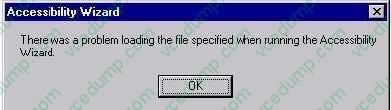
B. Save the accessibility options to a floppy disk and change the permissions to allow full control of the file.
C. Resave the settings for the options by using Utility Manager. Then copy the file to Peter's local profile folder.
D. Change the permissions of the .acw file in the shared network folder to allow read access for Peter's user account. -
Question 58:
You are the administrator of your company's network. You attempt to install a printer driver on a Windows 2000 computer for a user named Linda. You receive the following error message: "Error 11 - Cannot install printer driver."The driver was originally downloaded from the printer manufacturer's Web site. You have successfully used the driver in the past on other Windows 2000 Professional computers.You want to configure Linda's computer to check for driver integrity and to allow you to install this printer driver.What should you do?
A. Configure driver signing to display a message before installing an unsigned driver.
B. Configure driver signing to ignore File Signature Verification. Create a Local Computer Policy to enable Windows File Protection.
C. Use the Add Printer Driver wizard to install the driver. Create a Local Computer Policy to enable Windows File Protection.
D. Use the Print troubleshooter. Configure the computer to prevent the installation of unsigned drivers. -
Question 59:
From your Windows 2000 Professional computer, you need to print from a 16-bit accounting application to a network printer named Printer02. Printer02 is attached to a print server named PrtSrv. The accounting application allows you to print only to a local LPT port.You currently have two printers attached to your local LPT1 and LPT2 ports. You need to be able to print to the network printer and to both local printers. You install the driver for the network printer on your computer.What must you do next to enable printing on the network printer?
A. Create a new local printer port named PrtSrv\Printer02, and configure the printer to use the new port.
B. Create a new local printer port named PrtSrv\Printer02. In the properties for the new port, select the option to print directly to the printer. Configure the printer to use the new port.
C. Run the net use lpt3 \\PrtSrv\Printer02 command.
D. Run the net print \\PrtSrv\Printer02 command. -
Question 60:
You install Windows 2000 Professional on a computer named Client2. The network is configured as shown in the Network Configuration exhibit. (Click the Exhibit button.)You connect to shared resources on ServerE daily. Today, you cannot connect to ServerE. Heather can connect to ServerE successfully from her computer. You ping ServerE to find out the nature of the problem as shown in the Ping Results exhibit. (Click the Exhibit button.)You verify that all of the servers are connected to the network and are running correctly.What is the most likely cause of the problem?
A. the router configuration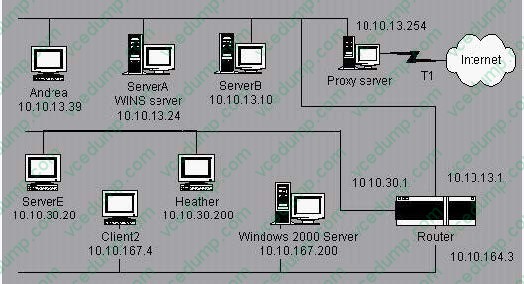
B. the WINS configuration on Client2
C. the WINS configuration on ServerE
D. the default gateway setting on Client2
Related Exams:
-
62-193
Technology Literacy for Educators -
70-243
Administering and Deploying System Center 2012 Configuration Manager -
70-355
Universal Windows Platform – App Data, Services, and Coding Patterns -
77-420
Excel 2013 -
77-427
Excel 2013 Expert Part One -
77-725
Word 2016 Core Document Creation, Collaboration and Communication -
77-726
Word 2016 Expert Creating Documents for Effective Communication -
77-727
Excel 2016 Core Data Analysis, Manipulation, and Presentation -
77-728
Excel 2016 Expert: Interpreting Data for Insights -
77-731
Outlook 2016 Core Communication, Collaboration and Email Skills
Tips on How to Prepare for the Exams
Nowadays, the certification exams become more and more important and required by more and more enterprises when applying for a job. But how to prepare for the exam effectively? How to prepare for the exam in a short time with less efforts? How to get a ideal result and how to find the most reliable resources? Here on Vcedump.com, you will find all the answers. Vcedump.com provide not only Microsoft exam questions, answers and explanations but also complete assistance on your exam preparation and certification application. If you are confused on your 70-210 exam preparations and Microsoft certification application, do not hesitate to visit our Vcedump.com to find your solutions here.