PL-400 Real Exam Questions

Microsoft Power Platform Developer

415 questions available · Page 1 of 42

Updated Exam DumpsVerified AnswersPass Guarantee

Get Complete Exam Dumps
Question 1 Drag & drop

DRAG DROP

A company is implementing business logic in a model-driven app. Employees import records from Microsoft Excel to create lead records.

The company has the following requirements:

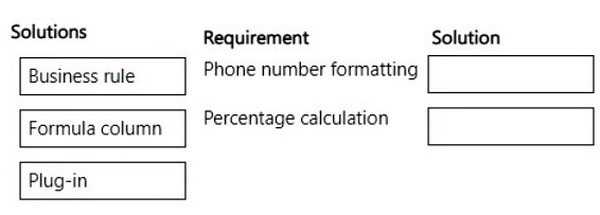
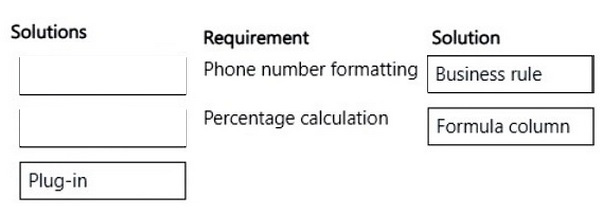
1. An existing phone number column must be formatted to only display numbers and periods.
2. Three existing columns must be calculated to display the sum based on a percentage.
3. The solution must not use custom development when possible.

You need to implement the business logic solution.

Which method should you use? To answer, move the appropriate solutions to the correct requirements.
You may use each solution once, more than once, or not at all. You may need to move the split bar between panes or scroll to view content.

NOTE: Each correct selection is worth one point.

Question diagram
Show answer and explanation
Correct answer diagram
Explanation

Box 1: Business rule
An existing phone number column must be formatted to only display numbers and periods.

By combining conditions and actions, the following actions are possible with business rules:

*-> Set column values

Clear column values

Set column requirement levels

Show or hide columns

Enable or disable columns

Validate data and show error messages

Create business recommendations based on business intelligence.

Box 2: Formula column
Three existing columns must be calculated to display the sum based on a percentage.

Question 2 Hotspot

HOTSPOT

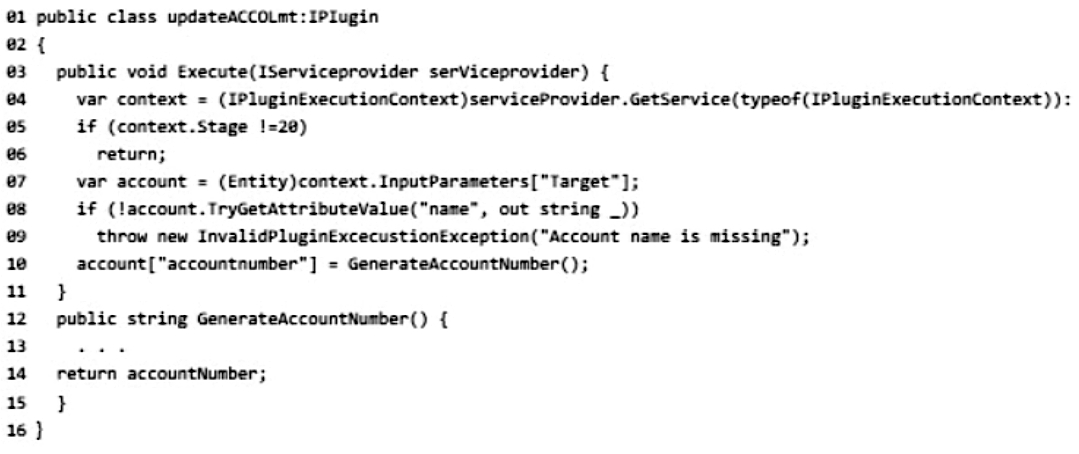
You are developing a Power Platform solution that uses a plug-in. The plug-in includes the following code (line numbers are included for reference):

The plug-in includes a step that is registered in the execution pipeline within the PreOperation stage for the Create message.

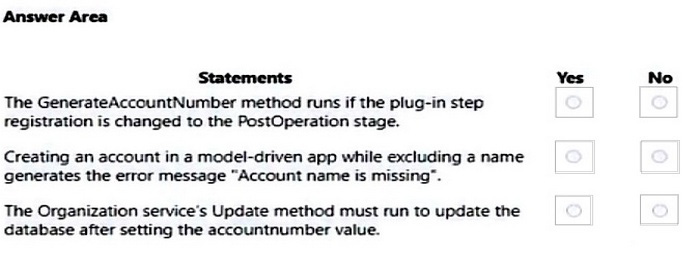
For each of the following statements, select Yes if the statement is true. Otherwise, select No.

NOTE: Each correct selection is worth one point.

Question diagram
Show answer and explanation
Correct answer diagram
Explanation

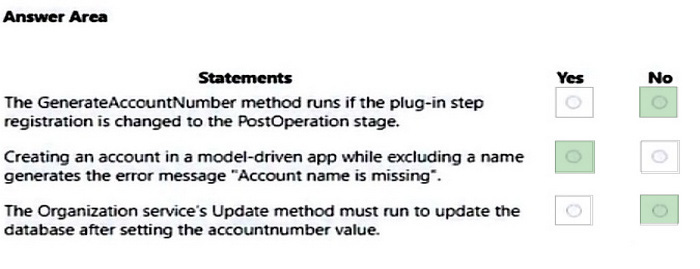
Box 1: No
The code will only run with stage is 20 (pre-operation), not with in Post-operation, which is 40.

Note: Stages: Valid values are 10 (pre-validation), 20 (pre-operation), 40 (post-operation), and 50 (post-operation, deprecated).

Box 2: Yes

Box 3: No
No, the Update method can be offline when updating the Account table.

Note: The IOrganizationService.Update(Entity) method updates an existing record.

References:
https://docs.microsoft.com/en-us/dotnet/api/microsoft.xrm.sdk.ipluginexecutioncontext.stage
https://docs.microsoft.com/en-us/dotnet/api/microsoft.xrm.sdk.iorganizationservice.update

Question 3 Hotspot

HOTSPOT

A company uses Dynamics 365 Sales and the Microsoft Online Services portal.

The multi-select OptionSet field data type is not supported in the portal.

You need to copy the selected field value to the text field.

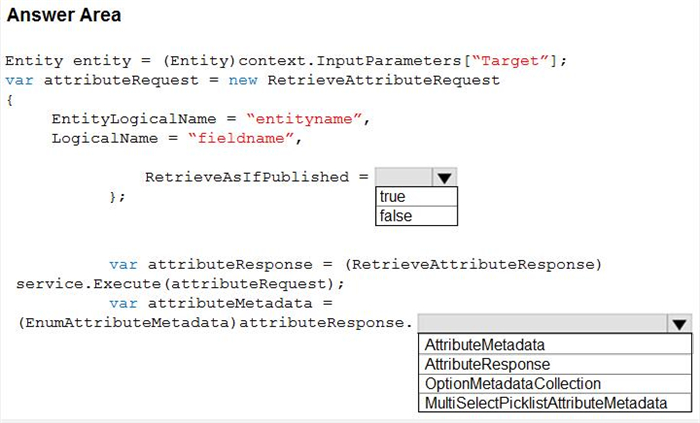
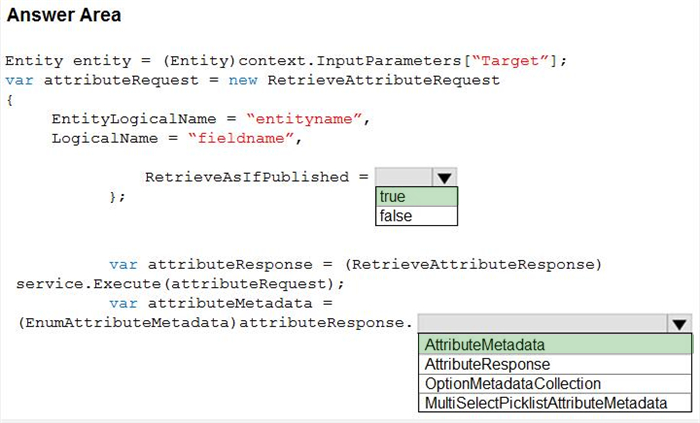
How should you configure the Organization service request? To answer, select the appropriate options in the answer area.

NOTE: Each correct selection is worth one point.

Question diagram
Show answer and explanation
Correct answer diagram
Explanation

Box 1: Yes
If you are creating an attribute editor you will need to retrieve entity data that has been saved but not published. For other scenarios you will want to only retrieve published metadata.
Set this value to true to include unpublished changes, as it would look if you called publish.
Set this value to false to include only the currently published changes, ignoring the changes that haven't yet been published.

Box 2: AttributeMetadata
AttributeMetadata class is returned in the RetrieveAttributeResponse.

References:
https://docs.microsoft.com/en-us/dotnet/api/microsoft.xrm.sdk.messages.retrieveattributerequest.retrieveasifpublished?view=dynamics-general-ce-9
https://docs.microsoft.com/en-us/dotnet/api/microsoft.xrm.sdk.metadata.attributemetadata?view=dynamics-general-ce-9

Case Study 4

Background

Northwind Electric Cars' ride sharing service is growing rapidly. The company is expanding to offer ride sharing in new cities. The company reports that their ability to perform background checks for potential employees is outpacing the capacity of the human resources (HR) department. The current background
check process requires significant manual work.

Current Environment

The HR department uses a model-driven app to manage candidate information. Regional managers report that it is difficult to determine where a candidate is in the background check process without having to contact HR.

The IT department performs all system customizations.

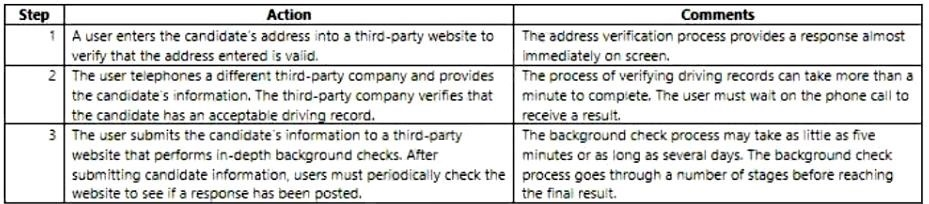
Verification process

Service providers

Each of the third-party services has an API available. Northwind wants to automate the verification process by calling the APIs from a Microsoft Power Platform solution.

Each of the third-party services charge per result. Northwind wants to perform the background check processes only when necessary to minimize costs.

Cross-origin resource sharing (CORS) is disabled for all three APIs.

Requirements. General

This project is a top priority for the Northwind. The company has provided time for developers to write code as needed to support the project. Use of Microsoft Azure resources is approved for use if necessary.

Requirements. Address verification

1. The system must perform address validation any time an address is added or updated in the model-driven app user interface.
2. Validation must not be performed unless an address is changed.
3. Users must initiate address validation by selecting a button on the command bar.
4. The API must return a version of the address in a uniform format. The returned address must replace the address entered by the user.
5. The API must return an error if the address entered cannot be validated. If the API returns an error, the user must contact the candidate to resolve the issue. The user must re-enter the address information to trigger validation.

Requirements. Driving record verification

1. Driving record verification must only be performed once for each candidate.
2. Information required for driving record verification must be sent to the driving record verification service automatically after the candidate's address is verified.
3. The API must return a value of either Approved or Rejected to indicate whether the candidate has met the company's requirements.

Requirements. Background check verification

1. Background check verification must be performed only once for each candidate.
2. The candidate's information must be sent to the background check service automatically if the candidate's driving record check is approved.
3. The API must return a submission identification number to the caller. The identification number can be used to return the latest stage information from the service.
4. The API also returns one of ten possible values. The value returned identifies the current stage of the verification process. The returned value may signify whether the candidate is automatically rejected, automatically passed, or calls for further manual investigation.
5. The content and number of stage values is subject to change. The HR department must be able to update the stage values.
6. In cases where further investigation is required, users must manually update the value to reflect the final result.
7. Regional managers must be able to use the model-driven app to identify the current stage of each of the verification processes for any candidate. The solution must include fields for the candidate's record to represent each stage.
8. The solution must connect to the service and update the background check stage for candidates at least once per hour for incomplete background checks.

Requirements. Environments

Issues. Address verification

Users report that the address verification API returns the following error message: The Same Origin Policy disallows reading the remote resource.

Issues. Background check verification

While reviewing API information for the background check verification process you observe that the API uses an IP address and not a fully-qualified domain name.

Code

AddressVerificationAPI.js
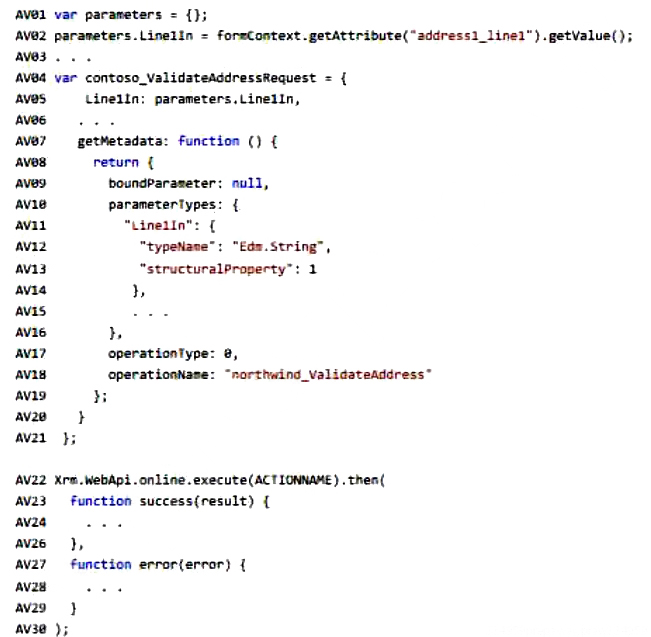
You create a custom action to communicate with the address verification API by using the following code. (Line numbers are included for reference only.)

Question 4 Hotspot

HOTSPOT

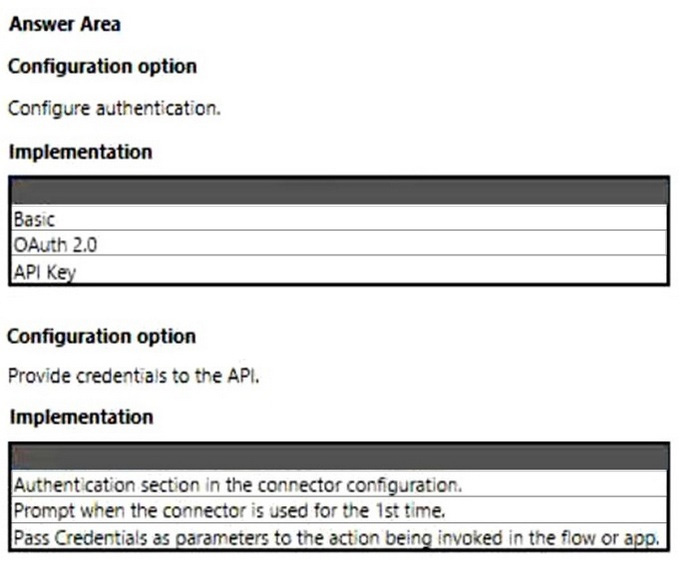
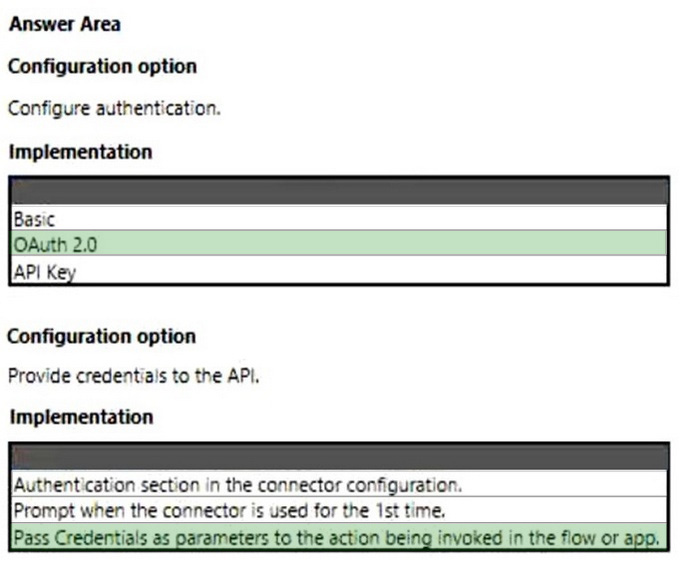
You need to configure a connector for the driving record verification API.

How should you configure the system? To answer, select the appropriate options in the answer area.

NOTE: Each correct selection is worth one point.

Question diagram
Show answer and explanation
Correct answer diagram
Explanation

Box 1: OAuth 2.0
Use API keys if you expect developers to build internal applications that don't need to access more than a single user's data. Use OAuth access tokens if you want users to easily provide authorization to applications without needing to share private data or dig through developer documentation.

Requirements. Driving record verification
1. Driving record verification must only be performed once for each candidate.
2. Information required for driving record verification must be sent to the driving record verification service automatically after the candidate's address is verified.
3. The API must return a value of either Approved or Rejected to indicate whether the candidate has met the company's requirements.

Box 2: Pass Credentials as parameters User makes an API call with the authorization header and the token gets validated by using validate-jwt policy in APIM by Azure AD.

Note, see step 4 below.
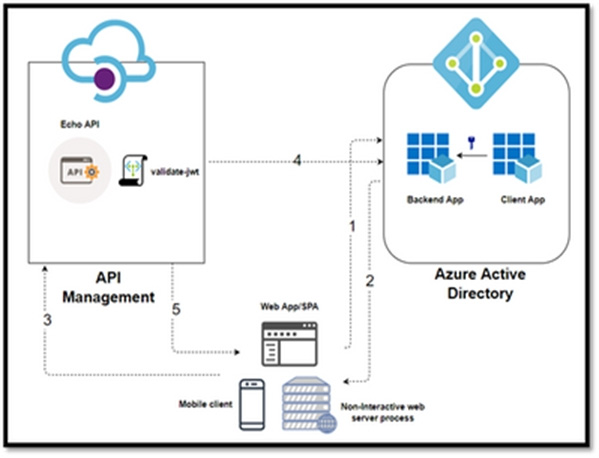
In this Diagram we can see the OAUTH flow with API Management in which:

1. The Developer Portal requests a token from Azure AD using app registration client id and client secret.
2. In the second step, the user is challenged to prove their identity by supplying User Credentials.
3. After successful validation, Azure AD issues the access/refresh token.
4. User makes an API call with the authorization header and the token gets validated by using validate-jwt policy in APIM by Azure AD.
5. Based on the validation result, the user will receive the response in the developer portal.

References:
https://zapier.com/engineering/apikey-oauth-jwt/
https://techcommunity.microsoft.com/t5/azure-paas-blog/protect-api-s-using-oauth-2-0-in-apim/ba-p/2309538

Question 5 Multiple choice

You have the following code:

You have a contact record that uses the GUID 991bf2fd-d40c-4752-9984-26b7c0455b69.

You need to assign the contact record as the primary contact for an account when you create the account.

Which two code segments can you use? Each correct answer presents a complete solution.

NOTE: Each correct selection is worth one point.

  1. A

    var data = { "name": "Contoso account",
    "primarycontactid": { "logicalname": "contact",
    "id": "991bf2fd-d40c-4752-9984-26b7c0455b69" }
    };

  2. B

    var data = { "name": "Contoso account",
    "[email protected]":
    "/contacts(991bf2fd-d40c-4752-9984-26b7c0455b69)"
    };

  3. C

    var data = { "name": "Contoso account",
    "[email protected]":
    "/contacts(991bf2fd-d40c-4752-9984-26b7c0455b69)"
    };

  4. D

    var data = { "name": "Contoso account",
    "primarycontactid":
    "/contacts(991bf2fd-d40c-4752-9984-26b7c0455b69)"
    };

Show answer and explanation

Correct answers: A, B

Explanation

B: To associate new table records to existing table records, set the value of single-valued navigation properties using the @odata.bind annotation

Example:
var data =
{
"name": "Sample Account",
"[email protected]": "/contacts(465b158c-541c-e511-80d3-3863bb347ba8)"
}

A: For mobile clients in the offline mode, you cannot use the @odata.bind annotation, and instead have to pass a lookup object (logicalname and id) pointing to the target record.

var data =
{
"name": "Sample Account",
"primarycontactid":
{
"logicalname": "contact",
"id": "465b158c-541c-e511-80d3-3863bb347ba8"
}
}

Note Syntax:
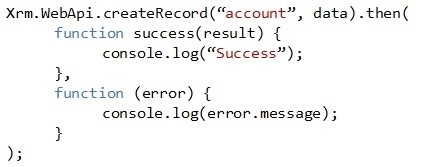
Xrm.WebApi.createRecord(entityLogicalName, data).then(successCallback, errorCallback);

entityLogicalName: Logical name of the table you want to create. For example: "account".
Data: A JSON object defining the columns and values for the new table record.

References:
https://docs.microsoft.com/en-us/powerapps/developer/model-driven-apps/clientapi/reference/xrm-webapi/
createrecord

Case Study 3

Background

Contoso Pharmaceuticals manufactures and sells drugs to retail and wholesale pharmacies, hospitals, and research facilities.

The company plans to implement Dynamics 365 Sales and Dynamics 365 Finance.

Current environment

1. Contoso maintains a Microsoft Excel workbook that lists all drugs they supply.
2. Pharmacies submit order requests through email.
3. All information at customer locations is handwritten by customer representatives.
4. Contoso uses Cerner, which is a medical industry application that uses a proprietary database.
5. Some accounts are referrals from other pharmacies.
6. Every pharmacy has its own Dynamics 365 Sales instance.

Requirements

General

Contoso wants to ensure that there is minimal custom code and custom connectors in the system.

Accounts

1. Ensure that the names of the pharmacies are synced between the accounting and the customer management systems.
2. Account numbers should be entered automatically into the pharmaceutical system that is in a Cerner database and kept in sync.
3. When the account is entered into the system, extra fields must appear if the referral customer box is selected. If the box is not selected, the extra fields must not appear.
4. A trigger must be created that changes the Priority field to 1 in the Account record 10 days after an Account record is created.
5. A field named Priority_Trigger must be created to trigger the Priority field.
6. A field named Facility type field must be added in order to select whether a customer is a retail

pharmacy, wholesale pharmacy, research facility, or hospital.

Users

1. UserA must be able to create and publish Power Apps apps.
2. UserB must be the owner of all the systems and be able to provide permissions and create all new environments.
3. UserC must be able to create apps connected to the systems and update the security roles and entities.
4. Pharmacy representatives must only be able to run the apps and access their own records.
5. Access to the accounting Power Apps app must be restricted to accounting team members.
6. End users must have minimum access to the required systems.
7. Only supervisors must be able to view phone numbers in the Accounts form.
8. Developers must be able to create new apps for all users.
9. Sales users must only have access to their own records.

Reporting

Pharmacy orders must be displayed in four graphs as follows:

1. Annual revenue over $100,000
2. Annual revenues under $100,000
3. Research facilities
4. Hospitals

The graphs must be interactive, and users must be able to drill down on any dimension.

Customizations

1. Ensure that notifications are sent to the sales team when a lead is added by using Slack.
2. Ensure that leads have a review stage added to the sales process.
3. Doctors must be manually added to a custom entity named Doctor if the doctor is not listed.
4. Refill dates for customer prescriptions should be automatically determined and a notification should be sent to the customer.
5. Fields for the doctor's name and phone number must be displayed in the customer record.
6. The doctor entered on the customer's record must be validated against doctors that exist in the system.
7. The new solution will be sold to other pharmacies for use. The application must not allow changes to be made.
8. The solution must be error free so that when it is installed in other environments it does not cause issues.

Mobile app

1. A custom mobile app must be created to allow salespeople to add or search by pharmacy name.
2. Pharmacy records must be uniquely identified by pharmacy name, address, contact name, and phone number.
3. When a pharmacy is added by using the mobile app, the phone number must be validated to be all digits.

Question 6 Multiple choice

You need to ensure that users can create the required charts.

Which two actions should you perform? Each correct answer presents part of the solution.

NOTE: Each correct selection is worth one point.

  1. A

    Create a quick view form to show the Accounts entity.

  2. B

    Configure filter fields in the Annual revenue field.

  3. C

    Add the Facility field to the account form.

  4. D

    Delete the Annual revenue field from the account form.

  5. E

    Create a view with annual revenue sorted lowest value to highest value.

Show answer and explanation

Correct answers: B, C

Explanation

Pharmacy orders must be displayed in four graphs as follows:
1. Annual revenue over $100,000
2. Annual revenues under $100,000
3. Research facilities
4. Hospitals
The graphs must be interactive, and users must be able to drill down on any dimension.

Case Study 6

Background

City Power & Light is an energy and utilities company that has offices in Europe. The company subsidizes home improvements for domestic customers, to improve energy efficiency and to meet environmental commitments. The company also distributes and generates electricity for domestic and commercial customers. The company has 2,000 employees in multiple offices and in work-from-home locations.

City Power & Light uses a team of schedulers, assessors, field engineers, and customer support agents for home improvements in a program named Get Energy Fit.

Current Environment

Get Energy Fit Program

City Power & Light uses the following to manage the Get Energy Fit program:

1. The company uses a Microsoft Excel spreadsheet named Planning Hub on Microsoft SharePoint
Online to store information about customer appointments, customer details, and customer eligibility in the program.
2. The company records sensitive customer information that includes the document identification numbers and the customer's financial information.
3. The company uses an assessor to verify customer eligibility in the program and to perform a suitability assessment. The assessor completes the suitability assessment by using a paper and clipboard at the customer property and enters the data to the Planning Hub after the assessment is completed. The assessor also uploads photographs to an on-premises document library. The assessor completes the eligibility assessment by using an application written in React.
4. Schedulers use Microsoft Outlook to schedule engineers and assessors for home improvement appointments. About 200 appointments are scheduled daily.
5. Employees for the company submit funding claims on behalf of the customer by uploading evidence and compliance checks information to an application named the Claim Submission Portal.

Technical Environment

1. Schedulers use Windows 11 desktop and laptop computers with the latest version of Microsoft Edge.

2. Assessors use iOS and Android tablet devices.
3. The Claim Submission Portal uses REST-based APIs for all operations and a dedicated testing environment. Authentication to the API is provided by using the following example header key and value pair: Authentication: 2C8D41431415E429C7FC7A74D8315
4. The company uses Microsoft Azure for hosting multiple applications.

Requirements

Overview

City Power & Light plans to implement Microsoft Power Platform to improve the customer experience and increase delivery for the Get Energy Fit program.

Business Requirements

1. Only team leaders and senior managers should have access to read personally identifiable information (PII).
2. All development changes must be tested in a separate environment.
3. The company requires out-of-the-box solutions, when possible.
4. Sensitive credentials, such as user passwords and API secrets, must be stored securely.
5. The Claim Submission Portal must allow citizen developers to create automated solutions.
6. Customer and appointment information must be accessible to all applications.

Planning Hub Application

The company is planning to replace the Planning Hub spreadsheet with a new application. The new application has the following requirements:

The application must support a component design that provides rapid changes requested by the schedulers.
The data model for the application must capture the following information:

- Information about customers such as name, address, and other PII.
- The data and time for an assessor's or engineer's appointment. Schedulers must be able to view all
appointments without filters.
- Records the details of the home improvements installed for the customer.
- Contains all the information and evidence for submission to the Claim Submission Portal.

After an assessor uploads the funding application and all evidence after a home improvement has been complete, the company requires that the status of the application is set to Submit and should run the following:

- Retrieve the details about the customer and the improvement installed.
- Send an approval to a senior manager to review and approve in Microsoft Teams.
- Upload the information to the API endpoint.
- If the upload fails to complete, it should retry after a delay of 30 seconds up to three times. If an error
occurs after three times, the application should send an email notification to the application support team.
- Must record the status on the funding application.

Suitability Assessment Tool

The company plans to implement a new application named the Suitability Assessment Tool for the assessors. The new application has the following requirements:

1. Must integrate with Microsoft Power Platform.
2. Assessors must be able to complete the eligibility assessment by using the Suitability Assessment
Tool. The assessors must be able to upload photographs to the on-premises file share.
3. Must be developed by using modular components that can be used by other applications.
4. Must be optimized for use on tablet devices.
5. All changes to the application must be completed in the Suitability Assessment Tool solution.

Reporting

The company has the following requirements for a reporting solution:

1. The data source for the reporting solution must support incremental refreshes.
2. The solution must report accurate data if an error occurs.

Issues

1. A recent audit identified that all users can access the PII in the Planning Hub spreadsheet.
2. After a developer deploys a change to the production environment, a user reports information is loaded incorrectly to the test system when processing a funding application.
3. After deploying a change to the new eligibility assessment tool in the development environment, you observe that the changes do not appear in the development environment.
4. After removing a column from the Planning Hub application and deploying the changes to the production environment, you observe that the column is still present.
5. You deploy the customizations for the data model. Users report that the email address of the user who created the appointment is missing and that searches on the description information do not return any results.
Question 7 Multiple choice

You need to resolve the issue with the eligibility assessment tool.

Which two commands should you run? Each correct answer presents part of the solution.

NOTE: Each correct selection is worth one point.

  1. A

    pac solution version

  2. B

    pac solution import

  3. C

    pac pcf push

  4. D

    pac pcf version --strategy manifest

Show answer and explanation

Correct answers: A, B

Explanation

Scenario, issue:
After deploying a change to the new eligibility assessment tool in the development environment, you observe that the changes do not appear in the development environment.

Note:

A: pac solution version Update build or revision version for the solution.

Example
pac solution version --patchversion 2

B: pac solution import
Import the solution into Dataverse.

Example pac solution import --path c:\Users\Documents\Solution.zip

Incorrect:
* pac pcf version
Patch version for controls

Example pac pcf version --patchversion 1.0.0.0 --path c:\Users\Downloads\SampleComponent --allmanifests

pac pcf version --strategy gittags

Optional Parameters for pcf version
--allmanifests -a

Updates patch version for all 'ControlManifest.xml' files

This parameter requires no value. It's a switch.

* pac pcf push
Import the Power Apps component framework project into the current Dataverse organization

Example pac pcf push --publisher-prefix dev

Question 8 Drag & drop

DRAG DROP

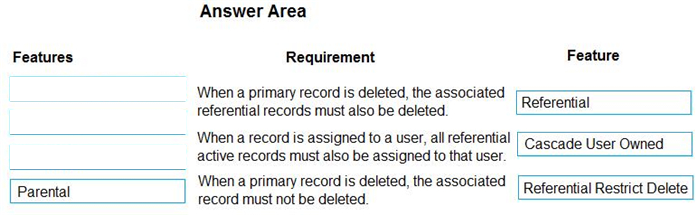
A company is creating a new system based on the Common Data Service (CDS).

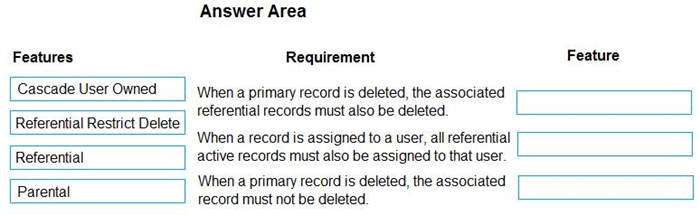
You need to select the CDS features that meet the company's requirements.

Which features should you select? To answer, drag the appropriate features to the correct requirements.
Each feature may be used once, more than once, or not at all. You may needs to drag the split bar between panes or scroll to view content.

NOTE: Each correct selection is worth one point.

Question diagram
Show answer and explanation
Correct answer diagram
Explanation

Box 1: Referential
Active/ Cascade Active one-to-many entity relationship: Perform the action on all active referencing entity records associated with the referenced entity record.

Box 2: Cascade User Owner
Cascade User Owned: Perform the action on all referencing entity records owned by the same user as the referenced entity record.

Box 3: Referential Restrict Delete
Restrict: Prevent the Referenced entity record from being deleted when referencing entities exist.

References:
https://docs.microsoft.com/en-us/powerapps/developer/common-data-service/configure-entity-relationship-cascading-behavior

Question 9 Hotspot

HOTSPOT

You are creating an app for a school.

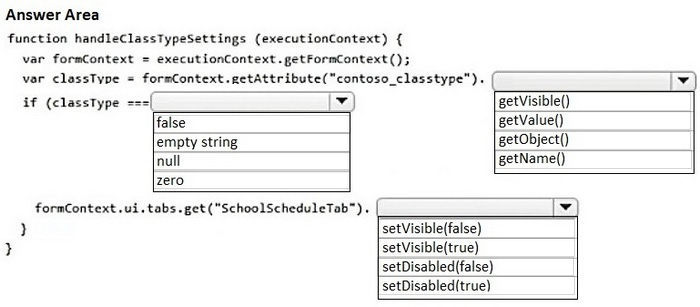
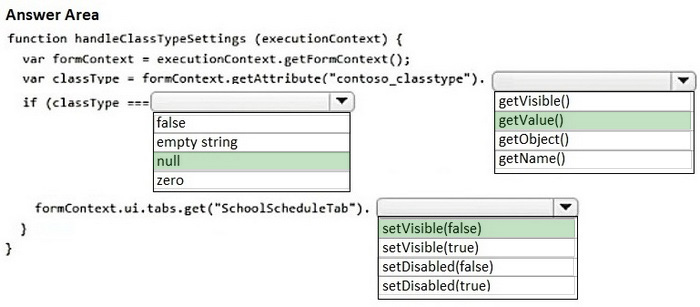
You need to implement client-side logic that uses the Microsoft Dataverse web API to evaluate the class type associated with a class record. The code must hide the School Schedule tab if no value is entered for Class Type.

How should you complete the code? To answer, select the appropriate options in the answer area.

NOTE: Each correct selection is worth one point.

Question diagram
Show answer and explanation
Correct answer diagram
Explanation

Box 1: null
Blank is a placeholder for "no value" or "unknown value." For example, a Combo box control's Selected property is blank if the user hasn't made a selection. Many data sources can store and return NULL values, which are represented in Power Apps as blank.

Box 2: getValue()
attribute.getValue (Client API reference)
Retrieves the data value for a column.

Syntax
formContext.getAttribute(arg).getValue()

Box 3: SetVisable(false)
control.setVisible (Client API reference)
Sets a value that indicates whether the control is visible.

Syntax formContext.getControl(arg).setVisible(bool);

Parameter
Bool
Specify true to show the control; false to hide the control.

References:
https://learn.microsoft.com/en-us/power-platform/power-fx/reference/function-isblank-isempty
https://learn.microsoft.com/en-us/power-apps/developer/model-driven-apps/clientapi/reference/attributes/
getvalue (https://learn.microsoft.com/en-us/power-apps/developer/model-driven-apps/clientapi/reference/controls/)
setvisible

Question 10 Multiple choice

You create a form in a model-driven app that uses data from the Lead table in a Microsoft Dataverse instance. You add a business rule to the Lead table. The business rule displays an error if the email address is null. You set the scope for the business rule to All Forms.

You configure a Power Apps portal by using the same Microsoft Dataverse instance. You create a web page by using the Lead form.

You need to ensure the same logic is applied on the Power Apps portal page.

What are two possible ways to achieve the goal? Each correct answer presents a complete solution.

NOTE: Each correct selection is worth one point.

  1. A

    Deactivate the business rule. Change the scope for the rule to Table and then reactivate the rule.

  2. B

    Replace the business rule logic with a Microsoft Power Automate cloud flow by using the Dataverse.
    When a row is added, modified or deleted trigger.

  3. C

    Extend the webFormClientValidate JavaScript function to replace the business rule logic. Edit the code
    in Power Apps Studio. Add the function in a <script> block.

  4. D

    Create a JavaScript web resource and replace the business rule with a JavaScript function. Add an OnSave event handler to the Lead form.

Show answer and explanation

Correct answers: A, D

Explanation

PowerApps Portal or CRM Portal don't support Business Rule that apply on the Forms.

A: Business rules defined for a table apply to both canvas apps and model-driven apps if the table is used in the app.

D: PostSave event occurs after the OnSave event is complete. This event is used to support or execute custom logic using web resources to perform after Save actions when the save event is successful or failed due to server errors.

References:
https://docs.microsoft.com/en-us/power-apps/maker/data-platform/data-platform-create-business-rule
https://powerusers.microsoft.com/t5/Power-Apps-Portals/Business-rules-in-a-PowerApps-Portal/td-p/404588