MD-102 Exam Details
-
Exam Code
:MD-102 -
Exam Name
:Endpoint Administrator -
Certification
:Microsoft Certifications -
Vendor
:Microsoft -
Total Questions
:431 Q&As -
Last Updated
:May 25, 2026
Microsoft MD-102 Online Questions & Answers
-
Question 311:
SIMULATION
Username and password
Use the following login credentials as needed:
To enter your username, place your cursor in the Sign in box and select the username below.
To enter your password, place your cursor in the Enter password box and select the password below.
Microsoft 365 Username: [email protected]
Microsoft 365 Password: i7A4$3o^HGD3L~=c[9xuOhM%^4:s11Ai
If the Microsoft Edge browser or Microsoft 365 portal does not load successfully, select the Microsoft Edge browser icon from the task bar, type the URL "https://portal.office.com", and press Enter.
The following information is for technical support purposes only:
Lab Instance: 48262079
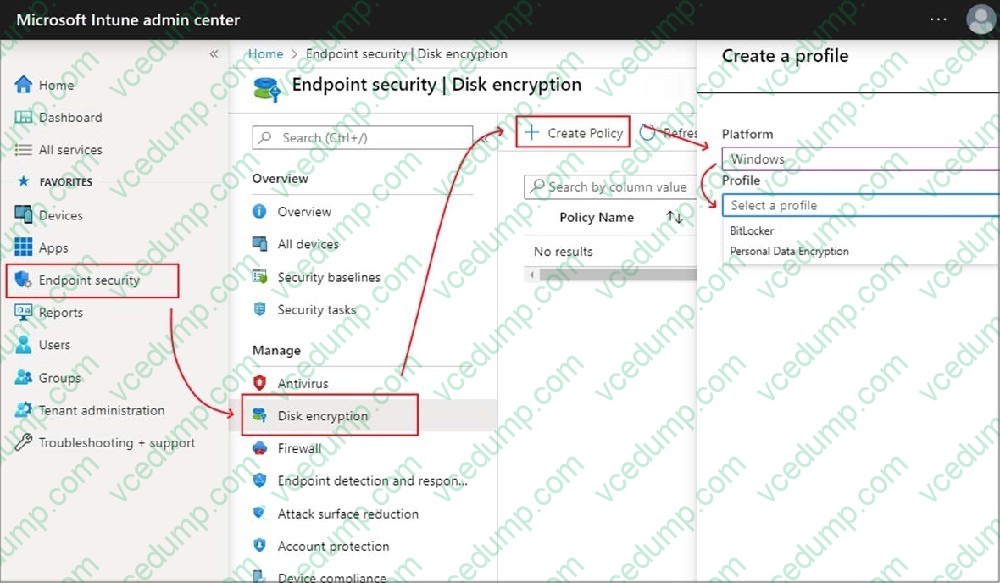
You need to create a compliance policy to validate whether all the Windows 10 or later devices enrolled in Microsoft Intune have BitLocker Drive Encryption (BitLocker) enabled.
A. See explanation below.
B. PlaceHolder
C. PlaceHolder
D. PlaceHolder -
Question 312:
You have a Microsoft 365 subscription that uses Microsoft Intune Suite.
You use Intune to manage Windows 11 devices.
You need to implement Windows Local Administrator Password Solution (Windows LAPS).
What should you configure?
A. a configuration profile
B. an account protection policy
C. an app protection policy
D. a device compliance policy -
Question 313:
HOTSPOT
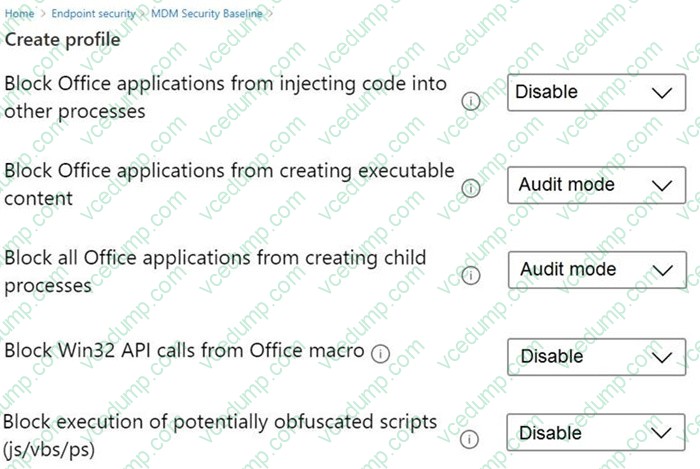
You have the MDM Security Baseline profile shown in the MDM exhibit. (Click the MDM tab.)
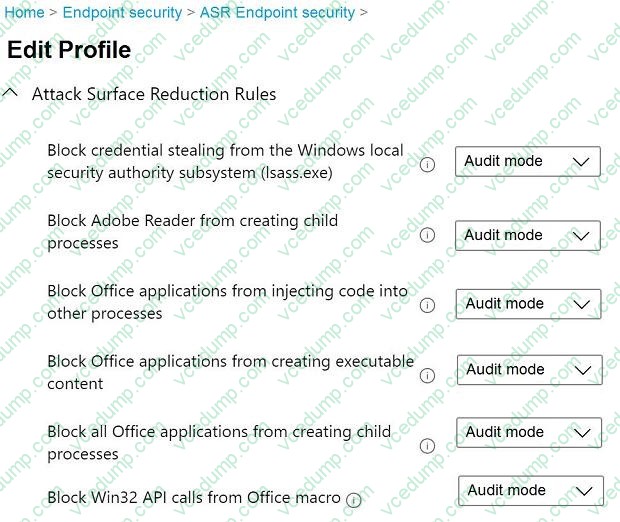
You have the ASR Endpoint Security profile shown in the ASR exhibit. (Click the ASR tab.)
You plan to deploy both profiles to devices enrolled in Microsoft Intune.
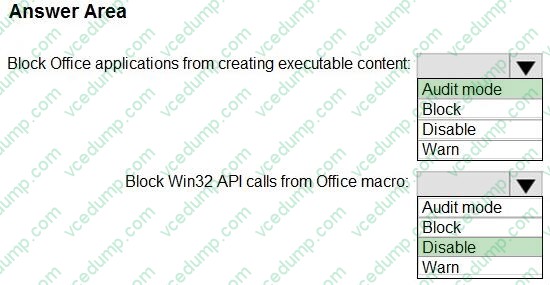
You need to identify how the following settings will be configured on the devices:
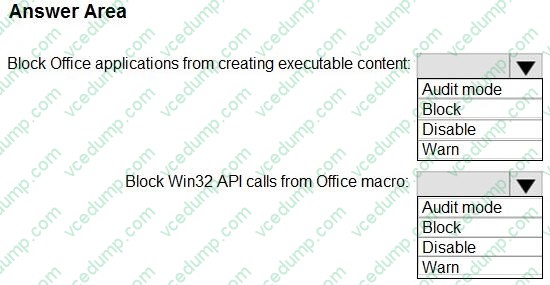
Block Office applications from creating executable content Block Win32 API calls from Office macro
Currently, the settings are disabled locally on each device.
What are the effective settings on the devices? To answer, select the appropriate options in the answer area.
NOTE: Each correct selection is worth one point.
-
Question 314:
Note: This section contains one or more sets of questions with the same scenario and problem. Each question presents a unique solution to the problem. You must determine whether the solution meets the stated goals. More than one solution in the set might solve the problem. It is also possible that none of the solutions in the set solve the problem.
After you answer a question in this section, you will NOT be able to return. As a result, these questions do not appear on the Review Screen.
You have a Microsoft 365 E5 subscription. The subscription contains devices that are Microsoft Entra joined and enrolled in Microsoft Intune
You create a user named User1.
You need to ensure that User1 can rotate BitLocker recovery keys by using Intune.
Solution: From the Microsoft Entra admin center, you assign the Helpdesk Administrator role to User1.
Does this meet the goal?
A. Yes
B. No -
Question 315:
HOTSPOT
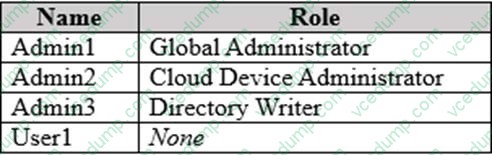
You have a Microsoft Entra tenant named contoso.com that contains the users shown in the following table.
The tenant contains a standalone workgroup computer named Computer1 that runs Window 11. Computer1 contains the local users shown in the following table.
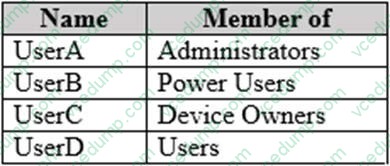
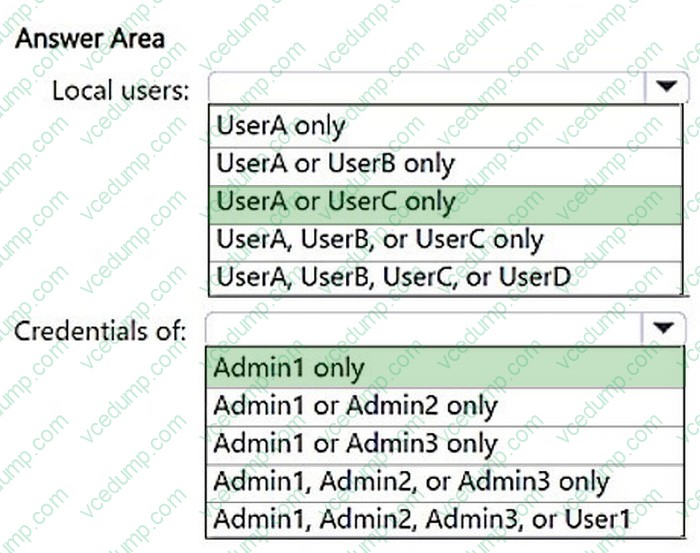
Computer1 needs to be joined to contoso.com.
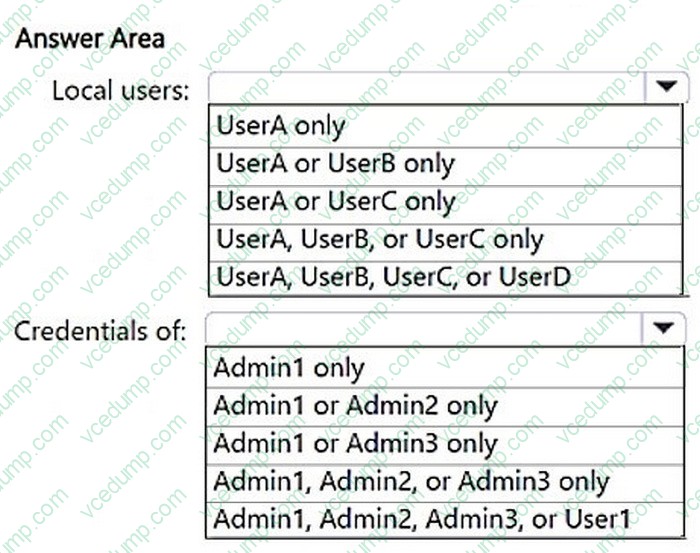
Which local users can join Computer1 to contoso.com, and the Microsoft Entra credentials of which user can be used? To answer, select the appropriate options in the answer area.
NOTE: Each correct selection is worth one point.
-
Question 316:
You have a Microsoft 365 subscription that includes Microsoft Intune.
You plan to use Windows Autopilot to deploy Windows 11 devices.
You need to meet the following requirements during Autopilot provisioning:
1. Display the app and profile configuration progress.
2. Block users from using the devices until all apps and profiles are installed
What should you configure?
A. an app configuration policy
B. an app protection policy
C. an enrollment device platform restriction
D. an enrollment status page -
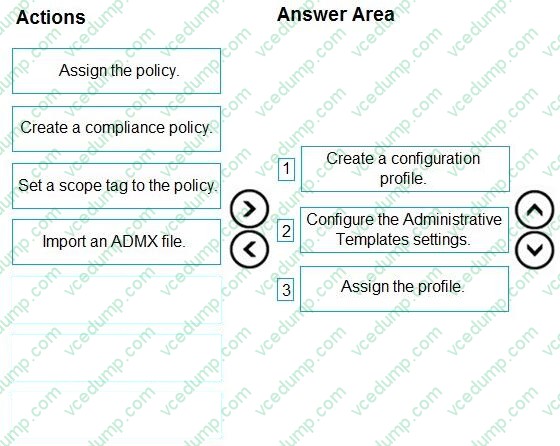
Question 317:
DRAG DROP
You have an on-premises Active Directory domain that syncs to Azure AD tenant.
The tenant contains computers that run Windows 10. The computers are hybrid Azure AD joined and enrolled in Microsoft Intune.
The Microsoft Office settings on the computers are configured by using a Group Policy Object (GPO).
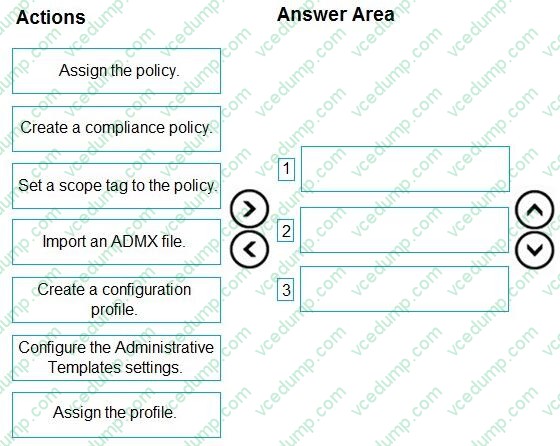
You need to migrate the GPO to Intune.
Which three actions should you perform in sequence? To answer, move the appropriate actions from the list of actions to the answer area and arrange them in the correct order.
Select and Place:
-
Question 318:
You have a Hyper-V host that contains the virtual machines shown in the following table.

On which virtual machines can you install Windows 11?
A. VM1 only
B. VM3 only
C. VM1 and VM2 only
D. VM2 and VM3 only
E. VM1, VM2, and VM3 -
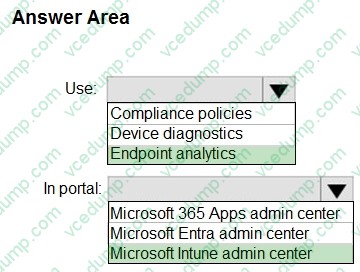
Question 319:
HOTSPOT
You have a Microsoft 365 subscription that uses Microsoft Intune Suite.
You use Intune to manage devices.
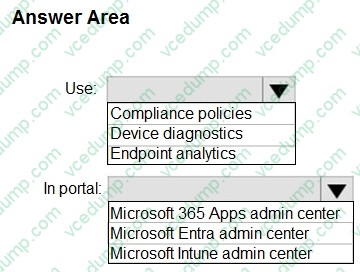
You need to assess device performance during startup and identify any device models that take longer than average to start.
What should you use to assess the device performance, and which portal should you use? To answer, select the appropriate options in the answer area.
NOTE: Each correct selection is worth one point.
-
Question 320:
You have the Windows 10 devices shown in the following table.
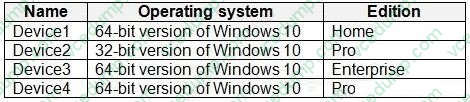
You plan to upgrade the devices to Windows 11 Enterprise.
On which devices can you perform a direct in-place upgrade to Windows 11 Enterprise?
A. Device3 only
B. Device3 and Device 4 only
C. Device2, Device3, and Device4 only
D. Device1, Device3, and Device4 only
E. Device1, Device2, Device3, and Device4 only
Related Exams:
-
62-193
Technology Literacy for Educators -
70-243
Administering and Deploying System Center 2012 Configuration Manager -
70-355
Universal Windows Platform – App Data, Services, and Coding Patterns -
77-420
Excel 2013 -
77-427
Excel 2013 Expert Part One -
77-725
Word 2016 Core Document Creation, Collaboration and Communication -
77-726
Word 2016 Expert Creating Documents for Effective Communication -
77-727
Excel 2016 Core Data Analysis, Manipulation, and Presentation -
77-728
Excel 2016 Expert: Interpreting Data for Insights -
77-731
Outlook 2016 Core Communication, Collaboration and Email Skills
Tips on How to Prepare for the Exams
Nowadays, the certification exams become more and more important and required by more and more enterprises when applying for a job. But how to prepare for the exam effectively? How to prepare for the exam in a short time with less efforts? How to get a ideal result and how to find the most reliable resources? Here on Vcedump.com, you will find all the answers. Vcedump.com provide not only Microsoft exam questions, answers and explanations but also complete assistance on your exam preparation and certification application. If you are confused on your MD-102 exam preparations and Microsoft certification application, do not hesitate to visit our Vcedump.com to find your solutions here.