MD-102 Exam Details
-
Exam Code
:MD-102 -
Exam Name
:Endpoint Administrator -
Certification
:Microsoft Certifications -
Vendor
:Microsoft -
Total Questions
:431 Q&As -
Last Updated
:May 25, 2026
Microsoft MD-102 Online Questions & Answers
-
Question 321:
A user named User1 has a computer named Computer1 that runs Windows 10.
User1 connects to a Microsoft Azure virtual machine named VM1 by using Remote Desktop.
User1 creates a VPN connection to a partner organization.
When the VPN connection is established, User1 cannot connect to VM1. When User1 disconnects from the VPN, the user can connect to VM1.
You need to ensure that User1 can connect to VM1 while connected to the VPN.
What should you do?
A. From the proxy settings, add the IP address of VM1 to the bypass list to bypass the proxy.
B. From the properties of VPN1, clear the Use default gateway on remote network check box.
C. From the properties of the Remote Desktop connection to VM1, specify a Remote Desktop Gateway (RD Gateway).
D. From the properties of VPN1, configure a static default gateway address. -
Question 322:
HOTSPOT
You have a Microsoft 365 subscription that uses Microsoft Intune Suite.
You use Microsoft Intune to manage devices.
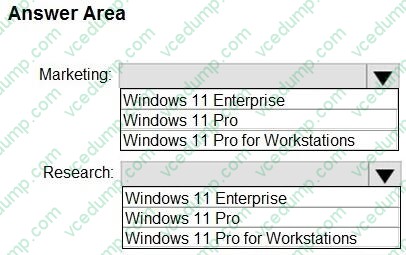
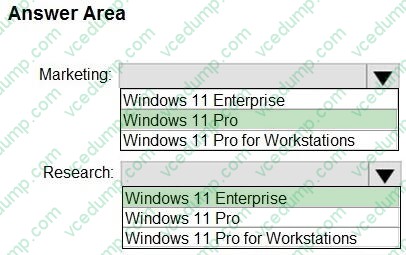
You plan to create Windows 11 device builds for the marketing and research departments. The solution must meet the requirements: Marketing department devices must support Windows Update for Business.
Research department devices must have support for feature update versions for up to 36 months from release.
What is the minimum Windows 11 edition required for each department? To answer, select the appropriate options in the answer area.
NOTE: Each correct selection is worth one point.
-
Question 323:
You have a Microsoft 365 E5 subscription that contains the following types of devices:
1. Windows 11
2. Android
3. iOS
All the devices are enrolled in Microsoft Intune.
You need to use Intune to deploy apps from the Enterprise App Catalog.
To which device types can you deploy the apps?
A. Windows 11 only
B. Windows 11 and Android only
C. Windows 11 and iOS only
D. Android and iOS only
E. Windows 11, Android, and iOS -
Question 324:
HOTSPOT
You have a Microsoft 365 subscription that uses Microsoft Intune Suite.
You use Microsoft Intune to manage devices.
Azure AD joined Windows devices enroll automatically in Intune.
You have the devices shown in the following table.
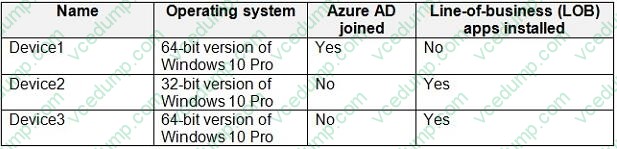
You are preparing to upgrade the devices to Windows11. All the devices are compatible with Windows 11.
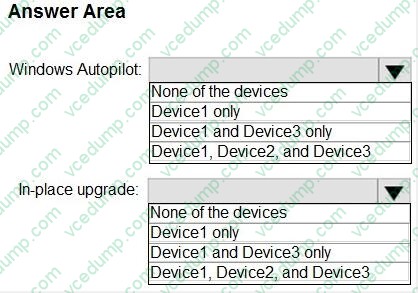
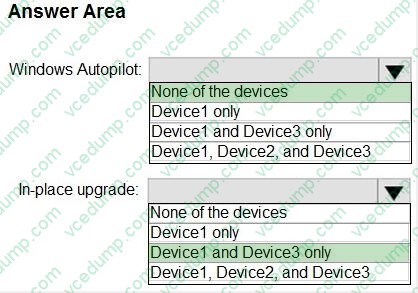
You need to evaluate Windows Autopilot and in-place upgrade as deployment methods to implement Windows 11 Pro on the devices, while retaining all user settings and applications.
Which devices can be upgraded by using each method? To answer, select the appropriate options in the answer area.
NOTE: Each correct selection is worth one point.
-
Question 325:
Your network contains an on-premises Active Directory domain. The domain contains two computers named Computer1 and Computer2 that run Windows 10.
You install Windows Admin Center on Computer1.
You need to manage Computer2 from Computer1 by using Windows Admin Center.
What should you do on Computer2?
A. Update the TrustedHosts list.
B. Run the Enable-PSRemoting cmdlet.
C. Allow Windows Remote Management (WinRM) through the Microsoft Defender firewall.
D. Add an inbound Microsoft Defender Firewall rule. -
Question 326:
HOTSPOT
You have a Microsoft 365 E5 subscription that uses Microsoft Intune. The subscription contains the resources shown in the following table.

User1 is the owner of Device1.
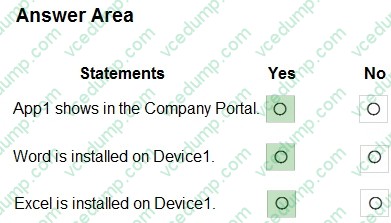
You deploy Microsoft 365 Apps Windows 10 and later app types to Intune as shown in the following table.

The next day you review the results of the app deployments.
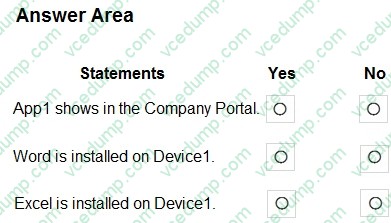
For each of the following statements, select Yes if the statement is true. Otherwise, select No.
NOTE: Each correct selection is worth one point.
-
Question 327:
You have a Microsoft Entra tenant that contains a device named Device1. Device1 is Microsoft Entra joined.
You need to validate the Microsoft Entra ID primary refresh token (PRT) for Device1.
Which command should you run?
A. klist tgt
B. dsregcmd /status
C. query session
D. sc.exe query state=all -
Question 328:
HOTSPOT
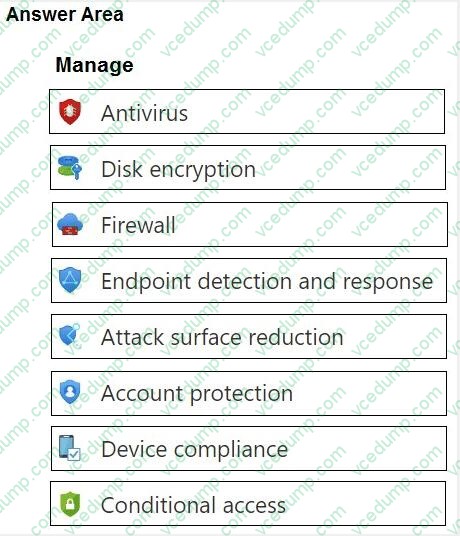
You have a Microsoft 365 E5 subscription that contains 100 Windows 10 devices enrolled in Microsoft Intune.
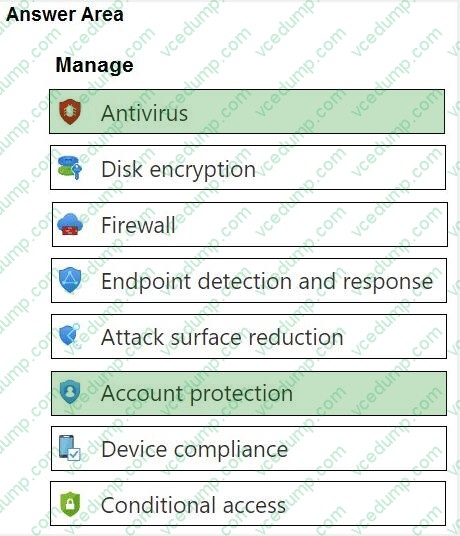
You need to create Endpoint security policies to meet the following requirements:
1. Hide the Firewall & network protection area in the Windows Security app.
2. Disable the provisioning of Windows Hello for Business on the devices.
Which two policy types should you use? To answer, select the policies in the answer area.
NOTE: Each correct selection is worth one point.
-
Question 329:
You have an Azure AD tenant named contoso.com.
You need to ensure that users are not added automatically to the local Administrators group when they join their Windows 11 device to contoso.com.
What should you configure?
A. Windows Autopilot
B. provisioning packages for Windows
C. Security defaults in Azure AD
D. Device settings in Azure AD -
Question 330:
HOTSPOT
You have a Microsoft 365 subscription.
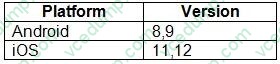
You plan to enroll devices in Microsoft Intune that have the platforms and versions shown in the following table.
You need to configure device enrollment to meet the following requirements:
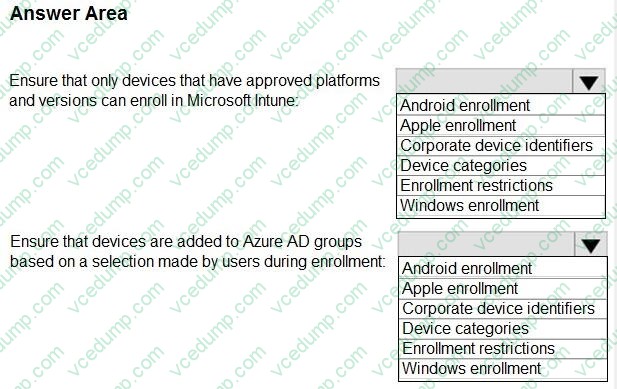
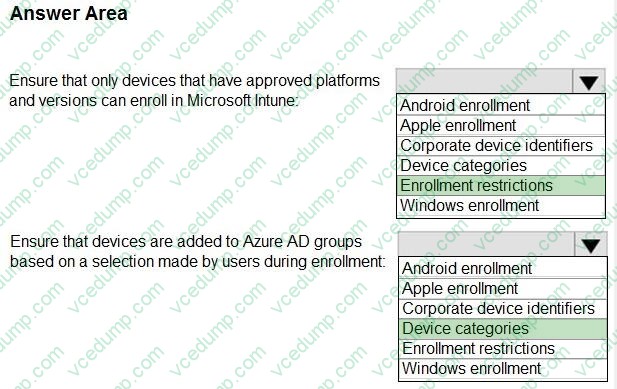
1. Ensure that only devices that have approved platforms and versions can enroll in Microsoft Intune.
2. Ensure that devices are added to Azure AD groups based on a selection made by users during the enrollment.
Which device enrollment setting should you configure for each requirement? To answer, select the appropriate options in the answer area.
NOTE: Each correct selection is worth one point.
Related Exams:
-
62-193
Technology Literacy for Educators -
70-243
Administering and Deploying System Center 2012 Configuration Manager -
70-355
Universal Windows Platform – App Data, Services, and Coding Patterns -
77-420
Excel 2013 -
77-427
Excel 2013 Expert Part One -
77-725
Word 2016 Core Document Creation, Collaboration and Communication -
77-726
Word 2016 Expert Creating Documents for Effective Communication -
77-727
Excel 2016 Core Data Analysis, Manipulation, and Presentation -
77-728
Excel 2016 Expert: Interpreting Data for Insights -
77-731
Outlook 2016 Core Communication, Collaboration and Email Skills
Tips on How to Prepare for the Exams
Nowadays, the certification exams become more and more important and required by more and more enterprises when applying for a job. But how to prepare for the exam effectively? How to prepare for the exam in a short time with less efforts? How to get a ideal result and how to find the most reliable resources? Here on Vcedump.com, you will find all the answers. Vcedump.com provide not only Microsoft exam questions, answers and explanations but also complete assistance on your exam preparation and certification application. If you are confused on your MD-102 exam preparations and Microsoft certification application, do not hesitate to visit our Vcedump.com to find your solutions here.