MB-800 Exam Details
-
Exam Code
:MB-800 -
Exam Name
:Microsoft Dynamics 365 Business Central Functional Consultant -
Certification
:Microsoft Certifications -
Vendor
:Microsoft -
Total Questions
:288 Q&As -
Last Updated
:Jul 10, 2026
Microsoft MB-800 Online Questions & Answers
-
Question 201:
DRAG DROP
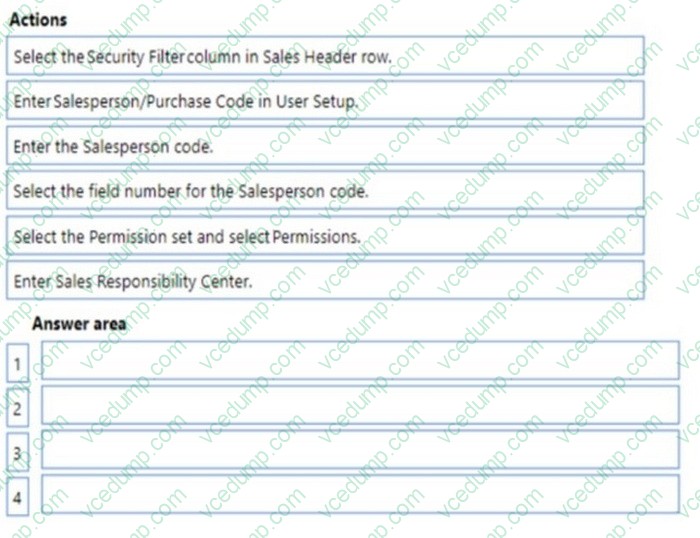
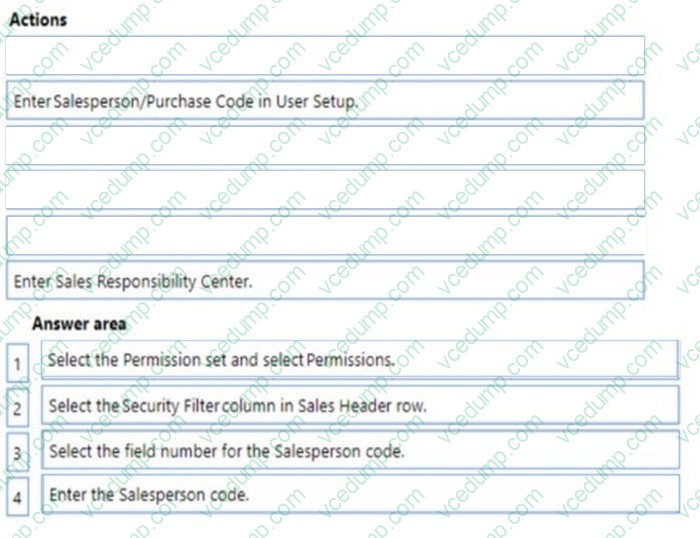
A company uses Dynamics 365 Business Central. You group salespeople into teams and assign each team a Salesperson code.
A salesperson reports that they can see the sales orders for other sales team members.
You need to ensure that sales team members can only see sales orders that they create.
Which four actions should you perform in sequence? To answer, move the appropriate actions from the list of actions to the answer area and arrange them in the correct order.
Select and Place:
-
Question 202:
HOTSPOT
A company uses Dynamics 365 Business Central.
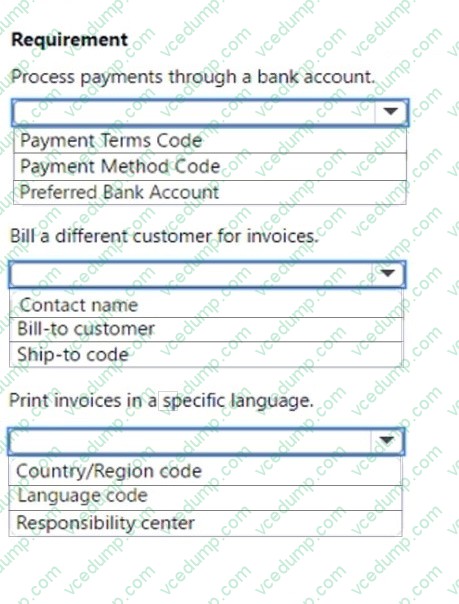
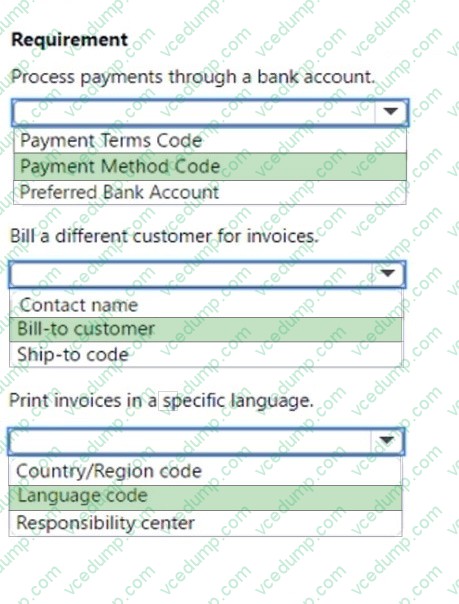
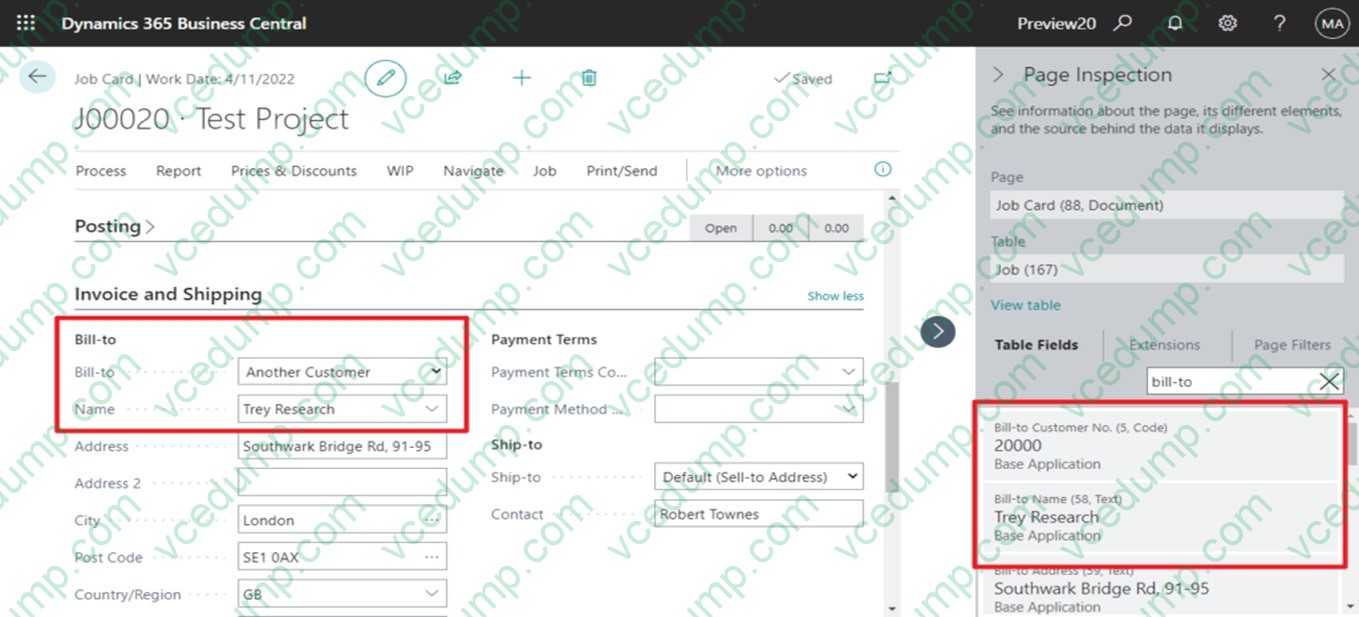
The company plans to configure a customer card based on the following requirements:
1. Process payments through a bank account.
2. Bill a different customer for invoices.
3. Print invoices in a specific language.
You need to configure the customer card.
Which components should you use? To answer, select the appropriate options in the answer area.
NOTE: Each correct selection is worth one point.
-
Question 203:
A company is implementing Dynamics 365 Business Central.
The company has service vehicles that will be fixed assets in Business Central.
All costs must be allocated 20% to Administration and 80% to the Service department.
You need to process fixed asset transactions to allocate costs as specified.
Which posting must you allocate manually?
A. Acquisition cost
B. Maintenance cost
C. Depreciation cost
D. Loss on disposal -
Question 204:
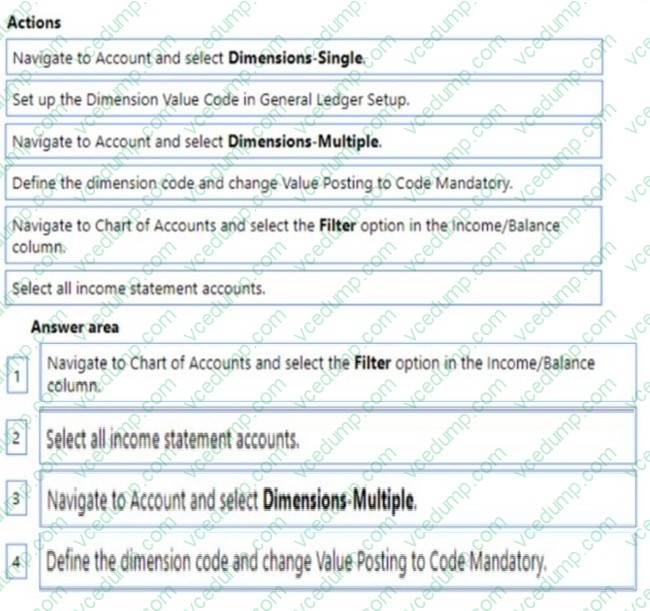
DRAG DROP
You set up a new company for a customer.
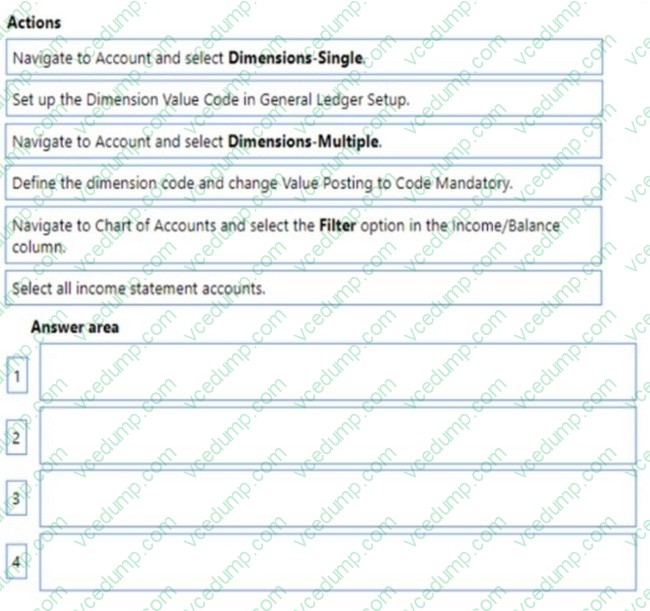
The customer requires that two global dimensions be automatically checked at transaction when income statement accounts are used.
You need to set up the requirements for all income statement accounts at once.
Which four actions should you perform in sequence? To answer, move the appropriate actions from the list of actions to the answer area and arrange them in the correct order.
Select and Place:
-
Question 205:
You need to train users on order processing requirements and how to process purchase invoices created from combined receipts.
Which two related processes should you include? Each correct answer presents a complete solution.
NOTE: Each correct selection is worth one point.
A. Create recurring purchase lines.
B. Delete POs that are fully invoiced.
C. Create a purchase credit memo.
D. Correct or cancel unpaid purchase invoices. -
Question 206:
You are implementing Dynamics 365 Business Central for a company.
The company needs to receive more items than they ordered from a vendor.
You need to configure over-receipt functionality on the items purchased.
In which two places should you configure the over-receipt functionality? Each correct answer presents part of the solution.
NOTE: Each correct selection is worth one point.
A. Item card
B. Vendor card
C. Stockkeeping Unit card
D. Over-Receipt code list -
Question 207:
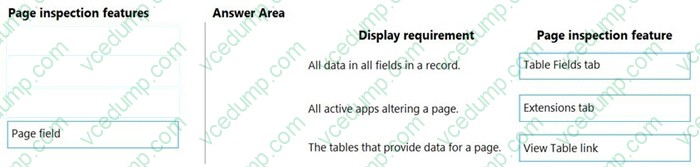
DRAG DROP
You set up a new company in Dynamics 365 Business Central.
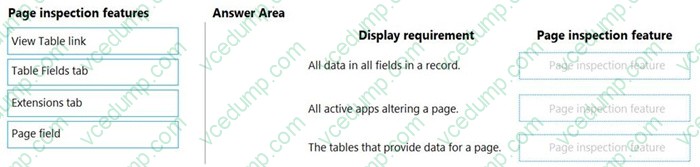
You need to demonstrate Page Inspection functionality.
Which features should you use? To answer, drag the appropriate page inspection features to the correct display requirements. Each page inspection feature may be used once, more than once, or not at all. You may need to drag the split bar between panes or scroll to view content.
NOTE: Each correct selection is worth one point.
Select and Place:
-
Question 208:
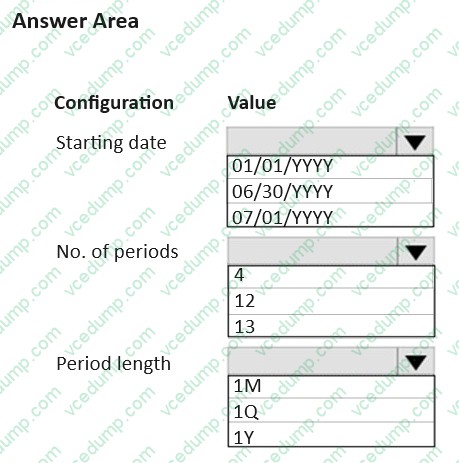
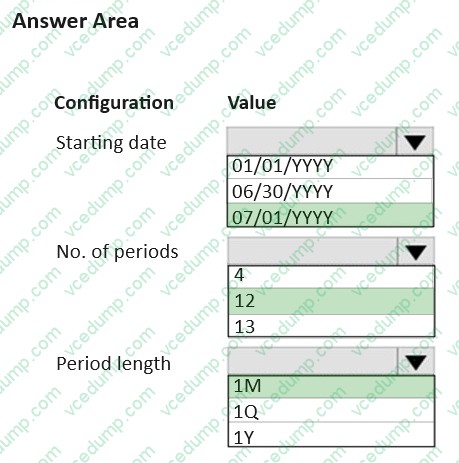
You need to create accounting periods based on the requirements from the finance department.
Which values should you use for each configuration? To answer, select the appropriate option in the answer area.
NOTE: Each correct selection is worth one point.
-
Question 209:
Note: This question is part of a series of questions that present the same scenario. Each question in the series contains a unique solution that might meet the stated goals. Some question sets might have more than one correct solution, while others might not have a correct solution.
After you answer a question in this section, you will NOT be able to return to it. As a result, these questions will not appear in the review screen.
You need to transfer opening balances data into the system.
Solution: Use RapidStart Services to import the data.
Does the solution meet the goal?
A. Yes
B. No -
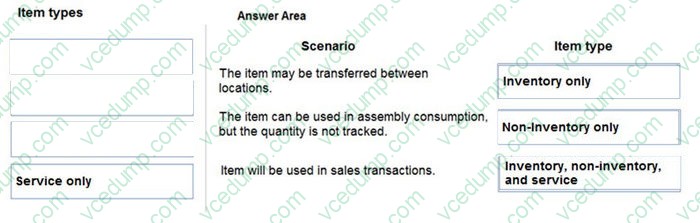
Question 210:
DRAG DROP
You are configuring Dynamics 365 Business Central for a company.
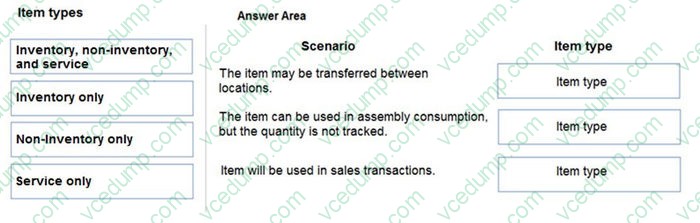
You need to create items.
Which item types should you use? To answer, drag the appropriate item types to the correct scenarios. Each item type may be used once, more than once, or not at all. You may need to drag the split bar between panes or scroll to view content.
NOTE: Each correct selection is worth one point.
Select and Place:
Related Exams:
-
62-193
Technology Literacy for Educators -
70-243
Administering and Deploying System Center 2012 Configuration Manager -
70-355
Universal Windows Platform – App Data, Services, and Coding Patterns -
77-420
Excel 2013 -
77-427
Excel 2013 Expert Part One -
77-725
Word 2016 Core Document Creation, Collaboration and Communication -
77-726
Word 2016 Expert Creating Documents for Effective Communication -
77-727
Excel 2016 Core Data Analysis, Manipulation, and Presentation -
77-728
Excel 2016 Expert: Interpreting Data for Insights -
77-731
Outlook 2016 Core Communication, Collaboration and Email Skills
Tips on How to Prepare for the Exams
Nowadays, the certification exams become more and more important and required by more and more enterprises when applying for a job. But how to prepare for the exam effectively? How to prepare for the exam in a short time with less efforts? How to get a ideal result and how to find the most reliable resources? Here on Vcedump.com, you will find all the answers. Vcedump.com provide not only Microsoft exam questions, answers and explanations but also complete assistance on your exam preparation and certification application. If you are confused on your MB-800 exam preparations and Microsoft certification application, do not hesitate to visit our Vcedump.com to find your solutions here.