FCP_FGT_AD-7.4 Exam Details
-
Exam Code
:FCP_FGT_AD-7.4 -
Exam Name
:FCP - FortiGate 7.4 Administrator -
Certification
:Fortinet Certifications -
Vendor
:Fortinet -
Total Questions
:89 Q&As -
Last Updated
:Jul 12, 2026
Fortinet FCP_FGT_AD-7.4 Online Questions & Answers
-
Question 21:
Which two settings are required for SSL VPN to function between two FortiGate devices? (Choose two.)
A. The client FortiGate requires the SSL VPN tunnel interface type to connect SSL VPN.
B. The server FortiGate requires a CA certificate to verify the client FortiGate certificate.
C. The client FortiGate requires a client certificate signed by the CA on the server FortiGate.
D. The client FortiGate requires a manually added route to remote subnets. -
Question 22:
An employee needs to connect to the office through a high-latency internet connection. Which SSL VPN setting should the administrator adjust to prevent SSL VPN negotiation failure?
A. SSL VPN idle-timeout
B. SSL VPN login-timeout
C. SSL VPN dtls-hello-timeout
D. SSL VPN session-ttl -
Question 23:
Refer to the exhibit.
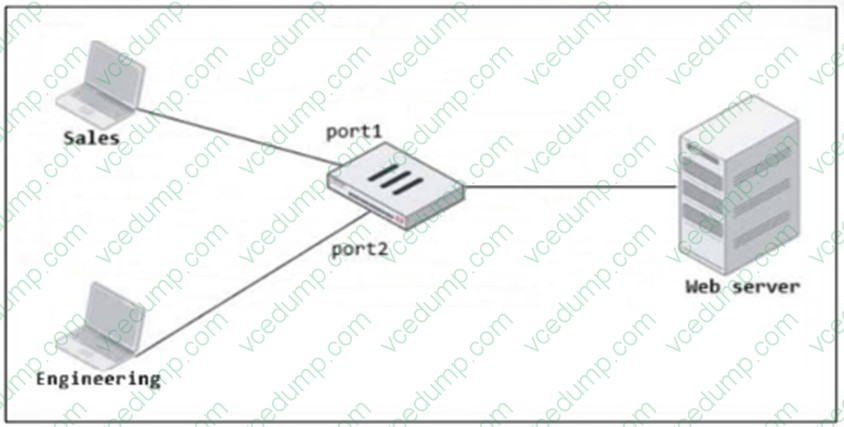
FortiGate has two separate firewall policies for Sales and Engineering to access the same web server with the same security profiles. Which action must the administrator perform to consolidate the two policies into one?
A. Enable Multiple Interface Policies to select port1 and port2 in the same firewall policy
B. Create an Interface Group that includes port1 and port2 to create a single firewall policy
C. Select port1 and port2 subnets in a single firewall policy.
D. Replace port1 and port2 with the any interface in a single firewall policy. -
Question 24:
Refer to the exhibit showing a FortiGuard connection debug output.
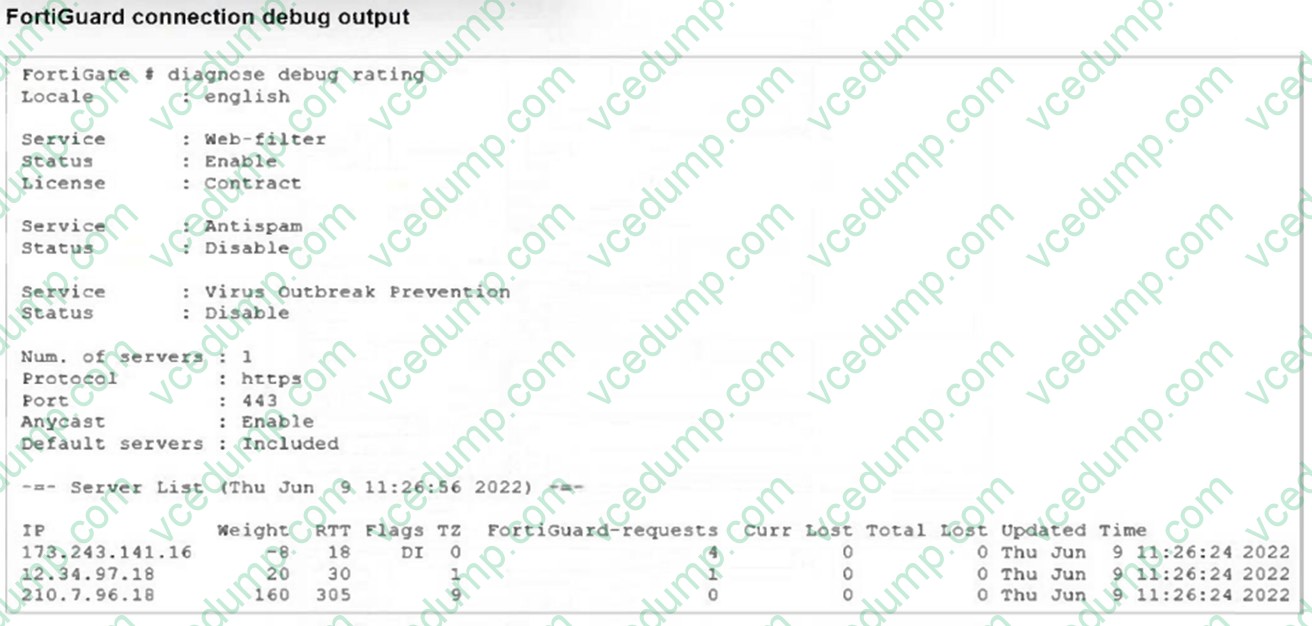
Based on the output, which two facts does the administrator know about the FortiGuard connection? (Choose two.)
A. One server was contacted to retrieve the contract information.
B. There is at least one server that lost packets consecutively.
C. A local FortiManaqer is one of the servers FortiGate communicates with.
D. FortiGate is using default FortiGuard communication settings. -
Question 25:
An administrator configured a FortiGate to act as a collector for agentless polling mode.
What must the administrator add to the FortiGate device to retrieve AD user group information?
A. LDAP server
B. RADIUS server
C. DHCP server
D. Windows server -
Question 26:
Refer to the exhibits.
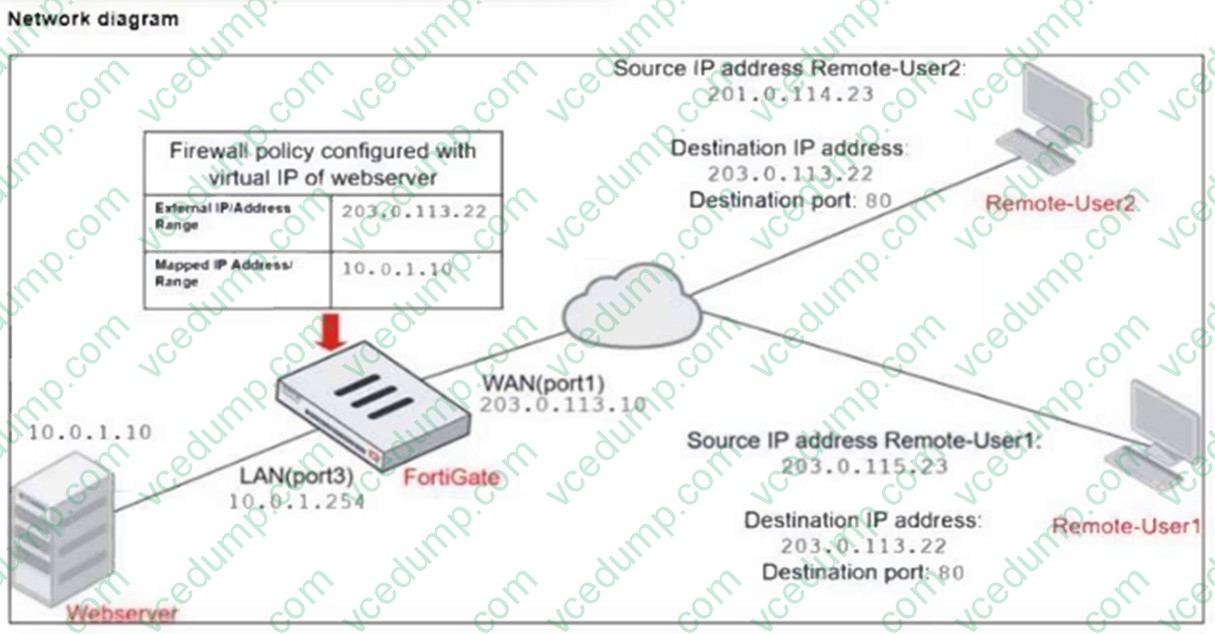
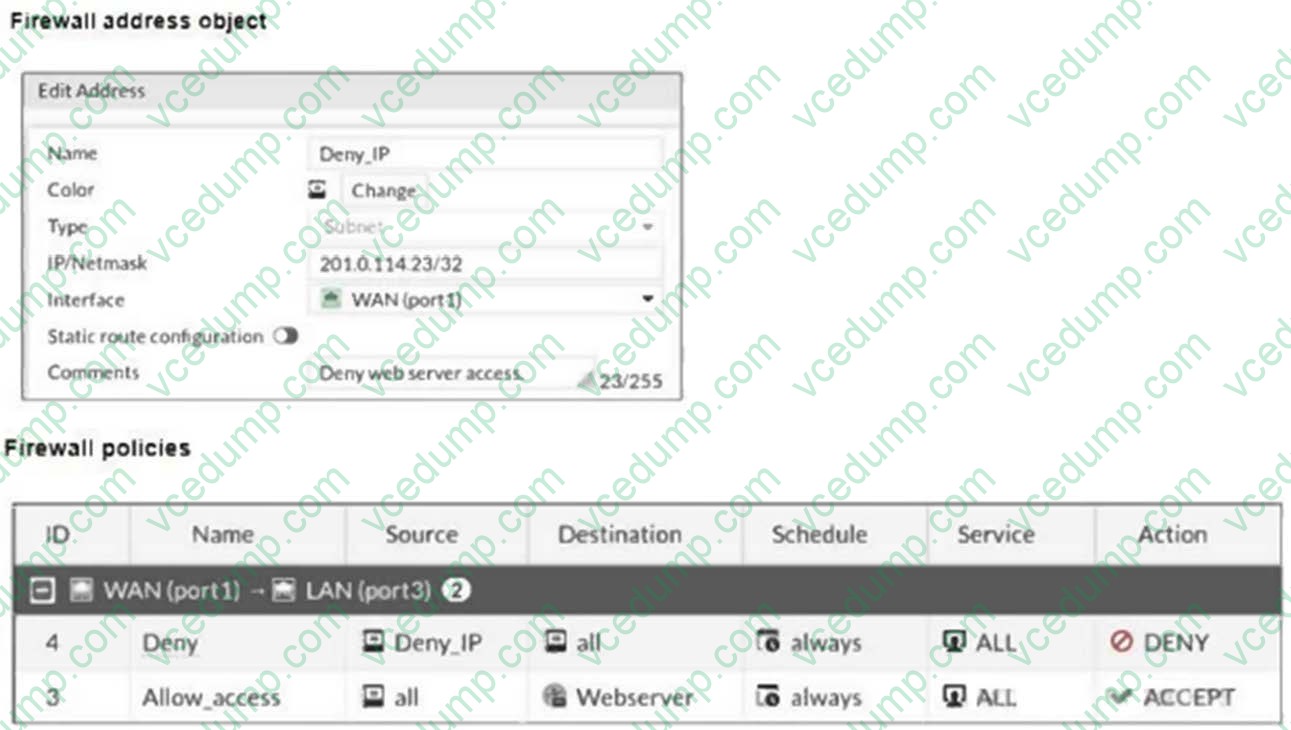
The exhibits show a diagram of a FortiGate device connected to the network, and the firewall configuration.
An administrator created a Deny policy with default settings to deny Webserver access for Remote-User2.
The policy should work such that Remote-User1 must be able to access the Webserver while preventing Remote-User2 from accessing the Webserver.
Which two configuration changes can the administrator make to the policy to deny Webserver access for Remote-User2? (Choose two.)
A. Enable match-vip in the Deny policy.
B. Set the Destination address as Webserver in the Deny policy.
C. Disable match-vip in the Deny policy.
D. Set the Destination address as Deny_IP in the Allow_access policy. -
Question 27:
Refer to the exhibits, which show the system performance output and the default configuration of high memory usage thresholds in a FortiGate.
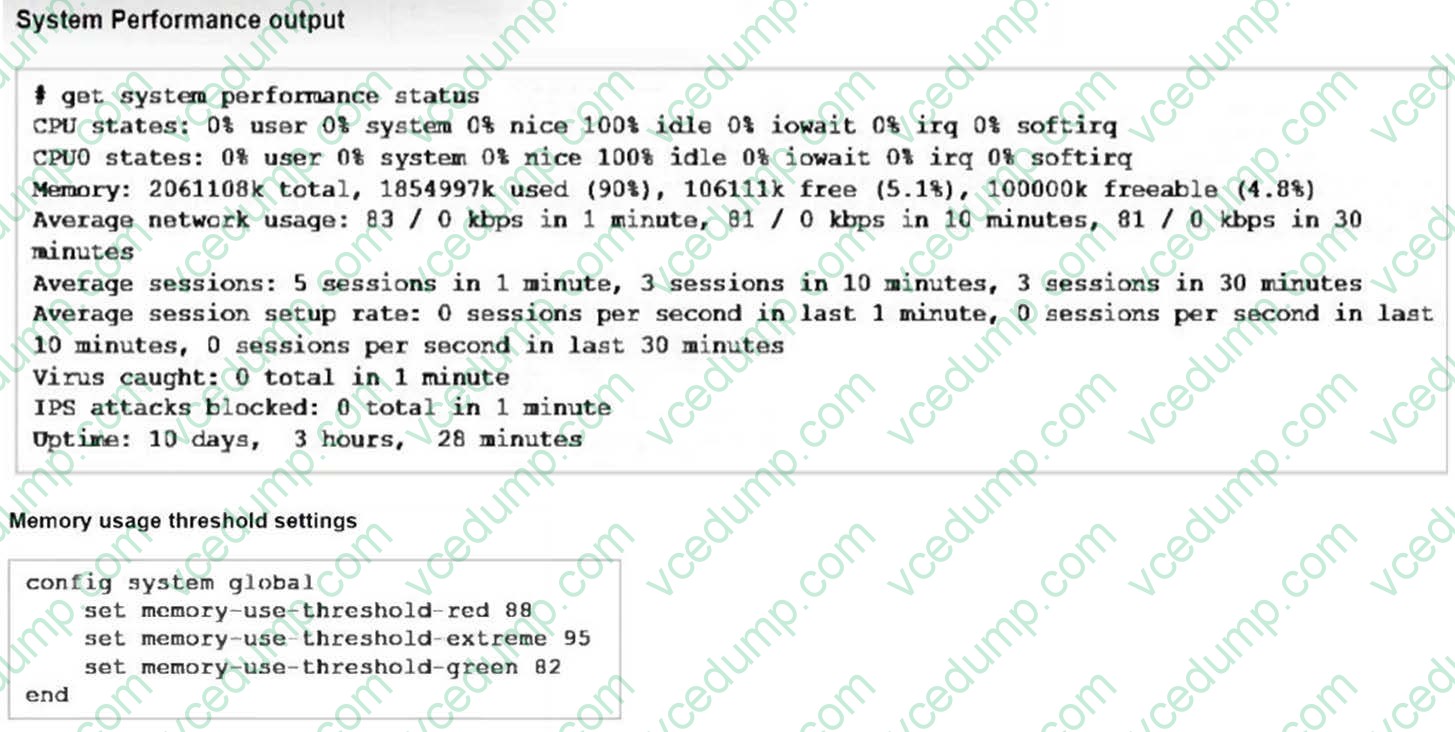
Based on the system performance output, what can be the two possible outcomes? (Choose two.)
A. FortiGate will start sending all files to FortiSandbox for inspection.
B. FortiGate has entered conserve mode.
C. Administrators cannot change the configuration.
D. Administrators can access FortiGate onlythrough the console port. -
Question 28:
The HTTP inspection process in web filtering follows a specific order when multiple features are enabled in the web filter profile. Which order must FortiGate use when the web filter profile has features such as safe search enabled?
A. FortiGuard category filter and rating filter
B. Static domain filter, SSL inspection filter, and external connectors filters
C. DNS-based web filter and proxy-based web filter
D. Static URL filter, FortiGuard category filter, and advanced filters -
Question 29:
A network administrator has configured an SSL/SSH inspection profile defined for full SSL inspection and set with a private CA certificate. The firewall policy that allows the traffic uses this profile for SSL inspection and performs web filtering. When visiting any HTTPS websites, the browser reports certificate warning errors.
What is the reason for the certificate warning errors?
A. The SSL cipher compliance option is not enabled on the SSL inspection profile. This setting is required when the SSL inspection profile is defined with a private CA certificate.
B. The certificate used by FortiGate for SSL inspection does not contain the required certificate extensions.
C. The browser does not recognize the certificate in use as signed by a trusted CA.
D. With full SSL inspection it is not possible to avoid certificate warning errors at the browser level. -
Question 30:
An administrator manages a FortiGate model that supports NTurbo. How does NTurbo enhance performance for flow-based inspection?
A. NTurbo offloads traffic to the content processor.
B. NTurbo creates two inspection sessions on the FortiGate device.
C. NTurbo buffers the whole file and then sends it to the antivirus engine.
D. NTurbo creates a special data path to redirect traffic between the IPS engine its ingress and egress interfaces.
Related Exams:
-
EMEA-ADVANCED-SUPPORT
Fortinet EMEA Advanced Support -
FCP_FAC_AD-6.5
FCP - FortiAuthenticator 6.5 Administrator -
FCP_FAZ_AD-7.4
FCP - FortiAnalyzer 7.4 Administrator -
FCP_FAZ_AN-7.4
FCP - FortiAnalyzer 7.4 Analyst -
FCP_FAZ_AN-7.6
Fortinet NSE 5 - FortiAnalyzer 7.6 Analyst -
FCP_FCT_AD-7.2
FCP - Forti Client EMS 7.2 Administrator -
FCP_FCT_AD-7.4
Fortinet NSE 6 - FortiClient EMS 7.4 Administrator -
FCP_FGT_AD-7.4
FCP - FortiGate 7.4 Administrator -
FCP_FGT_AD-7.6
FortiGate 7.6 Administrator FCP_FGT_AD-7.6 -
FCP_FMG_AD-7.4
FCP - FortiManager 7.4 Administrator
Tips on How to Prepare for the Exams
Nowadays, the certification exams become more and more important and required by more and more enterprises when applying for a job. But how to prepare for the exam effectively? How to prepare for the exam in a short time with less efforts? How to get a ideal result and how to find the most reliable resources? Here on Vcedump.com, you will find all the answers. Vcedump.com provide not only Fortinet exam questions, answers and explanations but also complete assistance on your exam preparation and certification application. If you are confused on your FCP_FGT_AD-7.4 exam preparations and Fortinet certification application, do not hesitate to visit our Vcedump.com to find your solutions here.