AZ-801 Exam Details
-
Exam Code
:AZ-801 -
Exam Name
:Configuring Windows Server Hybrid Advanced Services -
Certification
:Microsoft Certifications -
Vendor
:Microsoft -
Total Questions
:324 Q&As -
Last Updated
:May 25, 2026
Microsoft AZ-801 Online Questions & Answers
-
Question 221:
You have an on-premises server named Setver1 that runs Windows Server 2022 Standard.
You have an Azure subscription that contains the virtual machines shown in the following table.

The subscription contains a Microsoft Sentinel instance named Sentinel1 in the Central US Azure region.
You need to implement the Windows Firewall connector.
Which servers can send Windows Firewall logs to Sentinel1?
A. VM1 only
B. VM2only
C. VM1 and Server1 only
D. VM1.VM2, and VM3 only
E. VM1. VM2, and Server1 only
F. VM1, VM2. VM3. and Server1 -
Question 222:
DRAG DROP
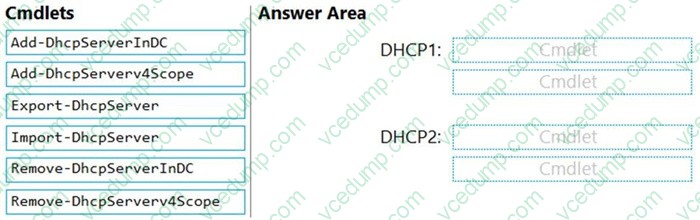
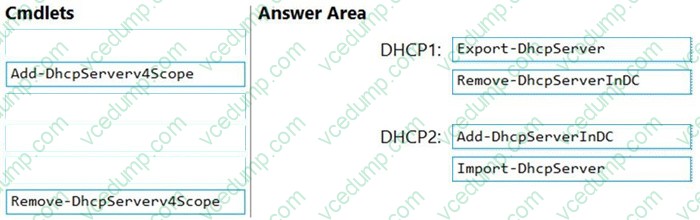
You are planning the DHCP1 migration to support the DHCP migration plan.
Which two PowerShell cmdlets should you run on DHCP1, and which two PowerShell cmdlets should you run on DHCP2? To answer, drag the appropriate cmdlets to the correct servers. Each cmdlet may be used once, more than once, or not at all. You may need to drag the split bar between panes or scroll to view content.
NOTE: Each correct selection is worth one point.
Select and Place:
-
Question 223:
You have the servers shown in the following table.

You need to ensure that you can validate network connectivity from Server1 to Server2 by using the ping command.
What should you do first?
A. For Server2, enable the File and Printer Sharing (Echo Request ?ICMPv4-In) firewall rule.
B. For Server2, add a connection security rule.
C. For Server1, enable the File and Printer Sharing (Echo Request ?ICMPv4-Out) firewall rule.
D. For Server1, add a connection security rule.
E. From Server2, run winrm quickconfig. -
Question 224:
HOTSPOT
Your network contains an Active Directory Domain Services (AD DS) domain. The domain contains servers that run Windows Server as shown in the following table.
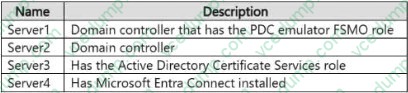
You need to implement Microsoft Defender for Identity. The solution must meet the following requirements:
Ensure that all AD DS authentication events are captured.
Prevent the use of port mirroring.
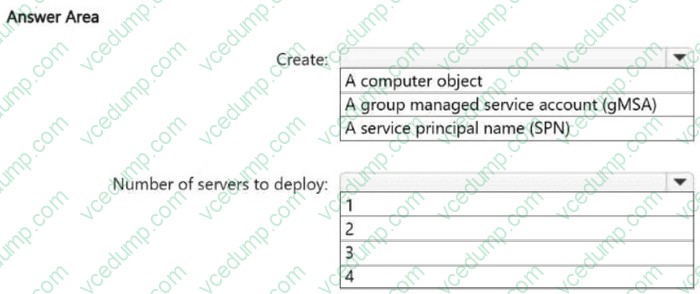
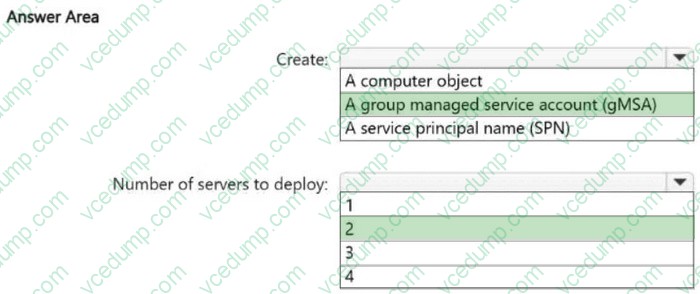
What should you create in the domain, and what is the minimum number of Defender for Identity sensors that you should deploy? To answer, select the appropriate options in the answer area.
NOTE: Each correct selection is worth one point.
-
Question 225:
You have the resources shown in the following table.
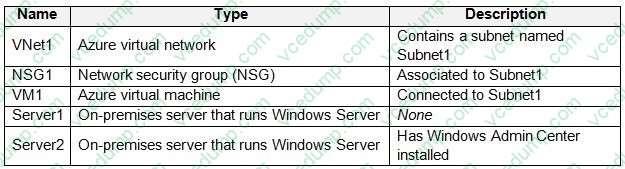
Your on-premises network is connected to VNet1 by using a Site-to Site VPN.
The network traffic sent from Server fails to reach VM1.
You need to review the contents of the network traffic sent from Server1 to VM1.
What should you do first?
A. From Server1, enable Windows Firewall logs.
B. From Windows Admin Center, enable the Packet Monitoring extension.
C. From NSG1, enable NSG flow logs.
D. From Azure Network Watcher, add a packet capture -
Question 226:
Note: This question is part of a series of questions that present the same scenario. Each question in the series contains a unique solution that might meet the stated goals. Some question sets might have more than one correct solution, while others might not have a correct solution.
After you answer a question in this section, you will NOT be able to return to it. As a result, these questions will not appear in the review screen.
You have a server named Server1 that runs Windows Server.
You need to ensure that only specific applications can modify the data in protected folders on Server1.
Solution: From Virus & threat protection, you configure Tamper Protection.
Does this meet the goal?
A. Yes
B. No -
Question 227:
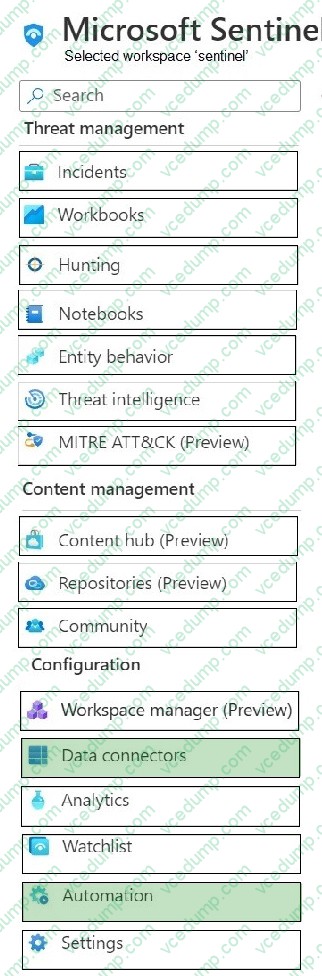
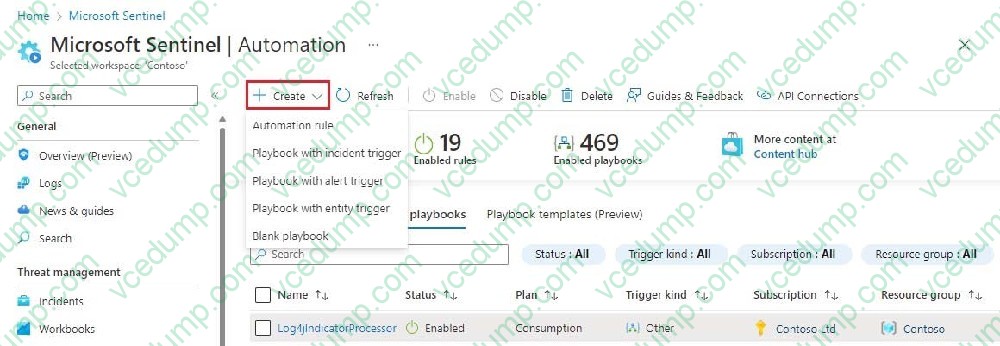
HOTSPOT
You have 50 on-premises servers that run Windows Server.
You have an Azure subscription that contains a Microsoft Sentinel workspace.
You plan to monitor the servers by using Microsoft Sentinel
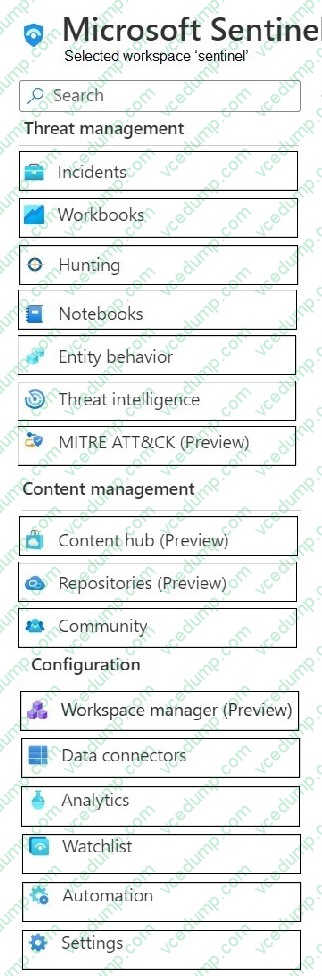
You need to perform the following actions in Microsoft Sentinel from the Azure portal:
Add the Windows Forwarded Events data connector.
Create a playbook that has an incident trigger.
Which two settings should you use? To answer, select the appropriate settings in the answer area
NOTE: Each correct selection is worth one point.
-
Question 228:
You have two Azure virtual networks named Vnet1 and Vnet2.
You have a Windows 10 device named Client1 that connects to Vnet1 by using a Point-to-Site (P2S) IKEv2 VPN.
You implement virtual network peering between Vnet1 and Vnet2. Vnet1 allows gateway transit Vnet2 can use the remote gateway.
You discover that Client1 cannot communicate with Vnet2.
You need to ensure that Client1 can communicate with Vnet2.
Solution: You enable BGP on the gateway of Vnet1.
Does this meet the goal?
A. Yes
B. No -
Question 229:
DRAG DROP
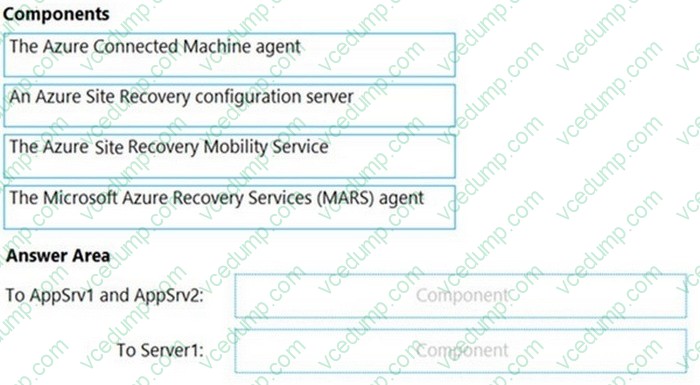
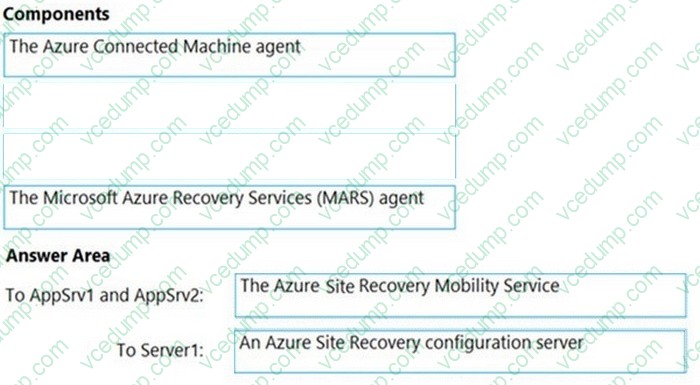
You have two physical servers named AppSrv1 and AppSrv2 and an unconfigured server named Server1. All the servers run Windows Server. Only Server1 can access the internet.
You plan to use Azure Site Recovery to replicate AppSrv1 and AppSrv2 to Azure.
You need to deploy the required components to AppSrv1, AppSrv2, and Server1.
Which components should you deploy? To answer, drag the appropriate components to the correct servers. Each component may be used once, more than once, or not at all. You may need to drag the split bar between panes or scroll to view content.
NOTE: Each correct selection is worth one point.
Select and Place:
-
Question 230:
You need to meet the technical requirements for Cluster3.
What should you include in the solution?
A. Enable integration services on all the virtual machines.
B. Add a Windows Server server role.
C. Configure a fault domain doe the cluster.
D. Add a failover cluster role.
Related Exams:
-
62-193
Technology Literacy for Educators -
70-243
Administering and Deploying System Center 2012 Configuration Manager -
70-355
Universal Windows Platform – App Data, Services, and Coding Patterns -
77-420
Excel 2013 -
77-427
Excel 2013 Expert Part One -
77-725
Word 2016 Core Document Creation, Collaboration and Communication -
77-726
Word 2016 Expert Creating Documents for Effective Communication -
77-727
Excel 2016 Core Data Analysis, Manipulation, and Presentation -
77-728
Excel 2016 Expert: Interpreting Data for Insights -
77-731
Outlook 2016 Core Communication, Collaboration and Email Skills
Tips on How to Prepare for the Exams
Nowadays, the certification exams become more and more important and required by more and more enterprises when applying for a job. But how to prepare for the exam effectively? How to prepare for the exam in a short time with less efforts? How to get a ideal result and how to find the most reliable resources? Here on Vcedump.com, you will find all the answers. Vcedump.com provide not only Microsoft exam questions, answers and explanations but also complete assistance on your exam preparation and certification application. If you are confused on your AZ-801 exam preparations and Microsoft certification application, do not hesitate to visit our Vcedump.com to find your solutions here.