AZ-801 Exam Details
-
Exam Code
:AZ-801 -
Exam Name
:Configuring Windows Server Hybrid Advanced Services -
Certification
:Microsoft Certifications -
Vendor
:Microsoft -
Total Questions
:324 Q&As -
Last Updated
:May 25, 2026
Microsoft AZ-801 Online Questions & Answers
-
Question 211:
Your network contains an Active Directory Domain Services (AD DS) domain. The domain contains two servers named Server1 and Server2.
Server1 runs Windows Server 2019 and hosts multiple printers. Server2 runs Windows Server 2025. Both servers have the Print and Document Services server role installed.
You need to migrate the printers hosted on Server1 to Server2. The solution must minimize administrative effort.
What tools can you use?
A. Print Management only
B. Windows Admin Center only
C. Server Manager and Print Management only
D. Print Management and Windows Admin Center only
E. Server Manager, Print Management, and Windows Admin Center -
Question 212:
Your network contains an Active Directory Domain Services (AD DS) domain. The domain contains two Windows Server Failover Cluster (WSFC) instances named Cluster1 and Cluster2. Cluster1 hosts Hyper-V virtual machines. Cluster2 does NOT have any high availability roles configured.
You need to create a Storage Spaces Direct cluster in Cluster2 that will store the virtual machine hard disk files for Cluster1.
Which role should you configure for Cluster2? To answer, select the appropriate options in the answer area.
NOTE: Each correct selection is worth one point.
A. Virtual Machine
B. iSCSI Target Server
C. Hyper-V Replica Broker
D. File Server -
Question 213:
HOTSPOT
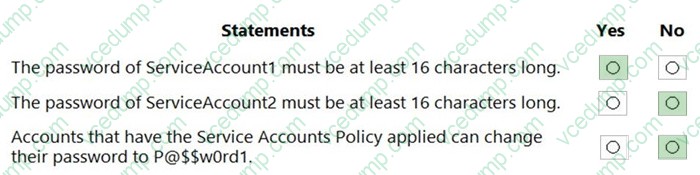
The Default Domain Policy Group Policy Object (GPO) is shown in the GPO exhibit. (Click the GPO tab.)
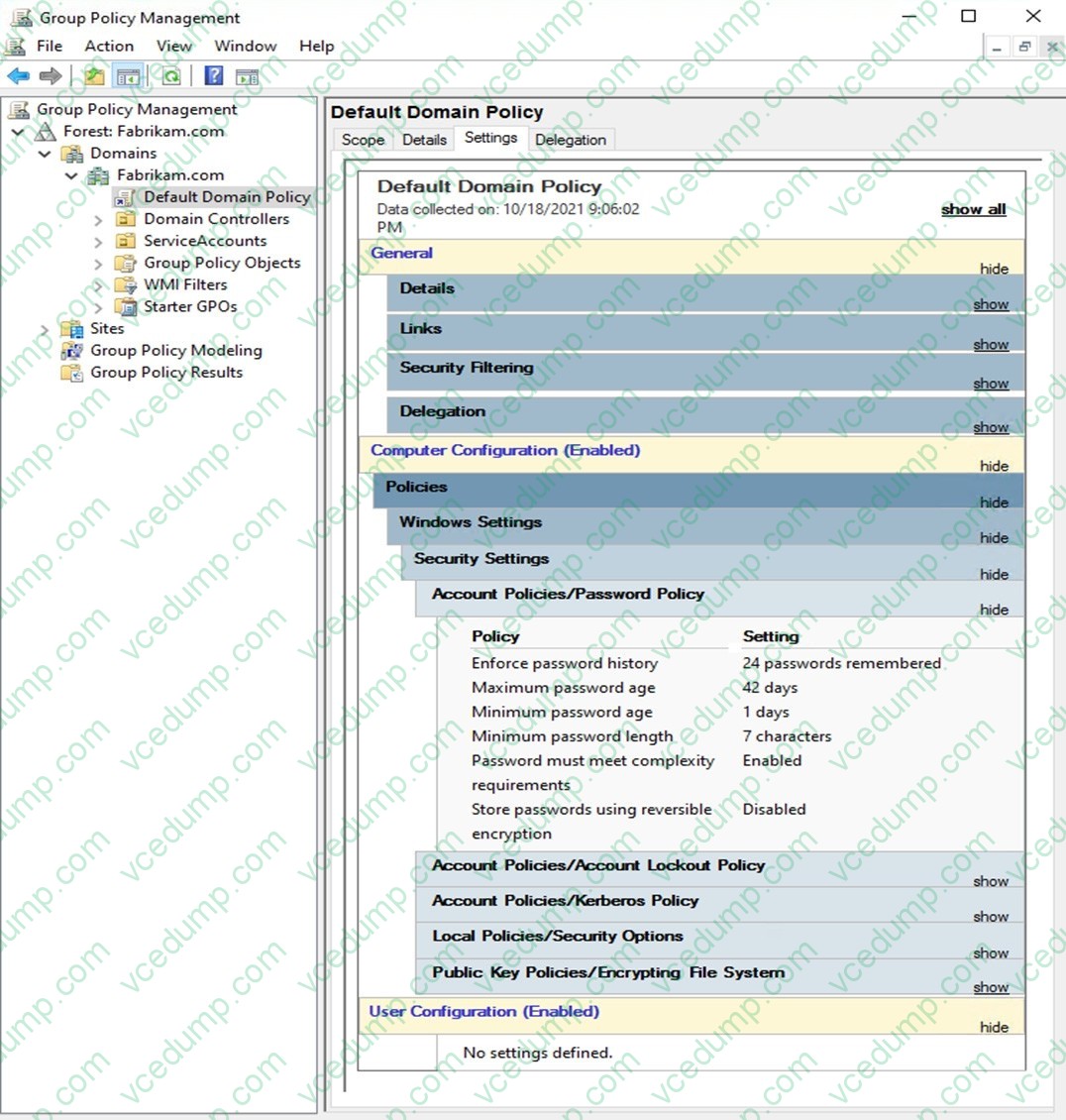
The members of a group named Service Accounts are shown in the Group exhibit. (Click the Group tab.)
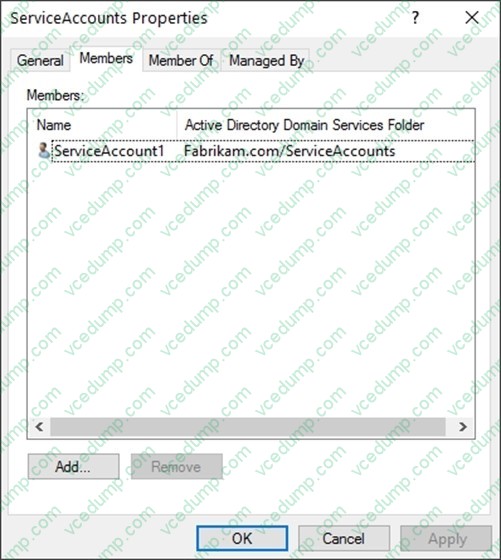
An organizational unit (OU) named ServiceAccounts is shown in the OU exhibit. (Click the OU tab.)
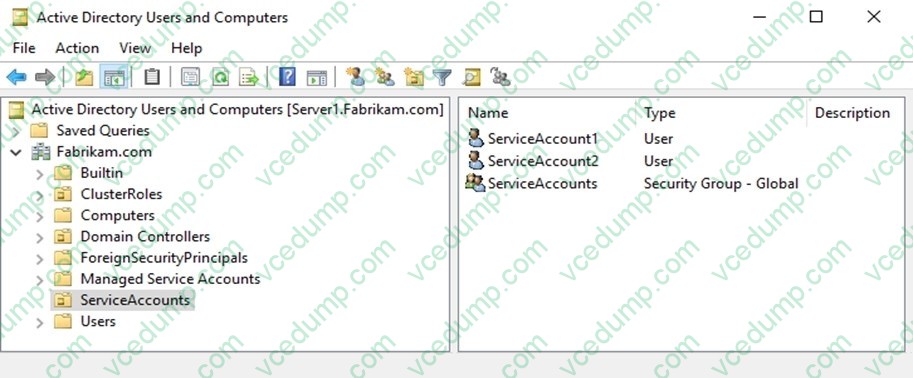
You create a Password Settings Object (PSO) as shown in the PSO exhibit. (Click the PSO tab.)
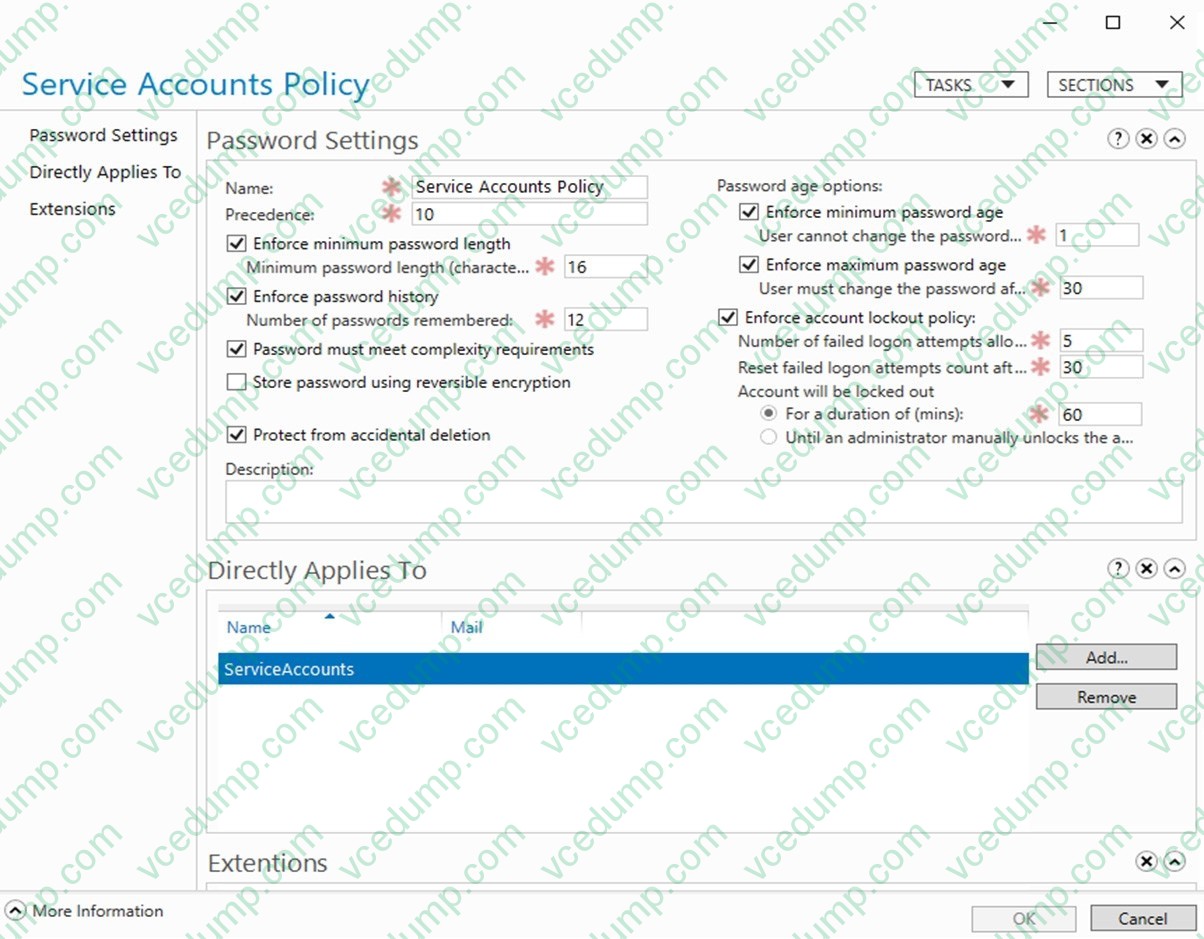
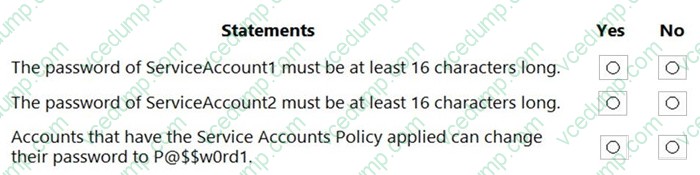
For each of the following statements, select Yes if the statement is true. Otherwise, select No.
NOTE: Each correct selection is worth one point.
-
Question 214:
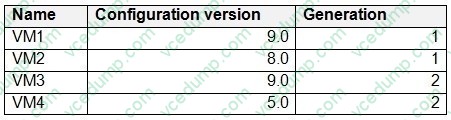
You have a server named Server1 that runs Windows Server 2019 and has the Hyper-V server role installed. Server1 hosts the virtual machines shown in the following table.
You deploy a new server named Server2 that runs Windows Server 2025 and has the Hyper-V server role installed.
You need to distribute the virtual machines across both servers.
Which virtual machines can you import to Server2?
A. VM3 only
B. VM1 and VM3 only
C. VM3 and VM4 only
D. VM1, VM2, and VM3 only
E. VM1, VM2, VM3, and VM4 -
Question 215:
HOTSPOT
You have a failover cluster named Cluster1 that contains three nodes.
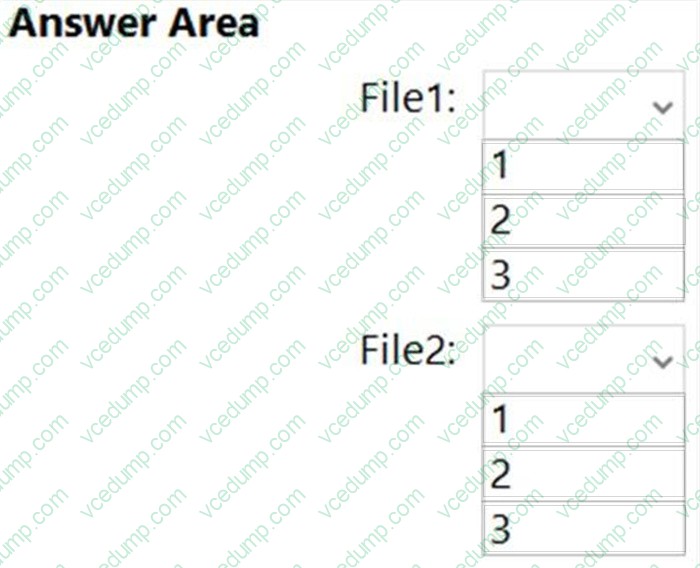
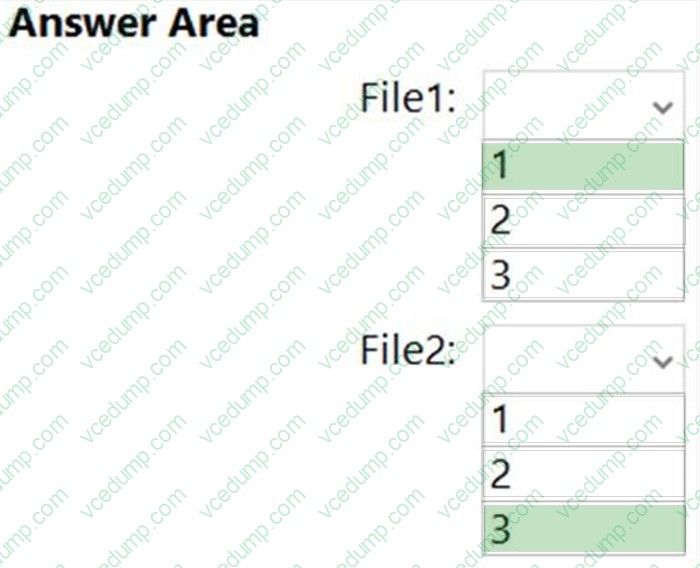
You plan to add two file server cluster roles named File1 and File2 to Cluster1. File1 will use the File Server for general use role. File2 will use the Scale-Out File Server for application data role.
What is the maximum number of nodes for File1 and File2 that can concurrently serve client connections? To answer, select the appropriate options in the answer area.
NOTE: Each correct selection is worth one point.
-
Question 216:
You have an Azure virtual machine named VM1 that runs Windows Server.
The operating system on VM1 fails to fully initialize its network stack, and you cannot establish a network connection.
You need to establish an interactive shell session.
What should you use?
A. Azure Bastion
B. Serial console
C. just-in-time (JIT) VM access -
Question 217:
DRAG DROP
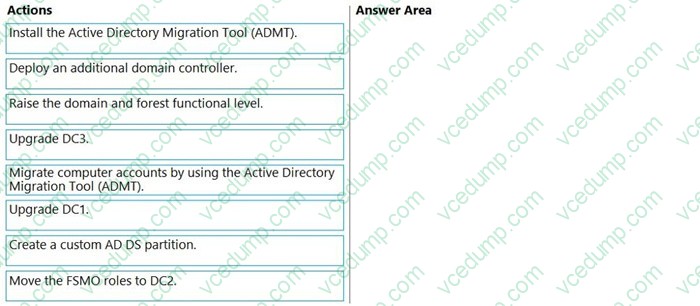
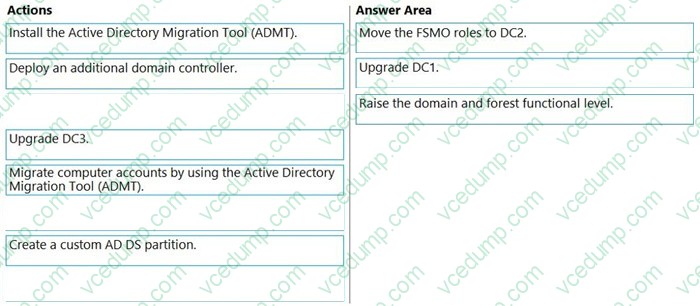
Your network contains an Active Directory Domain Services (AD DS) domain named contoso.com. The functional level of the forest and the domain is Windows Server 2012 R2. The domain contains the domain controllers shown in the following table.
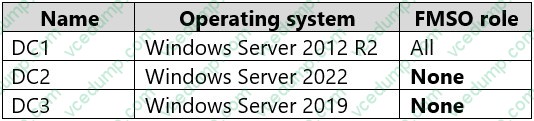
You need to raise the forest functional level to Windows Server 2016. The solution must meet the following requirements:
1. Ensure that there are three domain controllers after you raises the level.
2. Minimize how long the FSMO roles are unavailable.
Which three actions should you perform in sequence? To answer, move the appropriate actions from the list of actions to the answer area and arrange them in the correct order.
Select and Place:
-
Question 218:
You have 200 Azure virtual machines.
You create a recovery plan in Azure Site Recovery to fail over all the virtual machines to an Azure region. The plan has three manual actions.
You need to replace one of the manual actions with an automated process.
What should you use?
A. an Azure Desired State Configuration (DSC) virtual machine extension
B. an Azure Automation runbook
C. an Azure PowerShell function
D. a Custom Script Extension on the virtual machines -
Question 219:
Your on-premises network contains an Active Directory Domain Services (AD DS) domain. The domain contains a server named Server1 that hosts an app named App1. App1 uses Active Directory authentication.
You have a Microsoft Entra tenant that contains a user named User1.
You deploy Microsoft Entra Connect sync and configure password synchronization.
User1 fails to authenticate to App1.
You need to ensure that User1can authenticate to App1.
What should you do?
A. For Microsoft Entra Connect sync, enable the BlockCloudObjectTakeoverThroughHardMatch feature.
B. For Microsoft Entra Connect sync, enable password writeback.
C. From the AD DS domain, create a new user account named User1.
D. For Microsoft Entra Connect sync, disable soft match. -
Question 220:
HOTSPOT
Your network contains an Active Directory Domain Services (AD DS) domain. The domain contains an organizational unit (OU) named OU1 and a user named User1.
You plan to deploy a Hyper-V failover cluster named Cluster1.
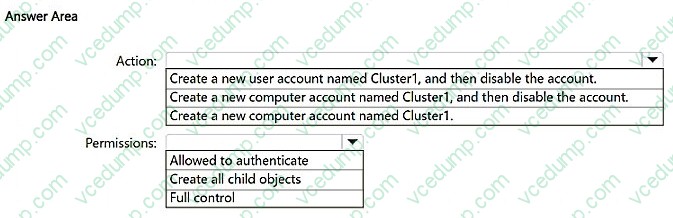
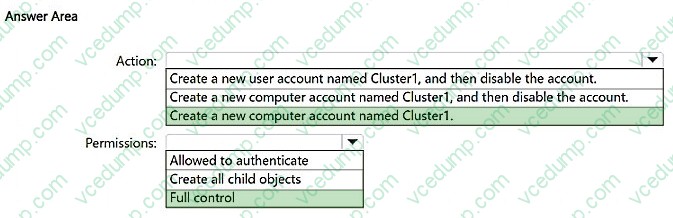
You need to prestage the account for Cluster1 and ensure that User1 can deploy Cluster1. The solution must follow the principle of least privilege.
Which action should you perform, and which permissions should you grant to User1 for Cluster1? To answer, select the appropriate options in the answer area.
NOTE: Each correct selection is worth one point.

Related Exams:
-
62-193
Technology Literacy for Educators -
70-243
Administering and Deploying System Center 2012 Configuration Manager -
70-355
Universal Windows Platform – App Data, Services, and Coding Patterns -
77-420
Excel 2013 -
77-427
Excel 2013 Expert Part One -
77-725
Word 2016 Core Document Creation, Collaboration and Communication -
77-726
Word 2016 Expert Creating Documents for Effective Communication -
77-727
Excel 2016 Core Data Analysis, Manipulation, and Presentation -
77-728
Excel 2016 Expert: Interpreting Data for Insights -
77-731
Outlook 2016 Core Communication, Collaboration and Email Skills
Tips on How to Prepare for the Exams
Nowadays, the certification exams become more and more important and required by more and more enterprises when applying for a job. But how to prepare for the exam effectively? How to prepare for the exam in a short time with less efforts? How to get a ideal result and how to find the most reliable resources? Here on Vcedump.com, you will find all the answers. Vcedump.com provide not only Microsoft exam questions, answers and explanations but also complete assistance on your exam preparation and certification application. If you are confused on your AZ-801 exam preparations and Microsoft certification application, do not hesitate to visit our Vcedump.com to find your solutions here.