AZ-801 Real Exam Questions

Configuring Windows Server Hybrid Advanced Services

324 questions available · Page 1 of 33

Updated Exam DumpsVerified AnswersPass Guarantee

Get Complete Exam Dumps
Question 1 Drag & drop

DRAG DROP

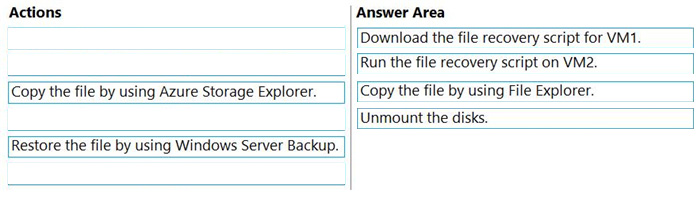
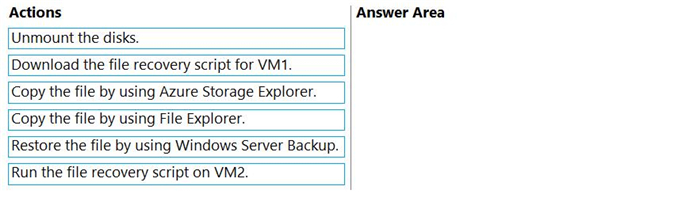
You have two Azure virtual machines named VM1 and VM2. VM1 is backed up to an Azure Recovery Services vault daily and retains backups for 30 days.

You need to restore an individual file named C:\Data\Important.docx from VM1 to VM2. The solution must minimize administrative effort.

Which four actions should you perform in sequence? To answer, move the appropriate actions from the list of actions to the answer area and arrange them in the correct order.

Question diagram
Show answer and explanation
Correct answer diagram
Question 2 Hotspot

HOTSPOT

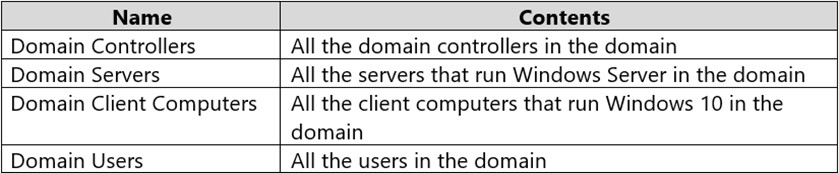
Your network contains an Active Directory Domain Services (AD DS) domain named contoso.com. The domain contains the organizational units (OUs) shown in the following table.

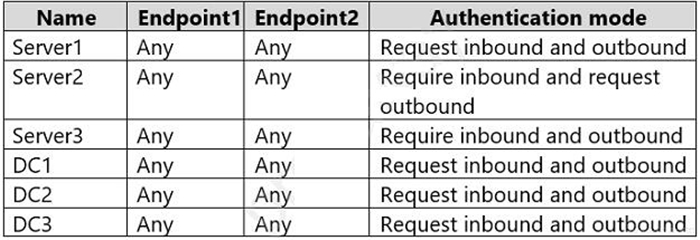
In the domain, you create the Group Policy Objects (GPOs) shown in the following table.

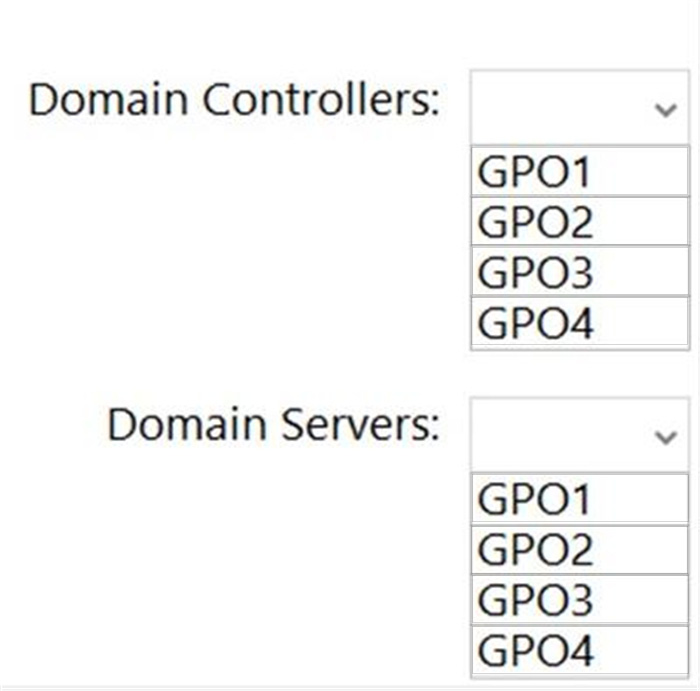
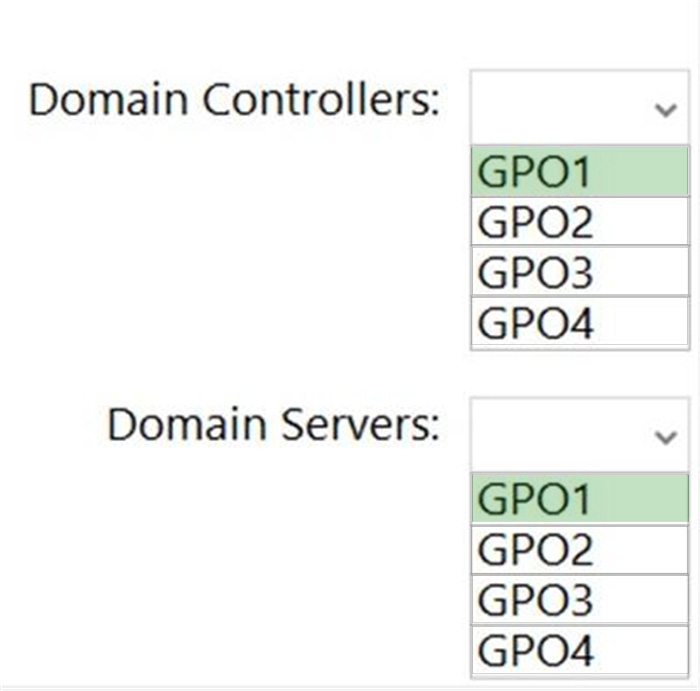
You need to implement IPsec authentication to ensure that only authenticated computer accounts can connect to the members in the domain. The solution must minimize administrative effort.

Which GPOs should you apply to the Domain Controllers OU and the Domain Servers OU? To answer, select the appropriate options in the answer area.

NOTE: Each correct selection is worth one point.

Question diagram
Show answer and explanation
Correct answer diagram
Question 3 Hotspot

HOTSPOT

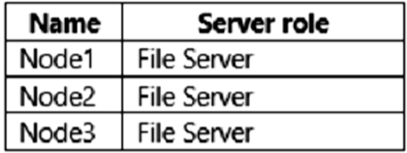
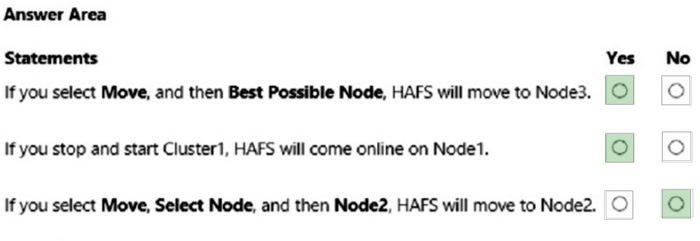
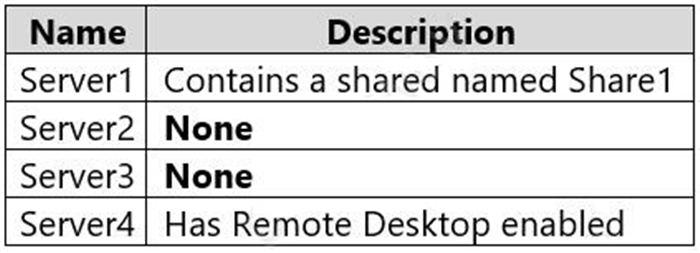
You have a failover cluster named Cluster1 that contains the nodes shown in the following table.

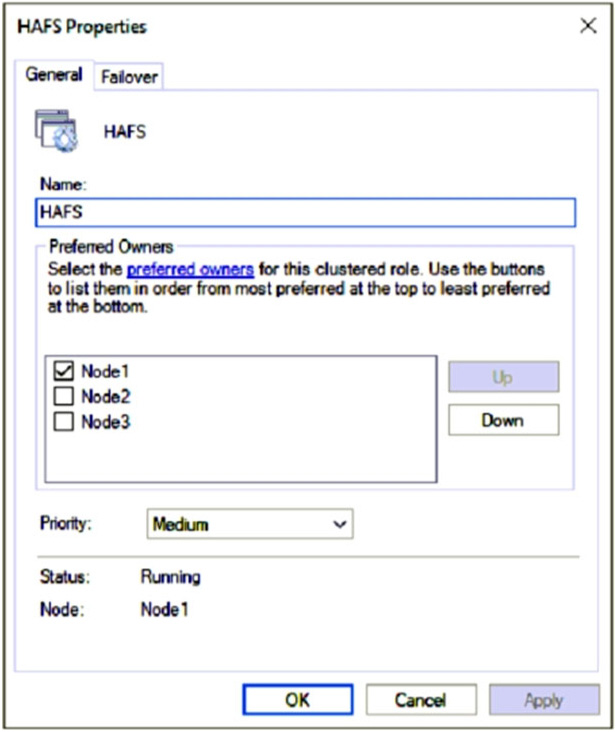
A File Server for general use cluster role named HAFS is configured as shown in the General exhibit (Click the General tab.)

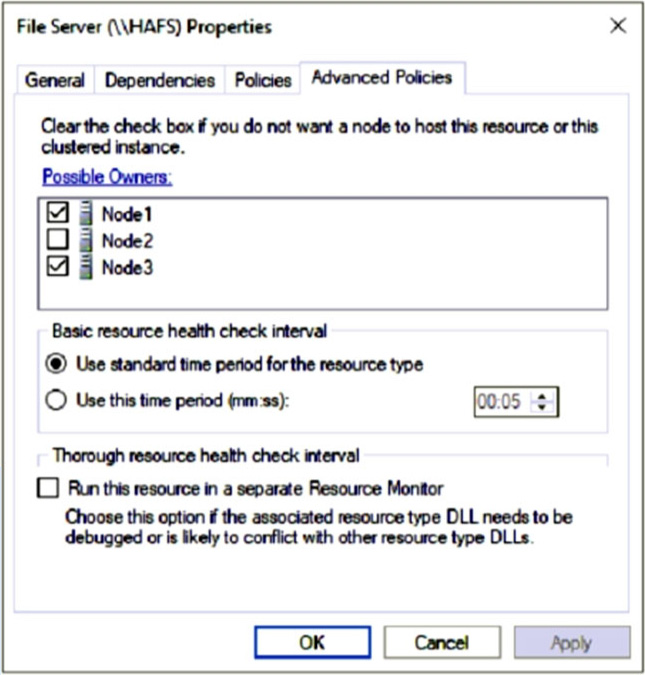
The Advanced Policies settings for HAFS are configured as shown in the Advanced Policies exhibit. (Click the Advanced Policies tab.)

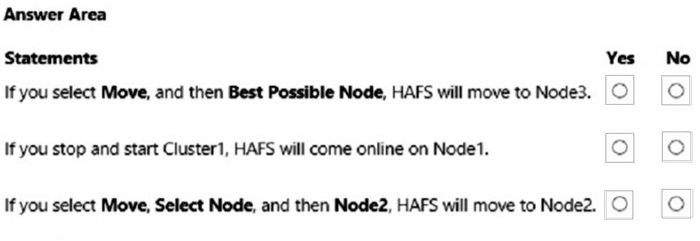
For each of the following statements, select Yes if the statement is true. Otherwise, select No.

Question diagram
Show answer and explanation
Correct answer diagram
Explanation

Box 1: Yes
HAFS will move from Node1 to Node3 if we test failover for the cluster.
Note: Test failover.
Test failover of the clustered resource to validate cluster functionality.
Take the following steps:
1. Connect to one of the SQL Server cluster nodes by using RDP.
2. Open Failover Cluster Manager. Select Roles. Notice which node owns the SQL Server FCI role.
3. Right-click the SQL Server FCI role.
4. Select Move, and then select Best Possible Node.
5. Failover Cluster Manager shows the role, and its resources go offline. The resources then move and come back online in the other node.

Box 2: Yes
Node1 is the preferred owner.

Box 3: No
Node2 is not a possible owner of the cluster.

References:
https://docs.microsoft.com/en-us/azure/azure-sql/virtual-machines/windows/failover-cluster-instance-vnn-azure-load-balancer-configure

Question 4 Single choice

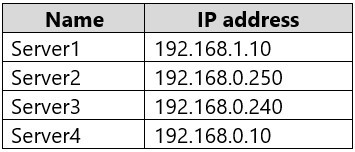
Your on-premises network contains two subnets. The subnets contain servers that run Windows Server as shown in the following table.

Server4 has the following IP configurations:

Ethernet adapter Ethernet:

Connection-specific DNS Suffix . . :

IPv4 Address . . . . . . . . . . . : 192.168.0.10
Subnet Mask . . . . . . . . . . . : 255.255.255.0
Default Gateway . . . . . . . . . : 192.168.0.1

From Server4, you can ping Server1 and Server2 successfully. When you ping Server3, you get a Request timed out response.

From Server2, you can ping Server1 and Server3 successfully.

The misconfiguration of which component on Server3 can cause the Request timed out response?

  1. A

    default gateway

  2. B

    IP address

  3. C

    subnet mask

  4. D

    DNS server

Show answer and explanation

Correct answer: C

Question 5 Single choice

You have two Azure virtual networks named Vnet1 and Vnet2.

You have a Windows 10 device named Client1 that connects to Vnet1 by using a Point-to-Site (P2S) IKEv2
VPN.

You implement virtual network peering between Vnet1 and Vnet2. Vnet1 allows gateway transit Vnet2 can use the remote gateway.

You discover that Client1 cannot communicate with Vnet2.

You need to ensure that Client1 can communicate with Vnet2.

Solution: You download and reinstall the VPN client configuration.

Does this meet the goal?

  1. A

    Yes

  2. B

    No

Show answer and explanation

Correct answer: A

Question 6 Single choice

You have an on-premises server named Server1 that runs Windows Server. Server1 has the Web Server (IIS) server role installed and hosts an ASP.NET web app named App1.

You have an Azure subscription.

You plan to migrate App1 to a container in Azure.

You need to export App1 to a ZIP file.

What should you install on Server1?

  1. A

    the Windows Server Migration Tools feature

  2. B

    the IIS Management Scripts and Tools role service

  3. C

    Web Deploy

  4. D

    Docker Enterprise

Show answer and explanation

Correct answer: C

Explanation

Azure Migrate, ASP.NET app containerization and migration to Azure App Service You can containerize ASP.NET applications and migrate them to Azure App Service by using the Azure Migrate App Containerization tool.

Prerequisites
Identify a machine on which to install the tool
You need a Windows machine on which to install and run the Azure Migrate App Containerization tool. The Windows machine could run a server (Windows Server 2016 or later) or client (Windows 10) operating system. (The tool can run on your desktop.)

If the Microsoft Web Deployment tool isn't already installed on the machine running the App Containerization tool and the application server, install it.

Application servers
Enable PowerShell remoting on the application servers.

If the Microsoft Web Deployment tool isn't already installed on the machine running the App Containerization tool and the application server, install it.
Etc.

References:
https://learn.microsoft.com/en-us/azure/migrate/tutorial-app-containerization-aspnet-app-service

Question 7 Single choice

You have an Azure subscription. The subscription contains multiple virtual machines that run Windows Server.

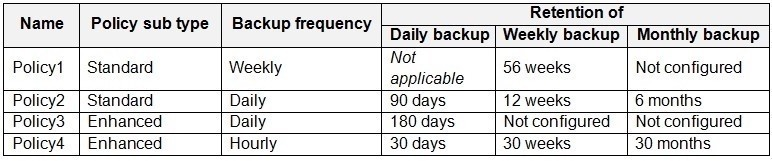
You have the Azure virtual machine backup policies shown in the following table.

You are evaluating automatically moving recovery points to the vault-archive tier.

For which policies can you enable tiering?

  1. A

    Policy2 and Policy4 only

  2. B

    Policy4 only

  3. C

    Policy1, Policy2, Policy3, and Policy4

  4. D

    Policy3 and Policy4 only

Show answer and explanation

Correct answer: A

Explanation

Policy1 - No
Policy1 has a weekly backup frequency, and retention of 56 weeks. There is no retention policy for monthly or yearly backups.

Policy2 - Yes
Policy1 has a daily backup frequency, and retention of 90 weeks for daily backups, and 6 months for monthly backups.

Policy3 - No
Policy3 has a daily backup frequency, and retention of 180 days. Policy1 has a weekly backup frequency, and retention of 56 weeks. There is no retention policy for monthly or yearly backups.

Policy4 - Yes

Nore:
What are the possible reasons if my VM recovery point was not moved to archive? Before you move VM recovery points to archive tier, ensure that the following criteria are met:

The recovery point should be a monthly or yearly recovery point. The age of the recovery point in standard tier needs to be >= 3 months.
The remaining retention duration should be >= 6 months.
There should be no unexpired daily or weekly recovery point between the recovery point in consideration and the next monthly or yearly recovery point.

Note 2: In Azure VM backup policies, tiering refers to a strategy of storing different recovery points in different storage tiers to optimize cost and performance. Typically, recent, frequently accessed recovery points are stored in a Standard Tier (also called the "instant recovery tier" or "snapshot tier") for rapid restores, while older data is moved to a lower-cost Archive Tier for long-term retention. This allows you to meet compliance needs and reduce costs by keeping less critical, older backups in cheaper, slower storage.

References:
https://learn.microsoft.com/en-us/azure/backup/archive-tier-support
Question 8 Single choice

You have an Azure virtual machine named VM1. Crash dumps for a process named Process1 are enabled for VM1.

When process1.exe on VM1 crashes, a technician must access the memory dump files on the virtual machine.

The technician must be prevented from accessing the virtual machine.

To what should you provide the technician access?

  1. A

    an Azure file share

  2. B

    an Azure Log Analytics workspace

  3. C

    an Azure Blob Storage container

  4. D

    a managed disk

Show answer and explanation

Correct answer: C

Explanation

References:
https://docs.microsoft.com/en-us/azure/azure-monitor/agents/diagnostics-extension-overview

Case Study 2

Overview

Contoso, Ltd. is a manufacturing company that has a main office in Seattle and branch offices in Los Angeles and Montreal.

Existing Environment

Active Directory Environment

Contoso has an on-premises Active Directory Domain Services (AD DS) domain named contoso.com that syncs with an Azure Active Directory (Azure AD) tenant. The AD DS domain contains the domain controllers shown in the following table.

Contoso recently purchased an Azure subscription.

The functional level of the forest is Windows Server 2012 R2. The functional level of the domain is Windows Server 2012. The forest has the Active Directory Recycle Bin enabled.

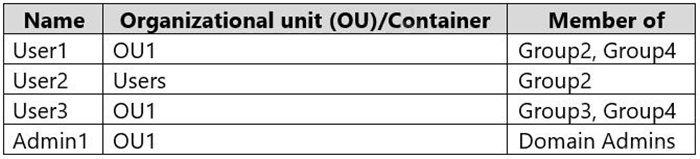
The contoso.com domain contains the users shown in the following table.

The contoso.com domain has the Group Policy Objects (GPOs) shown in the following table.

The contoso.com domain has the Password Settings Objects (PSOs) shown in the following table.

Server Infrastructure

The contoso.com domain contains servers that run Windows Server 2022 as shown in the following table.

By using Windows Firewall with Advanced Security, the servers have isolation connection security rules configured as shown in the following table.

Server4 has no connection security rules.

Server4 Configurations

Server4 has the effective Group Policy settings for user rights as shown in the following table.

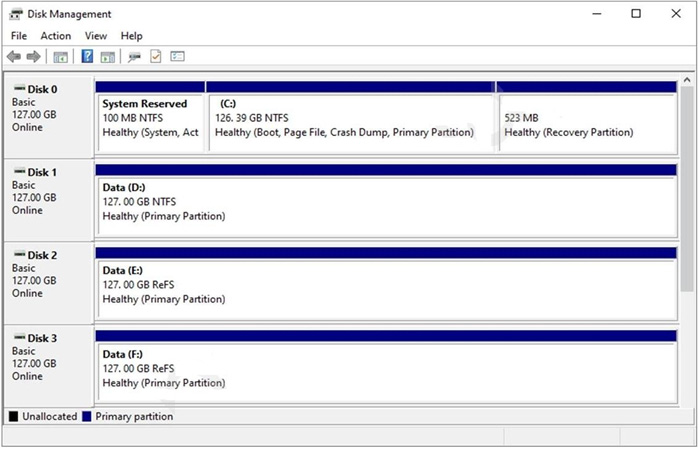
Server4 has the disk configurations shown in the following exhibit.

Virtualization Infrastructure

The contoso.com domain has the Hyper-V failover clusters shown in the following table.

Technical Requirements

Contoso identifies the following technical requirements:

1. Promote a new server named DC4 that runs to Windows Server 2022 to a domain controller.
2. Replicate the virtual machines from Cluster2 to an Azure Recovery Services vault.
3. Centrally manage performance alerts in Azure for all the domain controllers.
4. Ensure that User1 can recover objects from the Active Directory Recycle Bin.
5. Migrate Share1 to Server2, including all the share and folder permissions.
6. Back up Server4 and all data to an Azure Recovery Services vault.
7. Use Hyper-V Replica to protect the virtual machines in Cluster3.
8. Implement BitLocker Drive Encryption (BitLocker) on Server4.
9. Whenever possible, use the principle of least privilege.

Question 9 Hotspot

HOTSPOT

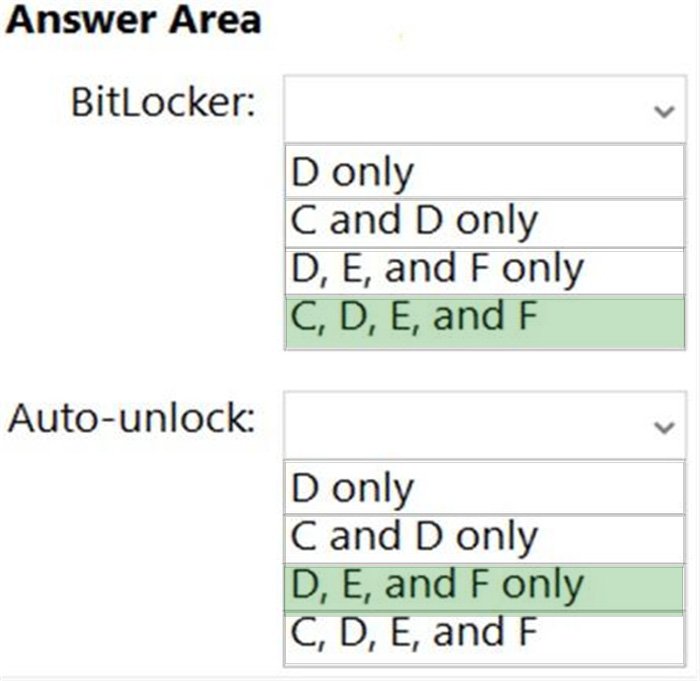
You need to configure BitLocker on Server4.

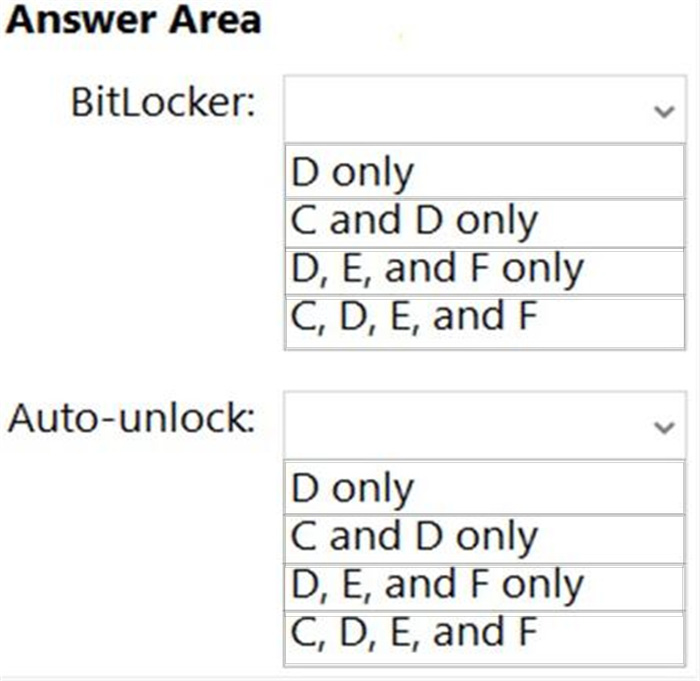
On which volumes can you turn on BitLocker, and on which volumes can you turn on auto-unlock? To answer, select the appropriate options in the answer area.

NOTE: Each correct selection is worth one point.

Question diagram
Show answer and explanation
Correct answer diagram
Explanation

References:
https://docs.microsoft.com/en-us/windows-server/storage/refs/refs-overview
https://docs.microsoft.com/en-us/powershell/module/bitlocker/enable-bitlockerautounlock?view=windowsserver2022-ps

Question 10 Single choice

You have two Azure virtual machines that run Windows Server.
You plan to configure a failover cluster and use an Azure Storage account as a cloud witness.
The solution must provide zone-level resiliency.

Which storage redundancy option should you use?

  1. A

    Locally-redundant storage (LRS)

  2. B

    Zone-redundant storage (ZRS)

  3. C

    Geo-redundant storage (GRS)

  4. D

    Geo-zone-redundant storage (GZRS)

Show answer and explanation

Correct answer: B