77-888 Exam Details
-
Exam Code
:77-888 -
Exam Name
:Excel 2010 Expert -
Certification
:Microsoft Certifications -
Vendor
:Microsoft -
Total Questions
:62 Q&As -
Last Updated
:Jul 14, 2026
Microsoft 77-888 Online Questions & Answers
-
Question 51:
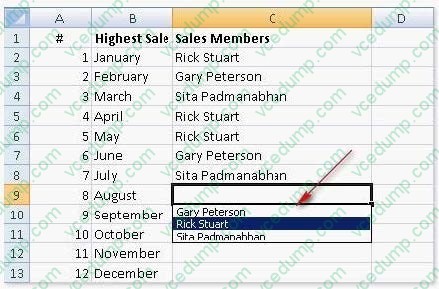
Rick works as an Office Assistant for Tech Perfect Inc. He is creating a report through Microsoft Excel 2010. He wants to fill the active cell with the content of the adjacent cell. Mark the option that he will choose to accomplish the task.
Hot Area:

-
Question 52:
You work as a Sales Manager for Rainbow Inc. You are working on a report in a worksheet in Excel 2010.
You want to insert flow-chart in the sheet. Mark the option that you will choose to insert flow- chart symbols in the report. Explanation: In order to accomplish the task, you will have to choose the Shapes option. Shapes are simple objects
provided by Microsoft Office to add them to a document. A single shape or combined multiple shapes can be inserted in the document. The Office includes simple shapes, such as lines, basic geometric shapes, arrows, equation shapes, flowchart shapes, stars, banners, and callouts. Users can add text, bullets, numbering, and Quick Styles to these shapes after inserting them in the document. Take the following steps to add a shape in a document:
Hot Area:

-
Question 53:
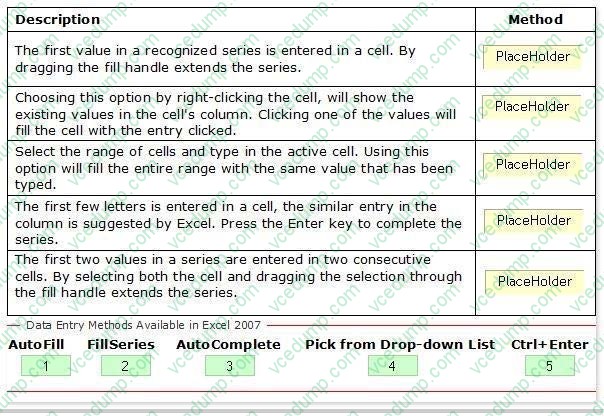
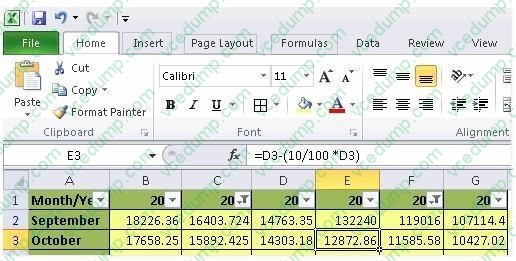
You work as a Help Desk Technician for Net Perfect Inc. You use Excel 2010 to create different reports for your company. Drag and drop the appropriate methods for efficient data entry in front of their descriptions.
Select and Place:
-
Question 54:
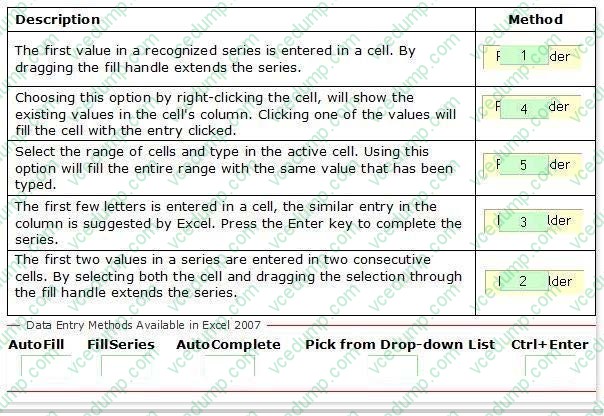
You work as a technician in Tech Perfect Inc. The Network Administrator of the company installs the Microsoft Excel 2010 application on the network. You open the application and see various changes in Excel 2010. You have to open an
existing worksheet through the application.
You are unable to find the Office button.
Mark the option that you will click to accomplish the task.
Hot Area:
-
Question 55:
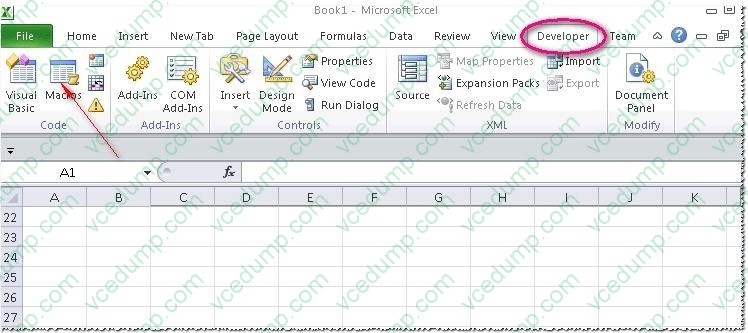
Rick works as an Office Assistant for Tech Perfect Inc. He is creating a user form through Microsoft Excel 2010. While creating forms for a number of users, he is required to repeat some of the actions multiple times. It is a very time consuming process. To resolve the issue, he has created a macro to record the sequence of actions to perform a certain task. Now, he wants to run the macro to play those exact actions back in the same order. Which of the following steps will Rick take to accomplish the task?
Each correct answer represents a part of the solution. Choose all that apply.
A. Click on the 'Macros' icon in the 'Developer' tab under the 'Code' category to run a Macro.
B. The Macro will be run in any worksheet of the Workbook.
C. Put the workbook in a trusted location.
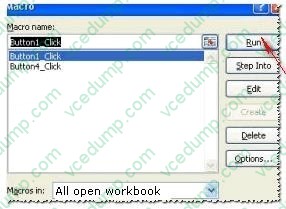
D. The Macro dialogue box appears on the screen which contains a list of Macros in it. Select the Macro to run and click the Run button.
E. Run the created Macro by using the shortcut key specified while creating the Macro. -
Question 56:
You work as an Office Assistant for Blue Well Inc. The company has a Windows-based network. Some employees have changed some data in the worksheet of the company. You want to identify changes that were made to the data in the workbook and then take a decision whether to accept or reject those changes. For this purpose, it is required to access and use the stored change history. Which of the following will you use to accomplish the task? Each correct answer represents a complete solution. Choose all that apply.
A. History tracking
B. Onscreen highlighting
C. Slicer-enabled highlighting
D. Reviewing of changes -
Question 57:
Rick works as an Office Assistant for Tech Perfect Inc. He is creating a report through Microsoft Excel 2010. Rick wants to trace the project with the actual requirements. For this purpose, he is required to compare month to month, actual v budget, quarter to quarter, year to year variances. Which of the following will Rick use to accomplish the task?
A. Evaluate Formula
B. Accounting template
C. Form control
D. Trust Center -
Question 58:
You work as an Office Assistant for Tech Tree Inc. You have created a report in a workbook in Microsoft Excel 2010. You want to summarize a large amount of data to analyze numerical data and to answer unexpected questions about your data in the Business Intelligence (BI) report that you are working with. For this purpose, you are required to create a PivotTable. Which of the following steps will you take to accomplish the task?
Each correct answer represents a part of the solution. Choose all that apply.
A. Click OK.
B. Choose Select a table or range under Choose the data that you want to analyze.
C. Select the Macro-enabled checkbox in the Insert Security dialog box, and then click OK.
D. Click PivotTable or click the arrow below PivotTable, and then click PivotTable in the Tables group on the Insert tab.
E. Click a cell in the cell range that contains data for using worksheet data as the data source. -
Question 59:
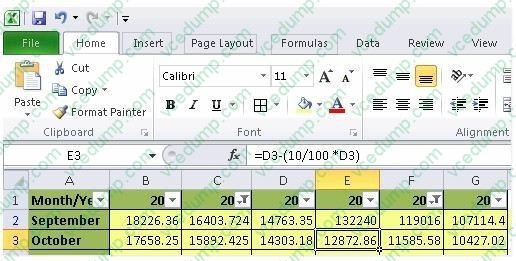
You work as an Office Assistant for Peach Tree Inc. Your responsibility includes creating sales incentive report of all sales managers for every quarter. You are using Microsoft Excel to create a worksheet for preparing the report. You have
inserted the sales figures of all sales managers as shown in the image given below:
You have to calculate the first quarter incentives for all sales managers. The incentive percentage (provided in cell B3) is fixed for all sales managers. The incentive will be calculated on their total first quarter sales. You have to write a formula
in the cell F8. Then you will drag the cell border to the cell F12 to copy the formula to all the cells from F8 to F12. In the first step, you select the F8 cell. Which of the following formulas will you insert to accomplish the task?
A. =andBand3/100 * E8
B. =B3/100 * E8
C. =B3/100 * andEand8
D. =$B$3/100 * E8
E. =B3/100 * $E$8 -
Question 60:
You work as an Office Assistant for Blue Well Inc. The company has a Windows-based network. You want to make a slicer available for use in another PivotTable. Which of the following steps will you take to accomplish the task?
Each correct answer represents a part of the solution. Choose all that apply.
A. Click the Insert Slicer arrow, and then click Slicer Connections on the Options tab in the Sort and Filter group.
B. In the Slicer Connections dialog box, clear the check box of any PivotTable fields for which you want to disconnect a slicer.
C. In the PivotTable Connections dialog box, select the check box of the PivotTables in which you want the slicer to be available.
D. Click the slicer that you want to share in another PivotTable.


Related Exams:
-
62-193
Technology Literacy for Educators -
70-243
Administering and Deploying System Center 2012 Configuration Manager -
70-355
Universal Windows Platform – App Data, Services, and Coding Patterns -
77-420
Excel 2013 -
77-427
Excel 2013 Expert Part One -
77-725
Word 2016 Core Document Creation, Collaboration and Communication -
77-726
Word 2016 Expert Creating Documents for Effective Communication -
77-727
Excel 2016 Core Data Analysis, Manipulation, and Presentation -
77-728
Excel 2016 Expert: Interpreting Data for Insights -
77-731
Outlook 2016 Core Communication, Collaboration and Email Skills
Tips on How to Prepare for the Exams
Nowadays, the certification exams become more and more important and required by more and more enterprises when applying for a job. But how to prepare for the exam effectively? How to prepare for the exam in a short time with less efforts? How to get a ideal result and how to find the most reliable resources? Here on Vcedump.com, you will find all the answers. Vcedump.com provide not only Microsoft exam questions, answers and explanations but also complete assistance on your exam preparation and certification application. If you are confused on your 77-888 exam preparations and Microsoft certification application, do not hesitate to visit our Vcedump.com to find your solutions here.