77-888 Exam Details
-
Exam Code
:77-888 -
Exam Name
:Excel 2010 Expert -
Certification
:Microsoft Certifications -
Vendor
:Microsoft -
Total Questions
:62 Q&As -
Last Updated
:Jul 14, 2026
Microsoft 77-888 Online Questions & Answers
-
Question 11:
You work as an Office Assistant for Blue Well Inc. The company has a Windows-based network. You want to get the trend of the Business data range. For this purpose, you want to use trendlines in the chart. Which of the following steps will you take to apply the trendlines in the chart? Each correct answer represents a part of the solution. Choose all that apply.
A. Clear the check box of any Trendline fields to disconnect a slicer.
B. Select the type that you want from Trendline options.
C. Click the Insert Trendline arrow, and then click Trendline Connections on the Options tab in the Sort and Filter group.
D. Select a chart and then navigate to the Chart Tools Layout tab. -
Question 12:
You work as an Office Assistant for Tech Perfect Inc. You are working in the spreadsheet of the company's high selling products. You want to find out the matching values. You get an unexpected error that when you attempt to look up or match a lookup_value within an array, Excel is not able to recognize the matching value. Which of the following steps will you take to resolve the problem? Each correct answer represents a part of the solution. Choose all that apply.
A. Remove the unseen spaces at the start or end of the first Macro cell.
B. Delete the column having the TRIM function.
C. Copy the contents of the new column and paste them on the top of the original column by using paste > special > values sequence.
D. Create a new column subsequent to the one with the additional spaces in it.
E. Use the TRIM function in the new column. -
Question 13:
You work as an Office Assistant for Tech Perfect Inc. You are working in the spreadsheet of the company's high selling products. You are trying to intersect two ranges that do not intersect each other. Which of the following errors will be occurred in this situation?
A. #VALUE!
B. #NAME?
C. #NULL!
D. #DIV/0! -
Question 14:
You work as an Office Assistant for Media Perfect Inc. You have created a spreadsheet in Excel 2010 and shared it with the other employees of the company. You want to select password protection and select options to prevent other employees from changing, moving, and deleting important data.
Which of the following options will you choose to accomplish the task?
A. Mark as Final
B. Protect Current Sheet
C. Encrypt with Password
D. Protect Workbook Structure -
Question 15:
Rick works as an Office Assistant for Tech Perfect Inc. The company has a Windows-based network. Rick is creating a project through Microsoft Excel 2010. The project on which he is working has 98 project tasks and 57 team members. Rick wants to check the progress of his project quickly and easily. Which of the following will Rick use to accomplish the task?
A. Gantt Chart Template
B. Form control
C. Trust Center
D. Accounting template -
Question 16:
You work as an Office Assistant for Blue well Inc. The company has a Windows-based network. You want to create a VBA procedure for the open event of a workbook. You are at the step of adding the following lines of code to the procedure: "Private Sub Workbook_Open() MsgBox Time Worksheets("Sheet2").Range("A2").Value = Time End Sub" Which of the following are the next steps that you will take to accomplish the task? Each correct answer represents a part of the solution. Choose all that apply.
A. Under Macro Settings in the Macro Settings category, click Enable all macros, and then click OK.
B. Switch to Excel and save the workbook with the .xslm extension as a macro-enabled workbook and close it.
C. Reopen the workbook.
D. Click OK in the message box. -
Question 17:
Rick works as an Office Assistant for Tech Perfect Inc. The company has a Windows-based network. He is creating a form through Microsoft Excel 2010. He wants to enable worksheet forms to satisfy the flexible design requirements and to customize their appearance, behavior, fonts, and other characteristics. Which of the following will Rick use to accomplish the task?
A. Form control
B. Accounting template
C. Trust Center
D. ActiveX control -
Question 18:
You work as an Office Assistant for Tech Tree Inc. You have created a report in a workbook in Microsoft Excel 2010. You have included various subtotals in a worksheet in the report to verify data accuracy. You want to remove all subtotals from the sheet before you send it to your manager.
Which of the following steps will you take to accomplish the task with the least administrative effort?
A. Select all the subtotals. From the shortcut menu, click the Remove All Subtotals option.
B. Hide the rows containing subtotals.
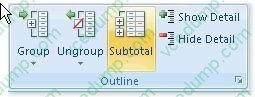
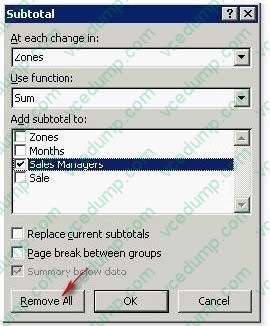
C. Open the Subtotal dialog box by clicking the Subtotal option in the Outline group on the Data tab. Click the Remove All button.
D. Delete all the rows containing subtotals. -
Question 19:
You work as an Office Assistant for Tech Perfect Inc. You are working in the spreadsheet of the company's high selling products. You input a formula for calculating the monthly sell of a particular product but your Excel cell shows a string of # symbols instead of returning a value as shown below:
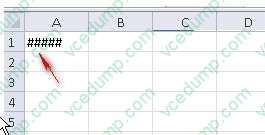
Which of the following are the reasons that are causing the above problem? Each correct answer represents a complete solution. Choose all that apply.
A. You are inserting a new column, next to a column that is already formatted as text.
B. The cell is not wide enough for displaying the calculated value.
C. The lookup_value or the array you are searching resides in a cell containing unseen spaces at the start or end of that cell.
D. Excel is trying to show the contents of the cell as a date or time stored as positive numeric values within Excel, but the cell contains a negative value. -
Question 20:
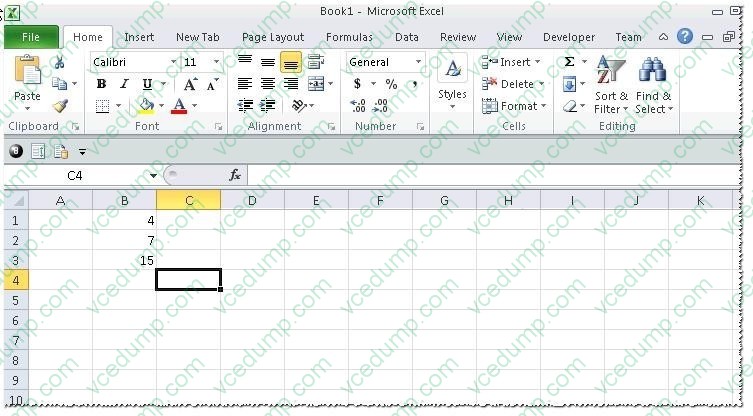
You work as an Office Assistant for Tech Perfect Inc. You are working in a spreadsheet as shown below:
You want to use Excel Transpose Function for copying the contents of cells B1:B3 into cells
A5:C5.
You simply type '=TRANSPOSE( B1:B3 )' into the cells A5:C5. It displays the Excel #VALUE! error message because the cells are working independently and the function will not work for each individual cell. Therefore, it is required to make
the cells A5:C5 work together as an ARRAY. For this purpose, you are required to use an array formula. Which of the following steps will you take to input Excel array formulas in the spreadsheet?
Each correct answer represents a part of the solution. Choose all that apply.
A. Type the array formula into the first cell.
B. Highlight the range of cells that you want to use as an input in his array formula.
C. Press CTRL-SHIFT-Tab to remove the error message.
D. Press CTRL-SHIFT-Enter.
Related Exams:
-
62-193
Technology Literacy for Educators -
70-243
Administering and Deploying System Center 2012 Configuration Manager -
70-355
Universal Windows Platform – App Data, Services, and Coding Patterns -
77-420
Excel 2013 -
77-427
Excel 2013 Expert Part One -
77-725
Word 2016 Core Document Creation, Collaboration and Communication -
77-726
Word 2016 Expert Creating Documents for Effective Communication -
77-727
Excel 2016 Core Data Analysis, Manipulation, and Presentation -
77-728
Excel 2016 Expert: Interpreting Data for Insights -
77-731
Outlook 2016 Core Communication, Collaboration and Email Skills
Tips on How to Prepare for the Exams
Nowadays, the certification exams become more and more important and required by more and more enterprises when applying for a job. But how to prepare for the exam effectively? How to prepare for the exam in a short time with less efforts? How to get a ideal result and how to find the most reliable resources? Here on Vcedump.com, you will find all the answers. Vcedump.com provide not only Microsoft exam questions, answers and explanations but also complete assistance on your exam preparation and certification application. If you are confused on your 77-888 exam preparations and Microsoft certification application, do not hesitate to visit our Vcedump.com to find your solutions here.