77-888 Exam Details
-
Exam Code
:77-888 -
Exam Name
:Excel 2010 Expert -
Certification
:Microsoft Certifications -
Vendor
:Microsoft -
Total Questions
:62 Q&As -
Last Updated
:Jul 14, 2026
Microsoft 77-888 Online Questions & Answers
-
Question 21:
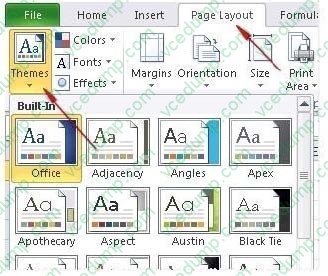
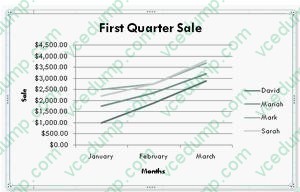
You work as a Sales Manager for Rainbow Inc. Your responsibility includes preparing sales report of the Sales department. You use Microsoft Excel 2010 to prepare sales reports. You have created a quarterly sales report of the department. After entering required data and inserting charts, you want to give a professional look to the document. You want to produce the document with soothing graphic effects, soft fonts, and light colors. Which of the following steps will you take to accomplish the task with least administrative burden?
A. Use the SmartArt option.
B. Create a new workbook through a template. Copy all data and charts of the report to the new workbook.
C. Choose one of the pre-built themes.
D. Select all the text of the document. Change font style to Verdana and font color to light gray. Use vibrant colors for charts. -
Question 22:
Which of the following steps will you take to merge copies of a shared workbook? Each correct answer represents a part of the solution. Choose all that apply.
A. In the Select Files to Merge into Current Workbook dialog box, click a copy of the workbook containing changes to be merged, and then click OK.
B. Click Compare and Merge Workbooks on Quick Access Toolbar.
C. Open the copy of the shared workbook to merge the changes.
D. Save the workbook if prompted.
E. Add Compare and Merge Workbooks.
F. Click Compare and Merge Workbooks on Macro Enabled Access Toolbar. -
Question 23:
Which of the following is used to display a trend based on adjacent data in a clear and compact graphical representation by taking up a small amount of space?
A. Trendline
B. Line chart
C. Sparkline
D. Backstage view -
Question 24:
You work as an Office Assistant for Tech Perfect Inc. You are working in a spreadsheet. You are facing a problem that when you type in a function and press Enter, the cell shows the function as you typed it, instead of returning the function's value as shown below:
Which of the following is the reason that is causing the above problem?
A. You are inserting a new column, next to a column that is already formatted as text.
B. Excel is trying to reference an invalid cell.
C. You are inserting a new column, next to a column containing Dates or Times.
D. The lookup_value or the array you are searching resides in a cell containing unseen spaces at the start or end of that cell. -
Question 25:
You work as an Office Manager for Blue Well Inc. The company has a Windows-based network. You have a formula that uses one or two variables or multiple formulas that all use one common variable. You want to examine a range of possibilities at a glance. Which of the following will you use to accomplish the task?
A. Goal Seek
B. Solver add-in
C. Data table
D. Scenario -
Question 26:
You work as an Office Assistant for Blue Well Inc. The company has a Windows-based network. You want to quickly filter data in a PivotTable report without opening drop-down lists to find the items that you want to filter. For this purpose, you are required to use a slicer. Which of the following are the ways that you can use to accomplish the task? Each correct answer represents a complete solution. Choose all that apply.
A. Create a copy of a slicer connected with the PivotTable.
B. Create a slicer connected with the PivotTable.
C. Create a slicer by disabling Macros associated with the PivotTable.
D. Use an existing slicer connected with another PivotTable. -
Question 27:
You work as an Office Assistant for Media Perfect Inc. You are creating a report in Microsoft Excel 2010. The report worksheet will include the sales made by all the sales managers in the month of January.
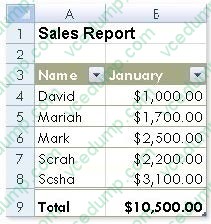
In the worksheet, you are required to place a pictorial representation displaying the percentage of total sales made by each sales manager in January. Which of the following charts will you use to accomplish the task? A.Bar
B. Line
C. Column
D. Pie -
Question 28:
You work as an Office Manager for Blue Well Inc. The company has a Windows-based network. You want to change values in cells to observe the way in which those changes are affecting the outcome of formulas in the worksheet. Which of the following will you use to accomplish the task?
A. Form control
B. Trust Center
C. Accounting template
D. What-if analysis -
Question 29:
You work as an Office Assistant for Blue Well Inc. The company has a Windows-based network. You want to filter data in a PivotTable report without opening drop-down lists to find the items that you want to filter. For this purpose, you are using a slicer. After filtering the data, you want to delete the slicer. Which of the following steps can you take to accomplish the task?
Each correct answer represents a complete solution. Choose all that apply.
A. Click the slicer that you want to delete on the Options tab in the Slicer type group.
B. Click the Macro setting, and then delete the slicer from the Macro-enabled slicers list.
C. Click the slicer, and then press Delete.
D. Right-click the slicer, and then click Remove . -
Question 30:
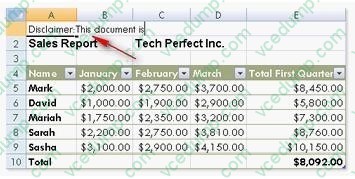
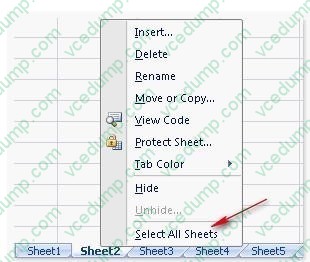
Rick works as a Sales Manager for Tech Perfect Inc. He is creating a report in Excel 2010. He has entered data in five worksheets in a workbook. He wants to enter
a disclaimer message in the A1 cell of each sheet in the workbook as shown in the image given below:
Which of the following is the easiest way to accomplish the task?
A. Write a disclaimer message in the A1 cell of the first sheet. Copy the disclaimer message and paste it on the remaining sheets.
B. Write a disclaimer message in the A1 cell of the first sheet. In the other sheets, insert a formula that points to the A1 cell of the first worksheet.
C. Select all the five sheets. Click the first sheet. Write a disclaimer message in the A1 cell of the active sheet.
D. Select all the five sheets. Write a disclaimer message in the A1 cell of the active sheet.
Related Exams:
-
62-193
Technology Literacy for Educators -
70-243
Administering and Deploying System Center 2012 Configuration Manager -
70-355
Universal Windows Platform – App Data, Services, and Coding Patterns -
77-420
Excel 2013 -
77-427
Excel 2013 Expert Part One -
77-725
Word 2016 Core Document Creation, Collaboration and Communication -
77-726
Word 2016 Expert Creating Documents for Effective Communication -
77-727
Excel 2016 Core Data Analysis, Manipulation, and Presentation -
77-728
Excel 2016 Expert: Interpreting Data for Insights -
77-731
Outlook 2016 Core Communication, Collaboration and Email Skills
Tips on How to Prepare for the Exams
Nowadays, the certification exams become more and more important and required by more and more enterprises when applying for a job. But how to prepare for the exam effectively? How to prepare for the exam in a short time with less efforts? How to get a ideal result and how to find the most reliable resources? Here on Vcedump.com, you will find all the answers. Vcedump.com provide not only Microsoft exam questions, answers and explanations but also complete assistance on your exam preparation and certification application. If you are confused on your 77-888 exam preparations and Microsoft certification application, do not hesitate to visit our Vcedump.com to find your solutions here.