77-888 Exam Details
-
Exam Code
:77-888 -
Exam Name
:Excel 2010 Expert -
Certification
:Microsoft Certifications -
Vendor
:Microsoft -
Total Questions
:62 Q&As -
Last Updated
:Jul 14, 2026
Microsoft 77-888 Online Questions & Answers
-
Question 41:
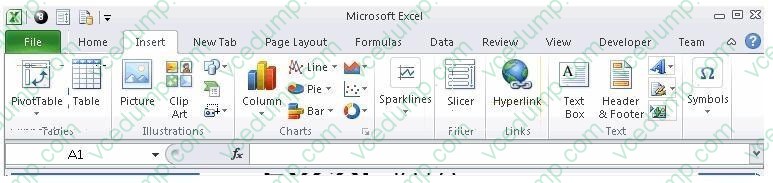
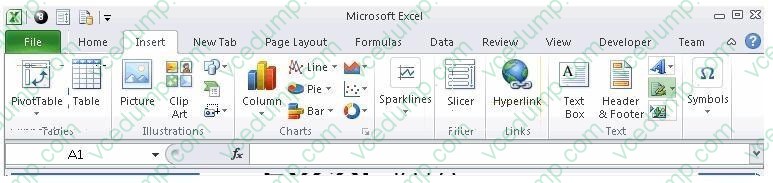
You work as an Office Assistant for Blue Well Inc. The company has a Windows-based network. You want to insert a signature line that specifies the individual who must sign. Mark the option that you will choose to accomplish the task.
Hot Area:
-
Question 42:
You work as an Office Assistant for Blue Well Inc. The company has a Windows-based network. You want to filter data in a PivotTable report without opening drop-down lists to find the items that you want to filter. For this purpose, you are using a slicer. After filtering the data, you want to disconnect the slicer. You have clicked anywhere in the PivotTable report. Which of the following steps will you take next to accomplish the task?
Each correct answer represents a part of the solution. Choose all that apply.
A. Clear the check box of any PivotTable fields for which you want to disconnect a slicer.
B. Right-click the slicer, and then click Remove .
C. Click the Insert Slicer arrow, and then click Slicer Connections on the Options tab in the Sort and Filter group.
D. Click the slicer, and then press Delete. -
Question 43:
You work as an Office Assistant for Blue well Inc. You want to record a macro and save it with the name "Auto_Open" so that the macro will run whenever you open the workbook containing the macro. While doing so, you observe that the
Auto_Open macro fails every time. Which of the following are the causes of this?
Each correct answer represents a complete solution. Choose all that apply.
A. The default workbook or a workbook loaded from the XLStart folder is opened before running the macro.
B. The workbook is opened programmatically using the Open method.
C. The workbook where a user wants to save the Auto_Open macro already contains a VBAprocedure in its Open event.
D. The workbook is based on the record button that is disabled by default before running the Auto_Open macro. -
Question 44:
You work as a Sales Manager for Maini Industries. Your company manufactures and sells construction equipment. You have to create a report that will show the highest selling items of each month. The report will be in the following format:
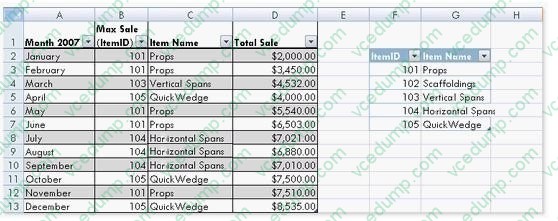
In a workbook, you create a table named Item_table as shown below:
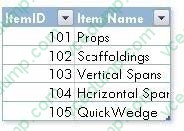
You fill in the required entries in the workbook.
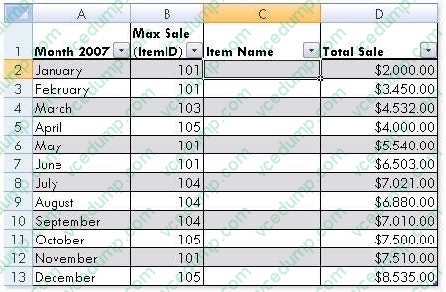
For the third column of the sheet, you want to use formulas to fill in the values. You want the cells in the third column to get automatically filled with the names corresponding to ItemID in the second column. You want the exact values to be filled in the column. You select the C2 cell in the third column.
Which of the following formulas will you enter in order to accomplish the task?
A. =VLOOKUP(B2,Item_table,2,FALSE)
B. =VLOOKUP(B2,Item_table,2,TRUE)
C. =VLOOKUP(2,Item_table,B2,FALSE)
D. =VLOOKUP(2,Item_table,B2,TRUE) -
Question 45:
You work as a Help Desk Technician for Dreams Unlimited Inc. Martha, a Sales Manager, is creating a sales report in Microsoft Excel. The report contains many worksheets. Martha has used many formulas in her report. She wants to monitor a cell which contains a formula. The formula refers to many other cells that are located in different worksheets in the report. She wants to know the effects on the cell when the values in different sheets change. She requests that you help her out to accomplish the task. Which of the following steps would you suggest she take in order to accomplish the task?
A. Click the New Window option in the Window group on the View tab. Click the Arrange All option in the Window group on the View tab. Select the Vertical option.
B. Select the cell which is to be monitored. On the Formulas tab in the Formula Auditing group, click Watch Window. Click Add Watch.
C. Click the New Window option in the Window group on the View tab. Click the Arrange All option in the Window group on the View tab. Select the Cascade option.
D. Select the cell which is to be monitored. On the Formulas tab in the Formula Auditing group, click Evaluate Formula. -
Question 46:
You work as an Office Assistant for Tech Tree Inc. You have created a report in a workbook in Microsoft Excel 2010. You have a number of PivotTables in a single report. You want to apply the same filter to all of those PivotTables. For this purpose, you are required to create a slicer in one PivotTable and share it with other PivotTables. Which of the following steps will you take to accomplish the task? Each correct answer represents a part of the solution. Choose all that apply.
A. In the Insert Slicers dialog box, select the check box of the PivotTable fields for which you want to create a slicer.
B. Click Insert Slicer in the Sort and Filter group on the Options tab.
C. Hold down CTRL, and then click the items on which you want to filter.
D. Select the Macro enabled checkbox of the PivotTable fields for which you want to create a slicer in the Insert Security dialog box and then click OK.
E. Click anywhere in the PivotTable report for which you want to create a slicer. -
Question 47:
Rick works as an Office Assistant for Tech Perfect Inc. The company has a Windows-based network. Rick wants to display data series, categories, data markers, and axes in the report. Which of the following actions will Rick take to accomplish the task?
A. He will use stand-alone slicers.
B. He will create a PivotTable report.
C. He will configure form controls.
D. He will create a PivotChart report. -
Question 48:
Rick works as an Office Assistant for Tech Perfect Inc. He is creating a report through Microsoft Excel 2010. Rick wants to interact with cell data but his computer does not contain VBA code and few features of his computer are still Excel 5. 0 features. Which of the following will Rick use to accomplish the task?
A. Accounting template
B. Trust Center
C. Form control
D. Evaluate Formula -
Question 49:
Rick works as an Office Assistant for Tech Perfect Inc. The company has a Windows-based network.
Rick has to perform the following tasks:
Summarize large amounts of data. Analyze numeric data.
Answer unexpected questions about data.
Which of the following actions will Rick take to accomplish the task?
A. He will create the accounting template.
B. He will use stand-alone slicers.
C. He will create a PivotTable report.
D. He will configure form controls. -
Question 50:
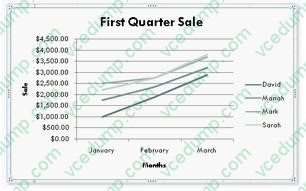
You work as an Office Assistant for Blue Well Inc. The company has a Windows-based network. You are creating a chart in Excel 2010. You want to show the slope of data points in the chart to know the trend of the Business Intelligence data range. Which of the following will you use to accomplish the task?
A. Trendline
B. Sparkline
C. Backstage view
D. Line charts
Related Exams:
-
62-193
Technology Literacy for Educators -
70-243
Administering and Deploying System Center 2012 Configuration Manager -
70-355
Universal Windows Platform – App Data, Services, and Coding Patterns -
77-420
Excel 2013 -
77-427
Excel 2013 Expert Part One -
77-725
Word 2016 Core Document Creation, Collaboration and Communication -
77-726
Word 2016 Expert Creating Documents for Effective Communication -
77-727
Excel 2016 Core Data Analysis, Manipulation, and Presentation -
77-728
Excel 2016 Expert: Interpreting Data for Insights -
77-731
Outlook 2016 Core Communication, Collaboration and Email Skills
Tips on How to Prepare for the Exams
Nowadays, the certification exams become more and more important and required by more and more enterprises when applying for a job. But how to prepare for the exam effectively? How to prepare for the exam in a short time with less efforts? How to get a ideal result and how to find the most reliable resources? Here on Vcedump.com, you will find all the answers. Vcedump.com provide not only Microsoft exam questions, answers and explanations but also complete assistance on your exam preparation and certification application. If you are confused on your 77-888 exam preparations and Microsoft certification application, do not hesitate to visit our Vcedump.com to find your solutions here.