70-687 Exam Details
-
Exam Code
:70-687 -
Exam Name
:Configuring Windows 8.1 -
Certification
:Microsoft Certifications -
Vendor
:Microsoft -
Total Questions
:266 Q&As -
Last Updated
:Dec 07, 2021
Microsoft 70-687 Online Questions & Answers
-
Question 31:
A company has client computers that run Windows 8. Finance department employees store files in the C:\Finance directory. File History on.
A Finance department employee attempts to restore a file to a previous version by using File History. The file is not available to restore.
You need to establish why the file history is not available and ensure that it is available in the future.
Which two actions should you perform? (Each correct answer presents part of the solution.
Choose two.)
A. Set the Protection Settings for drive C to On.
B. Restore the data files from the Previous
C. Versions tab located in the folder properties.
D. Review the File History backup log.
E. Move the file into a library. -
Question 32:
You administer a Windows 8.1 computer that runs Hyper-V. The computer hosts a virtual machine with multiple snapshots. The virtual machine uses one virtual CPU and 512 MB of RAM.
You discover that the virtual machine pauses automatically and displays the state as paused-critical
You need to identify the component that is causing the error.
Which component should you identify?
A. Insufficient hard disk space
B. Insufficient number of virtual processors
C. No virtual switch defined
D. Insufficient memory -
Question 33:
A company has Windows 8.1 client computers. A client computer named COMPUTER1 has a shared folder named Computer1 located in the user's Downloads folder. Computer1 is shared only with employees in the Marketing department.
All Marketing employees can connect to Computer1 from their client computers.
A Marketing employee is unable to connect to Computer1 from a legacy device that is not compatible with the Windows 8.1 default sharing settings. The device is able to connect to resources on other client computers.
You need to configure COMPUTER1 to allow the device to connect to Computer1.
Which setting should you enable?
A. Turn off network discovery
B. Use 128-bit encryption to help protect file sharing connections
C. Turn on sharing so anyone with network access can read and write files in the Public folders
D. Enable file sharing for devices that use 40- or 56-bit encryption
E. Turn off password protected sharing -
Question 34:
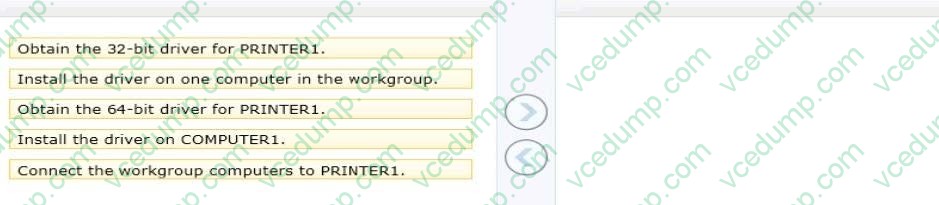
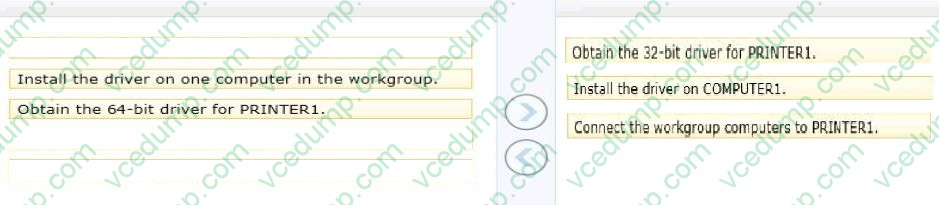
A local printer named PRINTER1 is shared from a client computer named COMPUTER1 that run a 64-bit version of Windows 8.
The workgroup contains client computers that run a 32-bit version of Windows 8.
Computers in the workgroup can't currently print to PRINTER1.
You need to ensure that the workgroup computers can print to PRINTER1.
Which three actions should you perform in sequence? (To answer, move the appropriate actions to the answer area and arrange the correct order.)
Select and Place:
-
Question 35:
You are setting up a Windows 8.1 computer.
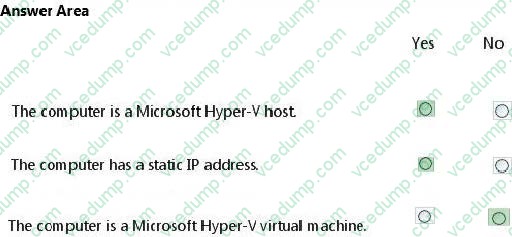
The computer's network connections are shown in the Network Connections exhibit (Click the Exhibit button.)
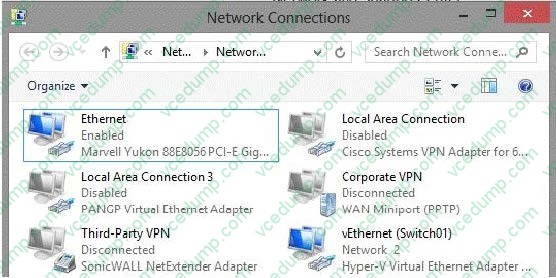
The computer's network settings are shown in the Network Settings exhibit. (Click the Exhibit button.)
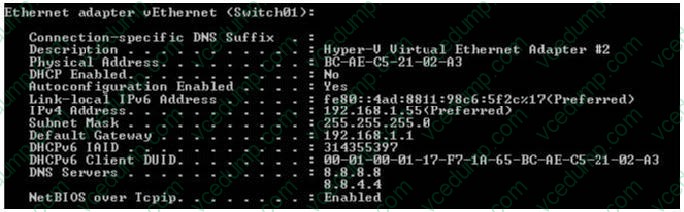
Advanced TCP/IP settings are shown in the Advanced TCP/IP Settings exhibit. (Click the Exhibit button,)
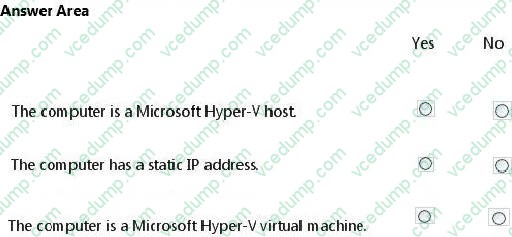
Consider each of the following statements. Does the information in the three screenshots support the inference as stated? Each correct selection is worth one point.
Hot Area:
-
Question 36:
You administer Windows 8 client computers in you company network.
You deploy an application that requires a specific Windows update to be installed on the computers.
You need to verify that the update is installed on specific computers.
What are two possible ways to achieve this goal? (Each correct answer presents a complete solution. Choose two)
A. Run The system update readiness tool
B. Open View updates history
C. Open the Check for updates applet
D. Run the DISM command with the /image and /get-packageinfoswiches
E. Run the DISM command with the /online and /get-packageinfoswiches -
Question 37:
You install Windows 8 on a client computer.
Several days later, you establish that the computer has been infected by malware. You are unable to establish when the computer was infected. You need to restore the client computer to full functionality.
What should you do?
A. Start the computer using the Last Known Good Configuration option.
B. Use the Refresh your PC without affecting your files function.
C. Start the computer in Safe Mode.
D. Use the Remove everything and install Windows function. -
Question 38:
A company has 10 client computers that run Windows 7. All client computers have the same hardware configuration. The hardware configuration includes custom hardware components manufactured by the company. The computer hard drives are configured as shown in the Disk Management window exhibit. (Click the Exhibit button.)
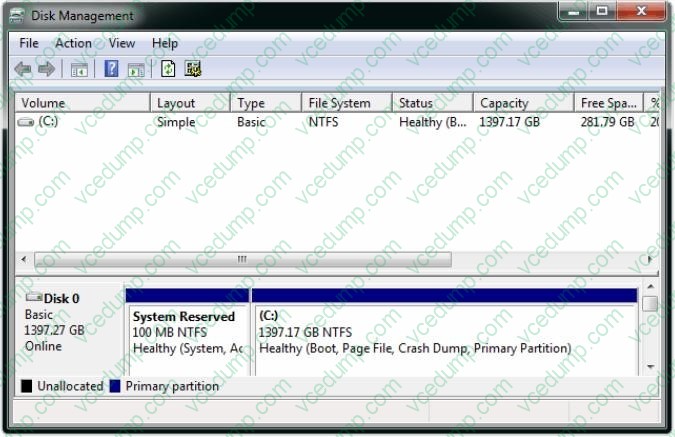
The company plans to upgrade the client computers to Windows 8.1.
You need to test hardware compatibility with Windows 8.1 on one client computer and leave the existing Windows 7 installation intact.
Which two actions should you perform? (Each correct answer presents part of the solution.
Choose two.)
A. Insert the Windows 8 installation media into the computer, and then run the Setup program.
B. Shrink the current hard drive partition, and then create a new partition for the Windows 8 installation.
C. Change the hard drive to a dynamic disk and create a new dynamic volume.
D. Start the computer from the Windows 8 installation media and then select the Custom installation option. -
Question 39:
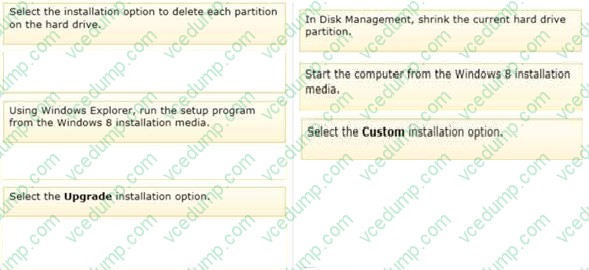
A computer currently runs a 64-bit version of Windows 7 Enterprise.
You need to deploy a 64-bit version of Windows 8 Pro to the computer. The new deployment must not affect the Windows 7 installation on the computer.
Which three actions should you perform in sequence? (To answer, move the appropriate actions from the list of actions to the answer area and arrange them in the correct order.)
Select and Place:

-
Question 40:
A company has an Active Directory Domain Services (AD DS) domain. The company has 20 Windows 8.1 tablet PCs that are connected to the domain.
You need to configure an authentication method that simplifies the process of logging on to the tablet PCs and maximizes the security.
Which authentication method should you configure?
A. Active Directory user account
B. PIN
C. Picture password
D. Microsoft account
Related Exams:
-
62-193
Technology Literacy for Educators -
70-243
Administering and Deploying System Center 2012 Configuration Manager -
70-355
Universal Windows Platform – App Data, Services, and Coding Patterns -
77-420
Excel 2013 -
77-427
Excel 2013 Expert Part One -
77-725
Word 2016 Core Document Creation, Collaboration and Communication -
77-726
Word 2016 Expert Creating Documents for Effective Communication -
77-727
Excel 2016 Core Data Analysis, Manipulation, and Presentation -
77-728
Excel 2016 Expert: Interpreting Data for Insights -
77-731
Outlook 2016 Core Communication, Collaboration and Email Skills
Tips on How to Prepare for the Exams
Nowadays, the certification exams become more and more important and required by more and more enterprises when applying for a job. But how to prepare for the exam effectively? How to prepare for the exam in a short time with less efforts? How to get a ideal result and how to find the most reliable resources? Here on Vcedump.com, you will find all the answers. Vcedump.com provide not only Microsoft exam questions, answers and explanations but also complete assistance on your exam preparation and certification application. If you are confused on your 70-687 exam preparations and Microsoft certification application, do not hesitate to visit our Vcedump.com to find your solutions here.