70-687 Exam Details
-
Exam Code
:70-687 -
Exam Name
:Configuring Windows 8.1 -
Certification
:Microsoft Certifications -
Vendor
:Microsoft -
Total Questions
:266 Q&As -
Last Updated
:Dec 07, 2021
Microsoft 70-687 Online Questions & Answers
-
Question 41:
You administer an installation of Windows 8.1 that runs as a virtual machine. The virtual machine has one 60-GB fixed size virtual hard disk with a single partition assigned as Volume C.
The virtual machine runs out of disk space. You increase the size of the virtual hard disk file to 200 GB to support an application demand for increased storage on Volume C.
You discover that Volume C is still 60 GB in File Explorer of the virtual machine.
You need to ensure that Volume C is configured to use 200 GB.
What should you do?
A. Configure the Virtual Disk type from fixed size to dynamic disk.
B. From Disk Management of the virtual hard disk, run the Extend the volume action task.
C. From Disk Management of the host computer, extend the Volume C.
D. Create a new storage space of Simple (no resiliency) type. -
Question 42:
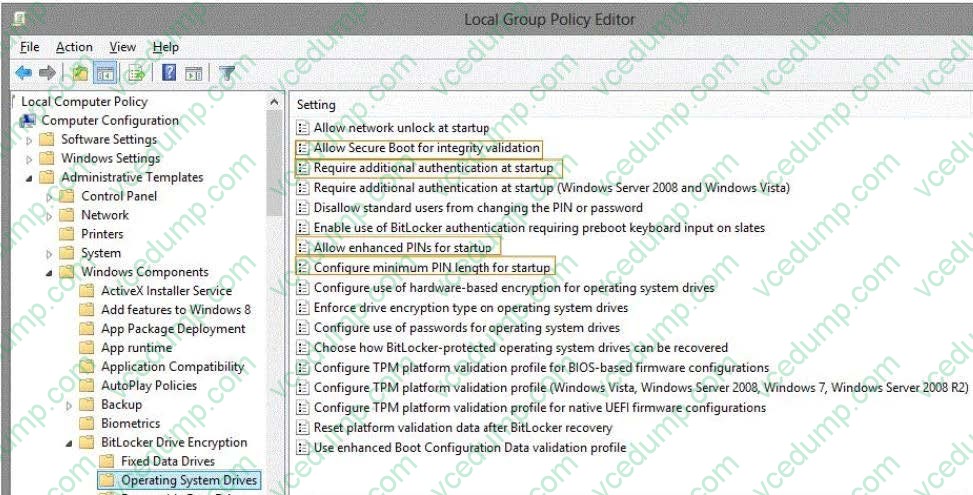
You administer Windows 8 computers in your company network. All computers include Windows 8 compatible Trusted Platform Module (TPM).
You configure a computer that will run a credit card processing application.
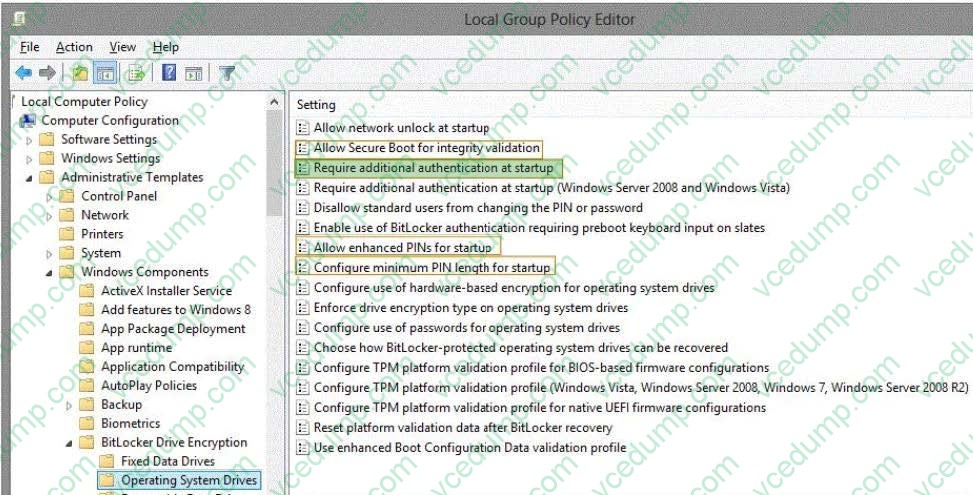
You need to ensure that the computer requires a user to enter a PIN code when starting the computer.
Which policy should you configure? (To answer, select the appropriate policy in the answer area.)
Hot Area:
-
Question 43:
A company has 100 client computers that run Windows 8.
You need to assign static IPv6 addresses to the client computers.
Which Windows Powershellcmdlet should you run?
A. Set-NetTCPSetting
B. Set-NetIPInterface
C. Set-NetlPv6Protocol
D. set-NetIPAddress -
Question 44:
A company has client computers that run Windows 8. Each employee has one client computer at the office. Some employees also have personal computers at home.
The company has applications that run only on Windows 8.
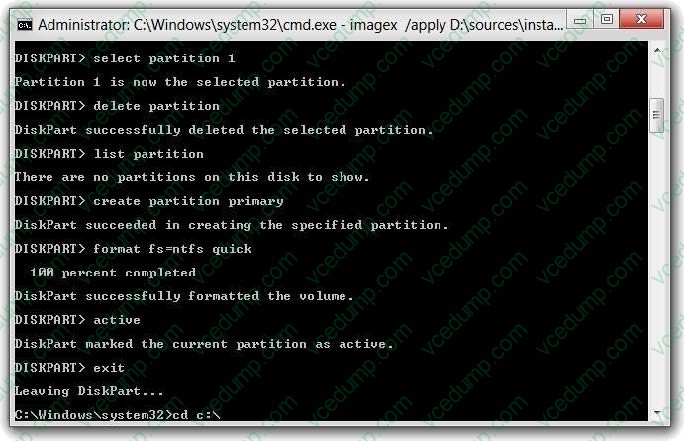
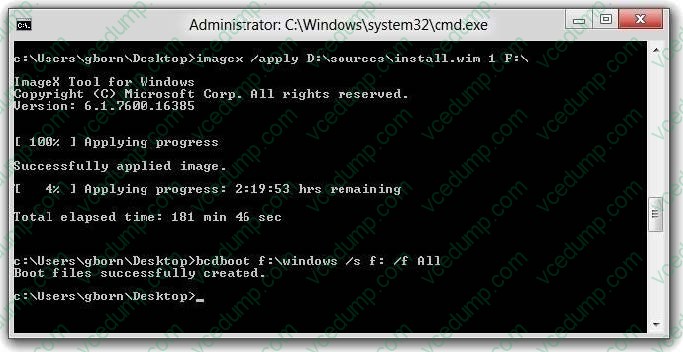
You need to deploy Windows To Go so that employees can run the applications on their home computers.
Which two command-line tools should you use? (Each correct answer presents part of the solution. Choose two.)
A. isoburn
B. BdeHdCfg
C. ImageX
D. bcd boot -
Question 45:
A computer that runs Windows 8 is configured with a 2 TB storage pool. The storage pool currently shows 1 TB of available space.
You try to save 100 MB of files to the storage drive. An error message states that the drive is full.
You need to make an additional 1 TB of space available in the storage pool.
What should you do?
A. Connect a 1 TB drive to the computer and add the new drive to the storage pool.
B. Connect a 1 TB drive to the computer and assign a drive letter to the new drive.
C. Set the resiliency type of the storage pool to Parity.
D. Set the logical size of the storage pool to 2 TB. -
Question 46:
A company has an Active Directory Domain Services (AD DS) domain. All client computers run Windows 7.
You plan to upgrade the client computers to Windows 8 Pro.
You need to choose the methods that do not require the manual entry of a product key during the upgrade.
Which two methods should you choose? (Each correct answer presents a complete solution. Choose two.)
A. Use the Windows 8 online upgrade tool.
B. Use Group Policy to assign the Windows 8 installation file to the client computers.
C. Use the Microsoft Deployment Toolkit.
D. Extract the contents of the Windows 8 .iso image file to a new shared folder and run the setup program from that folder. -
Question 47:
Two Windows 8.1 computers named COMPUTER1 and COMPUTER2.
You connect from COMPUTER1 to COMPUTER2 by using Remote Desktop. You are unable to copy any files between COMPUTER1 and COMPUTER2 during the Remote Desktop session.
You need to ensure that you can copy files between the computers during the Remote Desktop session.
What should you do?
A. On COMPUTER1, open Remote Desktop Connection and configure the Local devices and resources settings.
B. On COMPUTER2, add COMPUTER1 to the trusted hosts in Windows Remote Management (WinRM).
C. On COMPUTER2, open Remote Desktop Connection and configure the Local devices and resources settings.
D. On COMPUTER1, add COMPUTER2 to the trusted hosts in Windows Remote Management (WinRM). -
Question 48:
You are troubleshooting a computer that runs Windows 8. The computer is not joined to a domain.
You are unable to change any of the advanced Internet options, which are shown in the Advanced Internet Options exhibit. (Click the Exhibit button.)
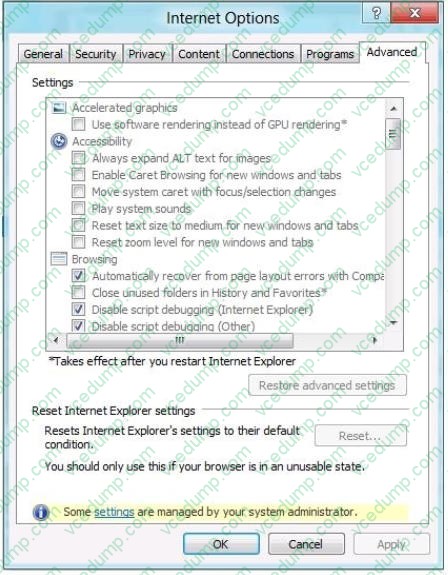
You need to ensure that you can change the advanced Internet options. Which tool should you use?
A. Credential Manager
B. Authorization Manager
C. Group Policy Object Editor
D. Ease of Access Center -
Question 49:
A company has Windows 8.1 client computers. All user data is stored locally. Each data file has a system access control list (SACL).
You need to ensure that an event is generated when a user modifies a local file.
Which audit policy setting should you configure?
A. Audit process tracking
B. Audit policy change
C. Audit object access
D. Audit privilege use -
Question 50:
A company has Windows 8.1 client computers. Employees use multiple Windows Store apps on the computers.
An employee installs a legacy app on his portable computer and then experiences problems with the computer. He installs two additional legacy apps and the problems increase.
You need to return the computer to its default state and retain all user data and Windows Store apps.
What should you do?
A. Run the Remove everything and install Windows feature.
B. Perform a system restore to the most recent restore point.
C. Use Windows 7 File Recovery to restore all Windows system files.
D. Run the Refresh your PC without affecting your files feature.
Related Exams:
-
62-193
Technology Literacy for Educators -
70-243
Administering and Deploying System Center 2012 Configuration Manager -
70-355
Universal Windows Platform – App Data, Services, and Coding Patterns -
77-420
Excel 2013 -
77-427
Excel 2013 Expert Part One -
77-725
Word 2016 Core Document Creation, Collaboration and Communication -
77-726
Word 2016 Expert Creating Documents for Effective Communication -
77-727
Excel 2016 Core Data Analysis, Manipulation, and Presentation -
77-728
Excel 2016 Expert: Interpreting Data for Insights -
77-731
Outlook 2016 Core Communication, Collaboration and Email Skills
Tips on How to Prepare for the Exams
Nowadays, the certification exams become more and more important and required by more and more enterprises when applying for a job. But how to prepare for the exam effectively? How to prepare for the exam in a short time with less efforts? How to get a ideal result and how to find the most reliable resources? Here on Vcedump.com, you will find all the answers. Vcedump.com provide not only Microsoft exam questions, answers and explanations but also complete assistance on your exam preparation and certification application. If you are confused on your 70-687 exam preparations and Microsoft certification application, do not hesitate to visit our Vcedump.com to find your solutions here.