70-687 Exam Details
-
Exam Code
:70-687 -
Exam Name
:Configuring Windows 8.1 -
Certification
:Microsoft Certifications -
Vendor
:Microsoft -
Total Questions
:266 Q&As -
Last Updated
:Dec 07, 2021
Microsoft 70-687 Online Questions & Answers
-
Question 21:
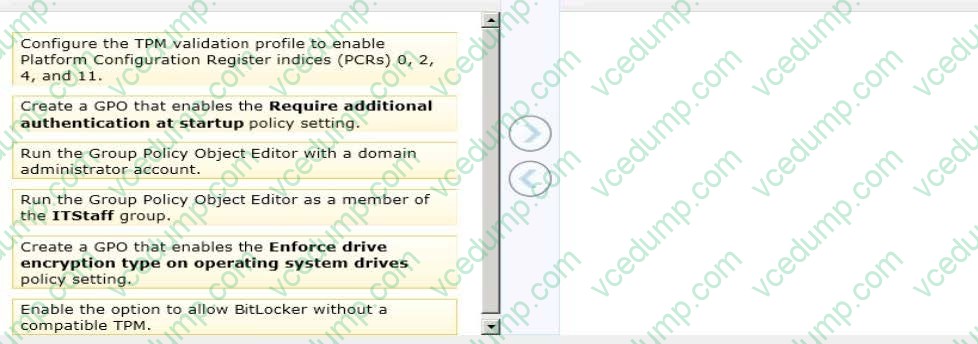
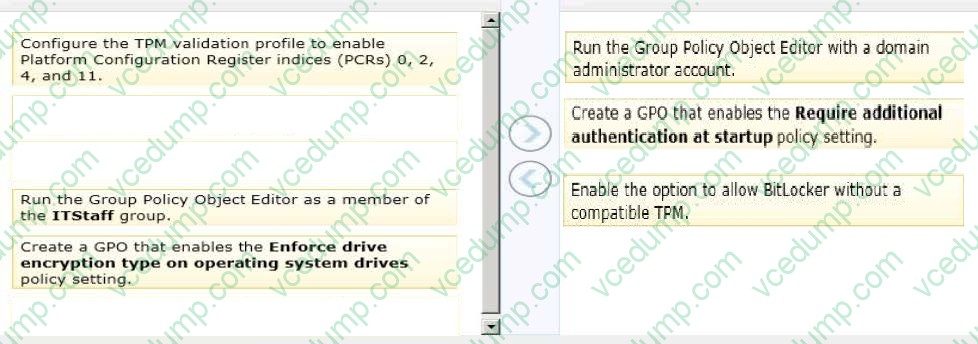
A company has an Active Directory Domain Services (AD DS) domain. All client computers run Windows 8. Some computers have a Trusted Platform Module (TPM) chip. Members of the ITStaff security group are part of the local Power Users group on each client computer.
You need to configure a single Group Policy object (GPO) that will allow Windows BitLocker Drive Encryption on all client computers by using the least amount of privilege necessary.
Which commands should you run? (To answer, drag the appropriate command or commands to the correct location or locations in the answer area. Commands may be used once, more than once, or not at all. You may need to drag the split bar between panes or scroll to view content.)
Select and Place:
-
Question 22:
A company is setting up a new branch office. You deploy 10 new Windows 8.1 64-bit client computers in the branch office.
The computers cannot connect to the Internet. You run the ipconfig command on one computer. The following output depicts a portion of the results.

You need to ensure that the computers can connect to the Internet. What should you do?
A. Deploy a Dynamic Host Configuration Protocol (DHCP) server. Configure all computers to use DHCP.
B. Deploy an Internet Information Services (IIS) server. Configure all computers to use IIS.
C. Deploy a Domain Name System (DNS) server. Configure all computers to use DNS.
D. Deploy a Windows Internet Name Service (WINS) server. Configure all computers to use WINS. -
Question 23:
You are a domain administrator for your company. Since the company's Windows 8.1 desktop computers are not backed up regularly, the company wants to enable folder redirection in order to move data from local desktops to network
storage.
You need to configure folder redirection on the domain so all existing desktops and any new desktops automatically apply the folder redirection settings.
What should you do?
A. Create a new Group Policy Object (GPO) and configure the folder redirection options to meet your company's requirements.
B. In computer management, create a task that is labeled Folder Redirection. Allow Folder Redirection to the specified path at named intervals.
C. Map a network drive from each local desktop, right-click Properties, and choose Folder Redirection with proper settings.
D. Sync your offline folder to the network location to ensure that backups are completed on the network. -
Question 24:
You administer desktop computers in your company network.
You are developing User State Migration Tool (USMT) procedures.
You need to ensure that the files located in C:\projects are included in the migration package.
What should you do?
A. Option A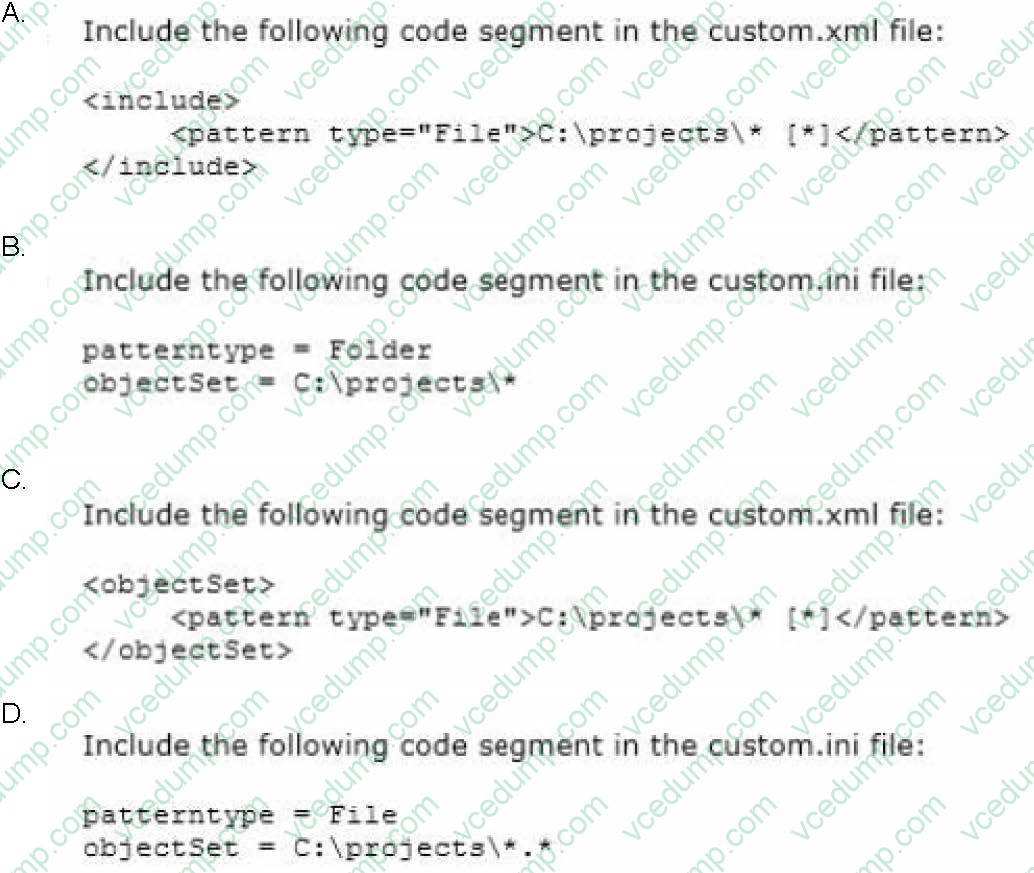
B. Option B
C. Option C
D. Option D -
Question 25:
A company has 100 client computers that run Windows 8. The client computers are members of a workgroup.
A custom application requires a Windows Firewall exception on each client computer.
You need to configure the exception on the client computers without affecting existing firewall settings.
Which Windows PowerShell cmdlet should you run on each client computer?
A. New-NetFirewallRule
B. Set-NetFirewallSetting
C. Set-NetFirewallRule
D. Set-NetFirewallProfile
E. New-NetIPSecMainModeRule -
Question 26:
You update the video card driver on a computer that runs Windows 8.
You can no longer configure the display settings to extend the display to a projector.
You need to restore the display options as quickly as possible and retain all user data.
What should you do?
A. Roll back the video card driver to the previous version.
B. Run the DisplaySwitch/extend command.
C. Run the sic /scannow command.
D. Start the computer from the Windows 8 installation media and perform a system image recovery. -
Question 27:
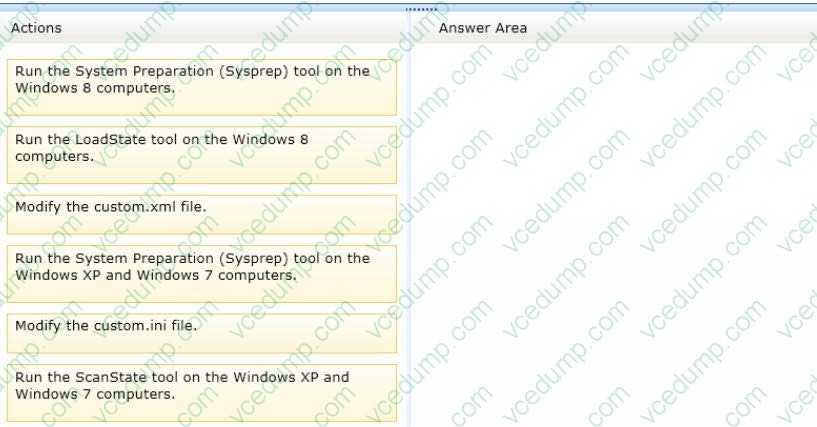
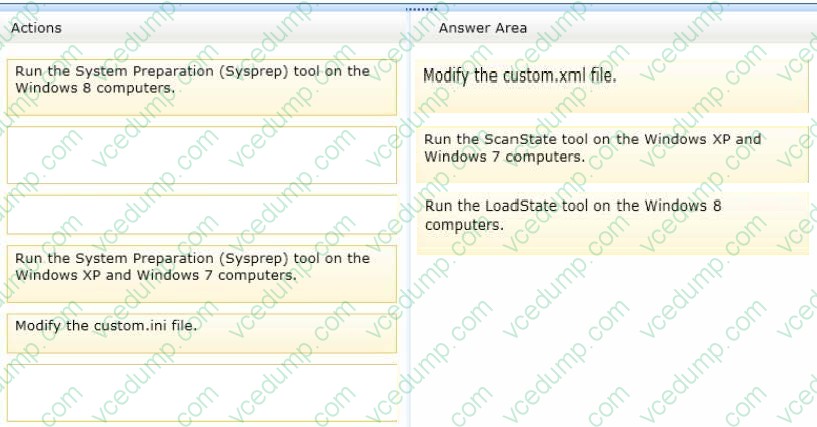
You administer Windows XP and Windows 7 client computers in your company network.
You add 100 new client computers that have Windows 8.1 Enterprise installed.
You need to migrate user profiles, local groups membership, and network mapped drives to the new client computers. You download and copy User State Migration Tool (USMT) files to a network share.
Which three actions should you perform next, in sequence? (To answer, move the appropriate three actions from the list of actions to the answer area and arrange them in the correct order.)
Select and Place:
-
Question 28:
You administer 100 Windows 8.1 Pro laptops in your company network.
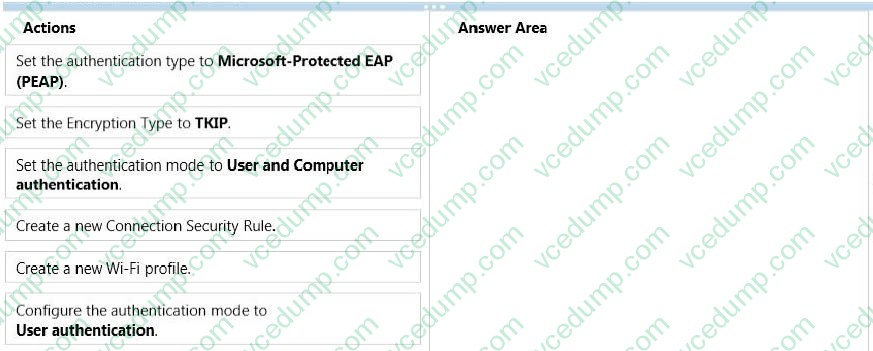
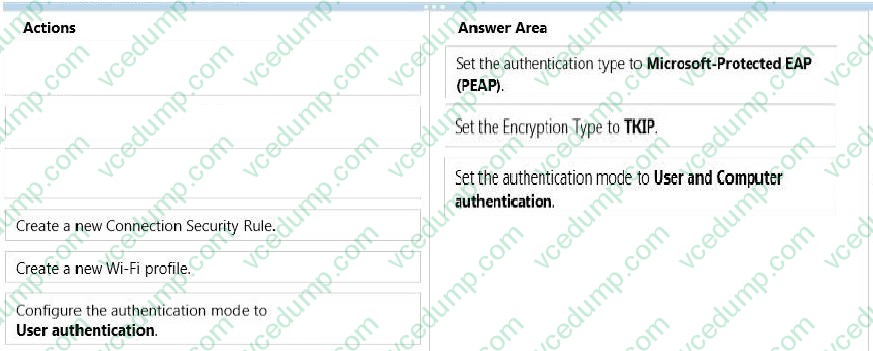
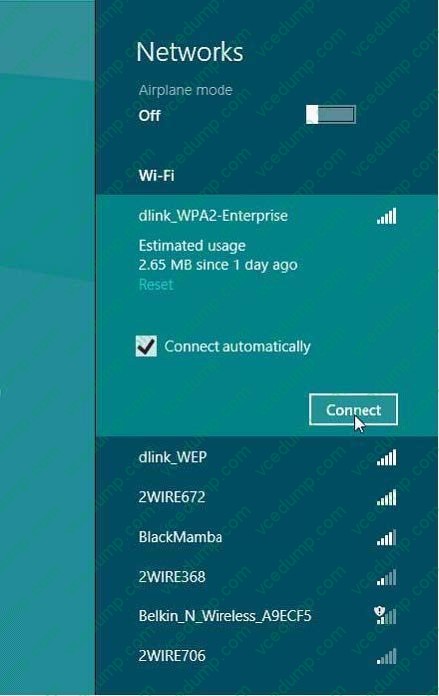
You have a wireless access point that requires 802.1x authentication. Authentication requests are forwarded to a RADIUS server.
You need to configure the laptops to connect to the wireless access point. Your solution must ensure that laptops authenticate to the RADIUS server by using stored credentials.
Which three actions should you perform in sequence? (To answer, move the appropriate three actions from the list of actions to the answer area and arrange them in the correct order.)
Select and Place:
-
Question 29:
A portable computer that runs Windows 8 uses a mobile broadband connection for the corporate wireless network. The computer also has a wired corporate network connection. The computer successfully downloads Windows updates when
connected to either network.
You need to ensure that the computer automatically downloads updates by using Windows Update only while connected to the wired corporate network connection.
What should you do?
A. Set the corporate wireless network to metered.
B. Set the corporate wireless network to non-metered.
C. Configure the Specify intranet Microsoft update service location local Group Policy setting.
D. Configure a Windows Firewall connection security rule. -
Question 30:
You administer Windows 8 laptops in your company network.
You install several custom desktop applications on the laptops.
You need to create a custom recovery image for Windows to use when selecting the Refresh your PC option. The custom recovery image must include the custom desktop applications.
Which command should you use to create the custom recovery image?
A. Recdisc.exe
B. Recover.exe
C. Recimg.exe
D. RecoveryDrive.exe
Related Exams:
-
62-193
Technology Literacy for Educators -
70-243
Administering and Deploying System Center 2012 Configuration Manager -
70-355
Universal Windows Platform – App Data, Services, and Coding Patterns -
77-420
Excel 2013 -
77-427
Excel 2013 Expert Part One -
77-725
Word 2016 Core Document Creation, Collaboration and Communication -
77-726
Word 2016 Expert Creating Documents for Effective Communication -
77-727
Excel 2016 Core Data Analysis, Manipulation, and Presentation -
77-728
Excel 2016 Expert: Interpreting Data for Insights -
77-731
Outlook 2016 Core Communication, Collaboration and Email Skills
Tips on How to Prepare for the Exams
Nowadays, the certification exams become more and more important and required by more and more enterprises when applying for a job. But how to prepare for the exam effectively? How to prepare for the exam in a short time with less efforts? How to get a ideal result and how to find the most reliable resources? Here on Vcedump.com, you will find all the answers. Vcedump.com provide not only Microsoft exam questions, answers and explanations but also complete assistance on your exam preparation and certification application. If you are confused on your 70-687 exam preparations and Microsoft certification application, do not hesitate to visit our Vcedump.com to find your solutions here.