70-687 Exam Details
-
Exam Code
:70-687 -
Exam Name
:Configuring Windows 8.1 -
Certification
:Microsoft Certifications -
Vendor
:Microsoft -
Total Questions
:266 Q&As -
Last Updated
:Dec 07, 2021
Microsoft 70-687 Online Questions & Answers
-
Question 1:
Your computer runs Windows 8 and is connected to an Active Directory Domain Services (AD DS) domain.
You create a folder and share the folder with everyone in your organization.
You need to modify the NTFS permissions of the folder to meet the following criteria:
Users from the Supervisors AD security group must be able to open files, but not modify them.
Users from the Marketing AD security group must be able to create, modify, and delete files.
Users from both groups must not be able to delete the folder.
Which permissions should you set?
A. Assign the Supervisors group the Read and Write permissions. Assign the Marketing group the Modify permission and the Delete Subfolders and Files special permission.
B. Assign the Supervisors group the Read and Write permissions. Assign the Marketing group the Full Control permission.
C. Assign the supervisors group the Read permission. Assign the Marketing group the Read and Write permissions and the Delete Subfolders and Files special permission.
D. Assign the Supervisors group the Read permission. Assign the Marketing group the Read and Write permissions and the Delete special permission. -
Question 2:
A company has Windows 8.1 client computers. The company develops a Windows Store app but does not publish it to the Windows Store.
You need to side load the Windows Store app on all client computers.
Which two actions should you perform? (Each correct answer presents part of the solution.
Choose two.)
A. Run the get-appxpackage Windows PowerShell cmdlet.
B. Run the add-appxpackage Windows PowerShell cmdlet.
C. Enable the Allow all trusted applications to install Group Policy setting.
D. Enable the Allow installation of desktop items Group Policy setting.
E. Run the msiexec command. -
Question 3:
You administer Windows 8 Enterprise (64-bit) computers in your company network. For some applications, some computers run a 32-bit version of the application, and other computers run a 64-bit version of the application.
You want to distribute a package that contains updates for the 32-bit applications only.
You need to determine if a particular computer is running 32-bit or 64-bit versions of the applications.
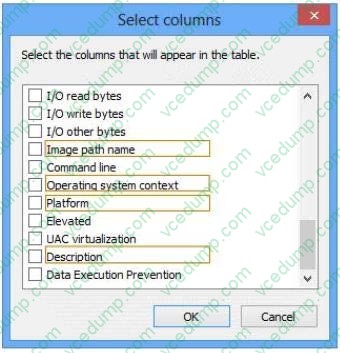
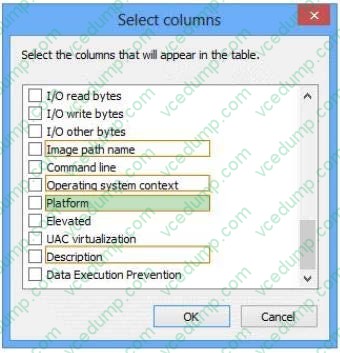
From the Select columns window, which column should you add to Task Manager? (To answer, select the appropriate column name in the answer area.)
Hot Area:
-
Question 4:
You manage client computers that run Windows 7 and Windows 8.
You are configuring Windows updates for all client computers.
You have the following requirements:
All client computers must use a specific Windows Server Update Services (WSUS) server for updates.
All client computers must check for updates each hour.
You need to configure local Group Policy settings to meet the requirements.
Which three actions should you perform? (Each answer presents part of the solution.
Choose three.)
A. Configure the Automatic Maintenance Activation Boundary policy setting.
B. Configure the Automatic Updates detection frequency policy setting.
C. Enable the Specify intranet Microsoft update service location policy setting.
D. Enable the Configure Automatic Updates policy setting for automatic download and scheduled installation.
E. Enable the Reschedule Automatic Updates scheduled installations policy setting. -
Question 5:
A company has client computers that run Windows 8. The corporate network is configured for IPv4 and IPv6. You need to disable Media Sensing for IPv6 on the client computers without affecting IPv4 communications. What should you do on each client computer?
A. Run the Disable-NetAdapterBinding Windows PowerShell cmdlet.
B. Run the Disable-NetAdapter Windows PowerShell cmdlet.
C. Run the Set-NetlPv6Protocol Windows PowerShell cmdlet.
D. Run the Set-NetlPv4Protocol Windows PowerShell cmdlet. -
Question 6:
You are troubleshooting a Windows 8.1 computer. The computer is not joined to a domain.
You are unable to change any of the advanced Internet options, which are shown in the Advanced Internet Options exhibit. (Click the Exhibit button.)
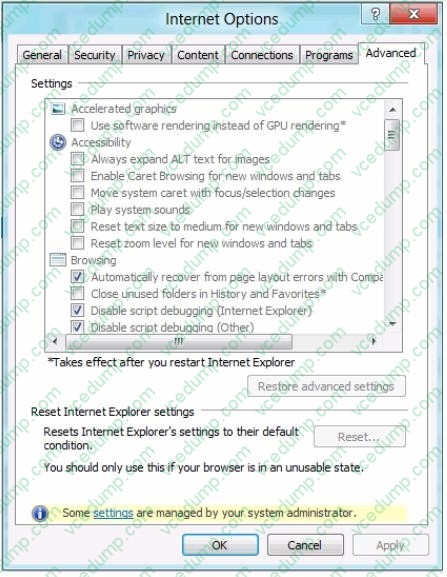
You need to ensure that you can change the advanced Internet options. What should you do?
A. Use the Group Policy Object Editor.
B. Use the Internet Explorer Administration Kit (IEAK).
C. Run Internet Explorer and use the Settings charm to change options.
D. Run the iexplore -k command. -
Question 7:
You administer Windows 8.1 Pro computers in your company network.
A user reports that her computer experiences frequent STOP errors.
You need to repair the Windows 8.1 installation. Your solution must ensure that the user retains her current documents and settings.
What should you do?
A. Create a recovery drive.
B. Reinstall Windows 8. Restore the user's personal files from a backup.
C. Run Reset your PC.
D. Run Refresh your PC. -
Question 8:
You deploy several tablet PCs that run Windows 8.
You need to minimize power usage when the user presses the sleep button.
What should you do?
A. Configure the active power plan to disable Wake Timers.
B. Configure the active power plan to use Fast Startup.
C. In Power Options, configure the sleep button setting to Hibernate.
D. In Power Options, configure the sleep button setting to Sleep. -
Question 9:
A company has 10 Windows 8.1 (64-bit) client computers.
You plan to create backup resources to allow the recovery of Windows 8.1 on any of the client computers.
You need to ensure that you can recover the computers from bootable media.
What should you do?
A. Turn on File History.
B. Create a new pool and storage space.
C. Run the Remove everything and install Windows feature.
D. Run the bcdboot command.
E. Run the recdisc command. -
Question 10:
A company has an Active Directory Domain Services (AD DS) domain with Windows 8.1 client computers.
Internet Explorer does not display warning messages to some users when public websites install software or run other installed applications on the client computers.
You need to configure Internet Explorer to always display warning messages about websites that attempt to install software or run applications.
What should you do?
A. Enable the Turn on Protected Mode Group Policy setting.
B. Enable the Automatic prompting for file downloads Group Policy setting.
C. Disable the Allow software to run or install even if the signature is invalid Group Policy setting.
D. Disable the Launching applications and files in an IFRAME Group Policy setting,

Related Exams:
-
62-193
Technology Literacy for Educators -
70-243
Administering and Deploying System Center 2012 Configuration Manager -
70-355
Universal Windows Platform – App Data, Services, and Coding Patterns -
77-420
Excel 2013 -
77-427
Excel 2013 Expert Part One -
77-725
Word 2016 Core Document Creation, Collaboration and Communication -
77-726
Word 2016 Expert Creating Documents for Effective Communication -
77-727
Excel 2016 Core Data Analysis, Manipulation, and Presentation -
77-728
Excel 2016 Expert: Interpreting Data for Insights -
77-731
Outlook 2016 Core Communication, Collaboration and Email Skills
Tips on How to Prepare for the Exams
Nowadays, the certification exams become more and more important and required by more and more enterprises when applying for a job. But how to prepare for the exam effectively? How to prepare for the exam in a short time with less efforts? How to get a ideal result and how to find the most reliable resources? Here on Vcedump.com, you will find all the answers. Vcedump.com provide not only Microsoft exam questions, answers and explanations but also complete assistance on your exam preparation and certification application. If you are confused on your 70-687 exam preparations and Microsoft certification application, do not hesitate to visit our Vcedump.com to find your solutions here.