70-687 Exam Details
-
Exam Code
:70-687 -
Exam Name
:Configuring Windows 8.1 -
Certification
:Microsoft Certifications -
Vendor
:Microsoft -
Total Questions
:266 Q&As -
Last Updated
:Dec 07, 2021
Microsoft 70-687 Online Questions & Answers
-
Question 201:
You use a Windows 8.1 laptop.
You want to back up the Pictures library.
You need to configure a backup strategy that backs up the Pictures library to a network drive every day. Additionally, you need to be able to recover a copy of any files from the library that have been changed within the last month.
What should you do?
A. Create a system image.
B. Configure File History.
C. Create a Storage Pool.
D. Configure computer restore points. -
Question 202:
You manage computers that run Windows 8.
You plan to install a desktop app named MarketingApp on one of the client computers.
You need to display a progress bar to the user while installing the app.
Which command should you run?
A. msiexec /i marketingapp.msi Jqn
B. msiexec /i marketingapp.msi /qb
C. msiexec /x marketingapp.msi /qb
D. msiexec /x marketingapp.msi /qn -
Question 203:
All client computers in a company's network environment run Windows 8. A client computer has two internal hard disk drives. The hard drives are configured as shown in the following table.
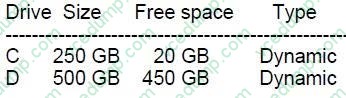
You are choosing a backup destination for drive C.
You have the following requirements:
Ensure that the backup file is available if drive C fails. Ensure that the backup file can be accessed by other computers on the network.
Support the backup of multiple system images.
You need to select a backup destination that meets the requirements.
Which destination should you select?
A. shared network folder
B. drive D
C. multiple DVDs
D. external hard drive -
Question 204:
You are configuring a computer that will be used in a kiosk in a public area. You install a new internal hard drive.
You need to protect the computer from starting an unauthorized operating system.
What should you do?
A. Ensure that the computer BIOS supports Unified Extensible Firmware Interface (UEFI) and is enabled. Install Windows 8 Pro 64-bit using UEFI and install it on the internal hard drive.
B. Install Windows 8 Pro 64-bit on the internal hard drive. Enable BitLocker on the internal hard disk.
C. Partition the internal hard drive as MBR disk. Install Windows 8 Enterprise 64-bit.
D. Partition the internal hard drive as GPT disk. Install Windows 8 Pro 64-bit. -
Question 205:
A company has an Active Directory Domain Services (AD DS) domain. All company employees work on their personally owned computers, which are not members of the domain. The computers are running Windows XP Home, Windows
Vista Business, Windows 7 Home Premium, or Windows 8.1. The company is a volume license subscriber.
The company plans to deploy Group Policies to all computers.
You need to ensure that every employee's computer is subject to the Group Policies.
What should you do first?
A. Join all the computers to the same homegroup.
B. Start each computer from a USB flash drive on which you have installed Windows To Go.
C. Start each computer from a USB flash drive on which you have installed BitLocker To Go.
D. Join all the computers to the domain. -
Question 206:
You administer Windows 8.1 computers in your company network, including a computer named Client.
You need to prevent users of Client1 from running applications that are stored on removable storage devices.
What should you do?
A. Set Local Computer Policy: Removable Disks to Deny write access to Enabled.
B. Set Local User Policy: Removable Storage Access to Removable Disks: Deny read access to Enabled.
C. Set Local User Policy: Removable Storage Access to Removable Disks: Deny write access to Enabled.
D. Set Local Computer Policy: Removable Storage Access to Removable Disks: Deny execute access to Enabled. -
Question 207:
A company has client computers that run Windows 8. Each computer has two hard drives. You need to create a dynamic volume on each computer that maximizes write performance. Which kind of dynamic volume should you create?
A. Striped volume
B. RAID 5 volume
C. Spanned volume
D. Mirrored volume -
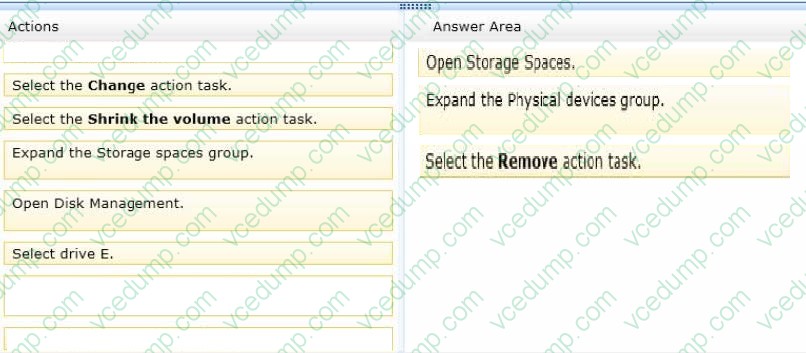
Question 208:
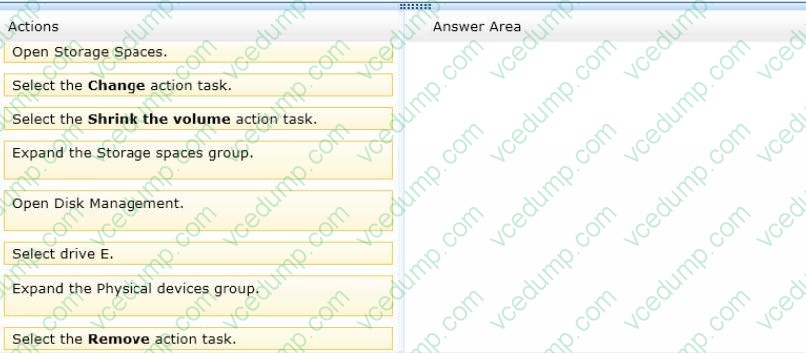
You administer Windows 8.1 client computers in your company network. A computer has a simple (no resiliency) storage space configured. The storage space is assigned to drive letter E.
You plug an eSATA drive into the computer and extend the storage space.
You need to unplug the eSATA drive without deleting existing data from the storage space.
Which three actions should you perform in sequence? (To answer, move the appropriate three actions from the list of actions to the answer area and arrange them in the correct order.)
Select and Place:
-
Question 209:
A company has an Active Directory Domain Services (AD DS) domain. All client computers run Windows 8.1 and are joined to the domain. All client computers are shared. Employees can log on to any client computer by using individual
accounts.
The company implements a new security policy.
You have the following requirements:

Ensure that each employee can log on to all computers by using his or her account.
Ensure that employees can reset their credentials from any client computer.
You need to choose authentication methods that meet the requirements.
Which two authentication methods meet the requirements? (Each correct answer presents a complete solution. Choose two.)
A. Active Directory user account
B. Local user account
C. Microsoft account
D. Pin
E. Picture password -
Question 210:
You administer Windows 8 client computers in your company network.
A guest at your company is connected to the Internet as shown in the following exhibit. (Click the Exhibit button.)
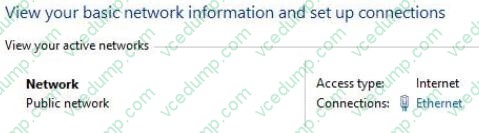
You need to ensure that the guest user is able to share network resources over Wi-Fi without lowering the overall security of the computer. What should you do?
A. Change the network location type to Work.
B. Configure File sharing connections settings for All networks.
C. Change the network location type to Private.
D. Configure File and printer sharing settings for Public networks.
Related Exams:
-
62-193
Technology Literacy for Educators -
70-243
Administering and Deploying System Center 2012 Configuration Manager -
70-355
Universal Windows Platform – App Data, Services, and Coding Patterns -
77-420
Excel 2013 -
77-427
Excel 2013 Expert Part One -
77-725
Word 2016 Core Document Creation, Collaboration and Communication -
77-726
Word 2016 Expert Creating Documents for Effective Communication -
77-727
Excel 2016 Core Data Analysis, Manipulation, and Presentation -
77-728
Excel 2016 Expert: Interpreting Data for Insights -
77-731
Outlook 2016 Core Communication, Collaboration and Email Skills
Tips on How to Prepare for the Exams
Nowadays, the certification exams become more and more important and required by more and more enterprises when applying for a job. But how to prepare for the exam effectively? How to prepare for the exam in a short time with less efforts? How to get a ideal result and how to find the most reliable resources? Here on Vcedump.com, you will find all the answers. Vcedump.com provide not only Microsoft exam questions, answers and explanations but also complete assistance on your exam preparation and certification application. If you are confused on your 70-687 exam preparations and Microsoft certification application, do not hesitate to visit our Vcedump.com to find your solutions here.