70-687 Exam Details
-
Exam Code
:70-687 -
Exam Name
:Configuring Windows 8.1 -
Certification
:Microsoft Certifications -
Vendor
:Microsoft -
Total Questions
:266 Q&As -
Last Updated
:Dec 07, 2021
Microsoft 70-687 Online Questions & Answers
-
Question 221:
You administer Windows 8 computers in your company network.
You install a new video driver. The computer will not start properly after restart. You are able to enter Safe Mode with Command Prompt.
You need to be able to start normally. You also need to ensure that user data is not lost.
What should you do?
A. Run the rstrui.exe command.
B. Roll back the driver.
C. Turn on File History.
D. Create a restore point. -
Question 222:
You administer Windows 8.1 client computers in your company network.
A user reports that her Internet connection is slower than usual.
You need to identify the Process Identifiers (PIDs) of applications that are making connections to the Internet.
Which command should you run?
A. netstat -an
B. jpconfig /showclassid
C. netstat -o
D. netsh set audit-logging
E. netsh show netdlls -
Question 223:
A company has an Active Directory Domain Services (AD DS) domain. All client computers run Windows 8.
A local printer is shared from a client computer. The client computer user is a member of the Sales AD security group.
You need to ensure that members of the Sales security group can modify the order of documents in the print queue, but not delete the printer share.
Which permission should you grant to the Sales group?
A. Manage queue
B. Manage this printer
C. Print
D. Manage spooler
E. Manage documents -
Question 224:
A company has client computers that run Windows 8.
The company implements the following security requirements:
All client computers must use two-factor authentication. At least one authentication method must include exactly four characters or gestures.
You need to choose authentication methods that comply with the security requirements.
Which two authentication methods should you choose? (Each correct answer presents part of the solution. Choose two.)
A. PIN
B. Biometric authentication
C. Picture password
D. Microsoft account -
Question 225:
A company has client computers that run Windows 8. Finance department employees store files in the C:\Finance directory. File History is on.
A Finance department employee attempts to restore a file to a previous version by using File History. The file is not available to restore.
You need to establish why the file history is not available and ensure that it is available in the future.
Which two actions should you perform? (Each correct answer presents part of the solution.
Choose two.)
A. Change the File History drive.
B. Review the File History backup log.
C. Move the file into a library.
D. Start the Volume Shadow Copy Service. -
Question 226:
A company has an Active Directory Domain Services (AD DS) domain. All client computers run
Windows 8 and are joined to the domain.
You have the following requirements:
Ensure that files in shared network folders are available offline.
Minimize all data access times.
Reduce network bandwidth usage.
You need to configure Group Policy settings to meet the requirements.
What should you do first?
A. Enable the Enable file synchronization on costed networks policy setting.
B. Enable and configure the Configure slow-link mode policy setting.
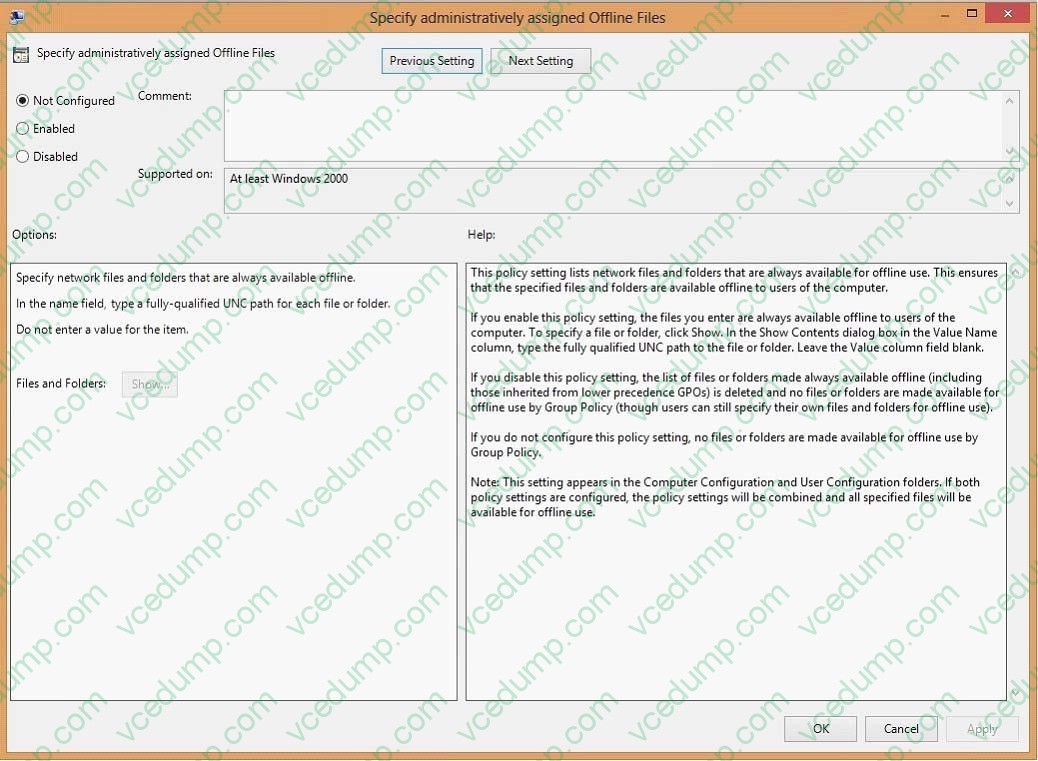
C. Enable and configure the specify administratively assigned Offline Files policy setting.
D. Enable the Synchronize all offline files when logging on policy setting. -
Question 227:
A company has an Active Directory Domain Services (AD DS) domain. All client computers run Windows 8 and are joined to the domain.
You have the following requirements:
Ensure that files in shared network folders are available offline. Maximize efficiency for users who connect to shared network folders from a mobile device.
You need to configure Group Policy settings to meet the requirements.
What should you do first?
A. Enable and configure the Configure slow-link mode policy setting.
B. Enable the Enable file synchronization on costed networks policy setting.
C. Enable the Synchronize all offline files when logging on policy setting.
D. Enable and configure the Specify administratively assigned Offline Files policy setting. -
Question 228:
You are a desktop administrator for your company and are assigned to work with the engineering team.
The hard drive on your top engineer's laptop has failed. You replace it and install Windows 8.1 Enterprise. You learn that the laptop was upgraded from Windows 7 Professional to Windows 8.1 Enterprise a month ago. When the computer
was using Windows 7, it had scheduled backups running several times a week using Backup and Restore, These backups were set to be stored on a network drive, Additionally, two weeks ago, this engineer made a full backup of the data
files and manually copied them to an external hard drive. No defaults in Windows 8.1 were changed.
You need to restore the most recent data.
What should you do?
A. Use Windows 8 File History to restore the latest copy of the data.
B. Use Windows File Recovery from the data stored on the network.
C. Restore Windows 7 and reinstall Windows 8.
D. Restore the data files form the external hard drive to the hard drive. -
Question 229:
A company has client computers that run Windows 8. On all client computers, Internet Explorer has the Display intranet sites in Compatibility View option enabled and the Download updated compatibility lists from Microsoft option disabled.
The corporate website was designed for a previous version of Internet Explorer. When viewed on the client computers, menus and image on the corporate website are displayed out of place.
You need to ensure that the corporate website displays correctly on the client computers without negatively impacting the display of any other website.
What should you do?
A. Manually add the corporate website to the compatibility view settings.
B. Enable the Display all websites in Compatibility View option.
C. Disable the Display intranet sites in Compatibility View option.
D. Manually download an updated compatibility list from Microsoft. -
Question 230:
A company has 10 client computers that run Windows 8. You are responsible for technical support. You purchase a support tool from the Windows Store while logged in with your Microsoft account.
You install the support tool on several client computers.
Three months later, you attempt to install the support tool on another client computer. The installation fails.
You need to ensure that you can install the support tool on the client computer.
What should you do?
A. Log in with your Microsoft account and remove a computer from the Windows Store device list.
B. On the computer on which you want to install the tool, synchronize the Windows Store application licenses.
C. Disassociate your Microsoft account from the computer on which you want to install the tool. Then reassociate your Microsoft account with the computer.
D. Reset your Microsoft account password.
Related Exams:
-
62-193
Technology Literacy for Educators -
70-243
Administering and Deploying System Center 2012 Configuration Manager -
70-355
Universal Windows Platform – App Data, Services, and Coding Patterns -
77-420
Excel 2013 -
77-427
Excel 2013 Expert Part One -
77-725
Word 2016 Core Document Creation, Collaboration and Communication -
77-726
Word 2016 Expert Creating Documents for Effective Communication -
77-727
Excel 2016 Core Data Analysis, Manipulation, and Presentation -
77-728
Excel 2016 Expert: Interpreting Data for Insights -
77-731
Outlook 2016 Core Communication, Collaboration and Email Skills
Tips on How to Prepare for the Exams
Nowadays, the certification exams become more and more important and required by more and more enterprises when applying for a job. But how to prepare for the exam effectively? How to prepare for the exam in a short time with less efforts? How to get a ideal result and how to find the most reliable resources? Here on Vcedump.com, you will find all the answers. Vcedump.com provide not only Microsoft exam questions, answers and explanations but also complete assistance on your exam preparation and certification application. If you are confused on your 70-687 exam preparations and Microsoft certification application, do not hesitate to visit our Vcedump.com to find your solutions here.