70-687 Exam Details
-
Exam Code
:70-687 -
Exam Name
:Configuring Windows 8.1 -
Certification
:Microsoft Certifications -
Vendor
:Microsoft -
Total Questions
:266 Q&As -
Last Updated
:Dec 07, 2021
Microsoft 70-687 Online Questions & Answers
-
Question 191:
A company has a Microsoft Software Assurance with Volume Licensing agreement. All client computers run Windows 8.1.
An employee updates a device driver on his computer and then restarts the computer. Windows does not start successfully. You establish that the updated driver is the cause of the problem.
You need to prevent the updated driver from running on startup, without impacting other drivers or personal data.
What should you do?
A. Use the Windows 8.1 PC Reset feature.
B. Reset the computer to the manufacturer's system image.
C. Start the computer with the Diagnostic and Recovery Toolset and configure the driver options.
D. Use the File History feature. -
Question 192:
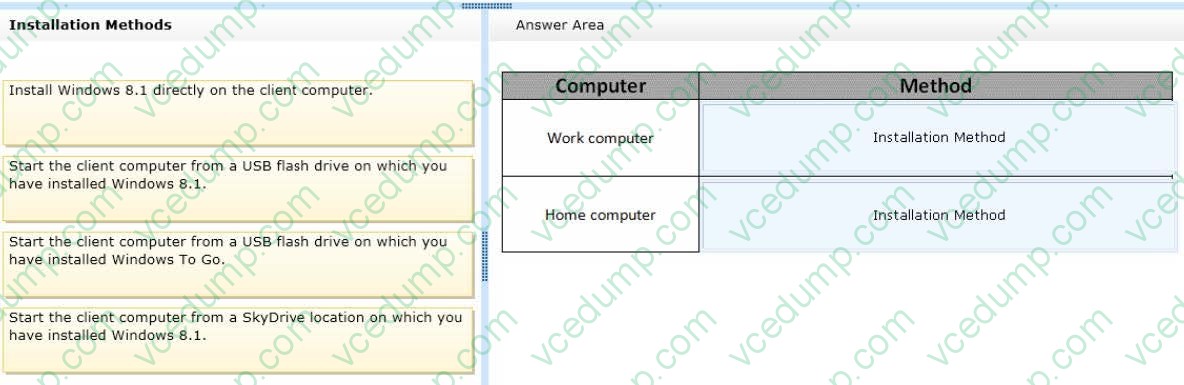
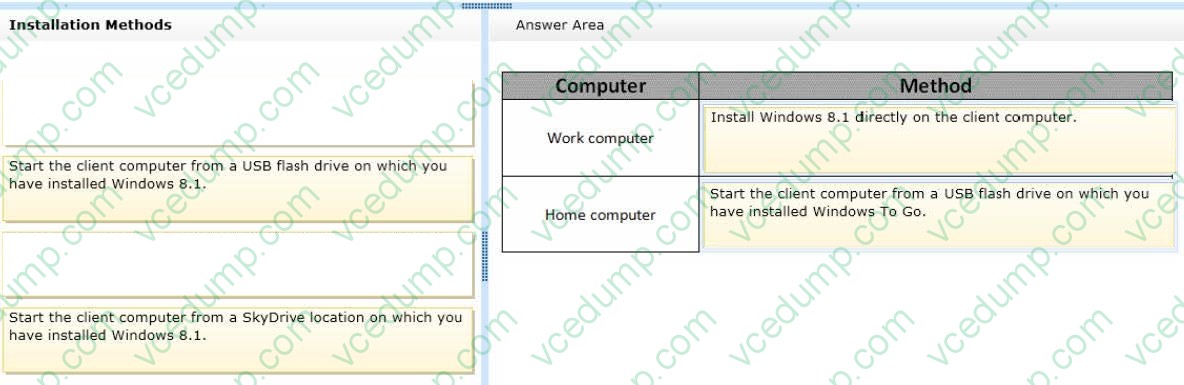
A company has client computers that run Windows 7. Each employee has two client computers: one at work and one at home.
The company plans to deploy Windows 8.1 to all client computers. You are planning a deployment strategy.
You have the following requirements:
1. Minimize deployment time.
2. Ensure that the PC Reset and PC Refresh features can be utilized on all work computers.
You need to plan a deployment strategy that meets the requirements.
What should you do? (To answer, drag the appropriate installation method or methods to the correct location or locations in the answer area. Methods may be used once, more than once, or not at all. You may need to drag the split bar between panes or scroll to view content.)
Select and Place:
-
Question 193:
You administer Windows 8 Enterprise computers in your company's Active Directory Domain Services (AD DS) domain.
Your company uses several peripheral devices. The drivers for these devices are not available on Windows Update.
You need to ensure that the drivers install when users connect these devices to their computers.
What should you do?
A. For the Group Policy setting Prioritize all digitally signed drivers equally during the driver ranking and selection process, select Disabled.
B. From Device Manager, find the detected scanner device and select Update Driver.
C. Add the following registry key to the computers: HKEY_LOCAL_MACHINE/Software/Microsoft/Windows/Current Version/DevicePath. Add ?osystemroot%\inf and the UNC path to the drivers share.
D. For the Group Policy setting Configure driver search locations, select Enabled. Make the drivers available on the UNC path to the driver's share. -
Question 194:
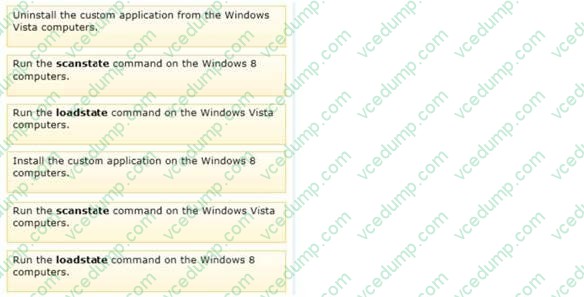
Ten client computers run Windows Vista and a custom application. The custom application is compatible with Windows 8.
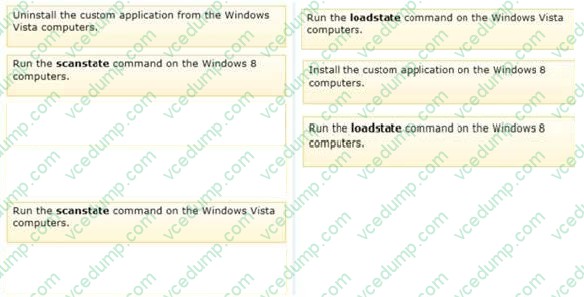
You purchase 10 new computers that have Windows 8 pre-installed. You plan to migrate user settings and data from the Windows Vista computers to the Windows 8 computers.
You install the User State Migration Toolkit (USMT) on a USB flash drive.
You need to ensure that the custom application settings are applied to the Windows 8 computers after the migration is complete.
Which three actions should you perform in sequence? (To answer, move the appropriate actions from the list of actions to the answer area and arrange them in the correct order.)
Select and Place:
-
Question 195:
A company has client computers that run Windows 8.
When a user tries to print from his portable client computer while connected to the corporate network, he discovers that the default printer is set to his home printer instead of to the office printer.
You need to ensure that the default printer for the computer is the office printer when the computer is connected to the corporate network and the user's home printer when the computer is connected to his home network.
What should you do on the portable computer?
A. In the printer properties of the corporate printer, configure the active port with the correct TCP/IP settings for the printer.
B. Install the corporate printer and set it as the default printer. Then add the home printer to the homegroup settings.
C. Connect to the home network and choose Connect from the shared printer object context menu. Then connect to the corporate network and choose Connect from the shared printer object context menu.
D. Set a default printer for each network. -
Question 196:
A company has an Active Directory Domain Services (AD DS) domain. All client computers run Windows 8.1 and are joined to the domain.
An employee is unable to connect his portable client computer to his home office homegroup.
You need to ensure that the network adapter settings of the client computer support joining a homegroup.
What should you do?
A. Disable IPv6.
B. Enable IPv4.
C. Enable IPv6.
D. Disable IPv4. -
Question 197:
A company has an Active Directory Domain Services (AD DS) domain with one physical domain controller. All client computers run Windows 8.
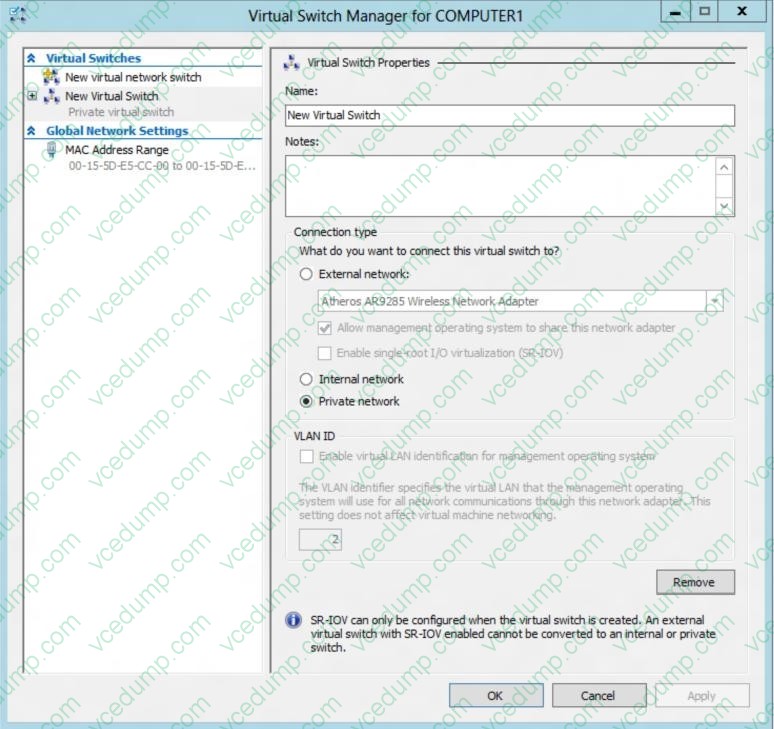
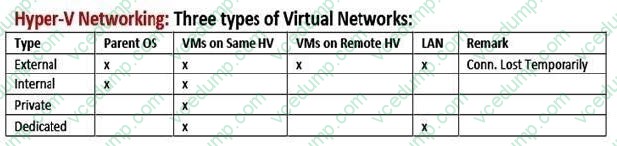
A client computer hosts a Windows 8 virtual machine (VM) test environment. The VMs are connected to a private virtual switch that is configured as shown in the Virtual Switch Manager exhibit. (Click the Exhibit button.)
You have the following requirements:

Configure the test environment to allow VMs to communicate with the host machine.
Minimize impact on the host machine. You need to meet the requirements. What should you do?
A. Create a new virtual switch with a Private Network [CP1] connection type.
B. Create a new virtual switch with an ExternalNetwork connection type.
C. Change the VLAN ID of the private virtual switch to Enable Virtual LAN identification.
D. Create a new virtual switch with an Internal Network connection type. -
Question 198:
A company plans to upgrade its client computer operating systems from Windows 7 to Windows 8.
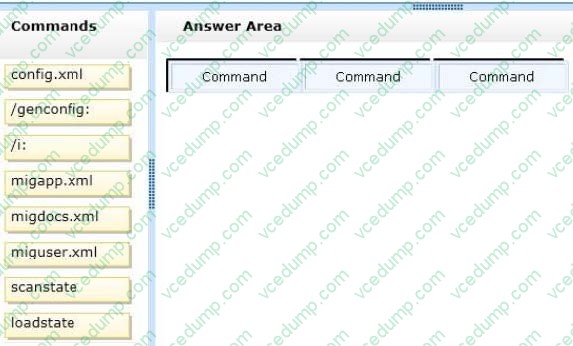
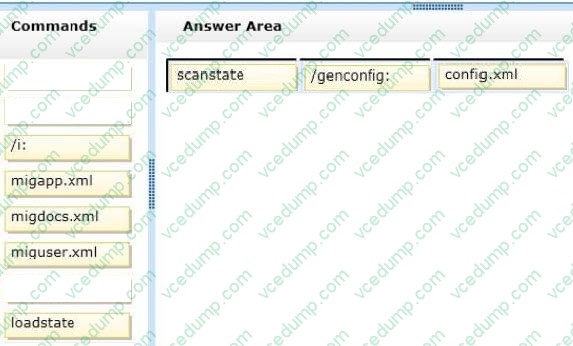
You need to use the User State Migration Tool (USMT) to configure the migration profile to exclude all files in the users' Documents folders.
Which command should you run on the client computers before the upgrade? (To answer, drag the appropriate command elements to the correct location or locations in the answer area. Each command may be used once, more than once, or not at all. You may need to drag the split bar between panes or scroll to view content.)
Select and Place:
-
Question 199:
A company has Windows 8.1 client computers.
Users frequently run a custom web application that modifies the system registry. Each time the application starts, the user is prompted for administrative approval.
You need to ensure that users can run the custom application and not be prompted for administrator approval.
What should you do?
A. Turn off Windows SmartScreen.
B. Set the Internet zone privacy level to Low.
C. Set the User Account Control (UAC) settings to Never notify.
D. Set the Internet zone security level to Medium. -
Question 200:
A desktop computer runs Windows 8. The computer is joined to an Active Directory Domain Services (AD DS) domain named contoso.com.
You have two domain user accounts:
1. A primary account named User1 that does not have domain administrative privileges.
2. An account named Admin1 that has administrative privileges in the domain.
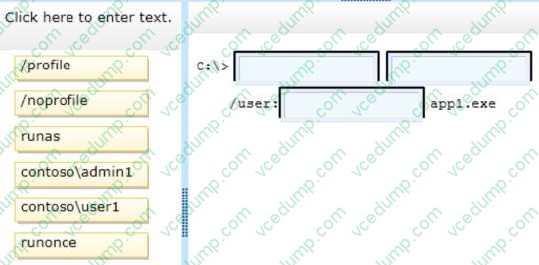
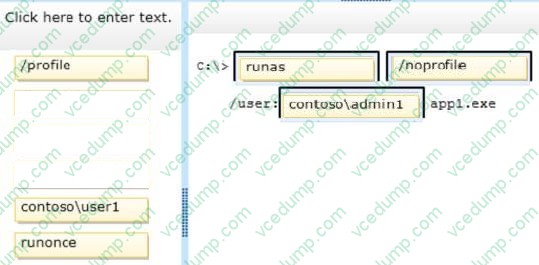
You are currently logged in as User1. You need to run an application named appl.exe.
You have the following requirements:
1. Start the application by using your administrative credentials.
2. Minimize the application load time.
You need to complete the command to meet the requirements.
Which command segments should you use to complete the command? (To answer, drag the appropriate command segments to the correct locations in the answer area. Command segments may be used once, more than once, or not at all.
You may need to drag the split bar between panes or scroll to view content.)
Select and Place:
Related Exams:
-
62-193
Technology Literacy for Educators -
70-243
Administering and Deploying System Center 2012 Configuration Manager -
70-355
Universal Windows Platform – App Data, Services, and Coding Patterns -
77-420
Excel 2013 -
77-427
Excel 2013 Expert Part One -
77-725
Word 2016 Core Document Creation, Collaboration and Communication -
77-726
Word 2016 Expert Creating Documents for Effective Communication -
77-727
Excel 2016 Core Data Analysis, Manipulation, and Presentation -
77-728
Excel 2016 Expert: Interpreting Data for Insights -
77-731
Outlook 2016 Core Communication, Collaboration and Email Skills
Tips on How to Prepare for the Exams
Nowadays, the certification exams become more and more important and required by more and more enterprises when applying for a job. But how to prepare for the exam effectively? How to prepare for the exam in a short time with less efforts? How to get a ideal result and how to find the most reliable resources? Here on Vcedump.com, you will find all the answers. Vcedump.com provide not only Microsoft exam questions, answers and explanations but also complete assistance on your exam preparation and certification application. If you are confused on your 70-687 exam preparations and Microsoft certification application, do not hesitate to visit our Vcedump.com to find your solutions here.