70-687 Exam Details
-
Exam Code
:70-687 -
Exam Name
:Configuring Windows 8.1 -
Certification
:Microsoft Certifications -
Vendor
:Microsoft -
Total Questions
:266 Q&As -
Last Updated
:Dec 07, 2021
Microsoft 70-687 Online Questions & Answers
-
Question 181:
You deploy several tablet PCs that run Windows 8.
You need to minimize power usage when the user presses the sleep button.
What should you do?
A. In Power Options, configure the sleep button setting to Hibernate.
B. Disable the C-State control in the computer's BIOS.
C. Configure the active power plan to set the system cooling policy to passive.
D. In Power Options, configure the sleep button setting to Sleep. -
Question 182:
A company has an Active Directory Domain Services (AD DS) domain. All client computers run Windows 8 and are members of the domain. Client computers maintain a list of sites in the Internet Explorer Restricted Sites security zone.
Users of one client computer are able to download and install an application from a site within the Restricted Sites zone.
You need to ensure that users of the computer can install applications only from sites that are not in the Restricted Sites zone.
What should you do?
A. Run the Set-ExecutionPolicy Windows PowerShell cmdlet.
B. Configure the Software Restriction Policy settings in the local Group Policy of the computer.
C. Add the blocked application as a software restriction policy to the GPO that configures AppLocker.
D. Run the Cet-AppLockerPolicy Windows PowerShell cmdlet.
E. Add the blocked application as an additional AppLocker rule to the GPO that configures AppLocker. -
Question 183:
You are a system administrator for a local accounting firm. Your company uses Windows 8.1 Pro desktop computers. All computers have a secondary D: drive.
You want to enable File History for all your users. You create the folder structure
D:\Backup\File History on all user computers. You launch the File History application and verify that it is turned on, Next, you click Select drive in Configure File History Settings. However, under Copy Files to: you get the message, "No usable
drives were found."
You need to successfully configure file history.
What should you do?
A. Verify that your local drive has enough free space.
B. Share the File History folder.
C. Grant NTFS rights to the File History folder.
D. Use a network drive for file history. -
Question 184:
You administer client computers in your company network. The network includes an Active Directory Domain Services (AD DS) domain.
Employees in the human resources (HR) department are getting new Windows 8.1 Enterprise computers. The HR department uses a line of business (LOB) Windows Store app named Timesheet that is not available in Windows Store.
You need to ensure that all employees in the HR department can use Timesheet on their new computers.
What should you do?
A. Set the Allow all trusted applications to install group policy to Enabled.
B. Set the Turn off the Store application group policy to Enabled.
C. Install and run the Microsoft Deployment Toolkit.
D. Install and run the Windows App Certification Kit. -
Question 185:
You administer Windows 8 Pro laptops in your company network. Your network has a Remote Access Server (RAS) in a perimeter network that runs Windows Server 2012.
All laptop users have a PPTP VPN configured on their computer. Users report that their VPN disconnects when they switch between WLAN and WWAN networks.
You need to ensure that if a VPN is disconnected, the laptop will automatically attempt to reconnect.
What should you do?
A. Create a new VPN connection, and the open Local Computer Policy and define Files not cached policy.
B. Run the netsh.exe command and include the wlan parameter
C. Create a new VPN connection, and disable offline files
D. Create a new Remote Desktop connection, and then set the Local Computer policy to Disable drives redirection for Remote Desktop Services. -
Question 186:
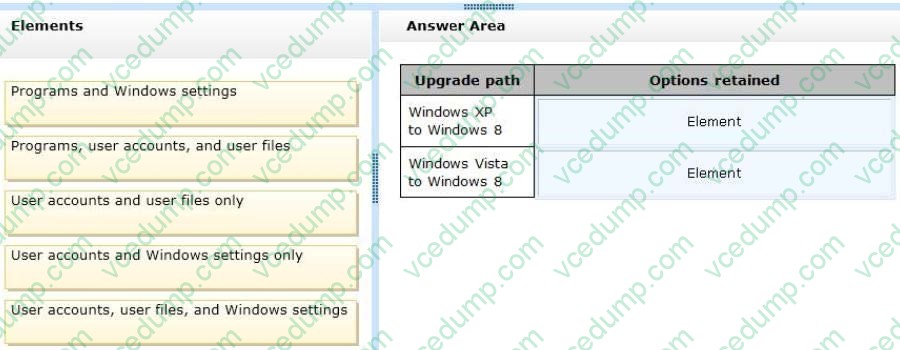
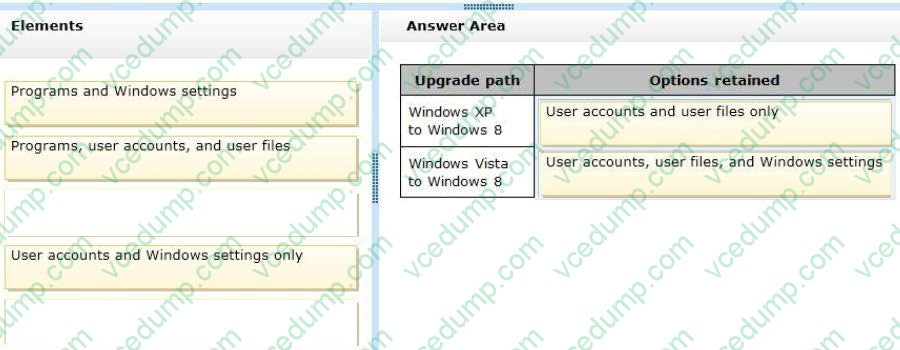
A company has client computers that run Windows XP or Windows Vista.
The company plans to upgrade all client computers to Windows 8. You are planning a deployment strategy.
You need to identify the elements that will be retained after the upgrades.
Which elements will be retained? (To answer, drag the appropriate element or elements to the correct location or locations in the answer area. Elements may be used once, more than once, or not at all. You may need to drag the split bar between panes or scroll to view content.)
Select and Place:
-
Question 187:
Your company is deploying new Windows 8.1 computers.
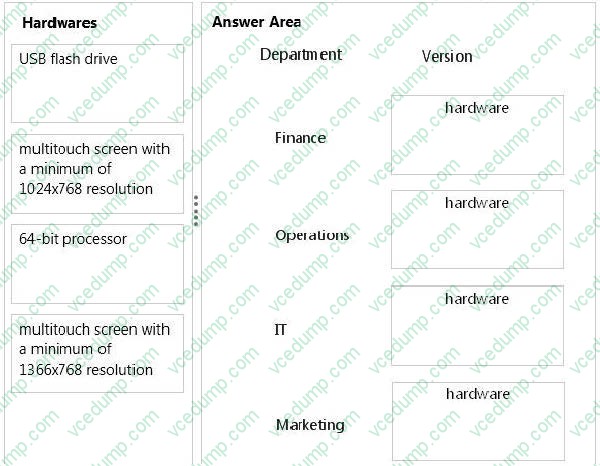
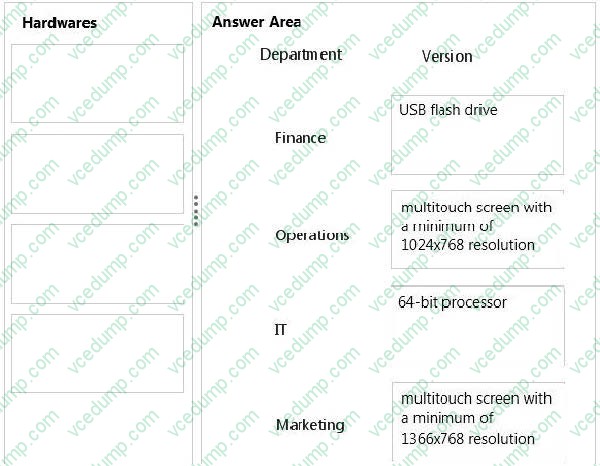
The company has several departments. Each department requires different hardware configurations. You need to implement the appropriate hardware.
You have the following requirements:
1. Finance must have BitLocker To Go.
2. Operations must have the ability to use tablets and access the Windows Store to download and run apps.
3. IT must have the ability to use Hyper-V with Windows 8.1.
4. Marketing must have the ability to use tablets as well as the snap app functionality.
What are the minimum hardware requirements to meet each department's needs? (To answer, drag the appropriate hardware to the correct location or locations in the answer area. Each answer may be used more than once.)
Select and Place:
-
Question 188:
You are the network administrator for Contoso, Ltd. Many users have Windows 8.1 laptops, and your IT department configures all of them to use BitLocker on all fixed drives.
Many users carry sensitive corporate data on their USB drives.
You need to enable BitLocker for these USB drives.
Which key protector option should you use?
A. A password
B. A startup key
C. A.tpm file
D. TPM -
Question 189:
A company has Windows 8.1 client computers.
A user stores files in multiple locations.
You need to determine which of the locations will be included in File History.
Which three of the following file locations are included in File History? (Each correct answer presents part of the solution. Choose three.)
A. %appdata%
B. Public Documents and Public Pictures
C. My Documents and My Pictures
D. Contacts, Desktop, and Favorites
E. C:\Program Files
F. All user profile folders -
Question 190:
A company has Windows 8.1 client computers.
One computer named Computer1 will be used to centralize event logs from other client computers.
You need to configure Computer1 to collect events from other client computers,
What should you do?
A. Run the New-EventLogcmdlet.
B. Create a source-computer-initiated subscription.
C. Run the Get-EventLogcmdlet.
D. Create a collector-initiated subscription.


Related Exams:
-
62-193
Technology Literacy for Educators -
70-243
Administering and Deploying System Center 2012 Configuration Manager -
70-355
Universal Windows Platform – App Data, Services, and Coding Patterns -
77-420
Excel 2013 -
77-427
Excel 2013 Expert Part One -
77-725
Word 2016 Core Document Creation, Collaboration and Communication -
77-726
Word 2016 Expert Creating Documents for Effective Communication -
77-727
Excel 2016 Core Data Analysis, Manipulation, and Presentation -
77-728
Excel 2016 Expert: Interpreting Data for Insights -
77-731
Outlook 2016 Core Communication, Collaboration and Email Skills
Tips on How to Prepare for the Exams
Nowadays, the certification exams become more and more important and required by more and more enterprises when applying for a job. But how to prepare for the exam effectively? How to prepare for the exam in a short time with less efforts? How to get a ideal result and how to find the most reliable resources? Here on Vcedump.com, you will find all the answers. Vcedump.com provide not only Microsoft exam questions, answers and explanations but also complete assistance on your exam preparation and certification application. If you are confused on your 70-687 exam preparations and Microsoft certification application, do not hesitate to visit our Vcedump.com to find your solutions here.