70-417 Exam Details
-
Exam Code
:70-417 -
Exam Name
:Upgrading Your Skills to MCSA Windows Server 2012 -
Certification
:Microsoft Certifications -
Vendor
:Microsoft -
Total Questions
:711 Q&As -
Last Updated
:Feb 03, 2022
Microsoft 70-417 Online Questions & Answers
-
Question 61:
DRAG DROP
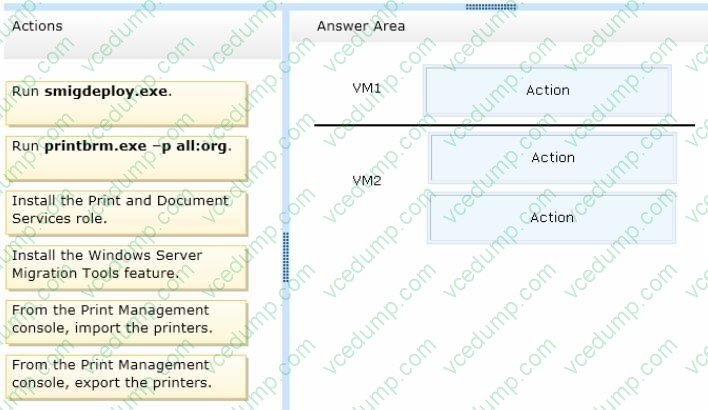
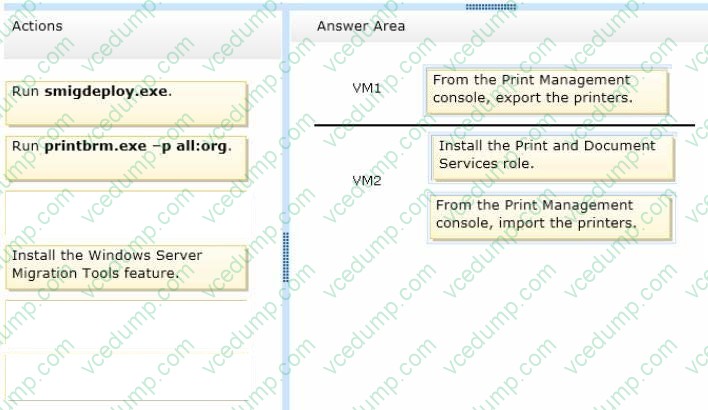
You have a Hyper-V host named Host1.Host1 contains two virtual machines named VM1 and VM2.VM1 is configured as a print server.VM1 runs Windows Server 2008 R2.VM2 is configured as a file server.VM2 runs Windows Server 2012 R2.
You need to migrate all of the printers on VM1 to VM2. Which actions should you perform on the virtual machines?
To answer, drag the appropriate action to the correct servers in the answer area. Each action may be used once, more than once, or not at all. You may need to drag the split bar between panes or scroll to view content.
Select and Place:
-
Question 62:
You have a VHD that contains an image of Windows Server 2012 R2. You plan to Apply updates to the image.
You need to ensure that only updates that can install without requiring a restart are installed.
Which DISM option should you use?
A. /Apply-Unattend
B. /Add-ProvisionedAppxPackage
C. /PreventPending
D. /Cleanup-Image -
Question 63:
Your role of Network Administrator at ABC.com includes the management of the Active Directory Domain Services (AD DS) domain named ABC.com. The network includes servers that run Windows Server 2012.
The network includes four Windows Server 2012 servers configured as nodes in a single failover clustering cluster named ABC-CL01.
You configure a custom line-of-business application (LOB) as a clustered resource on ABC-CL01. You need to identify the number of consecutive missed heartbeats required to initiate a failover.
What number should you identify?
A. 1
B. 2
C. 5
D. 10 -
Question 64:
Your network contains an Active Directory domain named contoso.com. The domain contains a read-only domain controller (RODC) named RODC1.
You create a global group named RODC_Admins.
You need to provide the members of RODC_Admins with the ability to manage the hardware and the software on RODC1. The solution must not provide RODC_Admins with the ability to manage Active Directory objects.
What should you do?
A. From Active Directory Users and Computers, configure the Managed By settings of the RODC1 account.
B. From Windows PowerShell, run the Set-ADAccountControl cmdlet.
C. From a command prompt, run the dsadd computer command.
D. From Active Directory Sites and Services, run the Delegation of Control Wizard. -
Question 65:
Your role of Network Administrator at ABC.com includes the management of the Active Directory Domain Services (AD DS) domain named ABC.com. The network includes servers that run Windows Server 2008 R2 Service Pack 1 (SP1) and
Windows Server 2012. A Windows Server 2012 Web server is named ABC-Web1. ABC-Web1 hosts a company Intranet site with the URL: http://intranet.ABC.com.
You want to configure the Intranet site to use HTTPS. You purchase an SSL certificate for intranet.ABC.com. You run the import certificate wizard and select the option to specify which certificate store to import the certificate into.
You need the certificate to be selectable in the bindings of the Intranet site in IIS Manager. Which certificate store should you import the SSL certificate into?
A. Certificates (Local Computer) \ Personal
B. Certificates (Local Computer) \ Trusted Root Certification Authorities.
C. Certificates (Local Computer) \ Trusted Publishers
D. Certificates (Local Computer) \ Trusted People
E. Certificates (Local Computer) \ TrustedDevices
F. Certificates (Local Computer) \ Web Hosting -
Question 66:
Your network contains two DNS servers named DNS1 and DNS2 that run Windows Server 2012 R2. DNS1 has a primary zone named contoso.com. DNS2 has a secondary copy of the contoso.com zone.
You need to log the zone transfer packets sent between DNS1 and DNS2. What should you configure?
A. debug logging from DNS Manager
B. logging from Windows Firewall with Advanced Security
C. monitoring from DNS Manager
D. a Data Collector Set (DCS) from Performance Monitor -
Question 67:
Your network contains an Active Directory domain named contoso.com. The domain contains a member server named HVServer1. HVServer1 runs Windows Server 2012 R2 and has the Hyper-V server role installed.
HVServer1 hosts 10 generation 1 virtual machines. All of the virtual machines connect to a virtual switch named Switch1. Switch1 is configured as a private network. All of the virtual machines have the DHCP guard and the router guard
settings enabled.
You install the DHCP server role on a virtual machine named Server1. You authorize Server1 as a DHCP server in contoso.com. You create an IP scope.
You discover that the virtual machines connected to Switch1 do not receive IP settings from Server1.
You need to ensure that the virtual machines can use Server1 as a DHCP server.
What should you do?
A. Enable MAC address spoofing on Server1.
B. Enable single-root I/O visualization (SR-IOV) on Server1.
C. Disable the DHCP guard on Server1.
D. Disable the DHCP guard on all of the virtual machines that are DHCP clients. -
Question 68:
You have a server named Server1 that runs a full installation of Windows Server 2012. You need to uninstall the graphical user interface (GUI) on Server1. You must achieve this goal by using the minimum amount of administrative effort. What should you do?
A. From Server Manager, uninstall the User Interfaces and Infrastructure feature.
B. From Windows PowerShell, run Uninstall-WindowsFeature PowerShell-ISE.
C. From Windows PowerShell, run Uninstall-WindowsFeature Desktop-Experience.
D. Reinstall Windows Server 2012on the server. -
Question 69:
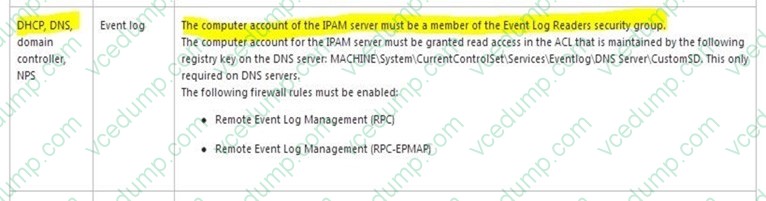
Your network contains an Active Directory domain named contoso.com. The domain contains a domain controller named DC1 and a member server named Server1. Server1 has the IP Address Management (IPAM) Server feature installed.
On DC1, you configure Windows Firewall to allow all of the necessary inbound ports for IPAM.
On Server1, you open Server Manager as shown in the exhibit. (Click the Exhibit button.)
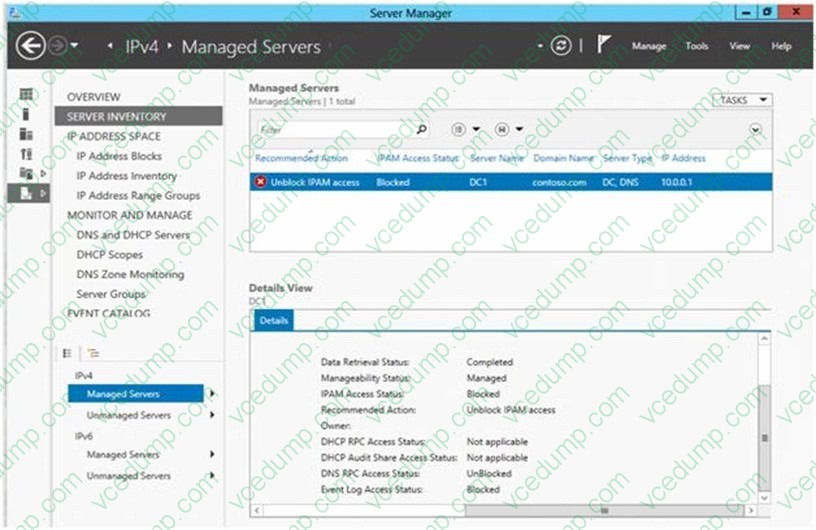
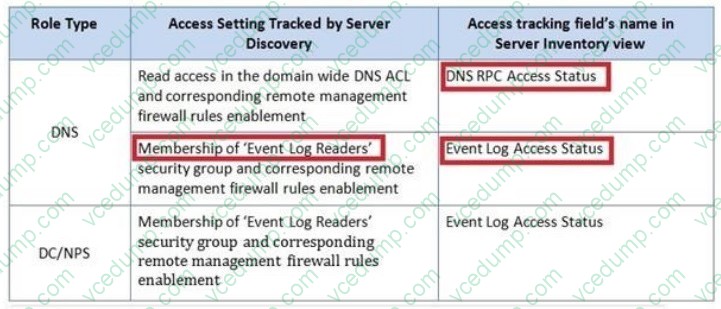
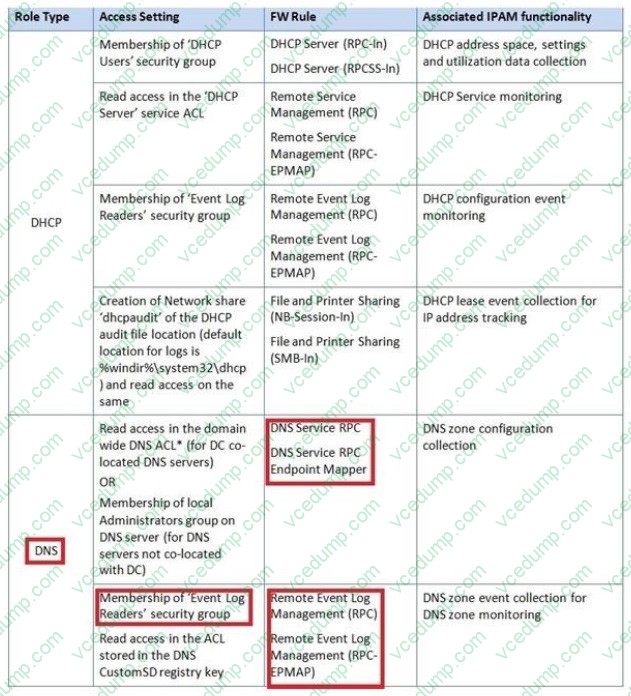
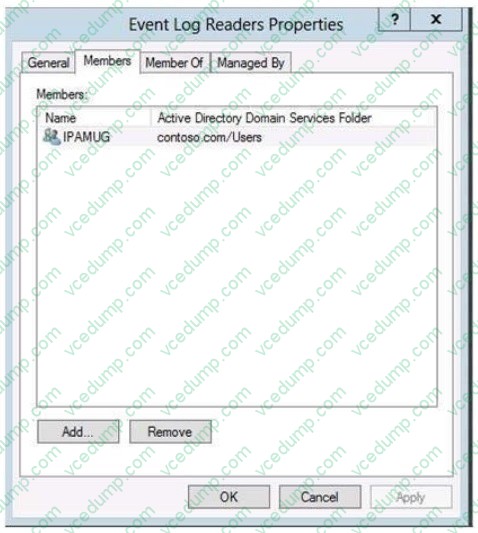
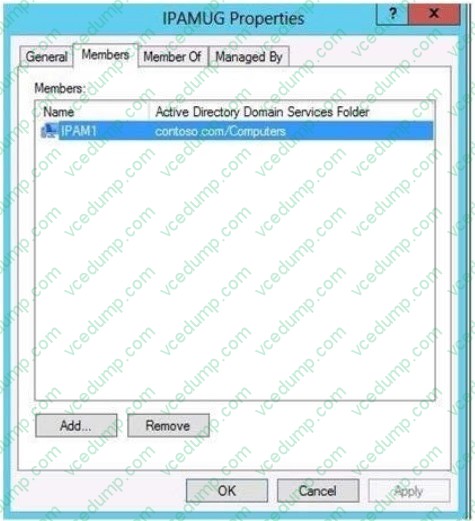
You need to ensure that you can use IPAM on Server1 to manage DNS on DC1. What should you do?
A. Add Server1 to the Remote Management Users group.
B. Modify the outbound firewall rules on Server1.
C. Add Server1 to the Event Log Readers group.
D. Modify the inbound firewall rules on Server1. -
Question 70:
Your network contains an Active Directory domain named contoso.com. The domain contains domain controllers that run Windows Server 2008 Service Pack 2 (SP2), Windows Server 2008 R2 Service Pack 1 (SP1), Windows Server 2012, and Windows Server 2012 R2.
A domain controller named DC1 runs Windows Server 2012 R2. DC1 is backed up daily.
During routine maintenance, you delete a group named Group1.
You need to recover Group1 and identify the names of the users who were members of Group1 prior to its deletion. You want to achieve this goal by using the minimum amount of administrative effort. What should you do first?
A. Perform an authoritative restore of Group1.
B. Mount the most recent Active Directory backup.
C. Use the Recycle Bin to restore Group1.
D. Reactivate the tombstone of Group1.
Related Exams:
-
62-193
Technology Literacy for Educators -
70-243
Administering and Deploying System Center 2012 Configuration Manager -
70-355
Universal Windows Platform – App Data, Services, and Coding Patterns -
77-420
Excel 2013 -
77-427
Excel 2013 Expert Part One -
77-725
Word 2016 Core Document Creation, Collaboration and Communication -
77-726
Word 2016 Expert Creating Documents for Effective Communication -
77-727
Excel 2016 Core Data Analysis, Manipulation, and Presentation -
77-728
Excel 2016 Expert: Interpreting Data for Insights -
77-731
Outlook 2016 Core Communication, Collaboration and Email Skills
Tips on How to Prepare for the Exams
Nowadays, the certification exams become more and more important and required by more and more enterprises when applying for a job. But how to prepare for the exam effectively? How to prepare for the exam in a short time with less efforts? How to get a ideal result and how to find the most reliable resources? Here on Vcedump.com, you will find all the answers. Vcedump.com provide not only Microsoft exam questions, answers and explanations but also complete assistance on your exam preparation and certification application. If you are confused on your 70-417 exam preparations and Microsoft certification application, do not hesitate to visit our Vcedump.com to find your solutions here.