70-417 Exam Details
-
Exam Code
:70-417 -
Exam Name
:Upgrading Your Skills to MCSA Windows Server 2012 -
Certification
:Microsoft Certifications -
Vendor
:Microsoft -
Total Questions
:711 Q&As -
Last Updated
:Feb 03, 2022
Microsoft 70-417 Online Questions & Answers
-
Question 51:
You work as a Network Administrator at ABC.com. The network contains a single Active Directory Domain Services (AD DS) domain named ABC.com. The network includes servers that run Windows Server 2008 R2 Service Pack 1 (SP1)
and Windows Server 2012. All servers in the network have Windows Remote Management (WinRM) enabled. You use a Windows 7 Enterprise client computer named ABC-Admin1. You are currently logged in to ABC-Admin1. From your
client computer, you want to obtain the IP address of a Windows Server 2012 member server named ABC-File1.
Which command or commands should you use?
A. Telnet ABC-File1 ipconfig.
B. NSLookup > Server ABC-File1 > ipconfig
C. WinRM -r:ABC-File1 ipconfig
D. WinRS -r:ABC-File1 ipconfig -
Question 52:
Your network contains an Active Directory domain named adatum.com. The domain contains three domain controllers. The domain controllers are configured as shown in the following table.
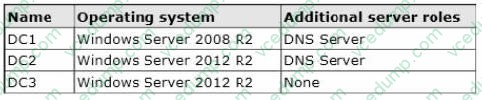
DC3 loses network connectivity due to a hardware failure.
You plan to remove DC3 from the domain.
You log on to DC3.
You need to identify which service location (SRV) records are registered by DC3.
What should you do?
A. Open the %windir%\system32\dns\backup\adatum.com.dns file.
B. Open the %windir%\system32\config\netlogon.dns file.
C. Run ipconfig /displaydns.
D. Run dcdiag /test:dns. -
Question 53:
Your network contains two servers named Server1 and Server2 that run Windows Server 2012 R2. Server1 and Server2 are part of a workgroup.
On Server1 and Server2, you create a local user account named Admin1. You add the account to the local Administrators group. On both servers, Admin1 has the same password.
You log on to Server1 as Admin1. You open Computer Management and you connect to Server2.
When you attempt to create a scheduled task, view the event logs, and manage the shared folders, you receive Access Denied messages. You need to ensure that you can administer Server2 remotely from Server1 by using Computer
Management. What should you configure on Server2?
A. From Local Users and Groups, modify the membership of the Remote Management Users group.
B. From Server Manager, modify the Remote Management setting.
C. From Windows Firewall, modify the Windows Management Instrumentation (WMI) firewall rule.
D. From Registry Editor, configure the LocalAccountTokenFilterPolicy resgistry value -
Question 54:
Your network contains an Active Directory domain named contoso.com. All servers run Windows Server 2012 R2. The domain contains a server named Server1.
You install the Windows PowerShell Web Access gateway on Server1.
You need to provide administrators with the ability to manage the servers in the domain by using the Windows PowerShell Web Access gateway.
Which two cmdlets should you run on Server1? (Each correct answer presents part of the solution. Choose two.)
A. Install PswaWebApplication
B. Add PswaAuthorizationRule
C. Set-WSManlnstance
D. Set-WSManQuickConfig
E. Set-BCAuthentication -
Question 55:
You have a cluster named Cluster1 that contains two nodes. Both nodes run Windows Server 2012 R2. Cluster1 hosts a virtual machine named VM1 that runs Windows Server 2012 R2.
You notice that VM1 is marked as being in a critical state in the cluster. You verify that VM1 is functioning correctly. You need to ensure that VM1 is no longer marked as being in a critical state.
Which cmdlet should you run?
A. Remove-ClusterVmMonitoredItem
B. Remove-ClusterResourceDependency
C. Reset-ClusterVMMonitoredState
D. Clear-ClusterNode -
Question 56:
You can create a printing pool to automatically distribute print jobs to the next available printer. A printing pool is one logical printer connected to multiple printers through multiple ports of the print server.
The printer that is idle receives the next document sent to the logical printer.
All printers in a pool must use the same driver. Is the above statement true or false?
A. True
B. False -
Question 57:
You need to verify whether a DNS response from a DNS server is signed by DNSSEC. What should you run?
A. Nslookup.exe
B. Dnscmd.exe
C. Get-NetIPAddress
D. Resolve-DNSName -
Question 58:
Your network contains an Active Directory domain named contoso.com. The domain contains an organizational unit (OU) named AHServers.OU.
You create and link a Group Policy object (GPO) named GP01 to AllServer.OU. GPO1 is configured as shown in the exhibit. (Click the Exhibit button.)
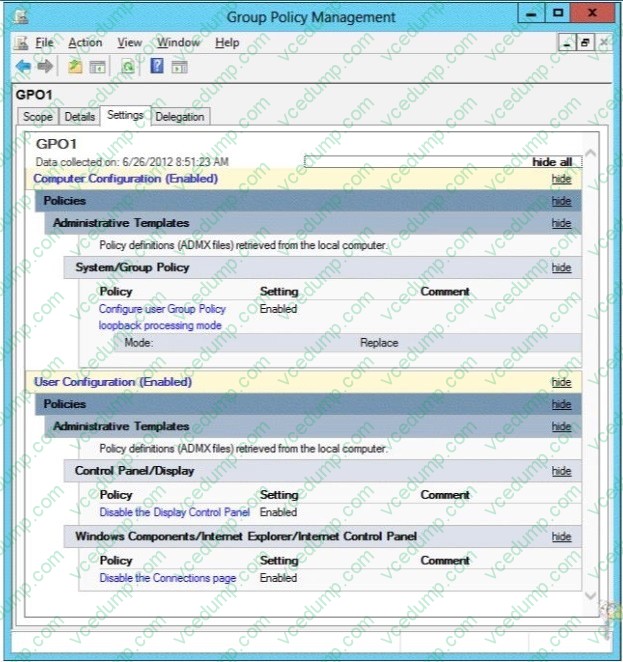
You need to ensure that GPO1 only applies to servers that have Remote Desktop Services (RDS) installed. What should you configure?
A. Item-level targeting
B. WMI Filtering
C. Security Filtering
D. Block Inheritance -
Question 59:
Complete the missing word from the sentence below that is describing one of the new roles in Server 2008:
By using __________ , you can augment an organization's security strategy by protecting information through persistent usage policies, which remain with the information, no matter where it is moved.
A. AD FS
B. AD RMS
C. RODC
D. AD LDS -
Question 60:
Your network has ipsec policy configured.
You need to exempt icmp and router discovery traffic from ipsec policy rule in windows firewall.
Which command will you use?
A. disable-netadapterbinding
B. update-netipsecrule
C. remove-netfirewallrule
D. set-netfirewallsetting
Related Exams:
-
62-193
Technology Literacy for Educators -
70-243
Administering and Deploying System Center 2012 Configuration Manager -
70-355
Universal Windows Platform – App Data, Services, and Coding Patterns -
77-420
Excel 2013 -
77-427
Excel 2013 Expert Part One -
77-725
Word 2016 Core Document Creation, Collaboration and Communication -
77-726
Word 2016 Expert Creating Documents for Effective Communication -
77-727
Excel 2016 Core Data Analysis, Manipulation, and Presentation -
77-728
Excel 2016 Expert: Interpreting Data for Insights -
77-731
Outlook 2016 Core Communication, Collaboration and Email Skills
Tips on How to Prepare for the Exams
Nowadays, the certification exams become more and more important and required by more and more enterprises when applying for a job. But how to prepare for the exam effectively? How to prepare for the exam in a short time with less efforts? How to get a ideal result and how to find the most reliable resources? Here on Vcedump.com, you will find all the answers. Vcedump.com provide not only Microsoft exam questions, answers and explanations but also complete assistance on your exam preparation and certification application. If you are confused on your 70-417 exam preparations and Microsoft certification application, do not hesitate to visit our Vcedump.com to find your solutions here.