70-417 Exam Details
-
Exam Code
:70-417 -
Exam Name
:Upgrading Your Skills to MCSA Windows Server 2012 -
Certification
:Microsoft Certifications -
Vendor
:Microsoft -
Total Questions
:711 Q&As -
Last Updated
:Feb 03, 2022
Microsoft 70-417 Online Questions & Answers
-
Question 1:
Your role of Network Administrator at ABC.com includes the management of the Active Directory forest. The network includes servers that run Windows Server 2008 R2 and Windows Server 2012. The forest contains three domains: a root domain named ABC.com, a child domain named US.ABC.com and another child domain named Research.US.ABC.com. The ABC.com root domain contains two Windows Server 2012 domain controllers named ABC-DC1 and ABC-DC2. ABC-DC1 contains the forest FSMO roles. ABC-DC1 contains the forest FSMO roles. ABC-DC2 contains the domain FSMO roles for the ABC.com domain.
The US.ABC.com domain contains two Windows Server 2008 R2 domain controllers named USABC- DC1 and US-ABC-DC2. US-ABC-DC1 contains the domain FSMO roles for the US.ABC.com domain. US-ABC-DC2 is configured as a Global Catalog Server. The Research.US.ABC.com domain contains two Windows Server 2012 domain controllers named Res-US-ABC-DC1 and Res-US-ABC-DC2. Res-US-ABC-DC1 contains the domain FSMO roles for the Res.US.ABC.com domain. Res-US-ABC-DC2 is configured as a Global Catalog Server.
All domain controllers in the forest are configured as DNS Servers. You plan to install a Windows Server 2008 R2 domain controller in the Research.US.ABC.com domain.
Which of the existing domain controllers must be online in order to create the planned additional domain controller?
A. ABC-DC1
B. US-ABC-DC1
C. US-ABC-DC1 and US-ABC-DC2
D. Res-US-ABC-DC1
E. Res-US-ABC-DC1 and Res-US-ABC-DC2
F. US-ABC-DC1 and Res-US-ABC-DC1 -
Question 2:
Your network contains one Active Directory domain named contoso.com. The forest functional level is Windows Server 2012. All servers run Windows Server 2012 R2. All client computers run Windows 8.1.
The domain contains 10 domain controllers and a read-only domain controller (RODC) named RODC01. All domain controllers and RODCs are hosted on a Hyper-V host that runs Windows Server 2012 R2.
You need to identify which domain controller must be online when cloning a domain controller.
Which cmdlet should you use?
A. Get-AdGroupMember
B. Get-ADDomainControllerPasswordReplicationPolicy
C. Get-ADDomainControllerPasswordReplicationPolicyUsage
D. Get-ADDomain
E. Get-ADOptionalFeature
F. Get-ADAccountAuthorizationGroup
G. Get-ADAuthenticationPolicySilo
H. Get-ADAuthenticationPolicy -
Question 3:
Your corporate network includes an Active Directory Domain Services (AD DS) domain named contoso.com. The domain contains a Windows Server 2012 R2 computer that is named Server1. On Server1 the role Windows Server Update
Services is installed.
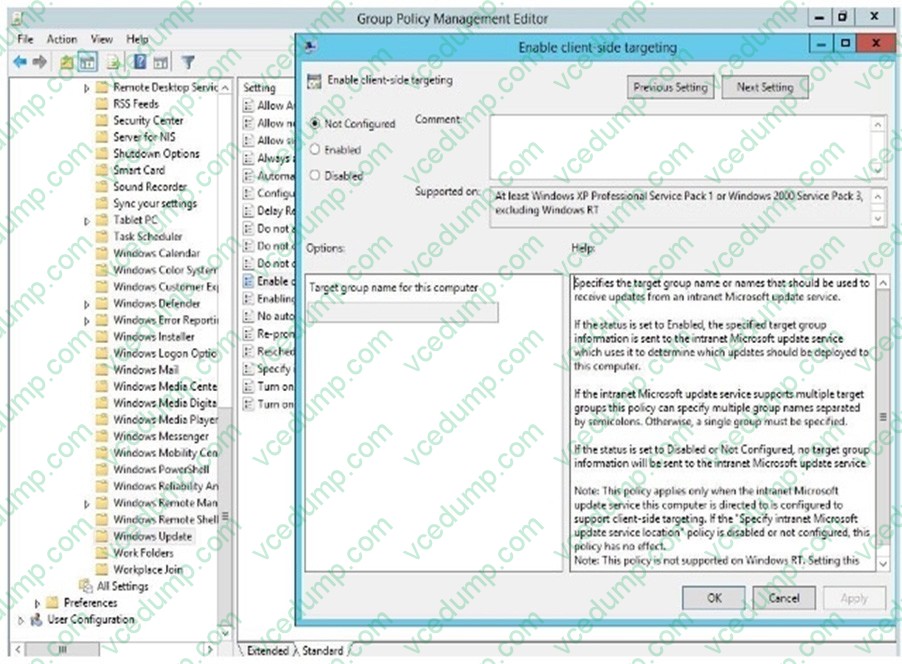
You want to use a Group Policy object (GPO) to assign members of a computer group.
Which settings you will configure?
A. Configure Automatic Updates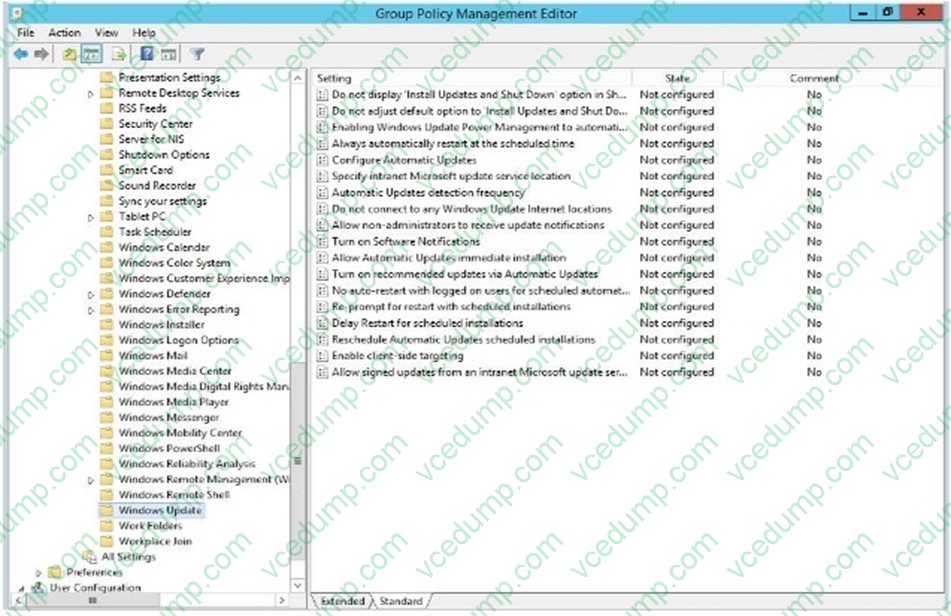
B. Specify intranet Microsoft update service
C. Enable Software Notifications
D. Enable recommended updates via Automatic Updates
E. Enable Client-side targeting
F. Allow signed updates from an intranet Microsoft update service location -
Question 4:
Your network contains a server named Server1 that runs Windows Server 2012. Server1 has the Hyper-V server role installed.
Server1 hosts four virtual machines named VM1, VM2, VM3, and VM4.
Server1 is configured as shown in the following table.
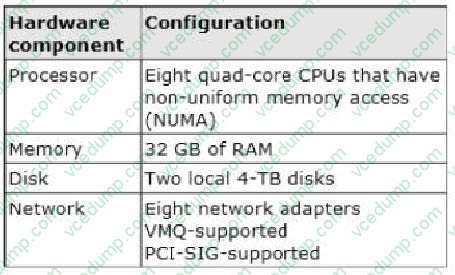
VM2 sends and receives large amounts of data over the network.
You need to ensure that the network traffic of VM2 bypasses the virtual switches of the parent partition.
What should you configure?
A. NUMA topology
B. Resource control
C. Resource metering
D. Virtual Machine Chimney
E. The VLAN ID
F. Processor Compatibility
G. The startup order
H. Automatic Start Action
I. Integration Services
J. Port mirroring -
Question 5:
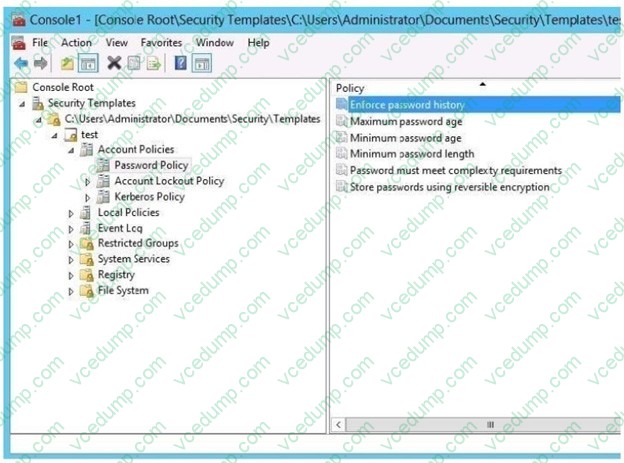
Your network contains an active directory domain named Contoso.com. The domain contains two servers named server1 and server2 that run Windows Server 2012 R2. You create a security template named template1 by using the security template snap-in. You need to apply template1 to server2.
Which tool should you use?
A. Security Configuration and Analysis
B. Server Manager
C. Security Template
D. Computer management -
Question 6:
Your network contains an Active Directory domain named contoso.com. The domain contains a member server named HVServer1. HVServer1 runs Windows Server 2012 R2 and has the Hyper-V server role installed.
HVServer1 hosts two virtual machines named Server1 and Server2. Both virtual machines connect to a virtual switch named Switch1.
On Server2, you install a network monitoring application named App1.
You need to capture all of the inbound and outbound traffic to Server1 by using App1.
Which two commands should you run from Windows PowerShell? (Each correct answer presents part of the solution. Choose two.)
A. Get-VM "Server2" | Set-VMNetworkAdapter -IovWeight 1
B. Get-VM "Server1" | Set-VMNetworkAdapter -Allow/Teaming On
C. Get-VM "Server1" | Set-VMNetworkAdapter -PortMirroring Source
D. Get-VM "Server2" | Set-VMNetworkAdapter -PortMirroring Destination
E. Get-VM "Server1" | Set-VMNetworkAdapter -IovWeight 0
F. Get-VM "Server2" | Set-VMNetworkAdapter-AllowTeaming On -
Question 7:
You create a new virtual disk in a storage pool by using the New Virtual Disk Wizard.
You discover that the new virtual disk has a write-back cache of 1 GB.
You need to ensure that the virtual disk has a write-back cache of 5 GB.
What should you do?
A. Detach the virtual disk, and then run the Resize-VirtualDisk cmdlet
B. Detach the virtual disk, and then run the Set-VirtualDisk cmdlet
C. Delete the virtual disk, and then run the New-StorageSubSystemVirtualDisk cmdlet
D. Delete the virtual disk, and then run the New-VirtualDisk cmdlet -
Question 8:
Your role of Network Administrator at ABC.com includes the management of the Active Directory Domain Services (AD DS) domain named ABC.com. The network includes servers that run Windows Server 2008 R2 Service Pack 1 (SP1) and Windows Server 2012. You use a Windows Server 2008 R2 (SP1) domain member server named ABC-Admin1 to manage other servers in the network. You install a new Windows Server 2008 R2 (SP1) server named ABC-SRV12. You join ABCSRV12 to the ABC.com domain as a member server and install the necessary software on ABCSRV12 to ensure that you can manage the server from other computers. You configure the Windows PowerShell Script Execution Policy on ABC-SRV12 to Unrestricted. What should you do next to ensure that you can manage ABC-SRV12 from ABC-Admin1?
A. You should run the Enable-PSRemoting PowerShell cmdlet.
B. You should run the Configure-SMRemoting.ps1 script.
C. You should run the Convert-Path PowerShell cmdlet.
D. You should run the Connect-PSSession PowerShell cmdlet. -
Question 9:
Your network contains two Web servers named Server1 and Server2. Both servers run Windows Server 2012 R2.
Server1 and Server2 are nodes in a Network Load Balancing (NLB) cluster. The NLB cluster contains an application named App1 that is accessed by using the URL http://app1.contoso.com.
You plan to perform maintenance on Server1. You need to ensure that all new connections to App1 are directed to Server2.
The solution must not disconnect the existing connections to Server1
What should you run?
A. The Set-NlbCluster cmdlet
B. The Set-NlbClusterNode cmdlet
C. The Stop-NlbCluster cmdlet
D. The Stop-NlbClusterNode cmdlet -
Question 10:
HOTSPOT
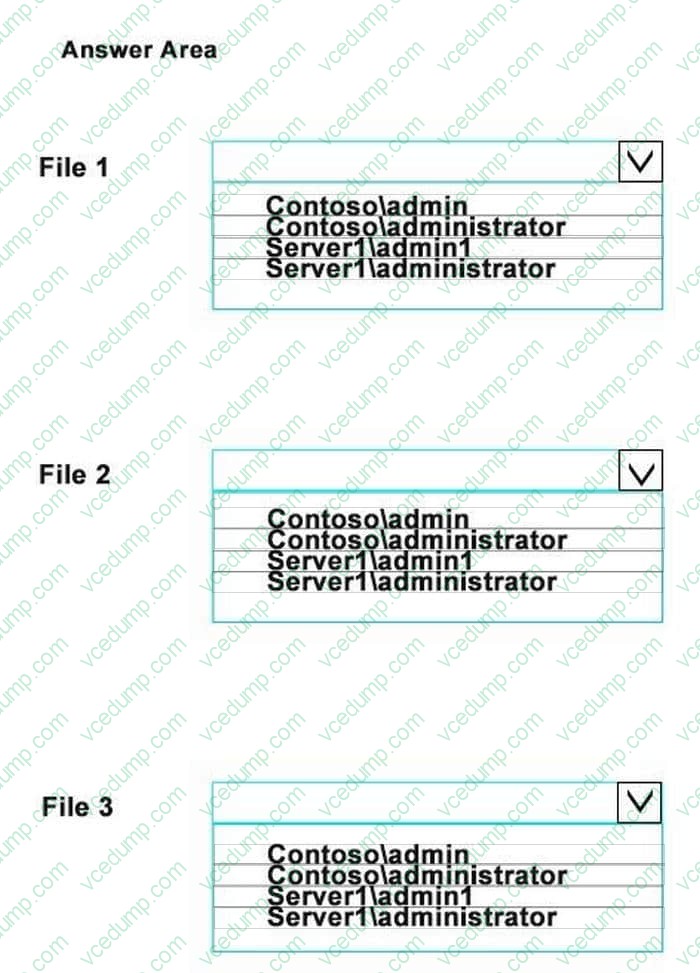
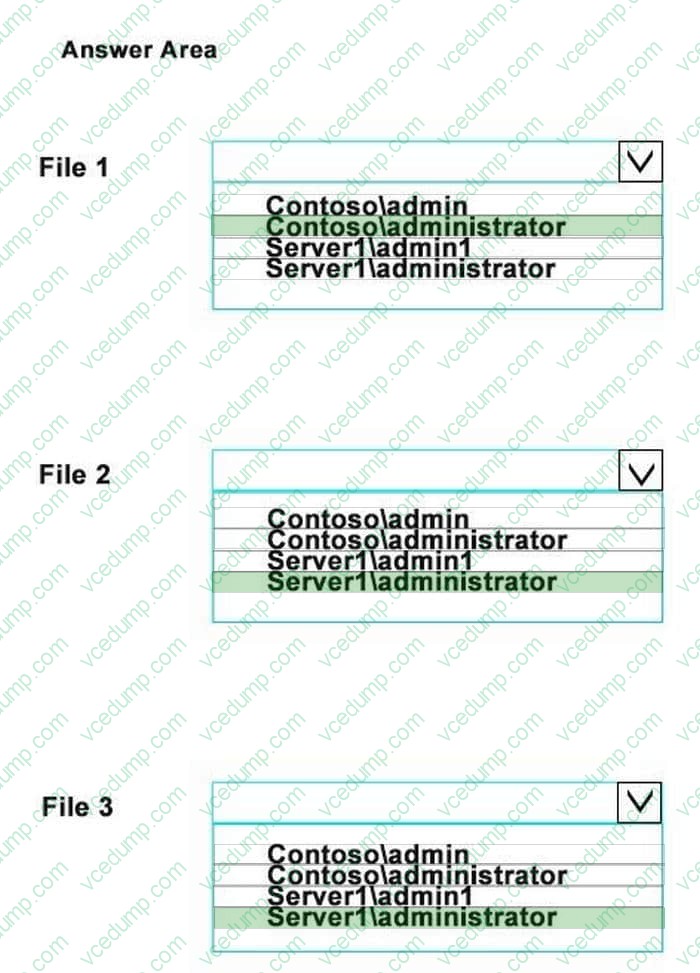
File1 has been encrypted by Contoso\admin1.
File2 has been encrypted by Server1\admin1.
File3 has been encrypted by Server1\administrator.
You need to back up the DRA agents.
Who is the owner of each of the agents?
You should to select one in every file.
Hot Area:
Related Exams:
-
62-193
Technology Literacy for Educators -
70-243
Administering and Deploying System Center 2012 Configuration Manager -
70-355
Universal Windows Platform – App Data, Services, and Coding Patterns -
77-420
Excel 2013 -
77-427
Excel 2013 Expert Part One -
77-725
Word 2016 Core Document Creation, Collaboration and Communication -
77-726
Word 2016 Expert Creating Documents for Effective Communication -
77-727
Excel 2016 Core Data Analysis, Manipulation, and Presentation -
77-728
Excel 2016 Expert: Interpreting Data for Insights -
77-731
Outlook 2016 Core Communication, Collaboration and Email Skills
Tips on How to Prepare for the Exams
Nowadays, the certification exams become more and more important and required by more and more enterprises when applying for a job. But how to prepare for the exam effectively? How to prepare for the exam in a short time with less efforts? How to get a ideal result and how to find the most reliable resources? Here on Vcedump.com, you will find all the answers. Vcedump.com provide not only Microsoft exam questions, answers and explanations but also complete assistance on your exam preparation and certification application. If you are confused on your 70-417 exam preparations and Microsoft certification application, do not hesitate to visit our Vcedump.com to find your solutions here.