70-410 Exam Details
-
Exam Code
:70-410 -
Exam Name
:Installing and Configuring Windows Server 2012 -
Certification
:Microsoft Certifications -
Vendor
:Microsoft -
Total Questions
:537 Q&As -
Last Updated
:Feb 03, 2022
Microsoft 70-410 Online Questions & Answers
-
Question 431:
Your network contains an Active Directory forest named contoso.com. The forest contains a single domain. The domain contains two domain controllers named DC1 and DC2 that run Windows Server 2012 R2.
The domain contains a user named User1 and a global security group named Group1.
You reconfigure DC2 as a member server in the domain.
You need to add DC2 as the first domain controller in a new domain in the forest.
Which cmdlet should you run?
A. Add-AdPrincipalGroupMembership
B. Install-AddsDomainController
C. Install WindowsFeature
D. Install AddsDomain
E. Rename-AdObject
F. Set AdAccountControl
G. Set-AdGroup
H. Set-User -
Question 432:
You have a file server named Server1 that runs Windows Server 2012 R2. Server1 has following hardware configurations:
-16GB of RAM
-A single quad-core CPU
-
Three network teams that have two network adapters each
You add additional CPUs and RAM to Server 1.
You repurpose Server1 as a virtualization host. You install the Hyper-V server role on Server1. You need to create four external virtual switches in Hyper-V. Which cmdlet should you run first?
A. Set-NetAdapter.
B. Add-Net1.bfoTeamNic
C. Add-VMNetworkAdapter
D. Remove-NetLbfoTeam -
Question 433:
Your network contains an Active Directory domain named contoso.com. The domain contains a server named Server1 that runs Windows Server 2012 R2. Server1 contains a virtual machine named VM1 that runs Windows Server 2012 R2.
You need to ensure that a user named User1 can install Windows features on VM1. The solution must minimize the number of permissions assigned to User1.
To which group should you add User1?
A. Hyper-V Administrators on Server1
B. Administrators on VM1
C. Server Operators on Server1
D. Power Users on VM1 -
Question 434:
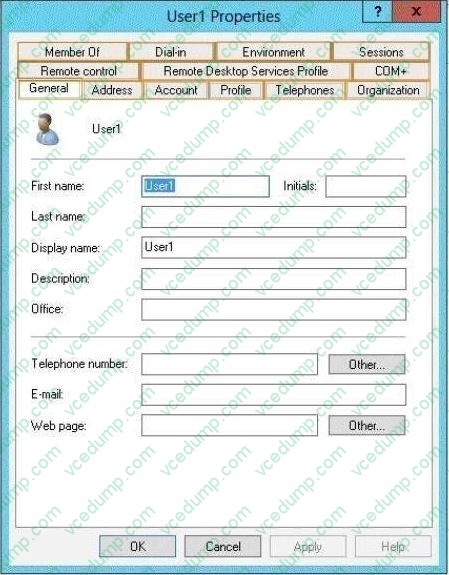
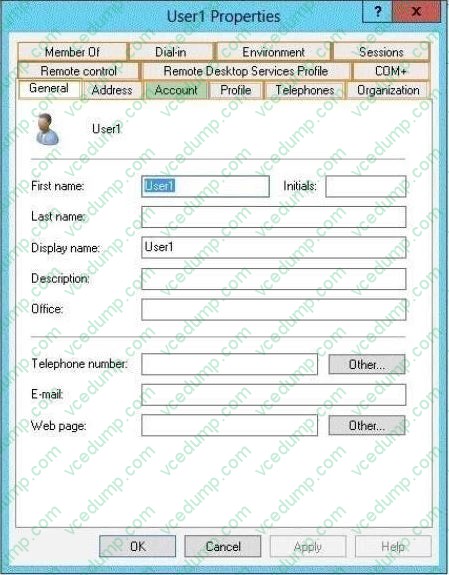
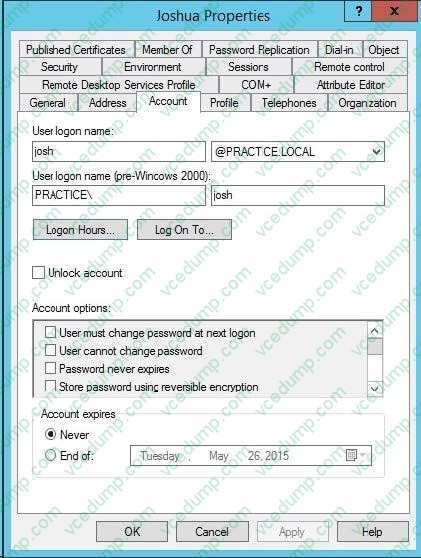
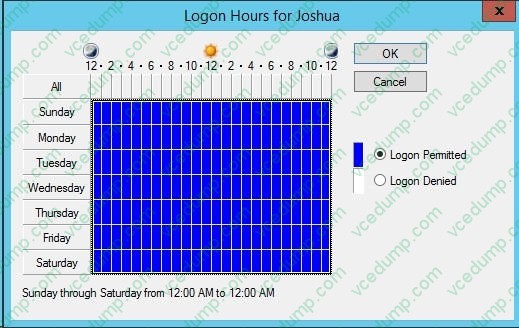
Your network contains an Active Directory domain named adatum.com. You create an account for a temporary employee named User1. You need to ensure that User1 can log on to the domain only between 08:00 and 18:00 from a client
computer named Computer1. From which tab should you perform the configuration?
To answer, select the appropriate tab in the answer area.
Hot Area:
-
Question 435:
Your network contains an Active Directory domain named contoso.com. The domain contains a domain controller named DC1 that runs Windows Server 2012 R2. You need to configure a central store for the Group Policy Administrative Templates.
What should you do on DC1?
A. From Server Manager, create a storage pool.
B. From Windows Explorer, copy the PolicyDefinitions folder to the SYSVOL\contoso.com\policies folder.
C. From Server Manager, add the Group Policy Management feature
D. From Windows Explorer, copy the PolicyDefinitions folder to the NETLOGON share. -
Question 436:
Your network contains an Active Directory domain named contoso.com.
You log on to a domain controller by using an account named Admin1. Admin1 is a member of the Domain Admins group.
You view the properties of a group named Group1 as shown in the exhibit. (Click the Exhibit button.)
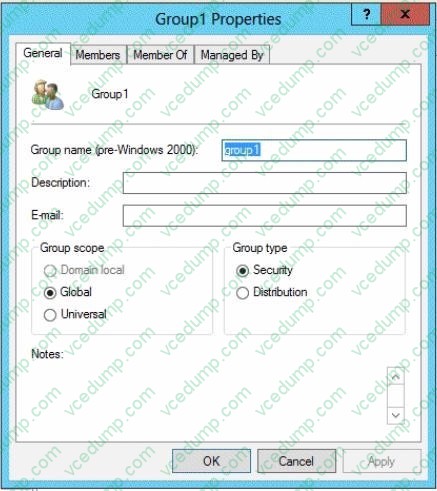
Group1 is located in an organizational unit (OU) named OU1.
You need to ensure that users from Group1 can modify the Security settings of OU1 only.
What should you do from Active Directory Users and Computers?
A. Modify the Managed By settings on OU1.
B. Right-click contoso.com and select Delegate Control.
C. Right-click OU1 and select Delegate Control.
D. Modify the Security settings of Group1. -
Question 437:
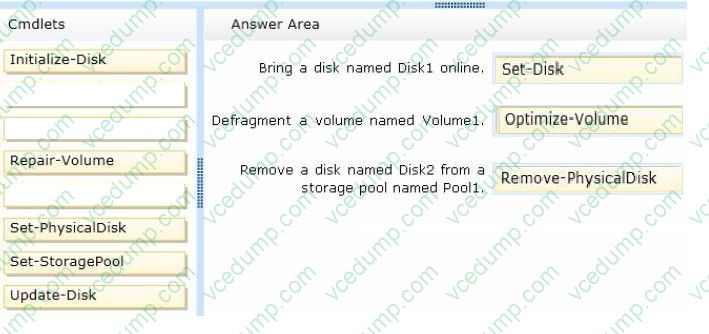
You have a server named Server1 that runs Windows Server 2012 R2.
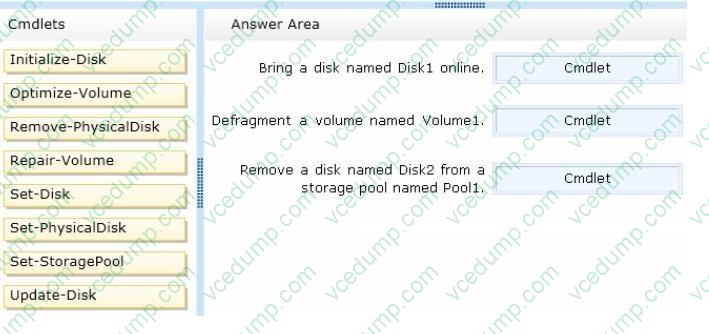
You need to perform the following storage configuration tasks on Server1:
Bring a disk named Diskl online.
Defragment a volume named Volumel.
Remove a disk named Disk2 from a storage pool named Pooll.
Which cmdlet should you use to perform each task?
To answer, drag the appropriate cmdlets to the correct tasks. Each cmdlet may be used once, more than once, or not at all. You may need to drag the split bar between panes or scroll to view content.
Select and Place:
-
Question 438:
You work as an administrator at Contoso.com. The Contoso.com network consists of a single domain named Contoso.com. All servers in the Contoso.com domain, including domain controllers, have Windows Server 2012 R2 installed.
You have been instructed to make sure that Contoso.com users are not able to install a Windows Store application. You then create a rule for packaged apps.
Which of the following is the rule based on? (Choose all that apply.)
A. The publisher of the package.
B. The publisher of the application.
C. The name of the package
D. The name of the application
E. The package version.
F. The application version. -
Question 439:
Your network contains two subnets. The subnets are configured as shown in the following table.
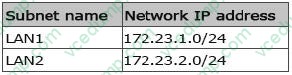
You have a server named Server2 that runs Windows Server 2012 R2. Server2 is connected to LAN1. You run the route print command as shown in the exhibit.
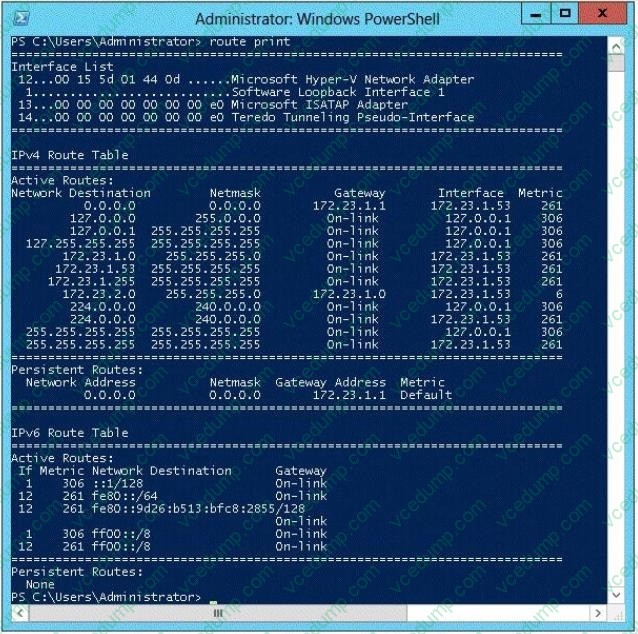
You need to ensure that Server2 can communicate with the client computers on LAN2. What should you do?
A. Change the metric of the 10.10.1.0 route.
B. Set the state of the Teredo interface to disable.
C. Set the state of the Microsoft ISATAP Adapter #2 interface to disable.
D. Run route delete 172.23.2.0. -
Question 440:
Your network contains an Active Directory domain named contoso.com. The domain contains an Application server named Server1. Server1 runs Windows Server 2012 R2. Server1 is configured as an FTP server.
Client computers use an FTP Application named App1.exe. App1.exe uses TCP port 21 as the control port and dynamically requests a data port.
On Server1, you create a firewall rule to allow connections on TCP port 21.
You need to configure Server1 to support the client connections from App1.exe.
What should you do?
A. Run netsh adv firewall set global statefulftp enable.
B. Create an inbound firewall rule to allow App1.exe.
C. Create a tunnel connection security rule.
D. Run Set-NetFirewallRule -DisplayName DynamicFTP -Profile Domain
E. Create an outbound firewall rule to allow App1.exe.
F. Run netsh firewall add portopening TCP 21 dynamicftp

Related Exams:
-
62-193
Technology Literacy for Educators -
70-243
Administering and Deploying System Center 2012 Configuration Manager -
70-355
Universal Windows Platform – App Data, Services, and Coding Patterns -
77-420
Excel 2013 -
77-427
Excel 2013 Expert Part One -
77-725
Word 2016 Core Document Creation, Collaboration and Communication -
77-726
Word 2016 Expert Creating Documents for Effective Communication -
77-727
Excel 2016 Core Data Analysis, Manipulation, and Presentation -
77-728
Excel 2016 Expert: Interpreting Data for Insights -
77-731
Outlook 2016 Core Communication, Collaboration and Email Skills
Tips on How to Prepare for the Exams
Nowadays, the certification exams become more and more important and required by more and more enterprises when applying for a job. But how to prepare for the exam effectively? How to prepare for the exam in a short time with less efforts? How to get a ideal result and how to find the most reliable resources? Here on Vcedump.com, you will find all the answers. Vcedump.com provide not only Microsoft exam questions, answers and explanations but also complete assistance on your exam preparation and certification application. If you are confused on your 70-410 exam preparations and Microsoft certification application, do not hesitate to visit our Vcedump.com to find your solutions here.