70-410 Exam Details
-
Exam Code
:70-410 -
Exam Name
:Installing and Configuring Windows Server 2012 -
Certification
:Microsoft Certifications -
Vendor
:Microsoft -
Total Questions
:537 Q&As -
Last Updated
:Feb 03, 2022
Microsoft 70-410 Online Questions & Answers
-
Question 421:
Your network contains an Active Directory domain named contoso.com. The domain contains a server named Server1 that runs Windows Server 2012 R2 and has the Remote Access server role installed.
A user named User1 must connect to the network remotely. The client computer of User1 requires Challenge Handshake Authentication Protocol (CHAP) for remote connections. CHAP is enabled on Server1.
You need to ensure that User1 can connect to Server1 and authenticate to the domain.
What should you do from Active Directory Users and Computers?
A. From the properties of User1, select Store password using reversible encryption.
B. From the properties of Server1, assign the Allowed to Authenticate permission to User1.
C. From the properties of User1, select Use Kerberos DES encryption types for this account.
D. From the properties of Server1, select Trust this computer for delegation to any service (Kerberos only). -
Question 422:
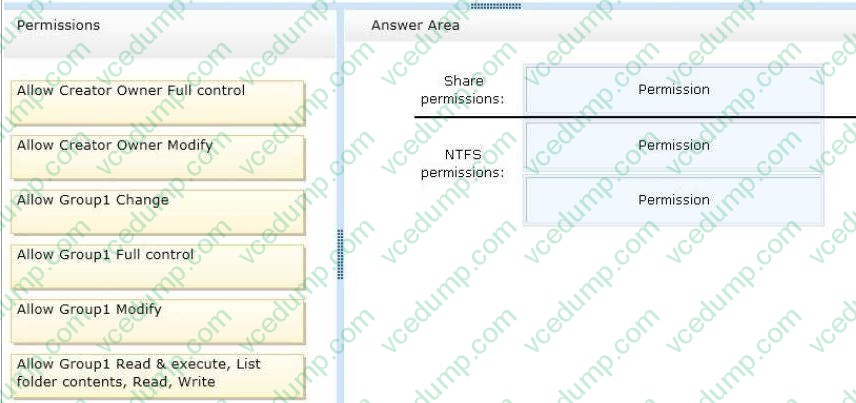
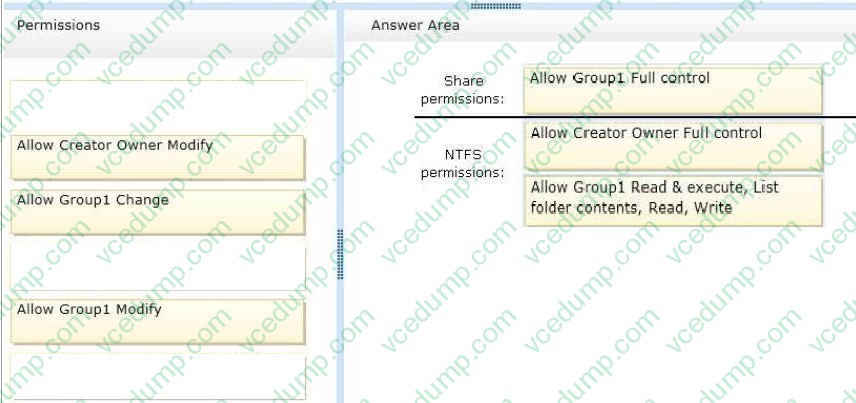
Your network contains an Active Directory domain named contoso.com. The domain contains a member server named Server1. Server1 runs Windows Server 2012 and has the File Server server role installed. On Server1, you create a share named Documents. The Share permission for the Documents share is configured as shown in the following table.

The NTFS permission for the Documents share is configured as shown in the following table.

You need to configure the Share and NTFS permissions for the Documents share. The permissions must meet the following requirements:
Ensure that the members of a group named Group1 can read files and run programs in - Documents. Ensure that the members of Group1 can modify the permissions on their own files in Documents.
Ensure that the members of Group1 can create folders and files in Documents.
Minimize the number of permissions assigned to users and groups.
How should you configure the permissions?
To answer, drag the appropriate permission to the correct location. Each permission may be used once, more than once, or not at all. You may need to drag the split bar between panes or scroll to view content.
Select and Place:
-
Question 423:
Your network contains an Active Directory forest. The forest contains two domains named contoso.com and corp.contoso.com. The forest contains four domain controllers. The domain controllers are configured as shown in the following table.
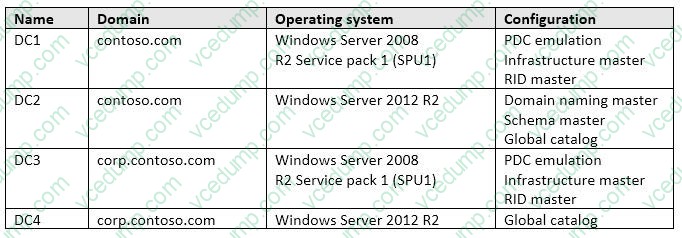
All domain controllers are DNS servers. In the corp.contoso.com domain, you plan to deploy a new domain controller named DC5.
You need to identify which domain controller must be online to ensure that DC5 can be promoted successfully to a domain controller.
Which domain controller should you identify?
A. DC1
B. DC2
C. DC3
D. DC4 -
Question 424:
Your network contains an Active Directory domain named contoso.com. The domain contains a print server named Server1 that runs Windows Server 2012 R2. Server1 contains a local group named Group1 that includes the Server
Operators group, the Administrators group, and the Print Operators group.
You share a printer named Printer1 on Server1.
You need to configure Printer1 to meet the following requirements:
Ensure that the members of Group1, the Server Operators group, the Administrators group, and the Print Operators group can send print jobs to Printer1.

Prevent other users from sending print jobs to Printer1.
Which two actions should you perform? (Each correct answer presents part of the solution. Choose two.)
A. Remove the permissions for the Creator Owner group.
B. Assign the Print permission to the Administrators group.
C. Remove the permissions for the Everyone group.
D. Assign the Print permission to the Server Operators group.
E. Assign the Print permission to Group1. -
Question 425:
Note: This question is part of a series of questions that use the same or similar answer choices. An answer choice may be correct for more than one question in the series. Each question is independent of the other questions in this series. Information and details provided in a question apply only to that question.
Your network contains one Active Directory domain named contoso.com. The domain contains 10 domain controllers and a read-only domain controller (RODC) named RODC01.
You plan to replace a domain controller named DC1. DC1 has the schema operations master role.
You need to transfer the schema master role to another domain controller named DC10 before you remove Active Directory from DC1.
Which tool should you use?
A. the ntdsutil command
B. the Set-ADDomainWindows PowerShell cmdlet
C. the Install-ADDSDomainWindows PowerShell cmdlet
D. the dsadd command
E. the dsamain command
F. the dsmgmt command
G. the net user command
H. the Set-ADForestWindows PowerShell cmdlet -
Question 426:
Your network contains an Active Directory domain named adatum.com. The domain contains a member server named L0N-DC1. L0N-DC1 runs Windows Server 2012 R2 and has the DHCP Server server role installed.
The network contains 100 client computers and 50 IP phones. The computers and the phones are from the same vendor.
You create an IPv4 scope that contains addresses from 172.16.0.1 to 172.16.1.254.
You need to ensure that the IP phones receive IP addresses in the range of 172.16.1.100 to 172.16.1.200. The solution must minimize administrative effort.
What should you create?
A. Server level policies
B. Reservations
C. Filters
D. Scope level policies -
Question 427:
A company's server deployment team needs to install fourteen Windows Server 2012 R2 to handle the expected increase in holiday traffic. The team would like the option of switching the servers between Server Core and Full GUI servers and do not want to be locked in to their first choice.
The server team would like four of the servers to include the Windows 8 Shell.
Which installation option is required for these servers?
A. Server Core
B. Desktop Experience
C. Server with a GUI
D. Minimal Server Interface -
Question 428:
Your network contains an Active Directory domain named contoso.com. The domain contains a server named Server1. Server1 runs Windows Server 2012 R2.
You create a group Managed Service Account named gservice1.
You need to configure a service named Service1 to run as the gservice1 account.
How should you configure Service1?
A. From the Services Console, configure the recovery settings
B. From a command prompt, run sc.exe and specify the config parameter
C. From Windows PowerShell, run Set-Service and specify the -PassThrough parameter
D. From a command prompt, run sc.exe and specify the sdset parameter -
Question 429:
Your network contains one Active Directory domain named contoso.com. The domain contains 2,000 client computers used by students.
You recently discover an increase in calls to the helpdesk that relate to security policy to meet the following requirement:
Modify the UserName of the built-in account named Administrator
Support a time mismatch between client computers and domain controllers of up to three minutes.
Which Two security settings should you modify?
A. Account Policies
B. Password Policy
C. Account Lockout Policy
D. Kerberos Policy
E. Local Policies
F. Audit Policy
G. User Rights Assignment
H. Security Options -
Question 430:
Your infrastructure divided in 2 sites. You have a forest root domain and child domain. There is only one DC on site 2 with no FSMO roles. The link goes down to site 2 and no users can log on. What FSMO roles you need on to restore the access?
A. Infrastructure master
B. RID master
C. Domain Naming master
D. PDC Emulator
Related Exams:
-
62-193
Technology Literacy for Educators -
70-243
Administering and Deploying System Center 2012 Configuration Manager -
70-355
Universal Windows Platform – App Data, Services, and Coding Patterns -
77-420
Excel 2013 -
77-427
Excel 2013 Expert Part One -
77-725
Word 2016 Core Document Creation, Collaboration and Communication -
77-726
Word 2016 Expert Creating Documents for Effective Communication -
77-727
Excel 2016 Core Data Analysis, Manipulation, and Presentation -
77-728
Excel 2016 Expert: Interpreting Data for Insights -
77-731
Outlook 2016 Core Communication, Collaboration and Email Skills
Tips on How to Prepare for the Exams
Nowadays, the certification exams become more and more important and required by more and more enterprises when applying for a job. But how to prepare for the exam effectively? How to prepare for the exam in a short time with less efforts? How to get a ideal result and how to find the most reliable resources? Here on Vcedump.com, you will find all the answers. Vcedump.com provide not only Microsoft exam questions, answers and explanations but also complete assistance on your exam preparation and certification application. If you are confused on your 70-410 exam preparations and Microsoft certification application, do not hesitate to visit our Vcedump.com to find your solutions here.