70-410 Exam Details
-
Exam Code
:70-410 -
Exam Name
:Installing and Configuring Windows Server 2012 -
Certification
:Microsoft Certifications -
Vendor
:Microsoft -
Total Questions
:537 Q&As -
Last Updated
:Feb 03, 2022
Microsoft 70-410 Online Questions & Answers
-
Question 401:
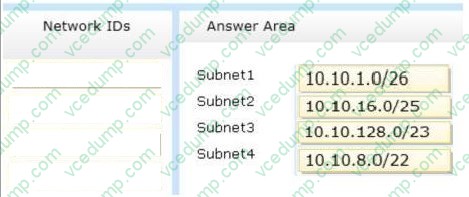
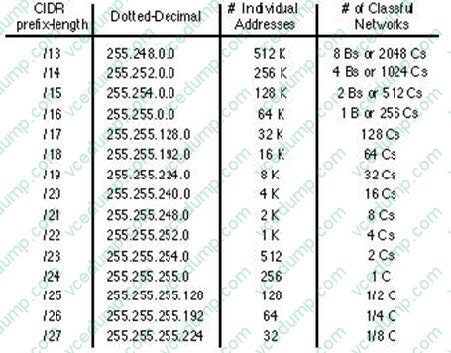
You plan to deploy a DHCP server that will support four subnets. The subnets will be configured as shown in the following table.
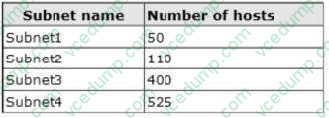
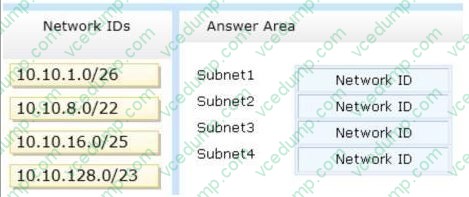
You need to identify which network ID you should use for each subnet. What should you identify? To answer, drag the appropriate network ID to the each subnet in the answer area.
Select and Place:
-
Question 402:
You have a server named Server1. Server1 runs Windows Server 2012 R2.
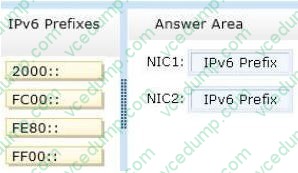
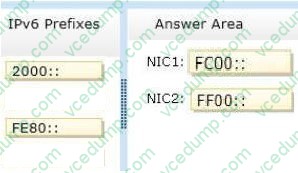
Server1 has two network adapters. Each network adapter must be configured as shown in the following table.

You need to configure the correct IPv6 address prefix for each network adapter. Which prefix should you select for each network adapter?
To answer, drag the appropriate IPv6 prefix to the correct network adapter in the answer area. Each prefix may be used once, more than once, or not at all. You
may need to drag the split bar between panes or scroll to view content.
Select and Place:
-
Question 403:
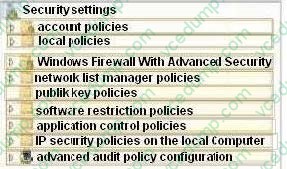
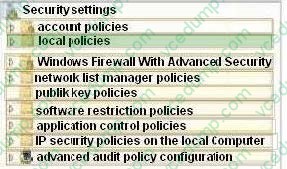
You have a server named Server1 that runs Windows Server 2012 R2. Several users are members of the local Administrators group. You need to ensure that all local administrators receive User Account Control (UAC) prompts when they run
a Microsoft Management Console (MMC). Which setting should you modify from the Local Security Policy?
To answer, select the appropriate settings in the answer area.
Hot Area:
-
Question 404:
You have a DNS server named Server1 that runs Windows Server 2012 R2.
From DNS Manager, you open the properties of Server1 as shown in the following exhibit.
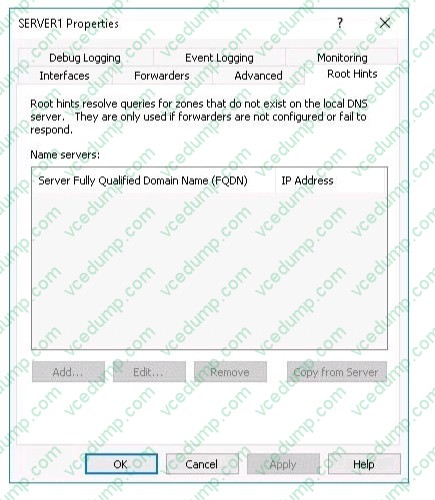
You need to configure the default root hints on Server1. What should you do?
A. Create a forward lookup zone named .(root).
B. Run the Set-DnsServerRootHint cmdlet.
C. Run the Add-DnsServerRootHint cmdlet.
D. Delete the forward lookup zone named .(root). -
Question 405:
Your network contains two Hyper-V hosts that run Windows Server 2012 R2. The Hyper-V hosts contain several virtual machines that run Windows Server 2012 R2.
You install the Network Load Balancing feature on the virtual machines.
You need to configure the virtual machines to support Network Load Balancing (NLB).
Which virtual machine settings should you configure?
A. DHCP guard
B. Port mirroring
C. Router guard
D. MAC address -
Question 406:
Note: This question is part of a series of questions that use the same or similar answer choices. An answer choice may be correct for more than one question in the series. Each question is independent of the other questions in this series.
Information and details provided in a question apply only to that question.
Your network contains a server named Server1 that runs Windows Server 2012 R2. Server1 has the Hyper-V server role installed.
Server1 hosts four virtual machines named VM1, VM2, VM3, and VM4.
Server1 is configured as shown in the following table.
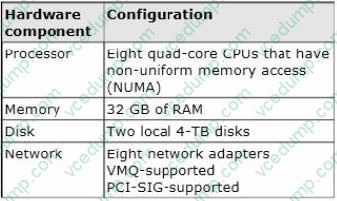
You install Windows Server 2012 R2 on VM2 by using Windows Deployment Services (WDS).
You need to ensure that the next time VM2 restarts, you can connect to the WDS server by using PXE.
Which virtual machine setting should you configure for VM2?
A. NUMA topology
B. Resource control
C. resource metering
D. virtual Machine Chimney
E. The VLAN ID
F. Processor Compatibility
G. The startup order
H. Automatic Start Action
I. Integration Services
J. Port mirroring -
Question 407:
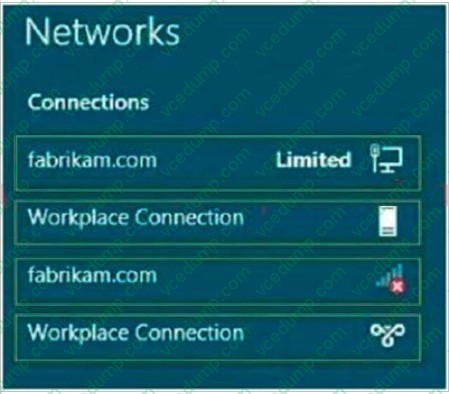
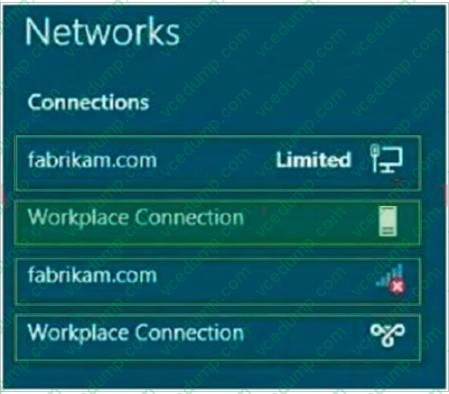
Your network contains an Active Directory domain named fabrikam.com. You implement DirectAccess and an IKEv2 VPN.
You need to view the properties of the VPN connection.
Which connection properties should you view? To answer, select the appropriate connection properties in the answer area.
Hot Area:
-
Question 408:
Your network contains an Active Directory domain named contoso.com. All user accounts in the sales department reside in an organizational unit (OU) named OU1.
You have a Group Policy object (GPO) named GPO1. GPO1 is used to deploy a logon script to all of the users in the sales department.
You discover that the logon script does not run when the sales users log on to their computers. You open Group Policy Management as shown in the exhibit.
You need to ensure that the logon script in GPO1 is applied to the sales users. What should you do?
A. Enforce GPO1.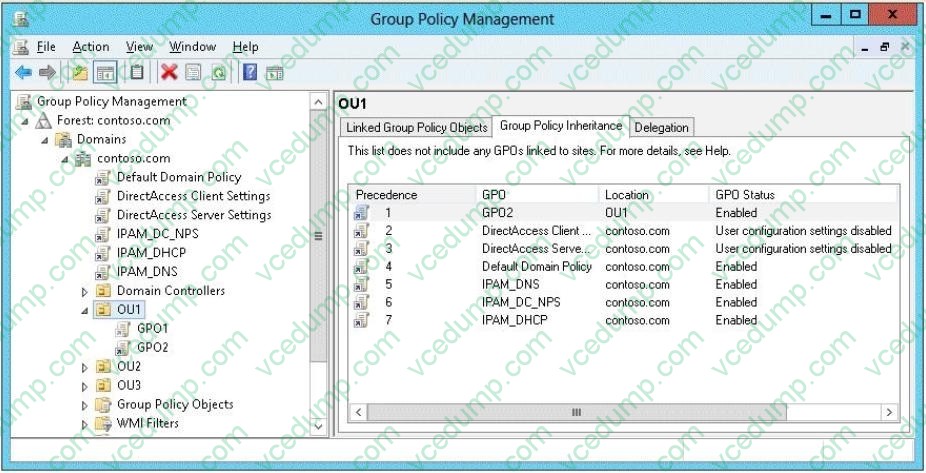
B. Modify the link order of GPO1.
C. Modify the Delegation settings of GPO1.
D. Enable the link of GPO1. -
Question 409:
You have a Hyper-V host named Server1 that runs Windows Server 2012 R2. Server1 has the virtual switches listed in the following table.
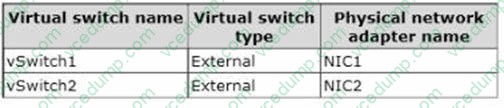
You create a virtual machine named VM1. VM1 has two network adapters. One network adapter connects to vSwitch1. The other network adapter connects to vSwitch2.You configure NIC teaming on VM1.
You need to ensure that if a physical NIC fails on Server1, VM1 remains connected to the network.
What should you do on Server1?
A. Run the Set-VmNetworkAdapter cmdlet.
B. Add a new network adapter to VM1.
C. Create a new virtual switch on Server 1.
D. Modify the properties of vSwitch1 and vSwitch2. -
Question 410:
You have a Hyper-V host named Server1 that runs Windows Server 2012 R2 Datacenter. Server1 is located in an isolated network that cannot access the Internet.
On Server1, you install a new virtual machine named VM1.VM1 runs Windows Server 2012 R2 Essentials and connects to a private virtual network.
After 30 days, you discover that VM1 shuts down every 60 minutes.
You need to resolve the issue that causes VM1 to shut down every 60 minutes.
What should you do?
A. OnVM1, run slmgr.exe and specify the /ipk parameter.
B. OnServer1, run slmgr.exe and specify the /rearm-sku parameter.
C. Create a new internal virtual network and attach VM1 to the new virtual network.
D. On Server1, run Add-WindowsFeatureVolumeActivation.
Related Exams:
-
62-193
Technology Literacy for Educators -
70-243
Administering and Deploying System Center 2012 Configuration Manager -
70-355
Universal Windows Platform – App Data, Services, and Coding Patterns -
77-420
Excel 2013 -
77-427
Excel 2013 Expert Part One -
77-725
Word 2016 Core Document Creation, Collaboration and Communication -
77-726
Word 2016 Expert Creating Documents for Effective Communication -
77-727
Excel 2016 Core Data Analysis, Manipulation, and Presentation -
77-728
Excel 2016 Expert: Interpreting Data for Insights -
77-731
Outlook 2016 Core Communication, Collaboration and Email Skills
Tips on How to Prepare for the Exams
Nowadays, the certification exams become more and more important and required by more and more enterprises when applying for a job. But how to prepare for the exam effectively? How to prepare for the exam in a short time with less efforts? How to get a ideal result and how to find the most reliable resources? Here on Vcedump.com, you will find all the answers. Vcedump.com provide not only Microsoft exam questions, answers and explanations but also complete assistance on your exam preparation and certification application. If you are confused on your 70-410 exam preparations and Microsoft certification application, do not hesitate to visit our Vcedump.com to find your solutions here.