70-347 Exam Details
-
Exam Code
:70-347 -
Exam Name
:Enabling Office 365 Services -
Certification
:Microsoft Certifications -
Vendor
:Microsoft -
Total Questions
:344 Q&As -
Last Updated
:Dec 10, 2021
Microsoft 70-347 Online Questions & Answers
-
Question 141:
You are the Office 365 administrator for a company. You plan to use Skype for Business Online on all mobile devices. Employees currently use the following device types:
Android
iOS
Nokia Symbian
Windows Phone
Some users report that they do not receive push notifications. Skype for Business Online must be able to send push notifications to all devices.
You need to open the required ports in the firewall.
Which destination port or ports should you open?
A. TCP 443
B. UDP 3478
C. TCP/UDP 50,000-59,999
D. TCP 5223 -
Question 142:
Note: This question is part of a series of questions that present the same scenario. Each question in the series contains a unique solution. Determine whether the solution meets the stated goals.
You need to modify the existing environment to meet the technical requirement for Outlook on the web.
Solution: You run the Set-OWAMailboxPolicy command.
Does this meet the goal?
A. Yes
B. No -
Question 143:
You are an Office 365 specialist for a consulting company.
Your company has been hired by several companies to migrate their legacy email solutions to Office 365.
You need to recommend mailbox migration strategies for the scenarios described in the following table.
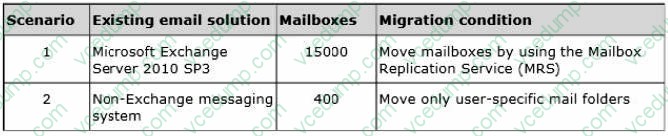
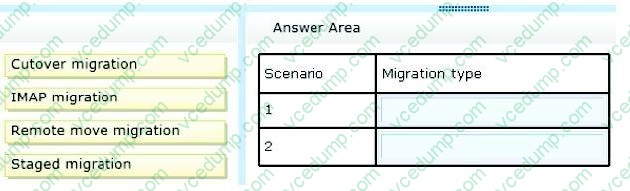
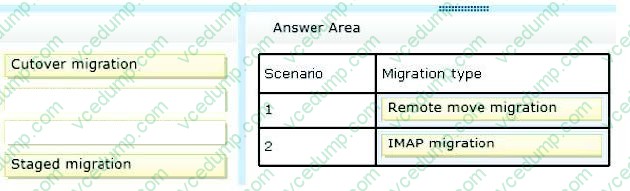
Which strategies should you recommend? To answer, drag the appropriate migration types to the correct targets. Each migration type may be used once, more than once, or not at all. You may need to drag the split bar between panes or scroll to view content.
Select and Place:
-
Question 144:
You are the Office 365 administrator for your company.
The company has established the following new requirements:
Members of the legal team must be able to conduct eDiscovery searches.
Executives must be notified when they send email messages that contain confidential information.
You need to configure the environment.
Which two actions should you perform? Each correct answer presents part of the solution.
NOTE: Each correct selection is worth one point.
A. Configure journaling to a Microsoft Exchange Online mailbox for all mailboxes.
B. Add the members of the legal team to the Discovery Management role group.
C. Create a Data Loss Prevention policy.
D. Place all executive mailboxes on In-Place Hold for 365 days and use In-Place eDiscovery for mailbox searches.
E. Enable Microsoft Exchange Online Archiving for the executive mailboxes.
F. Place all executive mailboxes on Retention Hold. -
Question 145:
Note: This question is part of a series of questions that present the same scenario. Each question in the series contains a unique solution that might meet the stated goals. Some question sets might have more than one correct solution, while
others might not have a correct solution.
After you answer a question in this section, you will NOT be able to return to it. As a result, these questions will not appear in the review screen.
You need to recommend a solution to implement the planned change for the email addresses of the New York office managers.
Solution: Populate the attributes in Active Directory and implement directory synchronization.
Does this meet the goal?
A. Yes
B. No -
Question 146:
Note: This question is part of a series of questions that present the same scenario. Each question in the series contains a unique solution that might meet the stated goals. Some question sets might have more than one correct solution, while
others might not have a correct solution.
After you answer a question in this section, you will NOT be able to return to it. As a result, these questions will not appear in the review screen.
You have an In-Place Hold that was implemented by running the following command:
New-MailboxSearch –Name "Hold-ProjectX" –SourceMailboxes "User1".
You are notified that the In-Place Hold is no longer required.
You need to ensure that the mailbox data can be deleted by using retention policies.
Solution: You run Set-MailboxSearch "Hold-ProjectX" -InPlaceHoldEnabled $false cmdlet.
Does this meet the goal?
A. Yes
B. No -
Question 147:
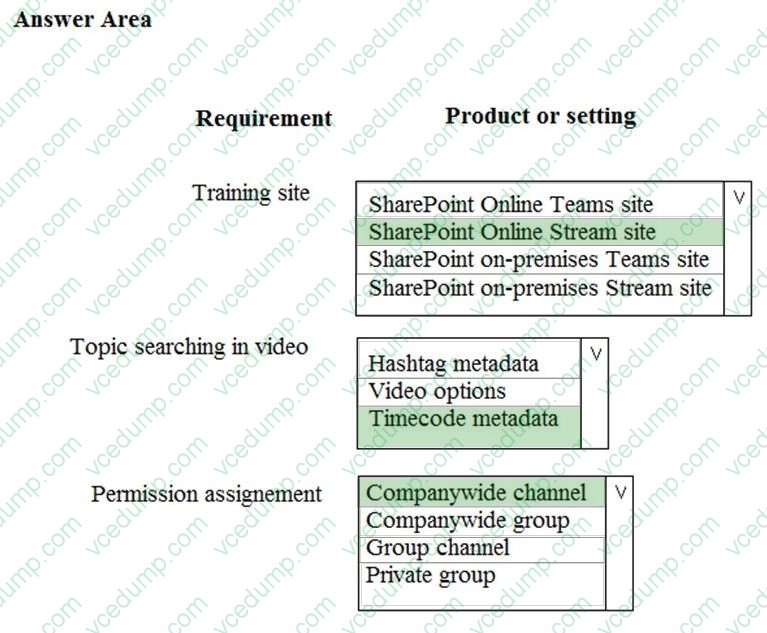
HOTSPOT
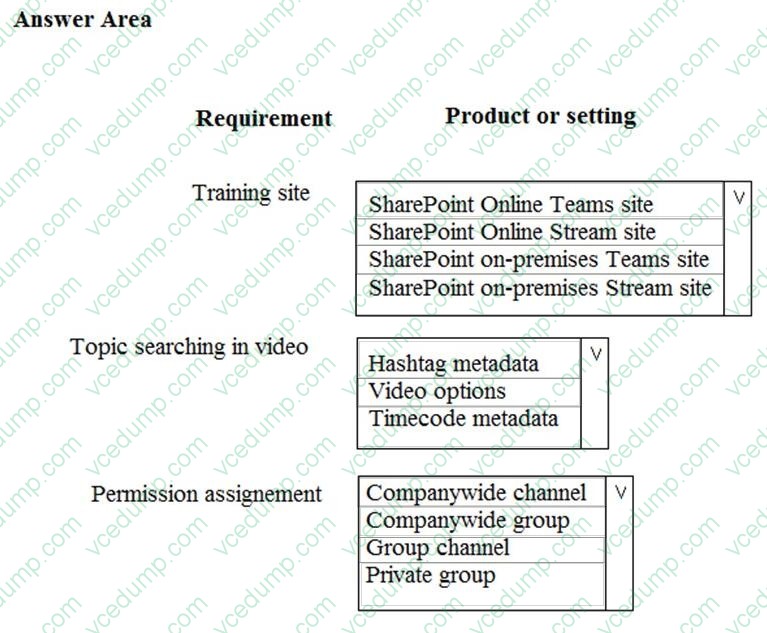
You need to deploy and configure the components required to implement the user training requirements. Which products or settings should you use? To answer, select the appropriate options in the answer area. NOTE: Each correct selection is worth one point.
Hot Area:
-
Question 148:
Your company has a hybrid deployment of Office 365.
You discover that some Active Directory user accounts are unavailable in Office 365. You need to identify why the user accounts are unavailable in Office 365.
What should you do?
A. Verify the miissetup.log file.
B. Run the Microsoft Remote Connectivity Analyzer.
C. Run the Test-OutlookWebServices cmdlet.
D. Run miisclient.exe. -
Question 149:
You manage an Office 365 tenant with an Enterprise E3 subscription.
You receive an eDiscovery request for a SharePoint Online site collection. You create an eDiscovery case and set.
You need to find and preserve content for the eDiscovery.
What should you do next?
A. Create an additional eDiscovery set.
B. Create a query filter.
C. Export documents from the SharePoint site collection.
D. Release the hold on the eDiscovery case. -
Question 150:
Note: This question is part of a series of questions that present the same scenario. Each question in the series contains a unique solution. Determine whether the solution meets the stated goals.
You configure an In-Place Hold for a user based on the technical requirement.
Which three Skype for Business features are disabled for the user? Each correct answer presents part of the solution.
A. shared Microsoft OneNote pages
B. file transfers
C. desktop sharing
D. audio conferencing
E. video conferencing
F. Microsoft PowerPoint annotations
Related Exams:
-
62-193
Technology Literacy for Educators -
70-243
Administering and Deploying System Center 2012 Configuration Manager -
70-355
Universal Windows Platform – App Data, Services, and Coding Patterns -
77-420
Excel 2013 -
77-427
Excel 2013 Expert Part One -
77-725
Word 2016 Core Document Creation, Collaboration and Communication -
77-726
Word 2016 Expert Creating Documents for Effective Communication -
77-727
Excel 2016 Core Data Analysis, Manipulation, and Presentation -
77-728
Excel 2016 Expert: Interpreting Data for Insights -
77-731
Outlook 2016 Core Communication, Collaboration and Email Skills
Tips on How to Prepare for the Exams
Nowadays, the certification exams become more and more important and required by more and more enterprises when applying for a job. But how to prepare for the exam effectively? How to prepare for the exam in a short time with less efforts? How to get a ideal result and how to find the most reliable resources? Here on Vcedump.com, you will find all the answers. Vcedump.com provide not only Microsoft exam questions, answers and explanations but also complete assistance on your exam preparation and certification application. If you are confused on your 70-347 exam preparations and Microsoft certification application, do not hesitate to visit our Vcedump.com to find your solutions here.