70-347 Exam Details
-
Exam Code
:70-347 -
Exam Name
:Enabling Office 365 Services -
Certification
:Microsoft Certifications -
Vendor
:Microsoft -
Total Questions
:344 Q&As -
Last Updated
:Dec 10, 2021
Microsoft 70-347 Online Questions & Answers
-
Question 331:
HOTSPOT
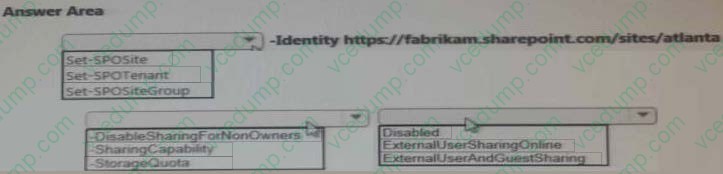
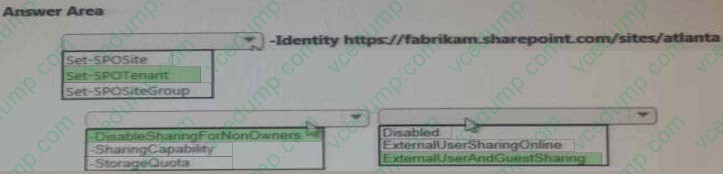
You enable sharing for all users in the organization.
You need to ensure that the Atlanta users meet the sharing requirements.
What should you do? To answer, select the appropriate options in the answer area.
NOTE: Each correct selection is worth one point.
Hot Area:
-
Question 332:
You are the Office 365 administrator for your company. The company's environment includes only Office 2013 and Windows 8.
Users are not allowed to install applications on client computers.
You need to enable Office Telemetry logging.
What should you do?
A. In Group Policy, enable logging in the User Configuration\Administrative Templates\Microsoft Office 2013\Telemetry Dashboard node.
B. Create a .reg file that sets the registry values under the HKEY_CURRENT_USER\Software\Policies\Microsoft\Office\15.0\OSM key to enable the Telemetry Agent to collect and upload data. Run the .reg file with standard privileges.
C. In Group Policy, enable logging in the User Configuration\Administrative Templates\Microsoft Office 2013\Telemetry logging node.
D. Create a .reg file that sets the registry values under the HKEY_LOCAL_MACHINE\Software\Microsoft\Office\15.0 key to enable Telemetry Agent to collect and upload data. Run the .reg file with standard privileges. -
Question 333:
Note: This question is part of a series of questions that present the same scenario. Each question in the series contains a unique solution. Determine whether the solution meets the stated goals.
Your company has an Office 365 subscription.
Users at the company use Microsoft Skype for Business to send instant messages to internal users, external partners, and users on the consumer version of Skype.
You discover that the Skype for Business users fail to communicate with users on Google Hangout.
You need to ensure that the Skype for Business users can send instant messages to the Google Hangout users.
Solution: You run the Set-CSExternalAccessPolicy-identity FederationAndPICDefault-EnableXmppAccess $true command.
Does this meet the goal?
A. Yes
B. No -
Question 334:
Note: This question is part of a series of questions that present the same scenario. Each question in the series contains a unique solution that might meet the stated goals. Some question sets might have more than one correct solution, while
others might not have a correct solution.
After you answer a question in this section, you will NOT be able to return to it. As a result, these questions will not appear in the review screen.
You have an In-Place Hold that was implemented by running the following command:
New-MailboxSearch -Name "Hold-ProjectX" -SourceMailboxes "User1".
You are notified that the In-Place Hold is no longer required.
You need to ensure that the mailbox data can be deleted by using retention policies.
Solution: You run the Set-Mailbox "User1" -LitigationHoldEnabled $false cmdlet.
Does this meet the goal?
A. Yes
B. No -
Question 335:
HOTSPOT
You are the Office 365 administrator for an organization. You do not plan to use Microsoft SharePoint Online.
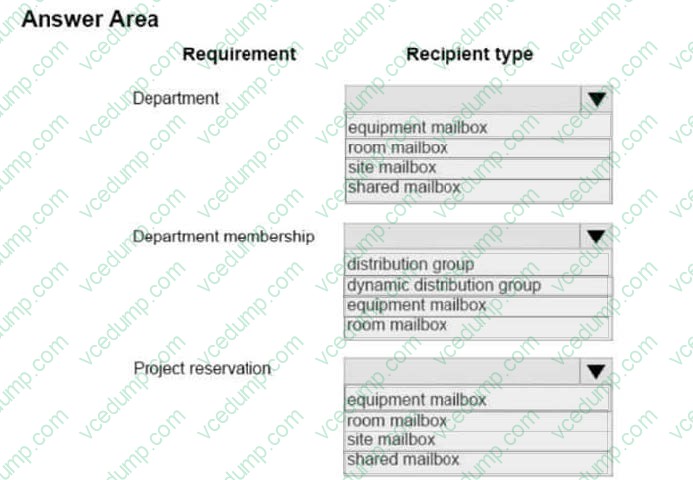
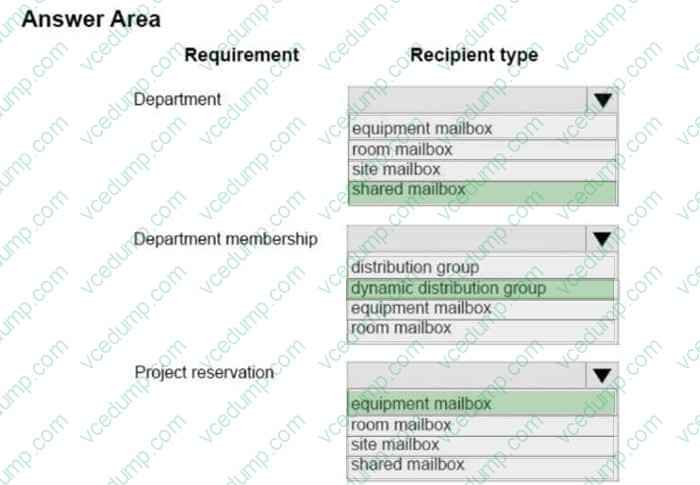
You must create several recipient objects that meet the following requirements:
an object that allows multiple users to read and respond to email for a department
an object whose members change automatically based on their department
an object that allows users to reserve and schedule the use of a portable display projector
You need to create the recipient objects.
Which recipient type should you use to meet each requirement? To answer, select the appropriate recipient object type in the dialog box in the answer area.
NOTE: Each correct selection is worth one point.
Hot Area:
-
Question 336:
Your company has a hybrid deployment of Office 365. You need to identify which certificate is used for token signing between the on-premises environment and Office 365. Which tool should you use?
A. The Exchange Management Console.
B. The AD FS 2.0 Management console.
C. The Active Directory Domains and Trusts snap-in.
D. The Office 365 portal.
E. The Certificates snap-in. -
Question 337:
You administer an Office 365 deployment.
You need to ensure that users can dial telephone numbers by using either the Skype for Business app for Windows or the Skype for Business mobile app.
What should you do?
A. In the Office 365 Admin center, enable Skype for Business PSTN Calling.
B. Run the Windows PowerShell cmdlet Enable-CsOnlineDialInConferencingUser.
C. In the Office 365 Admin center, enable Skype Meeting Broadcast.
D. Run the Windows PowerShell cmdlet Set-CsUser.
E. In the Office 365 Admin center, enable SkypeCloud PBX. -
Question 338:
You are deploying an Office 365 tenant that uses an Enterprise E3 subscription. You have a legacy application that requires the use of Office 2010 on client computers.
A number of users download and install Office 365 ProPlus. They are no longer able to run the legacy application. You must prevent users from installing Office 365 ProPlus on client computers. The users must be able to install Office on
tablets and phones.
You need to configure the Office 365 users.
From the Office 365 admin center, what should you do?
A. Assign and configure a rights management license to the user accounts.
B. Remove the service administrator privileges from the user accounts.
C. Reassign the user accounts an Enterprise E1 subscription.
D. Remove Office 365 ProPlus from the available user software. -
Question 339:
Your company subscribes to the Office 365 Enterprise E1 plan. You are the Microsoft Exchange Online administrator.
In the last week, employees have reported that they are receiving non-delivery report messages from other companies. The employees have not sent messages to recipients within those companies.
You need to prevent non-delivery report messages from reaching employees.
Which content filter option should you turn on in the Exchange admin center?
A. NDR backscatter
B. Conditional Sender ID filtering: hard fail
C. SPF record: hard fail
D. Block all bulk email messages -
Question 340:
Which two statements accurately describe the migration of the A. Datum mailboxes based on the chosen migration method? Each correct answer presents part of the solution. NOTE: Each correct selection is worth one point
A. Mailboxes in Office 365 must be created before you can perform the migration.
B. Calendar items will migrate automatically,
C. Contact items will migrate automatically.
D. Task items will migrate automatically.
E. User accounts in Office 365 must be created before you can perform the migration.
Related Exams:
-
62-193
Technology Literacy for Educators -
70-243
Administering and Deploying System Center 2012 Configuration Manager -
70-355
Universal Windows Platform – App Data, Services, and Coding Patterns -
77-420
Excel 2013 -
77-427
Excel 2013 Expert Part One -
77-725
Word 2016 Core Document Creation, Collaboration and Communication -
77-726
Word 2016 Expert Creating Documents for Effective Communication -
77-727
Excel 2016 Core Data Analysis, Manipulation, and Presentation -
77-728
Excel 2016 Expert: Interpreting Data for Insights -
77-731
Outlook 2016 Core Communication, Collaboration and Email Skills
Tips on How to Prepare for the Exams
Nowadays, the certification exams become more and more important and required by more and more enterprises when applying for a job. But how to prepare for the exam effectively? How to prepare for the exam in a short time with less efforts? How to get a ideal result and how to find the most reliable resources? Here on Vcedump.com, you will find all the answers. Vcedump.com provide not only Microsoft exam questions, answers and explanations but also complete assistance on your exam preparation and certification application. If you are confused on your 70-347 exam preparations and Microsoft certification application, do not hesitate to visit our Vcedump.com to find your solutions here.