70-347 Exam Details
-
Exam Code
:70-347 -
Exam Name
:Enabling Office 365 Services -
Certification
:Microsoft Certifications -
Vendor
:Microsoft -
Total Questions
:344 Q&As -
Last Updated
:Dec 10, 2021
Microsoft 70-347 Online Questions & Answers
-
Question 1:
All employees at a company have Exchange Online mailboxes.
You observe a surge in email messages that contain malware. You determine that all of the messages originate from a single IP address.
You need to ensure that no email messages from the IP address are delivered to the users.
What should you do?
A. Create a malware filter.
B. Create a connection filter.
C. Create a spam filter.
D. Create a new transport rule. -
Question 2:
You have a Microsoft Office 365 tenant. All users are assigned an Office 365 E3 license.
You plan to deploy Office 365 ProPlus applications to several client computers and mobile devices.
You need to ensure that all the Office applications are updated monthly with newly available Office features.
What should you do?
A. Assign an Office 365 E5 license to each user.
B. Assign an Enterprise Mobility + Security E5 license to each user.
C. From the Microsoft 365 admin center, modify the software download settings.
D. From the Microsoft 365 admin center, modify the User Account Office settings. -
Question 3:
HOTSPOT
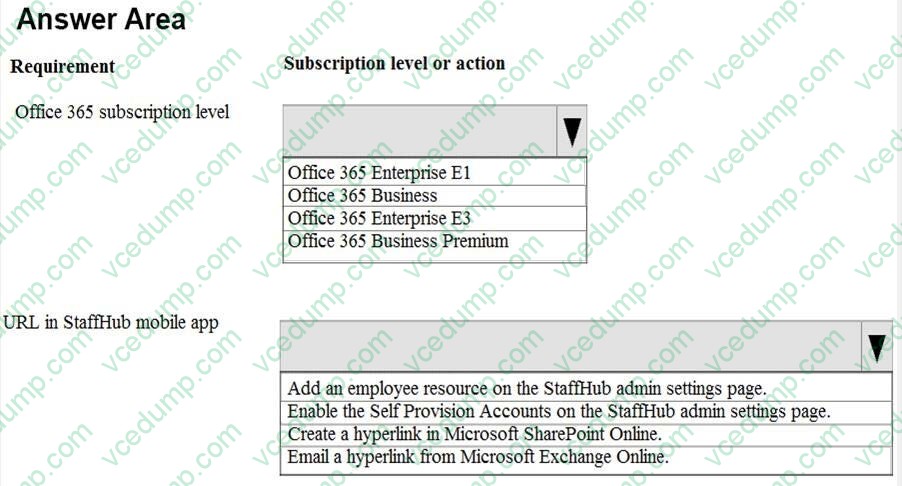
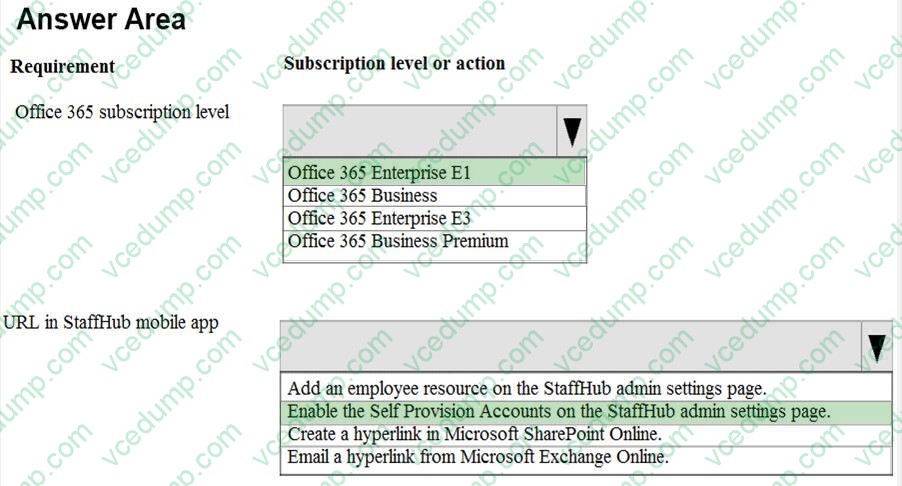
You are the Office 365 administrator for an organization. You plan to implement Microsoft StaffHub and PowerApps.
The organization requires an Office 365 subscription that supports StaffHub and has identified a custom URL that users must be able to access from the StaffHub mobile app.
You need to determine the correct Office 365 subscription that will provide the StaffHub feature and the StaffHub setting to configure the URL access. You must choose the least expensive Office 365 subscription that provides the StaffHub feature.
What should you do? To answer, select the appropriate option in the answer area.
NOTE: Each correct selection is worth one point.
Hot Area:
-
Question 4:
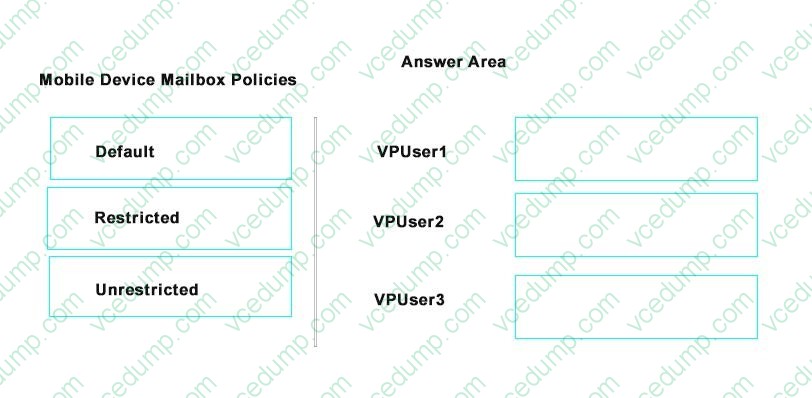
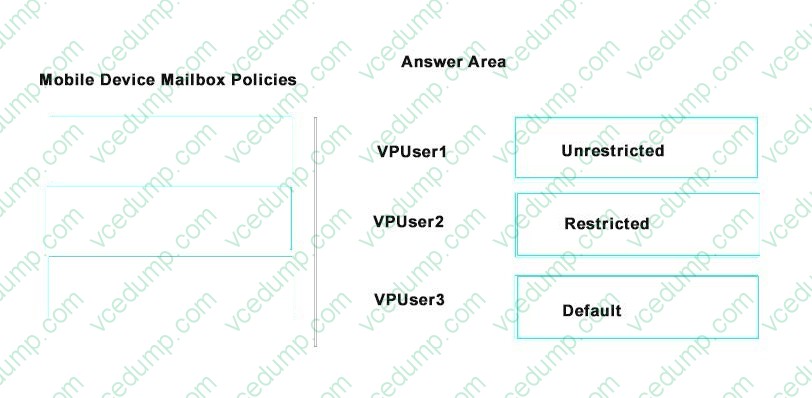
You plan to implement the new mobile device mailbox policy based on the technical requirement.
Which mobile device mailbox policy will apply to VPUser1, VPUSer2, and VPUser3? To answer, drag the appropriate mobile device mailbox policies to the correct users. Each mobile device mailbox policy may be used once, more than once, or not at all. You may need to drag the split bar between panes or scroll to view content.
Select and Place:
-
Question 5:
Your company uses Microsoft Exchange Online. Employees frequently need to change their primary email addresses.
The messaging operations team has requested a script to simplify the process of changing email addresses.
The script must perform the following actions:
Obtain employee information from a .csv file that has a header line of UserPrincipalName,CurrentPrimaryAddress,NewPrimaryAddress. Change employees' primary email addresses to the values in the NewPrimaryAddress column.
Retain employees' current email addresses as secondary addresses.
You create the following Windows PowerShell script to read the .csv file. Line numbers are included for reference only.
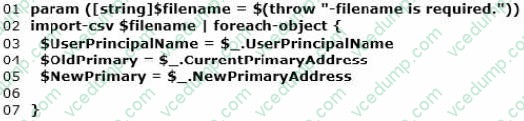
You need to complete the script to meet the requirements.
Which Windows PowerShell command should you insert at line 06?
A. Set-Mailbox -Identity $UserPrincipalName -WindowsEmailAddress $NewPrimary
B. Set-Mailbox-Identity $UserPrincipalName -PrimarySmtpAddress $NewPrimary
C. Set-Mailbox -Identity $UserPrincipalName -ExternalEmailAddress $NewPrimary
D. Set-MailUser -Identity $UserPrincipalName -EmailAddresses@{add = "SMTP:" + "$NewPrimary"; remove="SMTP:" + "$OldPrimary"} -
Question 6:
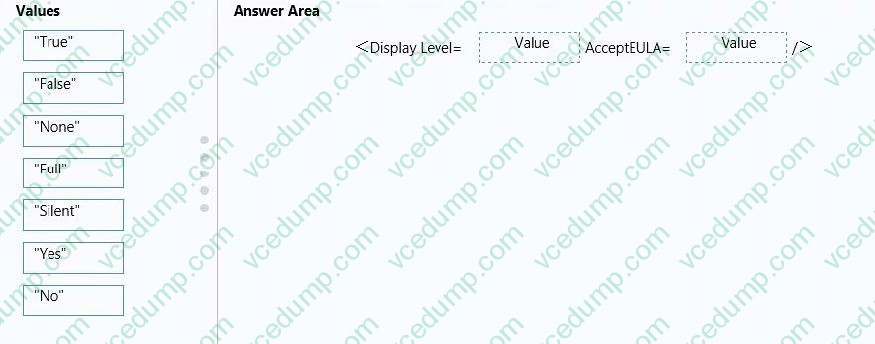
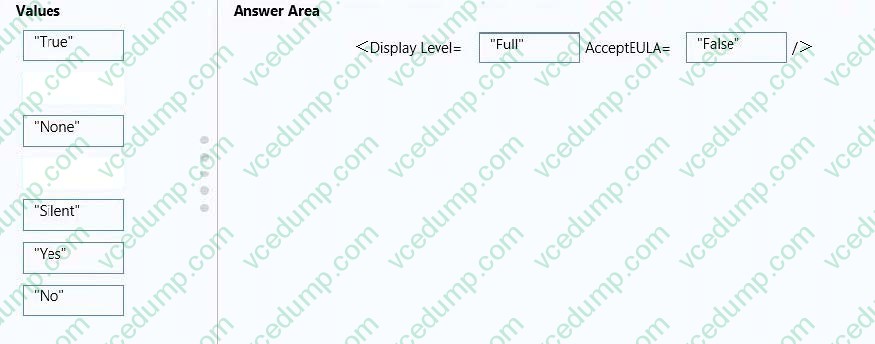
Your company uses the Office Deployment Tool to deploy Click-to-Run for Office 365 ProPlus.
Users report that confirmation dialog boxes do not appear during the installation of Office 365 ProPlus.
You need to ensure that confirmation dialog boxes are displayed to users.
How should you complete the relevant segment of the config.xml file? To answer, drag the appropriate values to the correct targets. Each value may be used once, more than once, or not at all. You may need to drag the split bar between panes or scroll to view content.
Select and Place:
-
Question 7:
Your company has an Exchange Server 2010 Service Pack (SP1) organization and a hybrid deployment of Office 365.
You have two federation servers named Server1 and Server2. You manage Server1 and Server2 by using a user account that is a member of the Domain Admins group.
You need to set the authentication method of the federation servers to forms-based authentication.
What should you do?
A. Modify the Web.config file in the %systemroot%\inetpub\adfs\Is directory.
B. Modify the Global.asax file in the %systemroot%\inetpub\adfs\Is directory.
C. From the AD FS 2.0 Management console, add a claims provider trust.
D. From the AD FS 2.0 Management console, add a relaying party trust. -
Question 8:
You manage an Office 365 tenant that uses an Enterprise E1 subscription.
You need to ensure that users are informed when Exchange Online Protection quarantines email messages.
Which Windows PowerShell cmdlet should you run?
A. Enable-JournalRule
B. New-RetentionPolicyTag
C. Start-ManagedFolderAssistant
D. Set-CsUser
E. Set-CsPrivacyConfiguration
F. Set-HostedContentFilterPolicy
G. Set-MalwareFilterPolicy
H. Set-MailboxJunkEmailConfiguration -
Question 9:
You are the Microsoft Lync administrator for a company that uses Lync Online.
The company has mandated that employees may use Lync Online to communicate with contacts from approved external domains.
You need to configure Lync Online to allow Lync federation with only three specific domains. You must achieve this goal by using the least amount of administrative effort.
Which two actions should you perform? Each correct answer presents part of the solution.
A. In the Lync admin center, set the External Access option to On except for blocked domains.
B. In the Office 365 admin center, add the three domains to the domain list and set the domain intent for each domain to Lync Online.
C. In the Lync admin center, set the External Access option to Off completely.
D. In the Lync admin center, set the External Access option to On only for allowed domains.
E. In the Lync admin center, configure the Presence Privacy Mode option to display presence information only to the users' contacts.
F. In the Lync admin center, add the three domains to the Blocked Or Allowed Domains list. -
Question 10:
Note: This question is part of a series of questions that present the same scenario. Each question in the series contains a unique solution. Determine whether the solution meets the stated goals.
You have an Office 365 subscription. All user mailboxes have an archive mailbox.
A new compliance policy has the following requirements:
All email messages that are more than one year old must be moved to the archive mailbox.
All email messages that are more than two years old must be deleted.
You create two default policy tags and one retention policy.
You need to implement the compliance policy.
Solution: You run the Set-Mailbox cmdlet and specify the -RetentionPolicy parameter.
Does this meet the goal?
A. Yes
B. No
Related Exams:
-
62-193
Technology Literacy for Educators -
70-243
Administering and Deploying System Center 2012 Configuration Manager -
70-355
Universal Windows Platform – App Data, Services, and Coding Patterns -
77-420
Excel 2013 -
77-427
Excel 2013 Expert Part One -
77-725
Word 2016 Core Document Creation, Collaboration and Communication -
77-726
Word 2016 Expert Creating Documents for Effective Communication -
77-727
Excel 2016 Core Data Analysis, Manipulation, and Presentation -
77-728
Excel 2016 Expert: Interpreting Data for Insights -
77-731
Outlook 2016 Core Communication, Collaboration and Email Skills
Tips on How to Prepare for the Exams
Nowadays, the certification exams become more and more important and required by more and more enterprises when applying for a job. But how to prepare for the exam effectively? How to prepare for the exam in a short time with less efforts? How to get a ideal result and how to find the most reliable resources? Here on Vcedump.com, you will find all the answers. Vcedump.com provide not only Microsoft exam questions, answers and explanations but also complete assistance on your exam preparation and certification application. If you are confused on your 70-347 exam preparations and Microsoft certification application, do not hesitate to visit our Vcedump.com to find your solutions here.