UIPATH-ADAV1 Exam Details
-
Exam Code
:UIPATH-ADAV1 -
Exam Name
:UiPath Automation Developer Associate v1.0 (UiADA) -
Certification
:UiPath Certifications -
Vendor
:UiPath -
Total Questions
:254 Q&As -
Last Updated
:Jul 17, 2026
UiPath UIPATH-ADAV1 Online Questions & Answers
-
Question 141:
A developer sets a breakpoint on one of the activities in the workflow. When deploying the code to production, the developer published the package and created a process in UiPath Orchestrator. At the time the process is executed in unattended mode from a UiPath Robot, what is the expected behavior?
A. Robot will crash and execution will stop because of the breakpoint.
B. When encountering the breakpoint the execution will pause until it is resumed manually.
C. Execution will proceed without taking into consideration the breakpoint.
D. Execution will throw an exception because of the breakpoint. -
Question 142:
The "Main.xaml" file has an "In" argument of type String with a default value of "String.Empty". What is the runtime value of the argument when executing the process from the Start Job window in UiPath Orchestrator?
A. A runtime error will occur as arguments are not allowed in the "Main.xaml" file.
B. Only the default value of "String.Empty" will be used, overriding any values provided in Orchestrator.
C. @ If any input arguments are provided in Orchestrator, those values will be used; otherwise, the default value of "String.Empty" will be used.
D. An Input Dialog box will prompt the user to input a value and that value will be used. -
Question 143:
Which of the following is the correct method to manage assets for a specific folder in UiPath Orchestrator?
A. Open the folder's contextual menu by clicking the three-dot icon, then select "Link Resources" and choose "Asset".
B. Select "Tenant" from the sidebar menu, then click the "Assets" tab.
C. Navigate to "Tenant" > "Folders", choose the desired folder, and click the "Manage Access" tab.
D. Select the folder from the sidebar menu, then click the "Assets" tab. -
Question 144:
A developer created an automation which scrapes data from PDF reports. The reports have the same structure and the title format is always "Report X - PDF"T where X is a number from 1 to 100. Only one report will be open at a time but other PDF files may be open on the desktop.
What is the recommended method to ensure the selector identifies the correct PDF to use?
A. Use the * wildcard character in place of the idx attribute value
B. Use the idx attribute value in the selector to increment for each file
C. Use the * wildcard character in place of the title attribute value
D. Use the * wildcard character in place of the "X" in the title attribute value -
Question 145:
After generating a strict selector using the Indicate target on screen option within a Click activity, what should the developer utilize to view the complete list of attributes for the targeted UI element?
A. Properties Panel
B. Open in UI Explorer
C. Output Panel
D. Debug Mode -
Question 146:
A developer has published a new library from UiPath Studio to the Orchestrator feed. Another developer on the team is connected to the same Orchestrator where the library has been published. What steps are necessary for adding this library as a dependency in a project?
A. Open the Manage Packages Window and ensure the Orchestrator feed is enabled. In the Imports Panel in Studio, search for the package by name, and then install the package.
B. Open the Manage Packages Window and install UiPath.System.Activities. Drag and Drop the Invoke Com Method activity and input the library name as a parameter.
C. Open the Manage Packages Window and install UiPath.System.Activities. Drag and Drop the Invoke Method activity and input the library name as a parameter.
D. Open the Manage Packages Window and ensure the Orchestrator feed is enabled. Search for the package by name in the Search bar and then install the package. -
Question 147:
A developer stored a UiPath Studio project remotely in GIT. Which feature allows the developer to view the project on their local machine?
A. Clone Repository
B. Copy to GIT
C. Disconnect
D. GIT Init -
Question 148:
A developer is building an automation that must interact with a destination remote computer reached by jumping through multiple RDP connections, as described by the following scenario:
1. The Robot is installed on Machine A, which connects through RDP to Machine
B.
2. From Machine B another RDP connection is opened to Machine C, where the automation must be performed.
Which of the following scenarios is appropriate for the developer who wants to use UI Automation activities?
A. Ul Automation can be used and the following are prerequisites: Machine A - install RDP extension. Machine B - no requirement. Machine C - install RemoteRuntime.msi.
B. UI Automation can be used and the following are prerequisites: Machine A - no requirement. Machine B - no requirement. Machine C - install RemoteRuntime.msi.
C. UI Automation can be used and the following are prerequisites: Machine A - install RDP extension. Machine B - install RDP extension and RemoteRuntime.msi. Machine C - install RemoteRuntime.msi.
D. UI Automation can be used and the following are prerequisites: Machine A - install RDP extension. Machine B - install RemoteRuntime.msi. Machine C - install RemoteRuntime.msi. -
Question 149:
When installing UiPath Studio, which of the following actions require administrator privileges?
A. Administrator privileges are not required for installing UiPath Studio.
B. Administrator privileges are required for installing the robot in both service mode and user mode.
C. Administrator privileges are required for installing the robot in user mode.
D. Administrator privileges are required for installing the robot in service mode. -
Question 150:
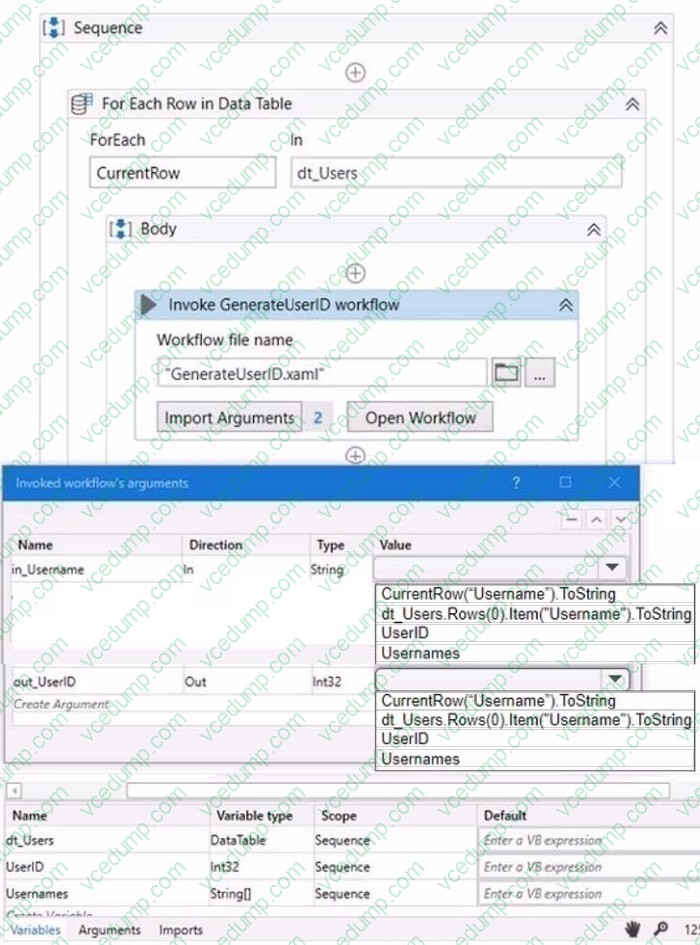
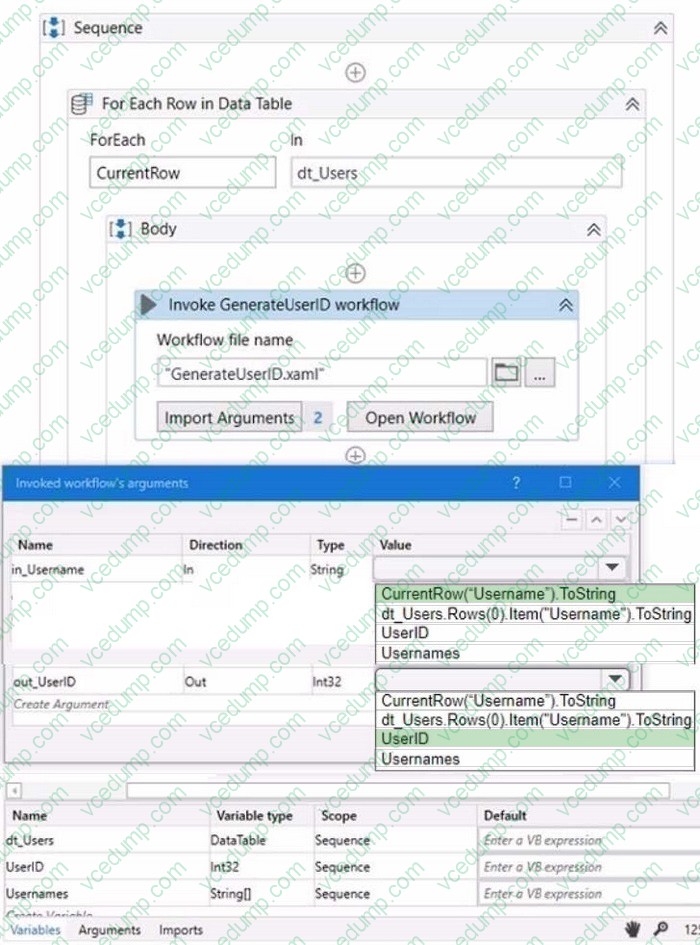
HOTSPOT
A developer wants to map the arguments that pass data to and from GenerateUserlD.xaml to the appropriate values in Main.xaml. The dt_Users datatable variable contains the columns First Name: Last Name Date of Birth and Username.
Instructions: From the Value drop-down lists shown in the following exhibit, select the correct variable that corresponds to each argument.
Related Exams:
-
UIPATH-AAAV1
UiPath Certified Professional Agentic Automation Associate (UiAAA) -
UIPATH-ABAAV1
UiPath Automation Business Analyst Associate (2023.10) -
UIPATH-ADAV1
UiPath Automation Developer Associate v1.0 (UiADA) -
UIPATH-ADPV1
UiPath Automation Developer Professional v1.0 (UiADP) -
UIPATH-ARDV1
UiPath Advanced RPA Developer v1.0 (UiARD) -
UIPATH-ASAPV1
UiPath Automation Solution Architect Professional v1.0 (UiASAP) -
UIPATH-RPAV1
UiPath RPA Associate v1.0 (UiRPA) -
UIPATH-SAIAV1
UiPath Specialized AI Associate (2023.10) -
UIPATH-SAIV1
UiPath Specialized AI Professional v1.0 (UiSAI)
Tips on How to Prepare for the Exams
Nowadays, the certification exams become more and more important and required by more and more enterprises when applying for a job. But how to prepare for the exam effectively? How to prepare for the exam in a short time with less efforts? How to get a ideal result and how to find the most reliable resources? Here on Vcedump.com, you will find all the answers. Vcedump.com provide not only UiPath exam questions, answers and explanations but also complete assistance on your exam preparation and certification application. If you are confused on your UIPATH-ADAV1 exam preparations and UiPath certification application, do not hesitate to visit our Vcedump.com to find your solutions here.