SC-400 Real Exam Questions

Microsoft Information Protection Administrator

352 questions available · Page 1 of 36

Updated Exam DumpsVerified AnswersPass Guarantee

Get Complete Exam Dumps
Question 1 Single choice

You have a Microsoft 365 tenant and 500 computers that run Windows 10. The computers are onboarded to the Microsoft 365 compliance center.

You discover that a third-party application named Tailspin_scanner.exe accessed protected sensitive information on multiple computers. Tailspin_scanner.exe is installed locally on the computers.

You need to block Tailspin_scanner.exe from accessing sensitive documents without preventing the application from accessing other documents.

Solution: From the Microsoft Defender for Cloud Apps, you mark the application as Unsanctioned.

Does this meet the goal?

  1. A

    Yes

  2. B

    No

Show answer and explanation

Correct answer: B

Explanation

Sanctioning/unsanctioning an app
You can unsanction a specific risky app by clicking the three dots at the end of the row. Then select Unsanction. Unsanctioning an app doesn't block use, but enables you to more easily monitor its use with the Cloud Discovery filters. You can then notify users of the unsanctioned app and suggest an alternative safe app for their use, or generate a block script using the Defender for Cloud Apps APIs to block all unsanctioned apps.

Instead Solution: From the Microsoft 365 Endpoint data loss prevention (Endpoint DLP) settings, you add the application to the unallowed apps list.

Unallowed apps is a list of applications that you create which will not be allowed to access a DLP protected file.

References:
https://learn.microsoft.com/en-us/defender-cloud-apps/governance-discovery#BKMK_SanctionApp
https://docs.microsoft.com/en-us/microsoft-365/compliance/endpoint-dlp-using?view=o365-worldwide
Question 2 Single choice

You have a Microsoft 365 E5 subscription that contains two users named User1 and Admin1. Admin1 manages audit retention policies for the subscription.

You need to ensure that the audit logs of User1 will be retained for 10 years.

What should you do first?

  1. A

    Assign a Microsoft Purview Audit (Premium) add-on license to User1.

  2. B

    Assign a 10-year audit log retention add-on license to Admin1.

  3. C

    Assign a Microsoft Purview Audit (Premium) add-on license to Admin1.

  4. D

    Assign a 10-year audit log retention add-on license to User1.

Show answer and explanation

Correct answer: B

Explanation

To retain an audit log for longer than 90 days (and up to 1 year), the user who generates the audit log (by performing an audited activity) must be assigned an Office 365 E5 or Microsoft 365 E5 license or have a Microsoft 365 E5 Compliance or E5 eDiscovery and Audit add-on license. To retain audit logs for 10 years, the user who generates the audit log must also be assigned a 10-year audit log retention add-on license in addition to an E5 license.

References:
https://learn.microsoft.com/en-us/microsoft-365/compliance/audit-log-retention-policies

Question 3 Single choice

You have a Microsoft 365 tenant that contains a Microsoft SharePoint Online site named Site1.

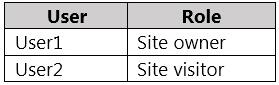
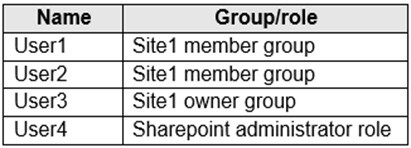
You have the users shown in the following table.

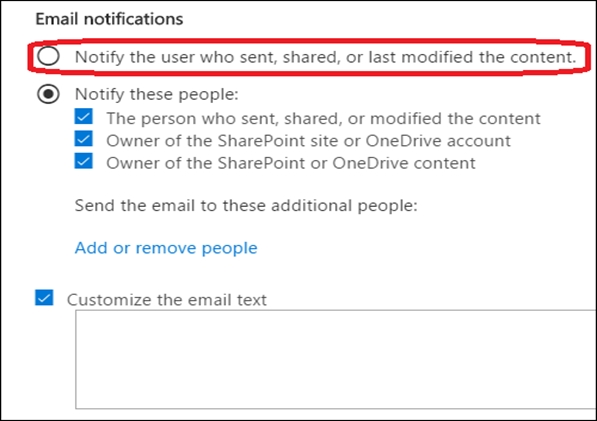
You create a data loss prevention (DLP) policy for Site1 that detects credit card number information. You configure the policy to use the following protection action:

When content matches the policy conditions, show policy tips to users and send them an email notification.

You use the default notification settings.

To Site1, User1 uploads a file that contains a credit card number.

Which users receive an email notification?

  1. A

    Used and User2 only

  2. B

    Used and User4 only

  3. C

    Used, User2, User3, and User4

  4. D

    Used only

  5. E

    Used and User3 only

Show answer and explanation

Correct answer: D

Explanation

References:
https://docs.microsoft.com/en-us/microsoft-365/compliance/get-started-with-the-default-dlp-policy?view=o365-worldwide

Question 4 Multiple choice

You have a Microsoft 365 tenant that uses Microsoft Exchange Online.

You need to recover deleted email messages from a user's mailbox.

Which two PowerShell cmdlets should you use? Each correct answer presents part of the solution.

NOTE: Each correct selection is worth one point.

  1. A

    Restore-RecoverableItems

  2. B

    Get-MailboxRestoreRequest

  3. C

    Restore-Mailbox

  4. D

    Get-RecoverableItems

  5. E

    Set-MailboxRestoreRequest

Show answer and explanation

Correct answers: A, D

Explanation

References:
https://docs.microsoft.com/en-us/exchange/recipients-in-exchange-online/manage-user-mailboxes/
recover-deleted-messages

Question 5 Single choice

You have a Microsoft 365 E5 subscription. Microsoft Priva Privacy Risk Management licenses are assigned to all users.

You need to review and delete all the personal data that relates to a former employee. The solution must minimize administrative effort.

What should you do first?

  1. A

    Create a retention policy.

  2. B

    Create an eDiscovery (Standard) case.

  3. C

    Purchase a Microsoft Priva Subject Rights Requests license.

  4. D

    From Data matching, add a personal data schema for the data profile.

Show answer and explanation

Correct answer: A

Explanation

You can create a retention policy that just retains content without deleting, retains and then deletes after a specified period of time, or just deletes content after a specified period of time.

Incorrect:
Not B: E-discovery is a form of digital investigation that attempts to find evidence in email, business communications and other data that could be used in litigation or criminal proceedings. The traditional discovery process is standard during litigation, but e-discovery is specific to digital evidence.

Not C: Priva Subject Rights Requests
Several privacy regulations around the world grant individuals-or data subjects-the right to make requests to review or manage the personal data that companies have collected about them. These subject rights requests are also referred to as data subject requests (DSRs), data subject access requests (DSARs), or consumer rights requests. For companies that store large amounts of information, finding the relevant data can be a formidable task. For most organizations, fulfilling requests is a highly manual and time consuming process.

Priva Subject Rights Requests is designed to help alleviate the complexity and length of time involved in responding to data subject inquires. We provide automation, insights, and workflows to help organizations fulfill requests more confidently and efficiently.

Not D:
With data matching, organizations can enable Microsoft Priva to identify data subjects based on exact supplied data values. This can help increase the accuracy of locating data subject content that corresponds with those data values both for your internal personnel and for external users you interact with. It also simplifies the need to supply fields manually during subject rights request creation, and provides context within subject rights requests and for the Overview tile that showcases your items with the
most data subject content.

Question 6 Drag & drop

DRAG DROP

You have a Microsoft 365 E5 subscription.

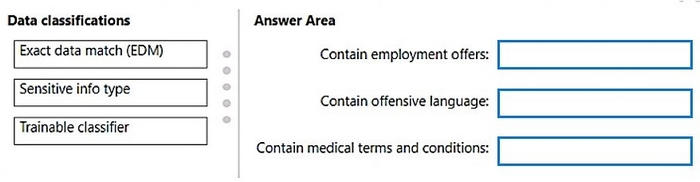
You need to label Microsoft Exchange Online emails that match the following conditions:

1. Contain employment offers
2. Contain offensive language
3. Contain medical terms and conditions

The solution must minimize administrative effort.

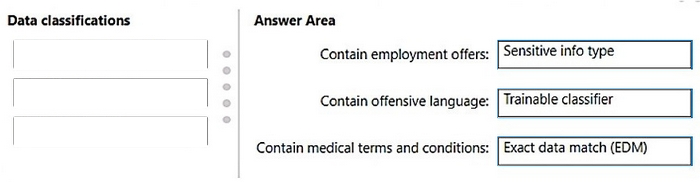
Which type of data classification should you use for each condition? To answer, drag the appropriate data classification types to the correct conditions. Each data classification type may be used once, more than once, or not at all. You may need to drag the split bar between panes or scroll to view content.

NOTE: Each correct selection is worth one point.

Question diagram
Show answer and explanation
Correct answer diagram
Explanation

Box 1: Sensitive info Type

Box 2: Trainable classifier
Contain offensive language

Trainable classifiers definitions
Microsoft Purview comes with multiple pretrained classifiers. They appear in the Microsoft Purview compliance portal > Data classification > Trainable classifiers view with the status of Ready to use.

For example:

* Profanity
Detects a specific category of offensive language text items that contain expressions that embarrass most people.

Box 3: Exact Data Match (EDM)
Contain medical terms and conditions

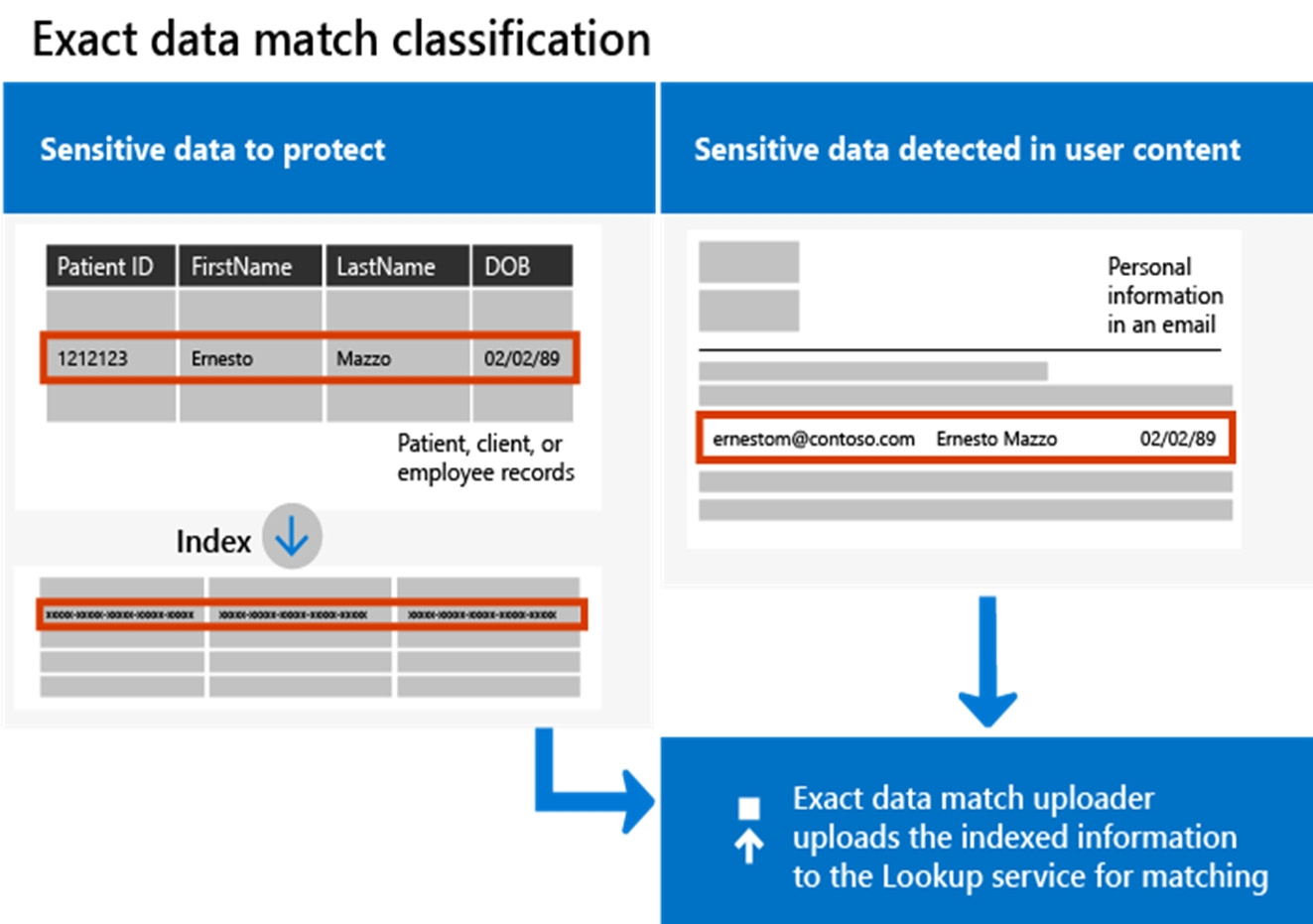
With Exact Data Match (EDM) based classification, you can create a custom sensitive information type that is designed to:

be dynamic and easily refreshed result in fewer false-positives work with structured sensitive data handle sensitive information more securely, not sharing it with anyone, including Microsoft be used with several Microsoft cloud services

EDM-based classification enables you to create custom sensitive information types that refer to exact values in a database of sensitive information. The database can be refreshed daily, and can contain up to 100 million rows of data. So as employees, patients, or clients come and go, and as records change, your custom sensitive information types remain current and applicable.

References:
https://learn.microsoft.com/en-us/purview/classifier-learn-about
https://learn.microsoft.com/en-us/purview/classifier-tc-definitions
https://learn.microsoft.com/en-us/purview/sit-learn-about-exact-data-match-based-sits

Question 7 Multiple choice

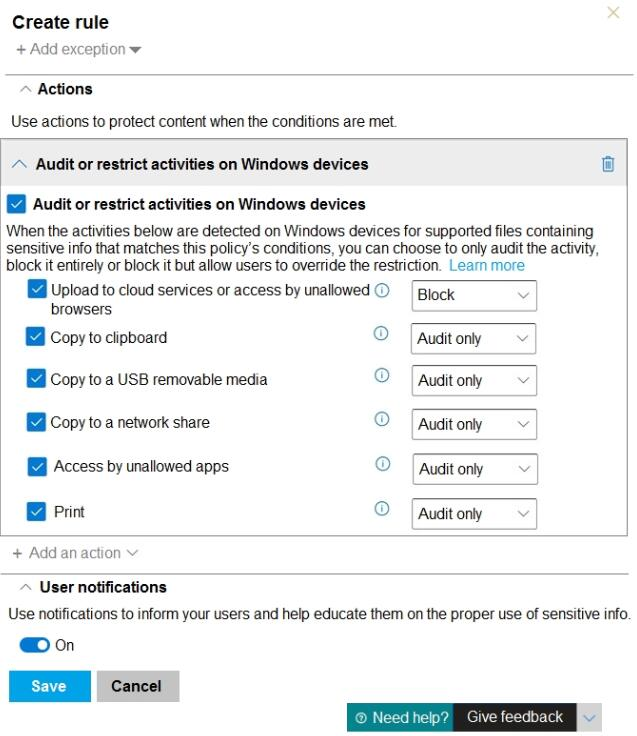
You have a data loss prevention (DLP) policy configured for endpoints as shown in the following exhibit.

From a computer named Computer1, 3 user can sometimes upload files to cloud services and sometimes cannot. Other users experience the same issue.

What are two possible causes of the issue? Each correct answer presents a complete solution.

NOTE: Each correct selection is worth one point.

  1. A

    The Access by unallowed apps action is set to Audit only.

  2. B

    The computers are NOT onboarded to the Microsoft 365 compliance center.

  3. C

    The Copy to clipboard action is set to Audit only.

  4. D

    There are file path exclusions in the Microsoft 365 Endpoint data loss prevention (Endpoint DIP) settings.

  5. E

    The unallowed browsers in the Microsoft 365 Endpoint data loss prevention (Endpoint DLP) settings are NOT configured.

Show answer and explanation

Correct answers: D, E

Question 8 Hotspot

HOTSPOT

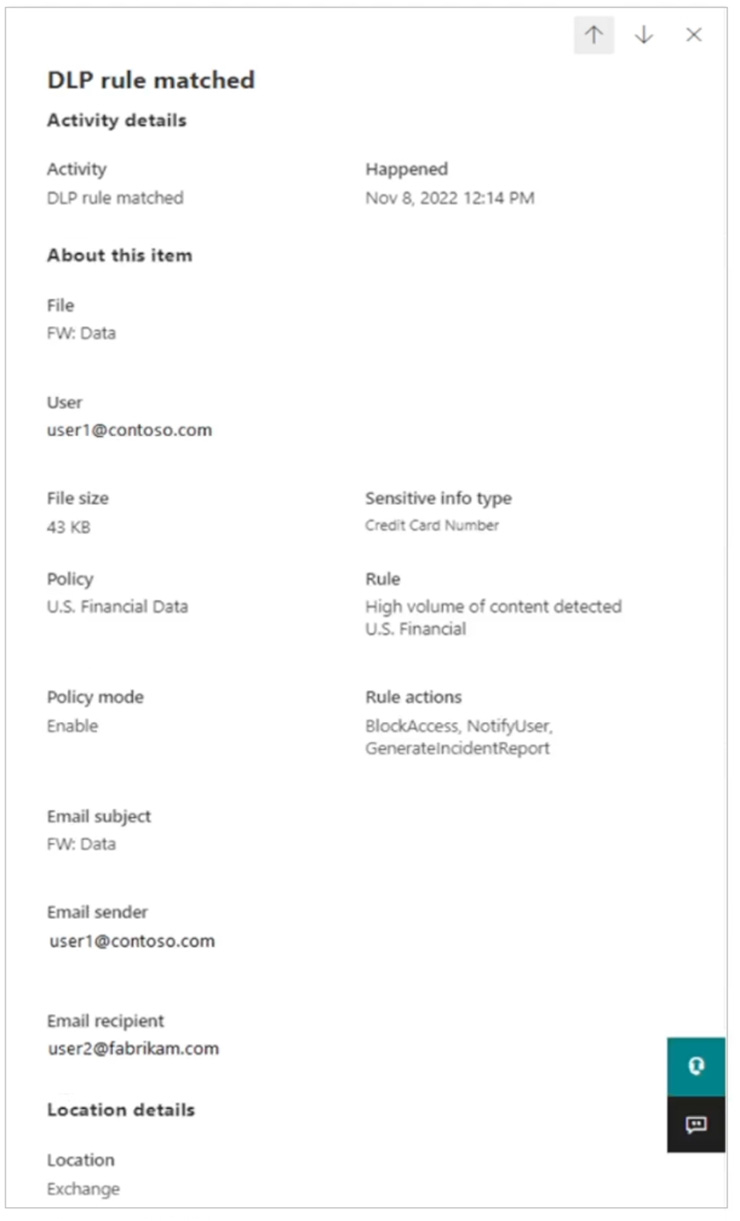
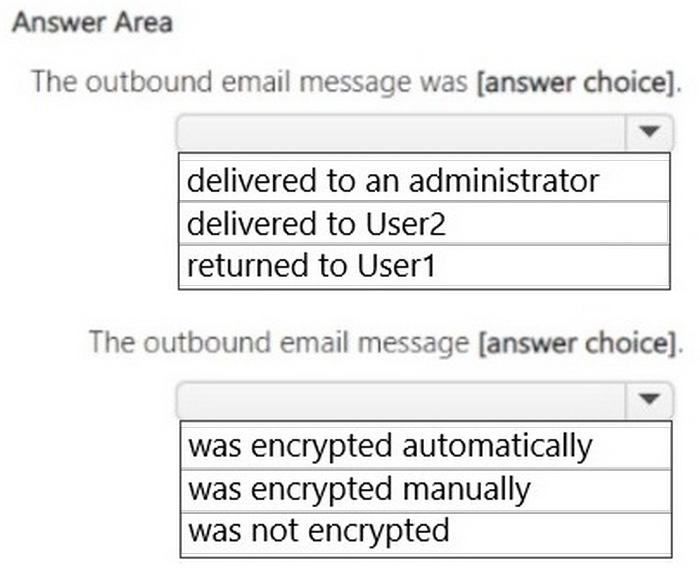
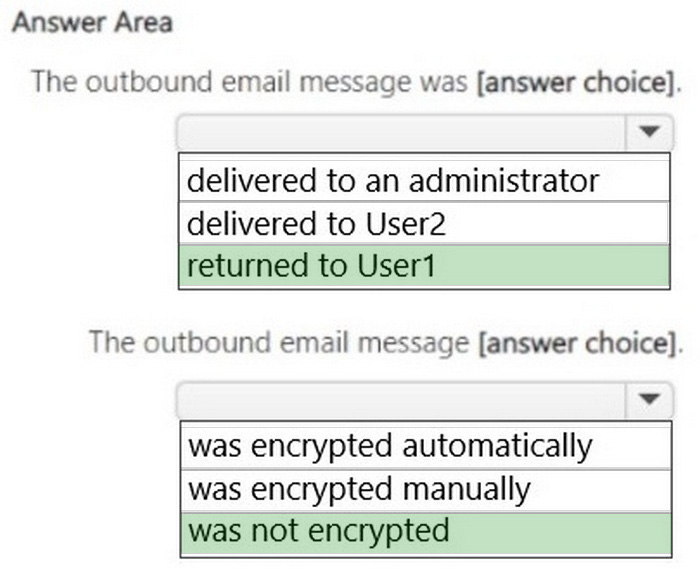
From the Microsoft Purview compliance portal, you review the activity details as shown in the following exhibit.

Use the drop-down menus to select the answer choice that completes each statement based on the information presented in the graphic.

NOTE: Each correct selection is worth one point.

Question diagram
Show answer and explanation
Correct answer diagram
Explanation

Box 1: returned to User1
The outbound email message was ______________.

We see:
Email sender: [email protected]
Sensitive info type: Credit Card Number
Rule: High volume of content detected U.S Financial Rule actions: BlockAccess, NotifyUser, GenerateincidentReport

Note 1: NotifyUser
Microsoft Purview, Send email notifications and show policy tips for DLP policies
You can use a Microsoft Purview Data Loss Prevention (DLP) policy to identify, monitor, and protect sensitive information across Office 365. You want people in your organization who work with this sensitive information to stay compliant with your DLP policies, but you don't want to block them unnecessarily from getting their work done. This is where email notifications and policy tips can help.

Note 2: GenerateincidentReport
Messaging policy and compliance, Data loss prevention DLP procedures, Create incident reports for DLP policy detections

In Exchange Server 2013 [Etc.], you can establish an action to create an incident report within a DLP policy rule set. Additionally, you can indicate to whom the report should be sent and what to do with the original message.

Content of an incident management report
The Generate Incident Report action enables users to send incident reports to an incident management mailbox. A single incident report will be generated for each message only if the Generate Incident Report action is applied within a policy.

Box 2: was not encrypted
The outbound email message was ______________.

The email was blocked because it was not encrypted.

Case Study 2

Overview

Contoso, Ltd. is a consulting company that has a main office in Montreal and three branch offices in Seattle, Boston, and Johannesburg.

Existing Environment

Microsoft 365 Environment

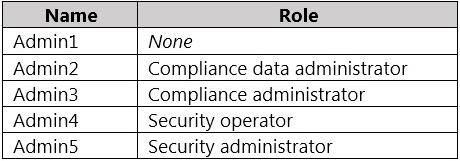
Contoso has a Microsoft 365 E5 tenant. The tenant contains the administrative user accounts shown in the following table.

Users store data in the following locations:

1. SharePoint sites
2. OneDrive accounts
3. Exchange email
4. Exchange public folders
5. Teams chats
6. Teams channel messages

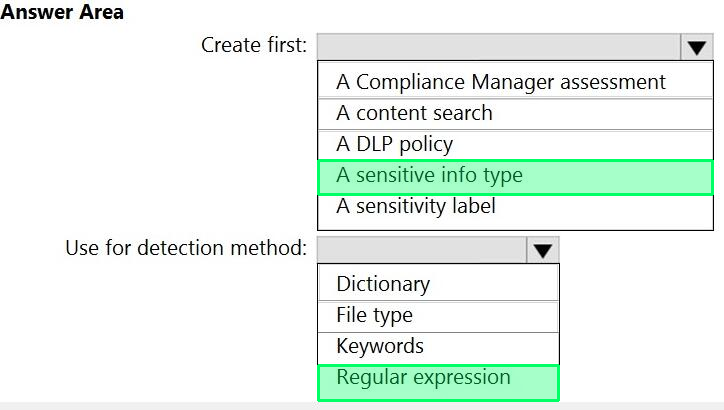
When users in the research department create documents, they must add a 10-digit project code to each document. Project codes that start with the digits 999 are confidential.

SharePoint Online Environment

Contoso has four Microsoft SharePoint Online sites named Site1, Site2, Site3, and Site4.

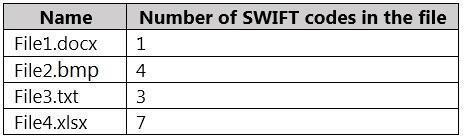
Site2 contains the files shown in the following table.

Two users named User1 and User2 are assigned roles for Site2 as shown in the following table.

Site3 stores documents related to the company's projects. The documents are organized in a folder hierarchy based on the project.

Site4 has the following two retention policies applied:

Name: Site4RetentionPolicy1
- Locations to apply the policy: Site4
- Delete items older than: 2 years
- Delete content based on: When items were created

Name: Site4RetentionPolicy2
- Locations to apply the policy: Site4
- Retain items for a specific period: 4 years
- Start the retention period based on: When items were created
- At the end of the retention period: Do nothing

Problem Statements

Management at Contoso is concerned about data leaks. On several occasions, confidential research department documents were leaked.

Requirements

Planned Changes

Contoso plans to create the following data loss prevention (DLP) policy:

Name: DLPpolicy1
Locations to apply the policy: Site2
Conditions:
- Content contains any of these sensitive info types: SWIFT Code
- Instance count: 2 to any
Actions: Restrict access to the content

Technical Requirements

Contoso must meet the following technical requirements:

1. All administrative users must be able to review DLP reports.
2. Whenever possible, the principle of least privilege must be used.
3. For all users, all Microsoft 365 data must be retained for at least one year.
4. Confidential documents must be detected and protected by using Microsoft 365.
5. Site1 documents that include credit card numbers must be labeled automatically.
6. All administrative users must be able to create Microsoft 365 sensitivity labels.
7. After a project is complete, the documents in Site3 that relate to the project must be retained for 10 years.

Question 9 Hotspot

HOTSPOT

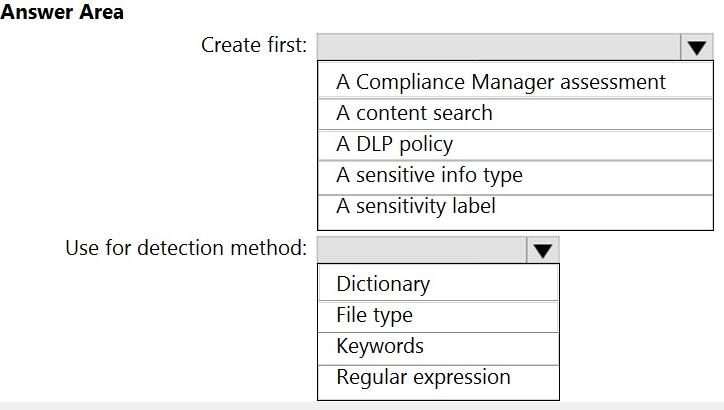
You need to meet the technical requirements for the confidential documents.

What should you create first, and what should you use for the detection method? To answer, select the appropriate options in the answer area.

NOTE: Each correct selection is worth one point.

Question diagram
Show answer and explanation
Correct answer diagram
Explanation

References:
https://docs.microsoft.com/en-us/microsoft-365/compliance/create-a-custom-sensitive-information-type?view=o365-worldwide

Question 10 Multiple choice

Your company has a Microsoft 365 tenant that uses a domain named Contoso.com.

You are implementing data loss prevention (DIP).

The company's default browser in Microsoft Edge.

During a recent audit, you discover that some user use Firefox and Google Chromo browsers to upload files labeled as Confidential to a third party Microsoft SharePoint Online site that has a URL of https:// m365x076709.sharepoint .
Uses are blocked from uploading the confidential files to the site from Microsoft Edge.

You need to ensure that the users cannot upload files labels as Confidential from Firefox and Google Chrome to any cloud services.

NOTE: Each correct selection is worth one point.

  1. A

    From the Microsoft 3G5 Endpoint data loss prevention (Endpoint DLP) settings, add Firefox and Google Chrome to the unallowed browsers list.

  2. B

    Create a DIP policy that applies to the Devices location.

  3. C

    From the Microsoft 365 Endpoint data loss prevention (Endpoint) DLP settings, add contoso.com as an allowed service domain.

  4. D

    From the Microsoft 365 compliance center, onboard the dcvu.es.

  5. E

    From the Microsoft J6b Endpoint data loss prevention (Endpoint) DLP settings, add: m36Sx0767W- sharepomt.com as a blacked service domain.

Show answer and explanation

Correct answers: A, C