
QSSA2018 Real Exam Questions

Qlik Sense System Administrator Certification - June 2018 Release

50 questions available · Page 1 of 5

Updated Exam DumpsVerified AnswersPass Guarantee

Get Complete Exam Dumps
Question 1 Single choice

Refer to the exhibit.
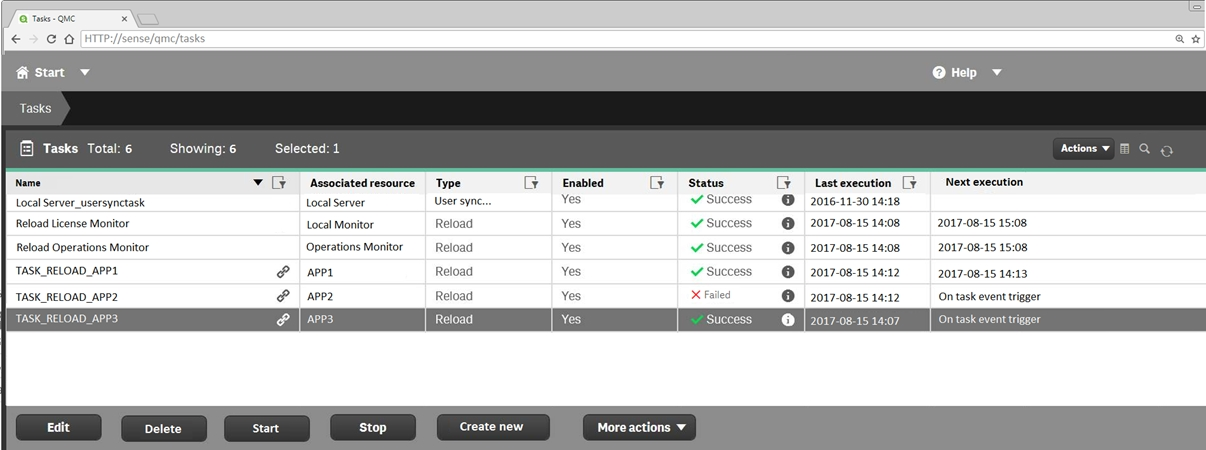
Refer to the exhibit.

A ContentAdmin user discovers TASK_RELOAD_APP2 fails. The user double-clicks the Failed task to open the Edit reload task screen. There are NO issues found in the Edit reload task screen. The user opens the Operations Monitor app, and finds an error message in the Task Details sheet:

Message from ReloadProvider: Reload failed in Engine. Check Engine or Script logs.

The Engine log did NOT provide any reason for the failure.

Which is the most efficient method to find the cause of this issue?

  1. A

    On the Failed task, click the information icon in the Status field, then click Download script log

  2. B

    Navigate to C:\ProgramData\Qlik\Sense\Log, then open and review the most recent file

  3. C

    Navigate to C:\Program Files\Qlik\Sense\Logging, then open and review the most recent file

  4. D

    In the QMC, select Audit, select Reload Tasks under Target resource, then click Audit and review

Show answer and explanation

Correct answer: D
Question 2 Single choice

A user creates an app in Qlik Sense Desktop using a database as the data source. The user is able to connect to the database and reload the app with new data.

To share the app, the user emails the app QVF file to the system administrator. The administrator imports the app successfully and publishes the app to the Everyone stream in the hub. The administrator creates a task to reload the data in the app every 12 hours.

The next day, the user observes that the data has NOT been refreshed in the app. No modifications have been made to the access rights for the data source.

What is the likely cause of this issue?

  1. A

    A custom property limits which tables can be accessed from the database

  2. B

    The system administrator does NOT have permission to access the source database

  3. C

    An identically-named data connection with another data source existed prior to the import

  4. D

    A security rule prevents the data connection from loading data into the app

Show answer and explanation

Correct answer: A

Question 3 Single choice

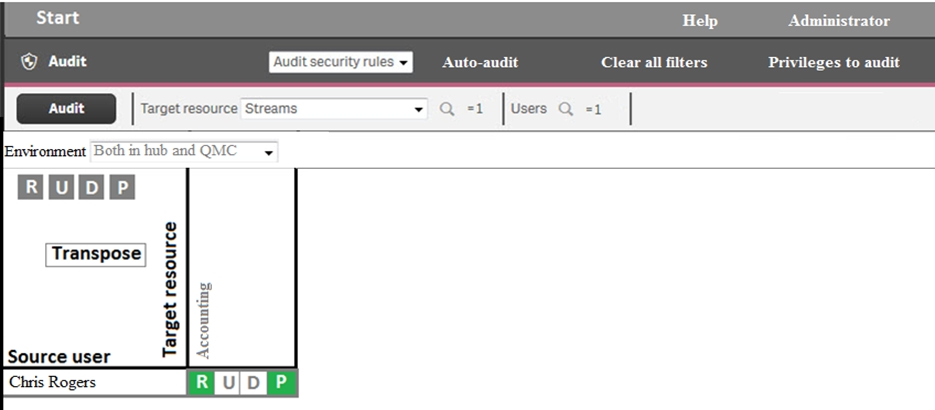
Refer to the exhibit.

An administrator creates this security rule to deny Chris Rogers access to the Accounting stream:

((user.name!="Chris Rogers"))

After conducting an audit on the Accounting stream, the administrator notices that Chris Rogers can still access the Accounting stream.

What is causing this issue?

  1. A

    The resource filter fails to include App_* to deny access for Chris Rogers

  2. B

    Another security rule is allowing Chris Rogers read access

  3. C

    The security rule contains incorrect syntax for Chris Rogers

  4. D

    The synchronization for Chris Rogers has NOT been completed

Show answer and explanation

Correct answer: A

Question 4 Single choice

A system administrator is installing and configuring a new Qlik Sense deployment. The system administrator completes the following steps: Makes sure the IT-provisioned server, named Server1, meets the required specifications

Installs Qlik Sense on Server1
Tests the installation by opening Qlik Sense from the server desktop shortcut Modifies default virtual proxy prefix to "qliksense"
Creates a new virtual proxy for users with a prefix of "QSE"
Links the new virtual proxy to the central proxy Configures the new virtual proxy to load balance with the central node Configures the new virtual proxy host white list with the server name, FQDN, and server IP address

When the system administrator tests the new virtual proxy using the URL, http://Server1/sense/hub, this error message displays:

Error 404 The requested resource cannot be found

What is causing this error?

  1. A

    The new central proxy was NOT created

  2. B

    The incorrect virtual proxy was used in the test

  3. C

    The new virtual proxy is configured incorrectly

  4. D

    The central proxy was NOT configured correctly

Show answer and explanation

Correct answer: C

Explanation

References:
https://support.qlik.com/articles/000009039

Question 5 Single choice

A company recently experienced a merger and needs to integrate new users into the Qlik Sense environment.

A system administrator must make sure that the system sizing and the tokens match the requirements for all employees in the future.

The system administrator learns the following information: 450 active Qlik Sense users before the merger
300 new Qlik Sense users
500 current token licenses
Reloads must have the same performance as before the merger
The number of apps will approximately double

Management requests an estimate from the system administrator about server resources and additional licenses.

Which set of tools should the system administrator use to meet these requirements?

  1. A

    Performance Monitor, Reloads Monitor, Scalability Tools, and License Monitor

  2. B

    Performance Monitor, License Monitor, Operations Monitor, and Scalability Tools

  3. C

    Performance Monitor, Reloads Monitor, QlikCockpit, and License Monitor

  4. D

    Performance Monitor, Reloads Monitor, Operations Monitor, and Scalability Tools

Show answer and explanation

Correct answer: B

Question 6 Single choice

A system administrator is creating a multi-node Qlik Sense Enterprise environment. The administrator successfully sets up the central node and a rim node. The administrator needs to configure the rim node as user node, then add a second rim node to the cluster and configure it as a reload node.

How should the system administrator meet these requirements?

  1. A

    1. Install Qlik Sense Enterprise on the second rim node and join the cluster
    2. Access the QMC, navigate to Nodes in the Start menu, and scroll down to the Service Activation section
    3. Select the rim node that must be configured as a user node and uncheck Scheduler
    4. Select the rim node that must be configured as a reload node and uncheck Proxy

  2. B

    1. Run the Qlik Sense Enterprise installer on the existing rim node.
    2. Select Repair and uncheck Scheduler
    3. Install Qlik Sense Enterprise on an additional server, join it to the existing cluster, and make sure that the Proxy service is NOT selected during the installation

  3. C

    1. Run the Qlik Sense Enterprise installer on the existing rim node
    2. Select Repair and uncheck Proxy
    3. Install Qlik Sense Enterprise on an additional server, join it to the existing cluster, and make sure that the Engine service is NOT selected during the installation

  4. D

    1. Install Qlik Sense Enterprise on the second rim node and join the cluster
    2. Access the Qlik Management Console (QMC), navigate to Nodes in the Start menu, and scroll down to the Service Activation section
    3. Select the rim node that must be configured as a user node and uncheck Proxy
    4. Select the rim node that must be configured as a reload node and uncheck Scheduler

Show answer and explanation

Correct answer: D
Question 7 Single choice

A system administrator adds RIM B to a two-node environment using the central node as the proxy. The system administrator is using the default virtual proxy for the central node to access the hub.

The system administrator sets up a load balancing rule to have all apps served on both RIM A and RIM B.
The system administrator performs the following steps:
1. Disables the default load balancing rule, "ResourcesOnNonCentralNodes"
2. Creates a new rule with the Resource filter "App_*" and checks Load balancing
3. Sets the condition to ((node.name="RIM A" or node.name="RIM B"))

The rule is successfully verified. The system administrator has users log in to the hub and open apps to verify that they are opening on RIM B. However, after multiple users open the same app, there is still NO report of activity on RIM B.

What is causing this issue?

  1. A

    There is a rule overlapping the custom load balancing rule

  2. B

    The filter should be ((node.name="RIM A") and (node.name="RIM B"))

  3. C

    A network connection problem is occurring and the load balancing is NOT working

  4. D

    The RIM B Engine has NOT been added to the virtual proxy

Show answer and explanation

Correct answer: D

Explanation

References:
https://community.qlik.com/t5/Qlik-Sense-Deployment-Management/Load-Balancing-Consumer-Nodes/td-p/1525604

Question 8 Single choice

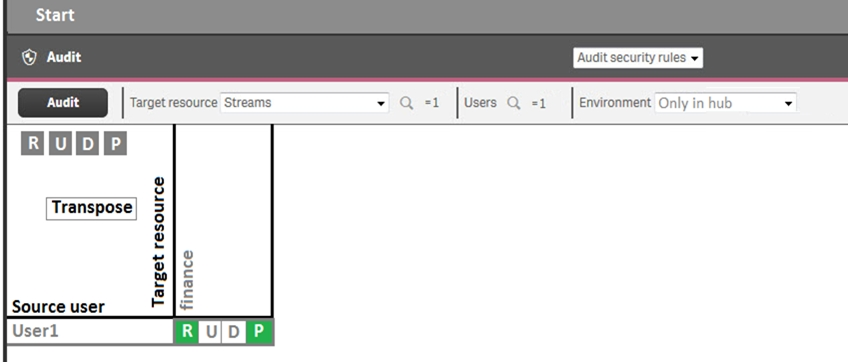
Refer to the exhibit.

A system administrator creates this security rule to keep User1 out of the finance stream:

((user.name!="User1"))

After conducting an audit on the finance stream, the system administrator notices that the security rule does NOT function as expected.

What is causing this issue?

  1. A

    The syntax of the security rule for User1 is NOT correct

  2. B

    The resource filter which applies to User1 does NOT include App_* to deny access for every app in the stream

  3. C

    Another security rule is allowing User1 Read and Publish permissions

  4. D

    UDC synchronization has NOT been performed

Show answer and explanation

Correct answer: B

Question 9 Multiple choice

A Qlik Sense deployment is planned for 200 users initially. Within a year, the number of users will grow to 2000, with over 100 apps. Most of these users will be within the organization's firewall. There are plans to eventually allow access to some apps to users outside the firewall.

Which two deployment models will ensure secure access to Qlik Sense apps by authorized users outside the firewall? (Choose two.)

  1. A

    Deploy a reverse proxy in the DMZ and configure it to forward all Qlik Sense traffic to the Qlik Sense servers on the corporate network.

  2. B

    Enable all external users to connect to the corporate network via a secure VPN to access Qlik Sense apps.

  3. C

    Deploy Qlik Sense in the DMZ and open all required ports to internal and external users.

  4. D

    Deploy Qlik Sense in the corporate network, open all required firewall ports, and allow external users to access apps directly.

  5. E

    Configure Qlik Sense in "off-line mode" for external users and allow them to access apps locally.

Show answer and explanation

Correct answers: B, D

Question 10 Single choice

A Qlik Sense environment uses user-based license types. A user, who can typically create new apps in Personal Work, can no longer create new apps. The personal Work area is NOT displayed for this user.

How should the system administrator resolve this issue?

  1. A

    In License Management, verify that Analyzer access rules applies to this user

  2. B

    In License Management, verify that Professional access rules applies to this user

  3. C

    In Users, look up the user and verify that this user is assigned the ContentAdmin role

  4. D

    In Audit, select Audit license rules, and verify there are no rules for this user

Show answer and explanation

Correct answer: D