NCS-CORE Exam Details
-
Exam Code
:NCS-CORE -
Exam Name
:Nutanix Certified Services Core Infrastructure Professional -
Certification
:Nutanix Certifications -
Vendor
:Nutanix -
Total Questions
:302 Q&As -
Last Updated
:Jul 16, 2026
Nutanix NCS-CORE Online Questions & Answers
-
Question 111:
An administrator needs to install prism central for their 2550 multi-cluster environment.
How should they deploy the application?
A. Deploy a large 3-VM Prism Central instance
B. Deploy a large 1-VM Prism Central instance.
C. Deploy a small 3-VM Prism Central instance.
D. Deploy a small 1-VM Prism Central instance. -
Question 112:
An administrator is currently using both 10g uplink with LACP and balance-tcp. A single VM should not be allowed to use more than a single 10G uplink, and both uplinks should be utilized.
Which two command should be used to configure the bond? (choose two)
A. Ovs-vsctl set port br0-up bond_mode=balance-slb
B. Ovs-vsctl set port br0-up bond_mode=balance-tcp
C. Ovs-vsctl set port br0-up bond_mode=active-backup
D. Ovs-vsctl set port br0-up other_config: bond-rebalance-interval=30000 -
Question 113:
Over the period of 2 to 3 weeks, a cluster displays the following:
1.
Periods where Warning Alerts of memory usage over 75% are asserted
2.
Periods where Critical Warnings of memory usage over 90% are asserted
3.
Periods of slow of frozen VDI desktops have caused work stoppage or slowdown
4.
VDI clones have periodically not powered up when called, causing work stoppage
Which steps should be used to prioritize the administrator's troubleshooting efforts?
A. Assess resource health on Hardware page Review the Analysis page for memory usage demand Determine the VDI workload-to-host affinity across the cluster
B. Analyze Alert Pages for a root cause of memory problem Analyze VM table page to access the VM functionality Analyze the VDI Clone properties for possible VDI Workload stress
C. Check Analysis page for CPU demand Verify VDI workload property for memory subscription Review the Hardware page to determine if the cluster has sufficient RAM
D. Review Analysis Page for memory use pattern Alert with VDI workload demand Analyze current and future workload in the Capacity Runaway tab for sufficient resources -
Question 114:
A consultant notes that a customer environment requires Nutanix storage containers to be mounted on non-Nutanix hosts for manual data migration workflows.
What configuration should the consultant validate to ensure setup was performed properly?
A. Prism Element ?Settings - Filesystem Whitelist
B. Prism Element - Settings - Cluster Details
C. Prism Central - Settings - Cluster Details
D. Prism Central - Settings - Filesystem Whitelist -
Question 115:
A customer recently bought services from their consultant to re-configure an existing Cluster for a new use case. The data on the cluster is not important. The customer does not know the CVM usernames and passwords.
Which Foundation tool should the consultant use to resolve this issue?
A. Foundation VM - Auto Discovery
B. Foundation Applet(CVM) - Auto Discovery
C. Foundation VM - Bare Metal
D. Foundation Applet(CVM) - Bare Metal -
Question 116:
A consultant configures an ESXi cluster which will utilize a vSphere Distributed Switch (vDS). The consultant has just migrated the first host to the dvSwitch when several alerts appear within Prism Element regarding Host-to-CVM connectivity.
What is causing these alerts?
A. The consultant migrated the CVM Backplane and VM network adapter over to the vDS.
B. The consultant migrated the CVM svm-iscsi-pg network adapter over to the vDS.
C. The consultant migrated the CVM Backplane network adapter over to the vDS.
D. VLAN tags are incorrectly configured on the vDS port groups. -
Question 117:
A consultant is reimaging a Nutanix cluster with a supported ISO, but Foundation returns an error that the media is not a supported ISO.
Which two actions should the consultant take to resolve this issue? (Choose two.)
A. Restart the imaging process in Foundation.
B. Obtain the MD5 checksum of the ISO and confirm the MD5 checksum of ISO is listed.
C. Edit the whitelist file in Foundation.
D. Download and replace with the latest iso whitelist. json from the Support Portal. -
Question 118:
A customer already has a Prism Central (PC) instance deployed in their environment and expects the consultant to unregister the old cluster before registering the new cluster What steps should the consultant take to safely and successfully unregister the customer's former cluster from PC?
A. Login to any CVM using SSH and use the multicluster command found within NCLi, followed by the unregistration_cleanup.py script on PE and PC.
B. Login to the PC Web UI, locate the PE cluster and click Unregister from the Actions dropdown menu.
C. Login to any PCVM using SSH and run the PE_unreglster.py script located in the Nutanix scripts directory, followed by the unregistratlon_cleanup.py script
D. Login to the PC Web Ul, navigate to Cluster Registrations found under settings in the Admin Center, check the box next to the desired PE. and click Remove -
Question 119:
Refer to the exhibits.
An administrator has reported that a new VM is not performing well.
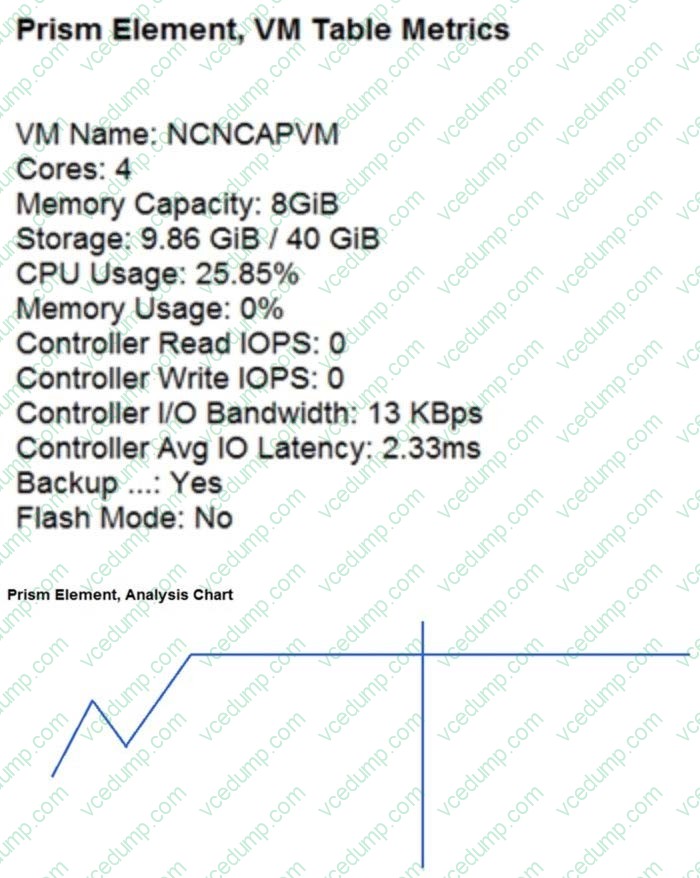
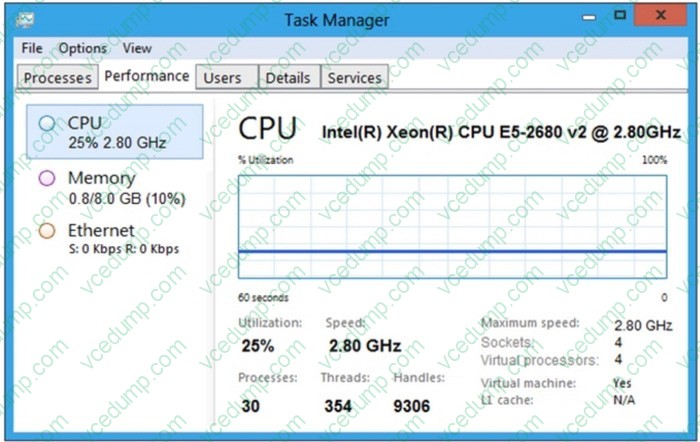
After analyzing the information presented in the exhibits, which option shows the best conclusion regarding this workload?
A. VM is CPU constrained since the hypervisor cannot provide the required resources.
B. VM is CPU constrained because more CPU needs to be added to the VM.
C. VM is Storage constrained, because the workload is waiting for storage access.
D. VM is not CPU constrained, because the VM is not running, a multithreaded application. -
Question 120:
An administrator is notified that a bare metal database server is down. This database server is being served storage using a Nutanix Volume Group. Upon investigating, the administrator finds that the disks in the database server that map to the vDisks in the volume group have gone offline.
What is causing this issue?
A. The Volume Group Load Balancer has been disabled.
B. Port 9443 is blocked in the server firewall.
C. Port 3260 has been blocked in the server firewall.
D. A CVM serving the Volume Group has gone offline.
Related Exams:
-
NCA-5.15
Nutanix Certified Associate (NCA) v5.15 -
NCA-5.20
Nutanix Certified Associate (NCA) v5.20 -
NCA-6.10
Nutanix Certified Associate NCA v6.10 -
NCA-6.5
Nutanix Certified Associate (NCA) v6.5 -
NCM-5.15
Nutanix Certified Master - Multicloud Infrastructure (NCM-MCI) v5.15 -
NCM-MCI
Nutanix Certified Master - Multicloud Infrastructure -
NCM-MCI-5.15
Nutanix Certified Master - Multicloud Infrastructure (NCM-MCI) v5.15 -
NCM-MCI-5.20
Nutanix Certified Master - Multicloud Infrastructure (NCM-MCI) v5.20 -
NCM-MCI-6.5
Nutanix Certified Master - Multicloud Infrastructure (NCM-MCI) v6.5 -
NCP-5.10
Nutanix Certified Professional (NCP) v5.10
Tips on How to Prepare for the Exams
Nowadays, the certification exams become more and more important and required by more and more enterprises when applying for a job. But how to prepare for the exam effectively? How to prepare for the exam in a short time with less efforts? How to get a ideal result and how to find the most reliable resources? Here on Vcedump.com, you will find all the answers. Vcedump.com provide not only Nutanix exam questions, answers and explanations but also complete assistance on your exam preparation and certification application. If you are confused on your NCS-CORE exam preparations and Nutanix certification application, do not hesitate to visit our Vcedump.com to find your solutions here.