NCS-CORE Exam Details
-
Exam Code
:NCS-CORE -
Exam Name
:Nutanix Certified Services Core Infrastructure Professional -
Certification
:Nutanix Certifications -
Vendor
:Nutanix -
Total Questions
:302 Q&As -
Last Updated
:Jul 16, 2026
Nutanix NCS-CORE Online Questions & Answers
-
Question 131:
During Foundation using a customer-provided network switch, a consultant is facing time-out issues.
What action should the consultant take to resolve this issue?
A. Check jumbo frames support of the network switch.
B. Ensure the firmware of network switch is updated.
C. Enable queue depth on ports connected to nodes.
D. Disable STP on ports connected to Nutanix nodes. -
Question 132:
A systems administrator configures a protection domain replication between two Nutanix clusters. After the first successful replication , the administrator tests DR by clicking activate on the remote cluster. While VMs are active on the remote cluster, the protection domain is marked as active on both clusters.
What steps are required to return both clusters to their original state?
A. 1. On the remote site, deactivate the Protection Domain using ncli 2. On the primary site, select the Protection Domain and dick migrate
B. 1. On the remote site, promote the Protection Domain 2. On the primary site, change the Protection Domain state from Decoupled to Disabled 3 Enable the original primary site as remote site
C. 1. On the prima7 site, suspend replications 2. On the remote site, deactivate the Protection Domain using ncli 3. On the remote site, migrate the protection domain back to the primary site
D. 1 On the remote site, restore the snapshots from the Protection Domain 2. On the remote site, select the Protection Domain and migrate to the primary site -
Question 133:
A customer is running out of storage in an ESXi cluster. The customer wants to add storage without paying for an additional hypervisor license.
Which option should the consultant recommend to meet the requirement?
A. Convert the cluster to AHV to support storage-only node requirements.
B. Select the storage-only checkbox during Foundation and then expand the cluster in Prism.
C. Buy a new node to meet the requirements of the storage-only node specifications.
D. Edit the factory_config.json file to configure the node as storage-only and then expand the cluster in Prism -
Question 134:
Which configuration item is a hard requirement to deploy a Nutanix cluster?
A. Nutanix cluster name
B. Cluster Virtual IP
C. Motion IP address
D. CVM IP address -
Question 135:
An administrator has a custom backup application that requires a 2TB disk and runs in Windows. Throughput is considerably lower than expected.
The application was installed on a VM with the following configuration:
1.
Four vCPUs with one core/vCPU
2.
4GB of Memory
3.
One 50GB vDisk for the Windows installation
4.
One 2TB vDisk for the application
What is the recommended configuration change to improve throughput?
A. Increase the number of cores per vCPU
B. Increase the vCPUs assigned to the VM
C. Span the 2TB disk across four vDisks
D. Add 4GB of memory to the VM -
Question 136:
Where can a consultant find Nutanix Enablement Starter Packs (ESPs)?
A. In the Partner Portal
B. In the Nutanix .NEXT Community Forum
C. In the Support Portal
D. In the Services section of the Nutanix website. -
Question 137:
While preparing for a new four-node cluster installation, the consultant has a Tech Review Call with the customer. The hardware is as follows:
1.
4 nodes in 1 Block
2.
8 x 10 GbE Ports
3.
4 x 1 GbE IPMI Ports
4.
Adequate Ethernet ports are available
5.
Ethernet cables are correct and available
6.
Adequate rack space is available
Which remaining item must be confirmed as available onsite?
A. Crash Cart
B. Fibre Channel switches
C. Redundant 208v power
D. Redundant 110v power -
Question 138:
Refer to the exhibit.
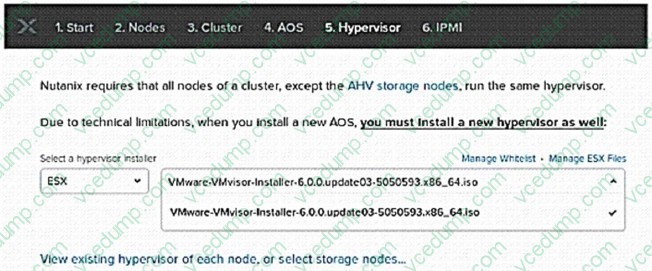
A consultant is installing AOS 5.10 and ESXi 6.5 on three nodes. During the Foundation process, ESXi 6.5 is not available as one of the choices for hypervisor. Which solution should the consultant use?
A. Upload ESXi image to /home/Nutanix/foundation/nos/hypervisor/esx.
B. Restart Foundation VM and refresh Foundation page.
C. Update the Foundation whitelist from the support portal.
D. Upload ESXi image to /home/Nutanix/foundation/isos/hypervisor/esx. -
Question 139:
An administrator needs to create and start five new VMs for a Data Analytics Project (OLAP). The VM Profile is as follows:
1.
vCPU:4
2.
vRAM: 64 GB
3.
vDisk: 1.5 TB
Each of the four nodes of the Nutanix cluster has the following:
1.
24 vCPU. 20% overall usage
2.
192 GB RAM, 60% overall usage
3.
2xl920GBSSD
4.
4x 2 TB HDD
At cluster level, there is a single RF2 container that is 30% utilized and has an extent store capacity of 13.5 TB.
Which component requires administrator attention?
A. Physical RAM, because it is not enough to power on all of the new VMs.
B. Physical Cores, because they are not enough to power on all of the new VMs.
C. Storage, because the capacity is not enough to create VMs.
D. Flash Tier because it is not enough to accommodate the workloads. -
Question 140:
Based on customer requirements, a consultant conducted an AHV cluster deployment. Each node is configured with four NICs.
Which two components should the consultant manually update in the As-Built Guide? (Choose two.)
A. Node Port Layout Diagram
B. Network Cabling Diagram
C. Logical Design Diagram
D. Site installation Diagram
Related Exams:
-
NCA-5.15
Nutanix Certified Associate (NCA) v5.15 -
NCA-5.20
Nutanix Certified Associate (NCA) v5.20 -
NCA-6.10
Nutanix Certified Associate NCA v6.10 -
NCA-6.5
Nutanix Certified Associate (NCA) v6.5 -
NCM-5.15
Nutanix Certified Master - Multicloud Infrastructure (NCM-MCI) v5.15 -
NCM-MCI
Nutanix Certified Master - Multicloud Infrastructure -
NCM-MCI-5.15
Nutanix Certified Master - Multicloud Infrastructure (NCM-MCI) v5.15 -
NCM-MCI-5.20
Nutanix Certified Master - Multicloud Infrastructure (NCM-MCI) v5.20 -
NCM-MCI-6.5
Nutanix Certified Master - Multicloud Infrastructure (NCM-MCI) v6.5 -
NCP-5.10
Nutanix Certified Professional (NCP) v5.10
Tips on How to Prepare for the Exams
Nowadays, the certification exams become more and more important and required by more and more enterprises when applying for a job. But how to prepare for the exam effectively? How to prepare for the exam in a short time with less efforts? How to get a ideal result and how to find the most reliable resources? Here on Vcedump.com, you will find all the answers. Vcedump.com provide not only Nutanix exam questions, answers and explanations but also complete assistance on your exam preparation and certification application. If you are confused on your NCS-CORE exam preparations and Nutanix certification application, do not hesitate to visit our Vcedump.com to find your solutions here.