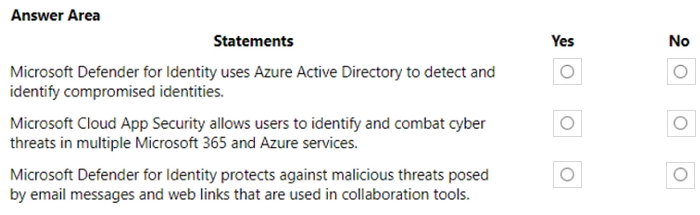
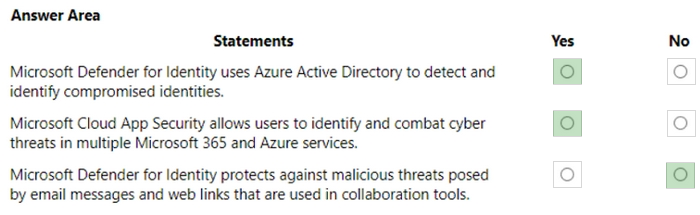
HOTSPOT
For each of the following statements, select Yes if the statement is true. Otherwise, select No.
NOTE: Each correct selection is worth one point.
Show answer and explanation
MS-900 Real Exam Questions
560 questions available · Page 1 of 56
Updated Exam DumpsVerified AnswersPass Guarantee
HOTSPOT
For each of the following statements, select Yes if the statement is true. Otherwise, select No.
NOTE: Each correct selection is worth one point.
You are a Microsoft 365 administrator for a company. Employees use Microsoft Office 365 ProPlus to create documents.
You need to implement document classification and protection by using Microsoft Azure Information Protection.
Which two actions should you perform? Each correct answer presents part of the solution.
NOTE: Each correct selection is worth one point.
Correct answers: A, D
References:
https://docs.microsoft.com/en-us/azure/information-protection/requirements
https://docs.microsoft.com/en-us/azure/information-protection/configure-policy-default
Your company plans to acquire a Microsoft 365 subscription.
One of the services included in the subscription is described as a private social network that can be used to effectively sort out support problems. It can also be used to collect feedback on projects and documents.
Which of the following is the service being described above?
Correct answer: B
References:
https://products.office.com/en-za/yammer/yammer-overview
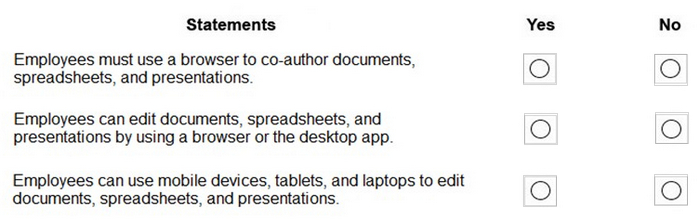
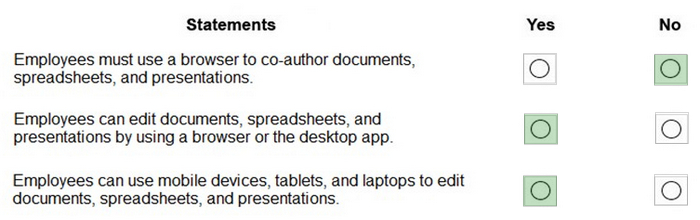
HOTSPOT
You are evaluating Office 365 ProPlus for a company.
For each of the following statements, select Yes if the statement is true. Otherwise, select No.
NOTE: Each correct selection is worth one point.
You are the Microsoft Office 365 administrator for a company.
You need to perform security and compliance reviews before new updates are distributed to the entire company.
What should you implement?
Correct answer: C
References:
https://docs.microsoft.com/en-us/office365/admin/manage/release-options-in-office-365?view=o365-worldwide
DRAG DROP
A company is evaluating Microsoft 365 and Microsoft Entra solutions.
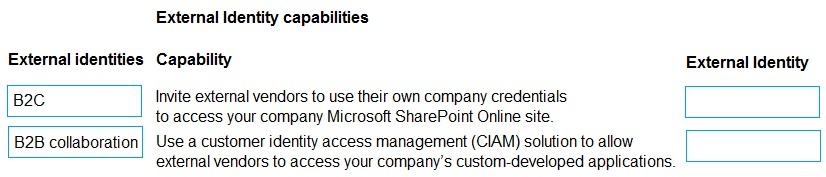
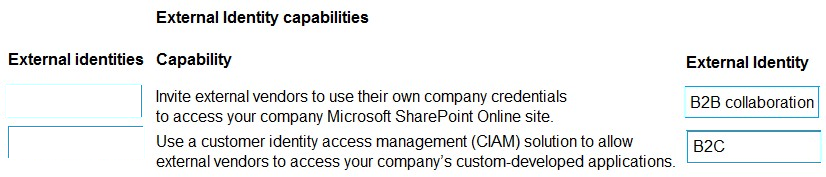
You need to describe the External Identities features in Microsoft Entra,
Match each External identity to its capability.
To answer, move the appropriate External Identity from the column on the left to its capability on the right.
You may use each External Identity once, more than once, or not at all.
NOTE: Each correct match is worth one point.
A company uses Microsoft 365.
Users who are based on-premises must be able to reset their own passwords.
The company plans to purchase Azure Active Directory (AD) licenses.
You need to identify the Azure AD licenses that meet this requirement.
Which two Azure AD licenses should you choose? Each correct answer presents a complete solution.
NOTE: Each correct selection is worth one point.
Correct answers: A, D
References:
https://docs.microsoft.com/en-us/azure/active-directory/authentication/concept-sspr-licensing
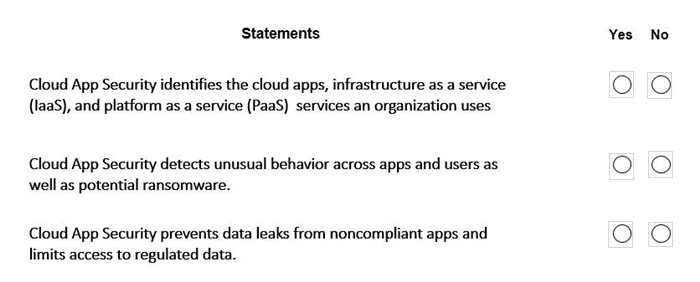
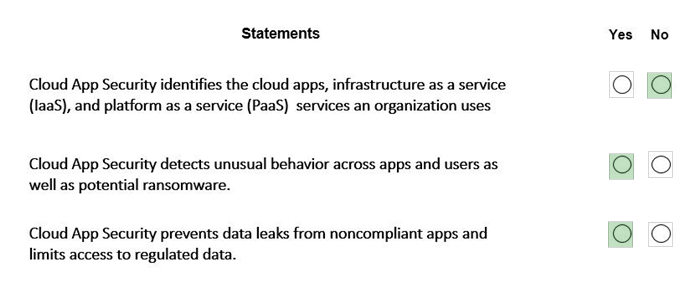
HOTSPOT
For each of the following statements, select Yes if the statement is true. Otherwise, select No.
NOTE: Each correct selection is worth one point.
A company uses Microsoft 365.
The company has the following reporting requirements:
1. Number of users connecting to Microsoft 365 services from Microsoft browsers.
2. Number of files in SharePoint Online.
3. Number of files in OneDrive.
You need to meet the company's reporting requirements.
Which admin center or portal should you use?
Correct answer: B
The Microsoft 365 admin center provides built-in usage and activity reports across Microsoft 365 services.
These reports include:
Usage by applications and services (including client/browser insights)
SharePoint site usage (total number of files, active files, storage)
OneDrive usage (file counts, activity, storage metrics)
From the Reports > Usage section, administrators can view organization-wide metrics and drill down into specific services such as SharePoint Online and OneDrive.
Other options are incorrect because:
The Microsoft 365 compliance portal focuses on compliance, auditing, and data governance, not general usage reporting.
The Exchange admin center is limited to Exchange-related reporting.
The SharePoint admin center provides service-specific management but not consolidated cross-service reporting.
A company is moving to Microsoft Azure. Some applications cannot be moved.
You need to identify which applications will remain in a hybrid environment after the migration.
Which applications will remain in a hybrid environment?
Correct answer: C