MD-102 Exam Details
-
Exam Code
:MD-102 -
Exam Name
:Endpoint Administrator -
Certification
:Microsoft Certifications -
Vendor
:Microsoft -
Total Questions
:431 Q&As -
Last Updated
:May 25, 2026
Microsoft MD-102 Online Questions & Answers
-
Question 281:
HOTSPOT
You have an Azure Active Directory Premium Plan 2 subscription that contains the users shown in the following table.

You purchase the devices shown in the following table.
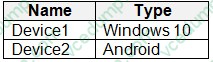
You configure automatic mobile device management (MDM) and mobile application management (MAM) enrollment by using the following settings:
MDM user scope: Group1
MAM user scope: Group2
For each of the following statements, select Yes if the statement is true. Otherwise, select No.
NOTE: Each correct selection is worth one point.

-
Question 282:
You are creating a device configuration profile in Microsoft Intune.
You need to configure specific OMA-URI settings in the profile.
Which profile type template should you use?
A. Device restrictions (Windows 10 Team)
B. Identity protection
C. Custom
D. Device restrictions -
Question 283:
HOTSPOT
You have an Azure AD tenant that contains the users shown in the following table.
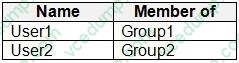
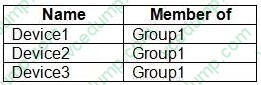
You have devices enrolled in Microsoft Intune as shown in the following table.
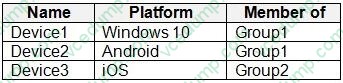
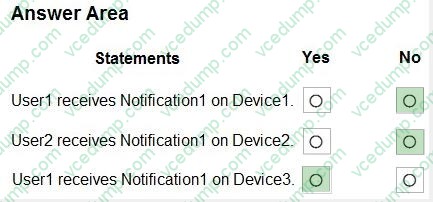
From Intune, you create and send a custom notification named Notification1 to Group1.
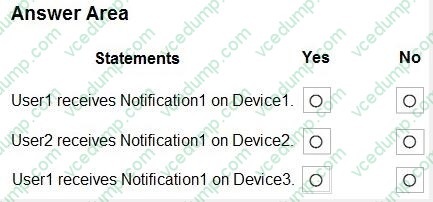
For each of the following statements, select Yes if the statement is true. Otherwise, select No.
NOTE: Each correct selection is worth one point.
-
Question 284:
You have a Microsoft 365 E5 subscription and use Microsoft Defender for Cloud Apps.
You plan to perform a security audit of all the apps detected by Cloud Discovery.
You need to track which apps were audited. The solution must ensure that the list of audited apps can be displayed in the cloud app catalog.
What should you do?
A. Apply a custom app tag to each app.
B. Deploy Conditional Access App Control.
C. Define each app as a critical asset.
D. Generate a Cloud Discovery snapshot report.
E. Enable app governance. -
Question 285:
HOTSPOT
You have a Microsoft 365 subscription.
All computers are enrolled in Microsoft Intune.
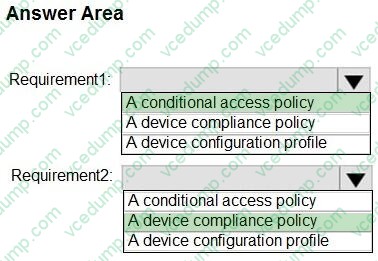
You have business requirements for securing your Windows 11 environment as shown in the following table.
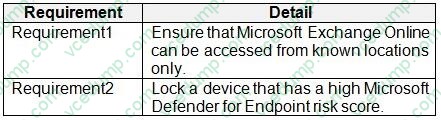
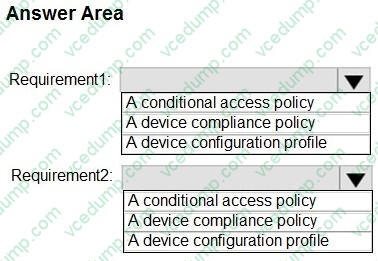
What should you implement to meet each requirement? To answer, select the appropriate options in the answer area.
NOTE: Each correct selection is worth one point.
-
Question 286:
Your network contains an Active Directory domain named contoso.com. The domain contains 25 computers that run Windows 11.
You have a Microsoft 365 subscription
You have an Azure AD tenant that syncs with contoso.com.
You configure hybrid Azure AD join and discover that some of the computers have a registered state of Pending.
You need to ensure that the computers complete the join successfully.
What should you ensure?
A. that Windows is activated on all the computers
B. that the users of the computers are assigned Microsoft 365 licenses
C. that each computer has a line of sight to a domain controller
D. that the computers contain the latest quality updates -
Question 287:
HOTSPOT
You have a Microsoft 365 E5 subscription.
You use Microsoft Intune to manage Windows 365 Cloud PC devices.
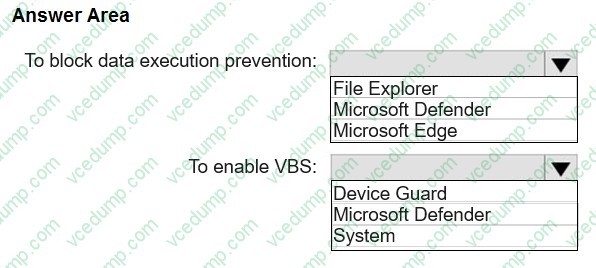
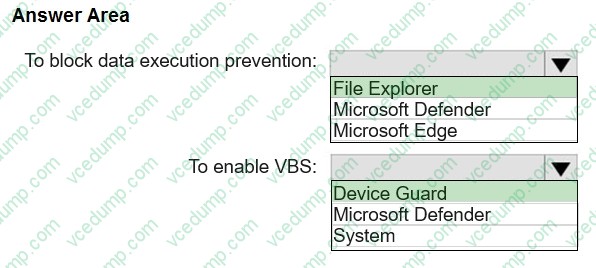
You need to deploy a Windows 365 Security Baseline to the Cloud PC devices. The solution must meet the following requirements:
1. Block data execution prevention.
2. Enable virtualization-based security (VBS) and Secure Boot.
What should you configure for the Windows 365 Security Baseline profile? To answer, select the appropriate options in the answer area.
NOTE: Each correct selection is worth one point.
-
Question 288:
You have a Microsoft 365 E5 subscription.
All devices are enrolled in Microsoft Intune.
You need to ensure that devices that have NOT checked in for 30 days are deleted from Intune.
What should you configure from the Microsoft Intune admin center?
A. a device limit restriction
B. automatic enrollment
C. a device clean-up rule
D. a configuration profile -
Question 289:
DRAG DROP
You have a Microsoft 365 E5 subscription that includes Microsoft Intune.
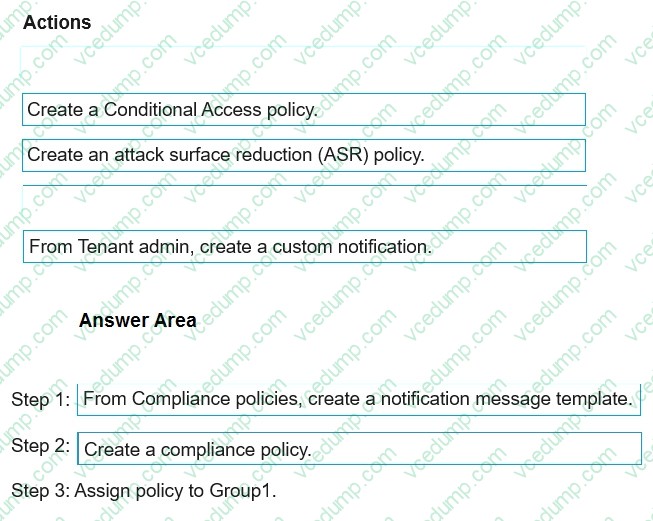
The subscription contains Android Enterprise devices that are enrolled in Intune and have personally-owned work profiles. All the Android devices are members of a group named Group1.
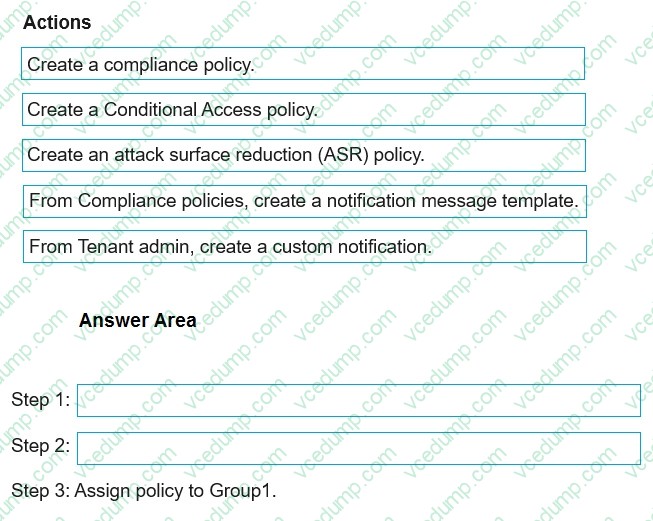
You need to ensure that end users and Intune administrators receive an email message when an Android device does NOT have an up-to-date security provider.
Which actions should you perform from the Microsoft Intune admin center in sequence? To answer, drag the appropriate actions to the correct order. Each action may be used once, more than once, or not at all. You may need to drag the split bar between panes or scroll to view content.
NOTE: Each correct selection is worth one point.
Select and Place:
-
Question 290:
You have a Microsoft 365 tenant that contains the devices shown in the following table.
The devices are managed by using Microsoft Intune.
You create a compliance policy named Policy1 and assign Policy1 to Group1. Policy1 is configured to mark a device as Compliant only if the device security settings match the settings specified in the policy.
You discover that devices that are not members of Group1 are shown as Compliant.
You need to ensure that only devices that are assigned a compliance policy can be shown as Compliant. All other devices must be shown as Not compliant.
What should you do from the Microsoft Intune admin center?
A. From Device compliance, configure the Compliance policy settings.
B. From Endpoint security, configure the Conditional access settings.
C. From Tenant administration, modify the Diagnostic settings.
D. From Policy1, modify the actions for noncompliance.

Related Exams:
-
62-193
Technology Literacy for Educators -
70-243
Administering and Deploying System Center 2012 Configuration Manager -
70-355
Universal Windows Platform – App Data, Services, and Coding Patterns -
77-420
Excel 2013 -
77-427
Excel 2013 Expert Part One -
77-725
Word 2016 Core Document Creation, Collaboration and Communication -
77-726
Word 2016 Expert Creating Documents for Effective Communication -
77-727
Excel 2016 Core Data Analysis, Manipulation, and Presentation -
77-728
Excel 2016 Expert: Interpreting Data for Insights -
77-731
Outlook 2016 Core Communication, Collaboration and Email Skills
Tips on How to Prepare for the Exams
Nowadays, the certification exams become more and more important and required by more and more enterprises when applying for a job. But how to prepare for the exam effectively? How to prepare for the exam in a short time with less efforts? How to get a ideal result and how to find the most reliable resources? Here on Vcedump.com, you will find all the answers. Vcedump.com provide not only Microsoft exam questions, answers and explanations but also complete assistance on your exam preparation and certification application. If you are confused on your MD-102 exam preparations and Microsoft certification application, do not hesitate to visit our Vcedump.com to find your solutions here.