MD-102 Exam Details
-
Exam Code
:MD-102 -
Exam Name
:Endpoint Administrator -
Certification
:Microsoft Certifications -
Vendor
:Microsoft -
Total Questions
:431 Q&As -
Last Updated
:May 25, 2026
Microsoft MD-102 Online Questions & Answers
-
Question 211:
You have a Microsoft 365 subscription that contains 1,000 iOS devices and includes Microsoft Intune.
You need to prevent the printing of corporate data from managed apps on the devices.
What should you configure?
A. an app configuration policy
B. a security baseline
C. an app protection policy
D. an iOS app provisioning profile -
Question 212:
HOTSPOT
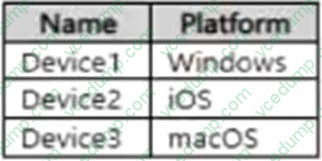
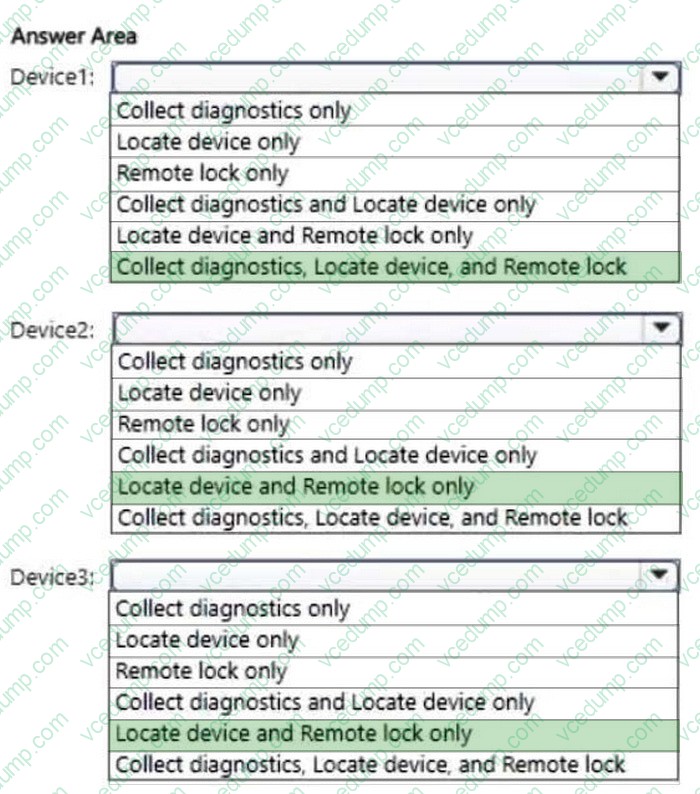
You have a Microsoft 365 subscription that contains devices enrolled in Microsoft Intune as shown in the following table.
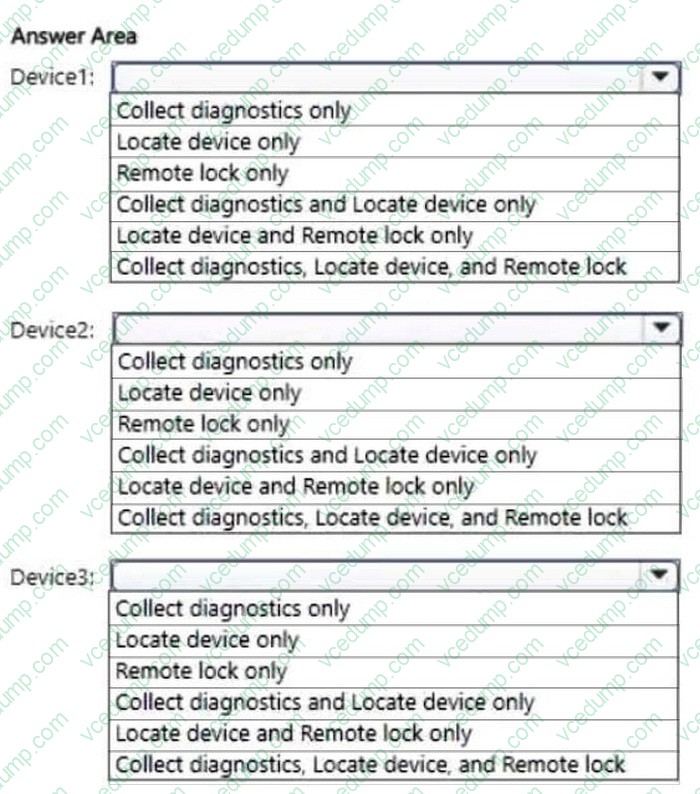
You plan to use the following remote actions on the devices:
1. Collect diagnostics
2. Locate device
3. Remote lock
Which remote actions does each device support? To answer, select the appropriate options in the answer area.
NOTE: Each correct selection is worth one point.
-
Question 213:
You have a Microsoft 365 E5 subscription that contains devices enrolled in Microsoft Intune.
You need to review security tasks in the Microsoft Intune admin center.
What should you do first?
A. Integrate Intune with Microsoft Defender for Endpoint.
B. Implement the ServiceNow connector.
C. Implement the Mobile Threat Defense connector.
D. Deploy an attack surface reduction (ASR) policy.
E. Deploy an Intune security baseline for Microsoft Defender for Endpoint. -
Question 214:
DRAG DROP
Your company has a Microsoft 365 E5 tenant.
All the devices of the company are enrolled in Microsoft Intune.
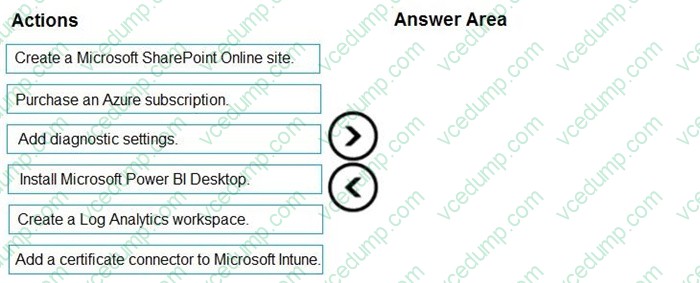
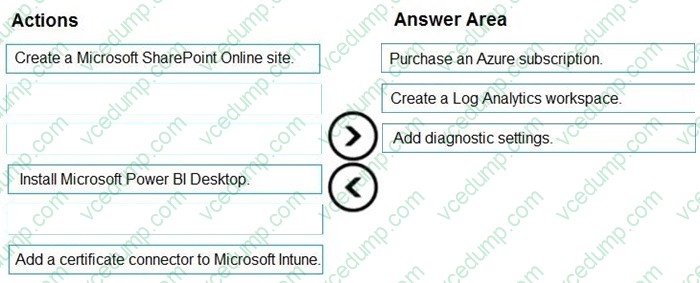
You need to create advanced reports by using custom queries and visualizations from raw Microsoft Intune data.
Which three actions should you perform in sequence? To answer, move the appropriate actions from the list of actions to the answer area and arrange them in the correct order.
Select and Place:
-
Question 215:
Your network contains an Active Directory domain named contoso.com. The domain contains two computers named Computer1 and Computer2 that run Windows 10.
On Computer1, you need to run the Invoke-Command cmdlet to execute several PowerShell commands on Computer2.
What should you do first?
A. On Computer2, run the Enable-PSRemoting cmdlet.
B. On Computer2, add Computer1 to the Remote Management Users group.
C. From Active Directory, configure the Trusted for Delegation setting for the computer account of Computer2.
D. On Computer1, run the New-PSSession cmdlet. -
Question 216:
HOTSPOT
You have a Microsoft 365 tenant and an internal certification authority (CA).
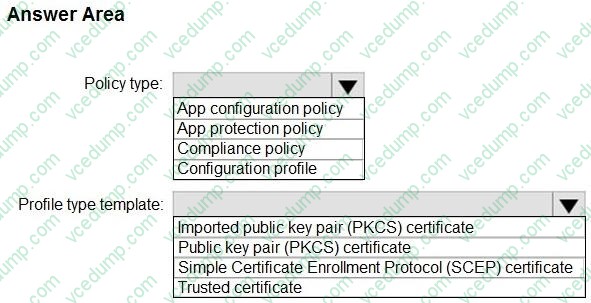
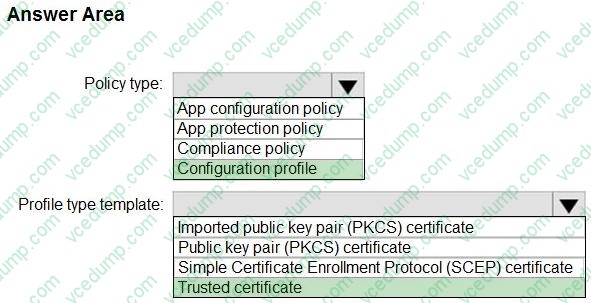
You need to use Microsoft Intune to deploy the root CA certificate to managed devices.
Which type of Intune policy and profile type template should you use? To answer, select the appropriate options in the answer area.
NOTE: Each correct selection is worth one point.
-
Question 217:
You have a Microsoft 365 tenant that uses Microsoft Intune.
You use the Company Portal app to access and install published apps to enrolled devices.
From the Microsoft Intune admin center, you add a Microsoft Store app.
Which two App information types are visible in the Company Portal?
NOTE: Each correct selection is worth one point.
A. Privacy URL
B. Information URL
C. Developer
D. Owner -
Question 218:
HOTSPOT
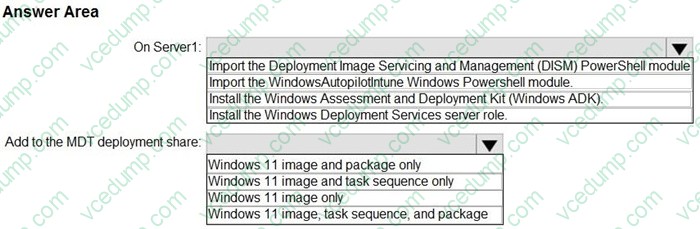
You have a server named Server1 and computers that run Windows 10. Server1 has the Microsoft Deployment Toolkit (MDT) installed.
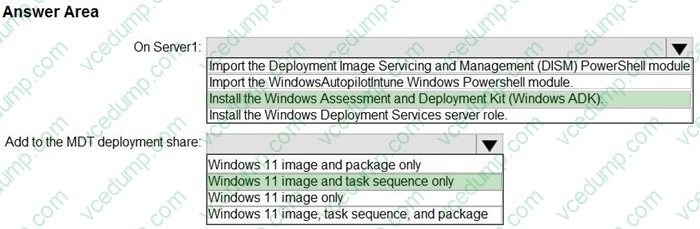
You plan to upgrade the Windows 10 computers to Windows 11 by using the MDT deployment wizard.
You need create a deployment share on Server1.
What should you do on Server1, and what are the minimum components you should add to the MDT deployment share? To answer, select the appropriate options in the answer area.
NOTE: Each correct selection is worth one point.
-
Question 219:
You have a Microsoft 365 E5 subscription.
You need to create a dynamic device group that will contain any device that has the word Marketing in its name.
Which device membership rule should you use?
A. (device.displayName -in "'Marketing'")
B. (device.displayName -contains "'Marketing'")
C. (device.displayName -in "Marketing")
D. (device.displayName -contains "Marketing") -
Question 220:
HOTSPOT
Your network contains an on-premises Active Directory domain that contains the locations shown in the following table.

In Microsoft Intune, you enroll the Windows 10 devices shown in the following table.
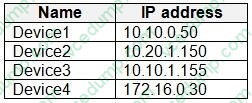
You have a Delivery Optimization device configuration profile applied to all the devices. The profile is configured as shown in the following exhibit.
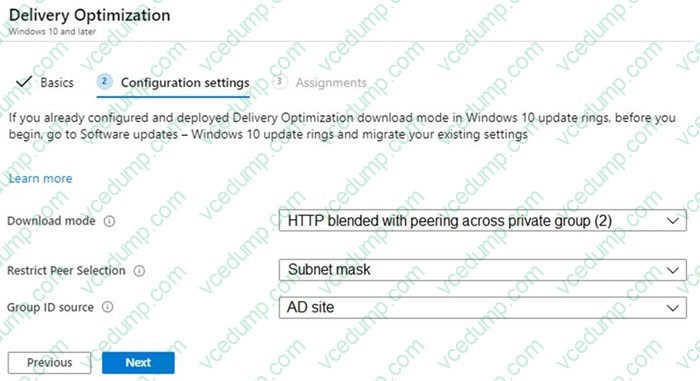
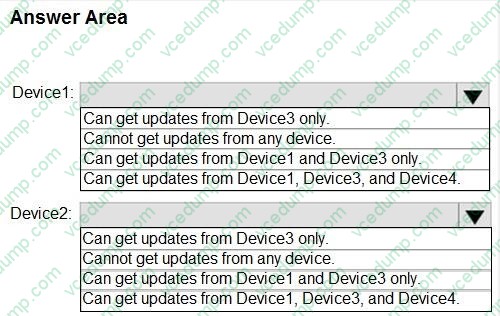
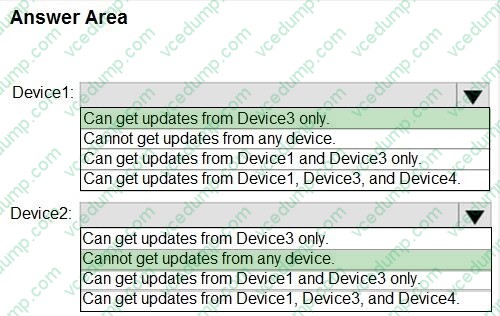
From which devices can Device1 and Device2 get updates? To answer, select the appropriate options in the answer area.
NOTE: Each correct selection is worth one point.
Related Exams:
-
62-193
Technology Literacy for Educators -
70-243
Administering and Deploying System Center 2012 Configuration Manager -
70-355
Universal Windows Platform – App Data, Services, and Coding Patterns -
77-420
Excel 2013 -
77-427
Excel 2013 Expert Part One -
77-725
Word 2016 Core Document Creation, Collaboration and Communication -
77-726
Word 2016 Expert Creating Documents for Effective Communication -
77-727
Excel 2016 Core Data Analysis, Manipulation, and Presentation -
77-728
Excel 2016 Expert: Interpreting Data for Insights -
77-731
Outlook 2016 Core Communication, Collaboration and Email Skills
Tips on How to Prepare for the Exams
Nowadays, the certification exams become more and more important and required by more and more enterprises when applying for a job. But how to prepare for the exam effectively? How to prepare for the exam in a short time with less efforts? How to get a ideal result and how to find the most reliable resources? Here on Vcedump.com, you will find all the answers. Vcedump.com provide not only Microsoft exam questions, answers and explanations but also complete assistance on your exam preparation and certification application. If you are confused on your MD-102 exam preparations and Microsoft certification application, do not hesitate to visit our Vcedump.com to find your solutions here.